

Geschäfts-PowerPoint-Vorlagen, trichterförmiges Diagramm, bearbeitbare Vertriebs-PPT-Folien




Try Before you Buy Download Free Sample Product
 Impress Your
 Audience
 100%
100% Editable
 Save Hours
 of Time


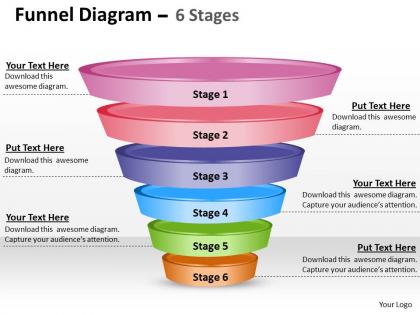
Unser Team von professionellen Experten bietet Ihnen ein 6-stufiges Business-PowerPoint-Vorlagen-Trichter-Diagramm, das bearbeitbar ist und Vertriebspräsentationsfolien umfasst, um verschiedene Geschäftsfunktionen wie Marketing oder strategische Planung hervorzuheben und darauf zu konzentrieren. Die PowerPoint-Präsentation bietet die hochwertigste 3D-Computerkunstgrafik mit Texthaltern, um jeden Abschnitt zu spezifizieren. Die exklusive PowerPoint-Folie, die mit Smart-Art-Technologie entworfen wurde, wird sicherlich dabei helfen, den Vertriebsprozess auszurichten und das potenzielle Umsatzwachstum zusammen mit der Konzentration auf problematische Bereiche zu verfolgen. Das ellipsenförmige Trichterdiagramm hilft nicht nur dabei, die Botschaft in einem mehrstufigen Ansatz zu vermitteln, sondern macht die Botschaft auch einprägsam. Die 3D-animierte Illustration nimmt von der Basis, dem Kopf, nach oben zum Hals hin an Breite ab, in dem Informationen auf beiden Seiten des Trichterdesigns hinzugefügt werden können. Die PPT-Folie verleiht Ihrem Inhalt Leben und hilft Ihnen, den traditionellen Ansatz des Verwendens von Aufzählungspunkten zur Vermittlung der Botschaft über den Tisch hinweg zu überwinden. Somit hilft es, eine große Anzahl nützlicher Geschäftsfunktionen wie Forschung, Entwicklung und Produktion darzustellen. Ihre Präsentationen müssen bestmöglich aussehen. Unsere Business-PowerPoint-Vorlagen Trichter-Diagramm bearbeitbare Vertriebspräsentationsfolien wurden entwickelt, um Ihnen in dieser bildorientierten Präsentationswelt über Wasser zu halten.
People who downloaded this PowerPoint presentation also viewed the following :
Geschäfts-PowerPoint-Vorlagen, editierbare Trichter-Diagramm-Vertriebspräsentationsfolien mit allen 11 Folien.
Springen Sie vom Brett mit unseren Business Powerpoint-Vorlagen Trichter-Diagramm bearbeitbaren Vertriebsppt-Folien. Ihr Team wird einen dreifachen Salto machen.






FAQs for Business powerpoint templates funnel diagram editable
So you'll want awareness at the top, then interest, consideration, and conversion below that. It's basically tracking how someone goes from never hearing about you to actually buying your stuff. Each level needs specific touchpoints - like social media ads for awareness or demos when they're considering. Oh, and don't forget retention at the bottom! I always skip that part but repeat customers are honestly the best. You should also throw in conversion rates between stages so you can see exactly where you're losing people. That's where the real insights happen.
Honestly, just make the funnel match how your customers actually move through your business. Map out those real touchpoints first - that's where I'd start. SaaS folks might do "Free Trial → Paid → Upsell" while retail is more like "Awareness → Purchase → Retention." Don't get stuck with those cookie-cutter templates that clearly weren't made by anyone in your industry. Change up the colors, adjust the width of each stage, focus on metrics that actually matter to you. The whole point is flexibility here. I mean, why force your business into someone else's generic framework when you can build something that makes sense?
Dude, visuals totally save the day with funnel diagrams. Nobody wants to stare at boring spreadsheets trying to figure out where customers are dropping off. Your brain just gets it faster when there's colors and arrows showing the flow. Makes those conversion bottlenecks super obvious. Plus when you're presenting to executives or your team, a clean visual beats walls of text every time - different people process info differently, you know? I always start with a simple template then add icons and highlights for the biggest conversion points. Makes the whole customer journey feel like an actual story instead of just... data.
Honestly, just track how people actually find you and what they do before buying. That's your real funnel right there. Most people go crazy making like 12 stages when you really only need 4-6 max. Check your sales data and ask your team what touchpoints they see all the time. Where do people usually bail out? Those are the moments that matter. Build your stages around those key decision points where you can actually do something about it. Don't overthink it - your customers are already telling you what the journey looks like if you pay attention.
Dude, the main thing I see people screw up is cramming like 15 stages into one funnel. Total nightmare to follow. Stick to 3-5 stages tops. Also - and this drives me crazy - they'll just steal someone's template without thinking if it actually matches how their customers buy stuff. Your process could be completely different! Oh, and most people forget to add what metrics they're gonna track at each step. Without data, your pretty diagram is basically worthless for making real decisions. Map out how your customers actually move through your sales process first, then worry about making it look nice.
So walk them through each stage using real numbers - tell a story, don't just flash pretty charts. Get them talking by asking stuff like "what's blocking us here?" because honestly, nobody wants to sit through slide after slide of bullet points. Use actual customer examples at each step so it feels real. The key thing? Connect every stage to business results they actually give a damn about. Oh and make sure you end with concrete next steps - like who's doing what by when. Otherwise you'll just have another meeting about having meetings, you know?
Honestly, I'd go with **Lucidchart** or **Draw.io** first - both have solid templates and your team can collaborate easily. **Canva** is another option if you want something that actually looks good (their templates are surprisingly nice for business stuff). **Miro** is perfect when you need the whole team brainstorming together. PowerPoint works too if you're already stuck in Microsoft world - their SmartArt isn't terrible. Start with Draw.io though since it's free. No point paying for anything until you know what you actually need, right?
Netflix is the obvious one - they obsessed over every step from free trial to paying customer. HubSpot basically built their entire company around perfecting their funnel, turning blog readers into buyers. Best Buy tracks how online visitors convert to in-store purchases too. Most SaaS companies are totally addicted to funnel optimization these days, honestly. The smart move? Focus on just one metric per stage instead of trying to fix everything simultaneously. I'd start by sketching out your customer journey first - you'll probably spot the biggest drop-off points pretty quickly.
Dude, funnel diagrams are honestly a game-changer for tracking where you're losing people. Map out your customer journey from first contact to sale, then you'll actually see which steps are killing your conversions. Maybe it's your email sequence that's trash, or people bail at pricing - who knows until you look? The visual makes it super obvious where to focus your energy instead of just guessing. Plus your whole team stays on the same page about what counts as a qualified lead. Start simple: list your current stages, track how many people move between each one. That's where you'll find your biggest problems hiding.
Honestly, conversion rates at each stage are what you really need to watch. Track visitors to leads, leads to prospects, prospects to customers - that whole chain. Cost per acquisition and customer lifetime value matter too. Some funnels take forever but that's just how it goes sometimes. Bounce rates will show you where people are bailing out. Time-to-conversion is another big one. The thing is, you've gotta set up tracking right from the start or you'll be flying blind trying to figure out what's actually working vs what's just burning cash.
Okay so funnel diagrams are honestly perfect for this - you can map out your whole customer journey from when someone first discovers you on social media to actually making a purchase. I'd start by tracking how people move through each stage: email nurturing, landing pages, all that stuff. The cool thing is spotting where you're bleeding customers (super annoying but so helpful). You can even build separate funnels for different channels. Like, your Google Ads funnel might look totally different from Instagram. Just map out what you've got now and see where the biggest drops happen.
Collect feedback at every stage and figure out where people are bailing. Survey the ones who didn't buy, run some user tests. Most companies just set up their funnel once and call it a day - terrible idea! Your customer journey probably changed since you first mapped it out. Maybe people need more hand-holding between discovering you and actually considering a purchase. Or your checkout's a nightmare (happens more than you'd think). Keep updating that diagram when you spot new patterns. Remove stages that aren't doing anything. Start small - pick one customer complaint this week and trace it back to which funnel stage it points to.
Dude, you HAVE to label everything clearly or your funnel becomes totally useless. I've watched people create these gorgeous diagrams that nobody can read because "Stage 3" tells you literally nothing. What does that even mean? Your funnel should tell the whole story - like, someone who wasn't there when you built it can still figure out what's happening. Good labels help you catch bottlenecks way faster too. When you're talking to your boss or stakeholders, specific terms make everything click. Don't make people guess what each step represents.
Oh man, templates are a lifesaver! You just grab one and don't have to build everything from zero. The design stuff used to eat up hours of my time - all those shapes and arrows, ugh. Most good ones already have the stages mapped out (awareness, interest, all that) so the flow actually makes sense. You can just drop in your content and tweak the colors to match your brand. Plus they usually follow best practices, which means you won't mess up the basic structure. Honestly beats staring at a blank screen wondering where to even start. Just customize and you're good to go!
So the old school sales funnel? Basically just push people through awareness, consideration, buy - then peace out. But customer-centric funnels are way smarter. You're thinking about what happens AFTER they purchase too - like keeping them happy, getting repeat business, turning them into people who actually recommend you. The linear thing just doesn't work anymore, honestly. Happy customers become your best marketing when they leave reviews and refer friends. That's free lead generation right there! Map out your post-purchase experience - that's where you'll see the biggest difference in your business.
-
Informative design.
-
Easy to edit slides with easy to understand instructions.