

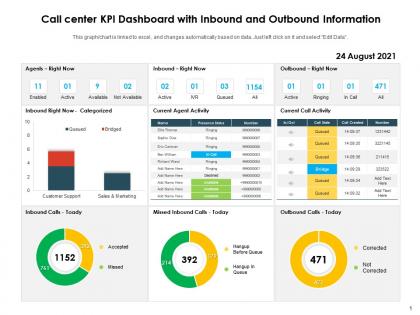
Call center kpi dashboard with inbound and outbound information




Try Before you Buy Download Free Sample Product
 Impress Your
 Audience
 100%
100% Editable
 Save Hours
 of Time


Our Call Center KPI Dashboard With Inbound And Outbound Information are topically designed to provide an attractive backdrop to any subject. Use them to look like a presentation pro.
People who downloaded this PowerPoint presentation also viewed the following :
Call center kpi dashboard with inbound and outbound information with all 2 slides:
Use our Call Center KPI Dashboard With Inbound And Outbound Information to effectively help you save your valuable time. They are readymade to fit into any presentation structure.
FAQs for Call center kpi dashboard with inbound
Honestly, start with the classics - average handle time, first call resolution, and customer satisfaction scores. Those three tell you almost everything. Agent utilization is huge too since you don't want people sitting around doing nothing. Service level and abandonment rate are worth tracking because customers get pissed when they can't get through. Maybe add occupancy rate if your manager's into that stuff. Just don't go crazy with like 15 different metrics - I've seen teams do that and it's a mess. Pick maybe 6-8 max and make sure everyone actually gets what moves the numbers.
Stop tracking vanity metrics that don't actually matter. Connect your call center data to what leadership genuinely cares about - like tying first-call resolution to customer lifetime value or handle time to retention rates. Most dashboards I've seen look fancy but tell you nothing useful (honestly, it's wild how many companies do this). Pick maybe 3-4 KPIs max that actually drive business results. Ask your boss what success looks like first, then figure out which metrics move those needles. Revenue growth goals? Link resolution rates to upselling opportunities. You'll be way more valuable than someone just reporting operational stats.
Honestly, Power BI is probably your best bet if you're already using Microsoft stuff - integrates like a dream and won't kill your budget. Tableau makes stunning dashboards but half the time they're so fancy nobody knows how to read them lol. Grafana's solid for real-time monitoring, especially when you're pulling data from everywhere. They all handle your standard call center metrics fine - AHT, FCR, agent performance, the usual suspects. Unless you need something super complex, I'd just go with Power BI and call it a day.
Dude, real-time integration is huge. You catch problems right when they start instead of discovering at 5pm that everything went sideways at lunch. Queue pileups, agents struggling, tech issues - you see it all instantly. Way better than the old days when we'd pull end-of-day reports and realize we were screwed hours ago (ugh, those were painful). Now you can move people around, fix staffing, or tackle tech problems before customers lose their minds. Just set up alerts for your biggest metrics though - otherwise you'll go crazy watching screens all day.
So agent performance is basically what makes or breaks your whole KPI dashboard. Track the usual stuff - handle time, first call resolution, customer satisfaction scores. Those numbers tell you everything about how your center's actually running. Happy agents do tend to make happy customers, though that sounds cheesy as hell. You want to spot your rockstar performers and figure out who needs more coaching. Oh, and don't just focus on individual stats - look at team patterns too. That's where you'll catch bigger issues before they blow up.
Definitely go with gauges plus trend lines for your CSAT dashboard. Gauges are perfect for showing where you stand against targets right now. Line charts will show you the patterns over time - super helpful. I'm totally that person who color-codes everything, so throw some red/yellow/green zones on those gauges. Makes it so obvious when something's off. Oh, and break it down by agent, department, issue type - whatever makes sense for your team. That way you can actually pinpoint what's going wrong instead of just staring at one big number. Your team should be able to look at it and instantly know what needs attention.
Don't cram every possible metric onto one screen - that's the fastest way to confuse everyone. Pick maybe 5-7 things that actually matter, like handle time, first call resolution, customer satisfaction. Skip the flashy stuff that looks cool but doesn't help anyone make decisions (seriously, who cares about total calls answered?). Your data needs to refresh constantly or people stop trusting it. But honestly? The biggest thing is just asking your team what they'd find useful. Agents and supervisors know what info would help them do their jobs better.
AHT basically shows how long you're spending on each call - talking plus whatever admin stuff you do after. Here's the thing though: faster isn't always better. Rush through calls and customers just call back, which totally defeats the point. But drag things out too long and you're creating these awful wait times for everyone else. You want that middle ground where you're actually solving problems without being inefficient about it. I'd look at your first call resolution rate too - that pairing really shows if you're doing things right. Different call types need different timeframes, so don't get hung up on one magic number.
Honestly, just focus on the before/after comparison - that's what actually matters. Track your first call resolution rates and customer satisfaction scores from like 30-60 days before training vs after. Quality scores from call monitoring are probably your best bet though, way more reliable than the other stuff. Average handle time, script adherence, upselling rates - all good to include. Oh and don't sleep on employee confidence surveys, those can be pretty telling too. Set up some kind of dashboard so you can see if you're actually getting ROI. I mean, training's expensive so you might as well prove it works, right?
Dude, having everything in one spot is a game changer. You'll catch patterns super fast - like when wait times start climbing or certain teams are tanking on customer scores. I swear it becomes weirdly addictive checking the numbers! Real-time data means you're not just guessing what's wrong anymore. Set alerts for your biggest metrics though, otherwise you'll be glued to your screen all day (learned that one the hard way). The best part? You start seeing how agent performance actually connects to customer happiness ratings.
Oh man, FCR is everything for keeping customers around. You know how annoying it is when you have to call somewhere three times for the same stupid issue? That's exactly why people bail. Companies with good first-call resolution see retention rates jump 30-40% compared to the ones where you're stuck in callback hell. Here's the thing though - when FCR starts tanking, you won't see customers leave immediately. Takes about 60-90 days before the churn really hits. So if retention numbers look sketchy, check your FCR trends first. It's like your early warning system.
Look at your call volume data - it shows when things get crazy so you know how to staff up. Daily rushes, seasonal patterns, plus those nightmare spikes when products launch or everything breaks (seriously the worst). Historical volume vs your service targets tells you exactly how many people to schedule per shift. Factor in handle times and wait goals too. Honestly, just pull up your busiest days from last month and check staffing levels. You'll instantly see where you had too many people sitting around or where you were drowning.
Dude, templates will save your life - no joke. Instead of building dashboards from zero each time, you just grab a pre-made layout and tweak it for your metrics. Super flexible too. Need to focus on hold times during busy season? Swap that in. Working on customer satisfaction this quarter? Easy switch. Your teams will look consistent across locations, which managers love. I'd start basic though - cover your main KPIs first, then mess around with it once you figure out what data actually helps (some stuff looks important but isn't). Way better than staring at a blank screen wondering where to begin.
Focus on three things: data source validation, automated quality checks, and regular audits. Your ACD system, CRM, and workforce management tools need to sync properly - mismatched timestamps will mess up everything (trust me on this one). Set up alerts for weird stuff like impossible handle times. Train your team to log interactions the same way every time, then spot check calls weekly. Honestly, most people treat validation as an afterthought but you can't do that. Build these checks into your daily routine or your dashboard's gonna be worthless.
Dashboards are honestly amazing for this stuff. Everyone can see the real-time numbers - call times, satisfaction scores, how each person's doing. No more wondering who's killing it or struggling, you know? Your team can track progress against goals, and you'll catch problems early instead of dealing with disasters later. Agents can even watch their own stats which helps them stay on track. Oh, and set up alerts when things drop too low - super helpful. Just don't go crazy with data at first. Start with maybe 3-4 key metrics per person or you'll overwhelm everyone.
-
Easy to edit slides with easy to understand instructions.
-
Informative presentations that are easily editable.
-
Excellent template with unique design.
-
Unique research projects to present in meeting.
-
Best way of representation of the topic.
-
Great designs, really helpful.
-
Informative design.
-
Great quality slides in rapid time.