

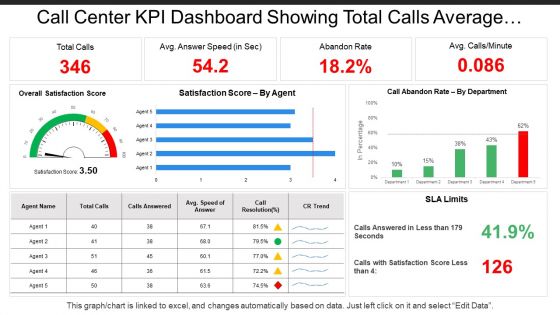
Call center kpi dashboard showing total calls average answer speed abandon rate





Try Before you Buy Download Free Sample Product
 Impress Your
 Audience
 100%
100% Editable
 Save Hours
 of Time


Hold forth on important considerations with our Call Center Kpi Dashboard Showing Total Calls Average Answer Speed Abandon Rate. Address the forum in a convincing fashion.
People who downloaded this PowerPoint presentation also viewed the following :
Call center kpi dashboard showing total calls average answer speed abandon rate with all 6 slides:
Insist on correct implementation with our Call Center Kpi Dashboard Showing Total Calls Average Answer Speed Abandon Rate. Ensure folks go completely by the book.

FAQs for Call center kpi dashboard showing total calls average answer
So for call center metrics, definitely track average handle time and first call resolution - those are your bread and butter. Customer satisfaction scores matter too, obviously. Don't sleep on abandon rate because angry customers hanging up is never good. I'd also watch service level percentages and call volume trends. Agent utilization is key but honestly, sometimes managers get too obsessed with that one. Keep your dashboard around 6-8 metrics max - any more and you're just drowning in data nobody actually uses. Real-time updates are clutch so you can fix stuff as it happens.
Honestly, having that real-time view of what's happening changes everything. You'll catch issues right away - like when wait times blow up or someone's stuck on tough calls. Managers can jump in fast, move calls around, or coach whoever needs help. The cool part? Once your team sees their own numbers, they get weirdly competitive about it. I'd start simple though - maybe just track 3 or 4 things so you don't drown in all the data. Trust me, it becomes pretty addictive watching those metrics improve!
Dude, real-time data is like having eyes on everything instead of just guessing what's going wrong. Queue times suddenly jump? You'll catch it immediately rather than hearing angry customer complaints later. Your supervisors can actually make smart staffing moves on the spot, and honestly, agents perform way better when they can watch their own numbers live - keeps them motivated I guess. Oh and don't go crazy with dashboards at first. Pick maybe 3 or 4 metrics that actually matter. Too much data just paralyzes everyone.
Honestly, real-time is ideal but every 15-30 minutes during busy periods works too. You'll catch problems as they pop up and can actually do something about staffing or whatever's breaking. Daily updates? Way too slow - you'll miss those random call surges that mess everything up. I learned this the hard way at my last job. Set up automatic refreshes so you're not constantly hitting reload buttons. Save the weekly/monthly reports for trend stuff, but your main dashboard needs fresh data. Otherwise you're basically flying blind when things get crazy.
Stick to metrics that actually matter - first call resolution, handle time, customer satisfaction. Group related stuff together so it tells a story at a glance. I swear, half the dashboards I've seen look like someone threw up rainbow charts everywhere. Real-time data beats historical for ops dashboards since agents need to spot issues fast. Clean visual hierarchy is huge. Oh, and definitely test with actual users first - they'll find the weird stuff you missed. Short sentences work. Longer ones should flow naturally when you're explaining complex relationships between different performance indicators.
So for call center dashboards, I'd go with Tableau, Power BI, or Looker - all handle your standard metrics like AHT, FCR, CSAT pretty well. Power BI's probably the move if you're already using Microsoft stuff since everything connects easily. Tableau does amazing complex visuals, Looker's killer for real-time data. Honestly, I've seen teams try to stick with Excel way too long - works at first but becomes a nightmare when you grow. Oh, and Power BI has a free trial so might as well test it with your current data setup first.
Here's what worked for me - pick maybe 3 or 4 metrics that actually connect to your revenue and customer stuff. Like don't just track call time by itself, but see how it affects satisfaction scores or if people buy again. First call resolution? Great, but does it reduce churn or boost lifetime value? I'd set up your dashboard to show both sides - the call center number AND what business result it drives. Makes it way easier to prove your team's impact during quarterly reviews (trust me on this one). The whole point is showing real connection between daily work and bigger company goals.
So you'll want to watch First Call Resolution - that's your golden metric right there. Nobody wants to explain their problem twice, trust me. CSAT and NPS surveys after calls give you the real scoop on how you're doing. Average Handle Time is useful but don't get crazy obsessive about it - rushing people off usually makes things worse. Customer Effort Score shows if you're making their life easier or harder. Oh, and set up those automated surveys to hit right when calls end. You need that feedback while it's still fresh.
So basically just schedule your data pulls to run overnight when traffic's low. Tableau and Power BI make this pretty straightforward with their built-in scheduling stuff. The trick is getting everything refreshed before your team's morning meetings - trust me, nobody wants to be looking at Friday's numbers on a Monday morning when things are crazy. Daily call volumes, resolution rates, agent performance - all that gets updated automatically. Honestly once you set it up the first time, you're pretty much done and it just runs itself.
So FCR basically shows if your agents are actually fixing problems on the first call. Nobody wants to call customer service twice for the same stupid issue - it's infuriating. Your costs go down because you're not dealing with repeat calls, and customers are way happier too. Most places shoot for around 70-80%. Below that? Your training probably needs work, or maybe your knowledge base sucks. Those are usually the easiest things to fix first. It's one of those metrics that actually tells you something useful about how things are really going.
Honestly, your call center dashboard is like having a cheat sheet for training. You'll see exactly where each person's crushing it and where they're totally lost - like someone might be super fast but can't solve problems on the first try. Way better than just throwing random training at everyone and hoping it sticks. Pull those weekly reports and you can actually customize coaching instead of boring everyone with generic stuff. The data updates constantly so you catch problems before they get worse. I always thought those one-size-fits-all training sessions were pretty useless anyway.
Oh man, data integration is going to be your biggest headache - all that call center info is scattered everywhere. Getting everyone on board is tough too. Agents think you're spying on them, and every manager has different ideas about which metrics matter (spoiler: they're all "critical"). Plus the whole thing turns into a technical mess pretty fast. Honestly? Just pick 3-4 metrics that everyone can actually agree on first. Get those running smoothly, then add more later. Way easier than trying to build some massive dashboard right out of the gate.
Honestly, visuals are a game changer for call center data. Those endless spreadsheets will make your eyes bleed after a while. Heat maps and line graphs let you spot stuff instantly - like when call volume spikes or if someone's having a rough week. Your brain just processes pictures way faster than rows of numbers. Plus explaining things to management becomes so much easier when you've got colorful charts instead of boring tables. I'd start basic with bar charts for your main metrics. Once everyone's on board, you can get fancy with interactive dashboards and all that.
Dude, you're basically flying blind without KPIs. How are you supposed to know if your agents are doing well or if there's some huge problem building up? Track stuff like average handle time, first call resolution, customer satisfaction - the basics. Otherwise you can't coach anyone properly or catch issues before they blow up. It's honestly crazy how many managers skip this step. Your service quality tanks, costs go up, and you don't even notice until customers start bailing. Pick 3-5 key metrics and start there.
So benchmarks are basically your sanity check - they tell you what's actually doable vs. what sounds impressive on paper. Don't set first call resolution at 95% when most places hit 73%. Your team will hate you. Start with industry averages, then tweak based on your actual resources and what customers expect. Some of these benchmarks are ancient though, especially in niche industries. Aim slightly above average to keep pushing improvement, but stay realistic. Nobody wins when targets are impossible to hit.
-
Easily Understandable slides.
-
Awesome presentation, really professional and easy to edit.