

Case Study 1 Salesforce CRM Customer Relationship Management Software Deployment SA SS




Try Before you Buy Download Free Sample Product
 Impress Your
 Audience
 100%
100% Editable
 Save Hours
 of Time


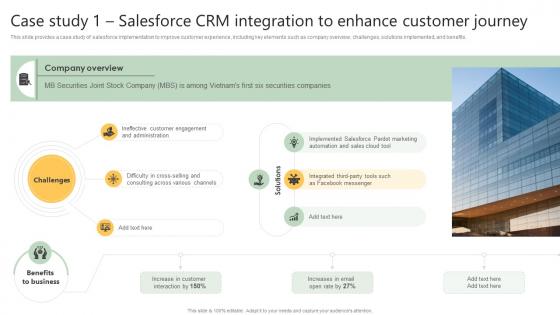
This slide provides a case study of salesforce implementation to improve customer experience, including key elements such as company overview, challenges, solutions implemented, and benefits.
People who downloaded this PowerPoint presentation also viewed the following :
Case Study 1 Salesforce CRM Customer Relationship Management Software Deployment SA SS with all 9 slides:
Use our Case Study 1 Salesforce CRM Customer Relationship Management Software Deployment SA SS to effectively help you save your valuable time. They are readymade to fit into any presentation structure.









FAQs for Case Study 1 Salesforce CRM Customer Relationship Management Software
So you've got requirements gathering, stakeholder alignment, data migration, customization, testing, and training. Map your current processes first - seriously, people always skip this and regret it. Get end users involved early, not just for training at the end. Data cleanup will probably take forever (it always does), so plan for that mess. Oh, and definitely start with a pilot group before going company-wide. Way better to work out the kinks with like 10 people than have 200 employees mad at you. Trust me on that one.
First thing - map out your current sales process and find what's driving everyone crazy day-to-day. Actually talk to the people using it (reps, managers, marketing team). Trust me, they'll give you way better insights than whatever leadership thinks is wrong. Figure out your must-haves vs nice-to-haves early on. Don't skip checking what integrations you need with existing tools either. Oh, and assess your data quality now because moving over messy data is a nightmare. Start with those stakeholder interviews - they're gonna shape your whole strategy anyway.
Honestly, most companies are looking at 3-6 months for Salesforce rollouts. Small shops can sometimes pull it off in 6-8 weeks if they keep things simple. Enterprise stuff? That's a whole different beast - think 9-12 months, maybe longer if you're dealing with ancient legacy systems that hate everything modern. Mid-size places usually hit that 4-6 month sweet spot. Heavy customization will definitely slow you down, and don't even get me started on data migration nightmares. My advice? Figure out what you absolutely need versus what would just be cool to have. Saves everyone's sanity.
First thing - audit your data and figure out what you actually need. Don't be that person dragging 10 years of garbage into your shiny new system. Clean everything up first, it's way easier than fixing it later. Test everything in a sandbox environment before going live. I learned this the hard way when field mappings went sideways on me. Document the whole process while you're at it - future you will be grateful. Set up your validation rules in Salesforce beforehand. Plan for downtime during the actual move. Most importantly: back up everything, test it twice, then migrate once. Sounds paranoid but trust me on this one.
Get your key users involved early - like, during design and testing so they actually feel invested. Skip the generic training garbage. Build role-specific sessions instead because nobody wants to sit through demos about features they'll never touch. Find champions in each department to help after launch. Don't overwhelm people with everything at once - roll features out gradually. Quick reference guides are clutch here. Here's the thing though - you've gotta show them how it actually makes their job easier, not just say "use this because we bought it."
Look, customization is where Salesforce actually becomes useful instead of just another boring CRM. You're gonna be tweaking fields, workflows, page layouts - basically molding it to fit how your team works. This part makes or breaks most projects, no joke. Start with what you absolutely need first. The fancy stuff can wait. I've seen too many people try recreating their old janky system exactly and it becomes this nightmare to manage later. Trust me on that one - keep it simple at first, then build up from there.
Focus on the obvious stuff first - lead conversion rates, sales cycle times, revenue growth. Data quality improvements too. But honestly, user adoption matters way more than people think. What's the point of perfect setup if your sales team ignores it? Check login rates and whether they're actually filling out fields completely. I'd also grab some quick feedback from the team - surveys or just casual chats work. Set your baselines before you flip the switch so you can prove it's working later. Give it 30-60 days after launch, then start measuring everything.
Honestly, data migration is gonna be your worst nightmare - your current data is probably messier than you realize, so budget extra cleanup time. Users hate change, period. Getting them involved early saves you so many headaches later. Don't go crazy with customizations right away; stick to basic features first. Scope creep will kill you if you're not careful. You need a project manager who's not afraid to shut down random feature requests halfway through. Trust me, people will keep asking for "just one more thing" until you're completely off track.
Ugh, yeah Lightning deployment is such a headache compared to Classic. Back in the day you'd just push your Apex classes and triggers - pretty simple stuff. Now you're juggling component bundles, JavaScript files, and making sure everything works on mobile (which honestly breaks half the time). The security policies are way stricter too and will randomly kill your deployment if something's off. I learned this the hard way last month. Set up CI/CD from the start and test everything in sandbox first. Trust me on this one.
Honestly, connecting other tools to Salesforce is a game changer. Your marketing platform can feed leads directly in, accounting software handles invoicing automatically, support tools give you the full customer picture - it all just flows together. No more copying data between systems (seriously, life's too short for that). Most tools like HubSpot and QuickBooks already have connectors built in. I'd start by listing what your team actually uses every day, then tackle those integrations first. The insights you'll get when everything's talking to each other? Chef's kiss.
Start with your data access controls - user profiles, permissions, sharing rules. Only let people see what they actually need. Two-factor auth is a must for everyone, no exceptions. Encrypt your sensitive stuff (SSNs, financial data, etc.) and set up field-level security for the really critical pieces. Oh, and definitely audit those third-party apps - I've seen them have way more access than anyone realized. Honestly, just do a basic user access audit first. You'll probably find a bunch of old permissions that shouldn't be there anymore.
So with Agile, you're basically chopping up your Salesforce deployment into these short 2-4 week sprints instead of doing one huge rollout. Way better than waterfall where you disappear for months building stuff nobody ends up wanting. Get your users involved early and often - they'll actually tell you what works. Deploy your core features first (your MVP stuff), then keep adding based on real feedback. Honestly, CRM requirements change constantly anyway, so this approach just makes sense. You can pivot fast when things shift, and trust me, they will.
Oh dude, Salesforce actually hooks you up pretty well with deployment stuff. Their Trailhead platform is free and weirdly addictive - I got sucked into those modules for hours once. Documentation is solid too, plus they've got step-by-step implementation guides. The community forums are clutch because other admins share what actually worked (and what didn't). If you need hand-holding, their Premier Success plans give you dedicated support during rollout. Start with their Implementation Workbook template though - trust me, you'll forget something obvious otherwise and kick yourself later. Customer success team is there too if things get hairy.
Dude, you absolutely need to get stakeholders involved early or you're screwed. They'll help you figure out what actually needs to be built and spot problems before they blow up. Plus they become your advocates when it's time to roll out - which honestly makes all the difference. I've watched so many projects crash because IT just went off and built something nobody wanted. Regular check-ins throughout the whole thing, not just a kickoff meeting. They're also clutch for testing and handling all the inevitable pushback when people have to change how they work. Trust me on this one.
Honestly, budget for constant training - Salesforce updates 3x yearly and people forget stuff they don't use daily. Your data will get messy fast without maintenance. Duplicates, missing fields, old contact info... it adds up and tanks your ROI. Check quarterly who actually needs premium licenses vs basic ones (you'd be surprised how much you can save there). Integrations break randomly when systems update too. I learned this the hard way at my last job. Set up reviews with your admin team every few months or you'll have angry executives breathing down your neck later.
-
The slides come with appealing color schemes and relevant content that helped me deliver a stunning presentation without any hassle!
-
Their designing team is so expert in making tailored templates. They craft the exact thing I have in my mind…..really happy.