

CRM Application Architecture To Establish Customer Relationship




Try Before you Buy Download Free Sample Product
 Impress Your
 Audience
 100%
100% Editable
 Save Hours
 of Time


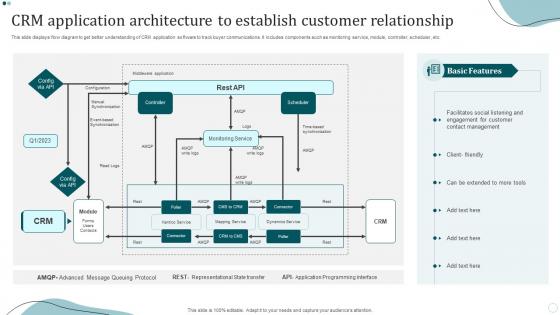
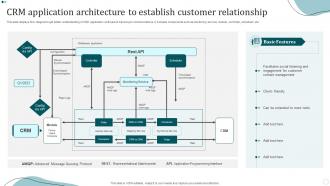
This slide displays flow diagram to get better understanding of CRM application software to track buyer communications. It includes components such as monitoring service, module, controller, scheduler, etc.
People who downloaded this PowerPoint presentation also viewed the following :
CRM Application Architecture To Establish Customer Relationship with all 6 slides:
Use our CRM Application Architecture To Establish Customer Relationship to effectively help you save your valuable time. They are readymade to fit into any presentation structure.





FAQs for CRM Application Architecture To
So you'll definitely need a central database - that's like your main hub. Contact management and sales pipeline tracking are must-haves too. Marketing automation is super helpful, plus customer service modules. Oh, and good analytics/dashboards because your sales people will literally lose their minds without proper reporting lol. Integration APIs are key so everything can actually talk to each other - email, accounting, whatever tools you're already using. Mobile access is non-negotiable these days since we're all glued to our phones. Honestly though, start by figuring out what fits your actual business flow first before getting carried away with features.
So your CRM basically pulls data from all your different systems - email, social media, ERP stuff - through APIs and middleware. Think of it like a translator that makes everything talk to each other. Most systems sync in real time or do batch updates throughout the day. Honestly, the whole setup is pretty slick when it works right. I'd start by listing out all your data sources first, then figure out which connections will actually move the needle on understanding your customers better. Don't try to integrate everything at once though - that's a headache waiting to happen.
Honestly, cloud-based CRM is the way to go these days. It handles all the scaling and storage automatically, plus you get updates without lifting a finger. No more dealing with server headaches (seriously, who has time for that?). Your data syncs everywhere instantly, and the uptime is way better than those old on-premise systems. Integration with other tools? Super smooth. Your whole team can collaborate in real-time too. I mean, some people still swear by legacy systems, but cloud-native options just grow with your business better. Trust me on this one.
Your CRM basically gives you the whole picture of each customer - no more of that annoying "let me transfer you" runaround. Teams can see purchase history, past chats, preferences, all that stuff in real time. Customers don't have to repeat themselves constantly (thank god). You can actually send offers that make sense and catch issues before they blow up. The automated stuff handles follow-ups so people don't get forgotten. Honestly, it's a game changer once you get it right. Start by figuring out where your customer data is getting stuck in different departments.
Start with encryption - data at rest and in transit, that's your foundation. Then set up role-based access so people only see what they actually need. MFA is absolutely essential now (trust me on this one). Regular security audits will catch stuff you missed, and don't sleep on API security since your CRM talks to everything else. Oh, and make sure your backups are encrypted too - seems obvious but you'd be surprised how many people skip that. Having an incident response plan ready is clutch. Honestly, encryption and access controls will cover most of your bases right off the bat.
Here's the thing - your deployment choice totally reshapes how you'll build the whole CRM system. With cloud, you just focus on APIs and integrations since someone else handles the infrastructure mess. Way less stressful. On-premise though? You're designing everything from scratch - data centers, backups, the works. More control but way more problems to solve. Hybrid's honestly the most annoying because you're constantly building bridges between two completely different setups. My take: figure out what integrations you actually need first, then pick whatever model makes that easier. Don't get stuck doing it backwards.
Database performance is huge - that's where most CRMs actually die, not from user overload like people think. API rate limiting will bite you too. Redis caching is a lifesaver during traffic spikes, trust me on this one. Your data layer needs to handle way more transactions than you're expecting. Load balancing becomes non-negotiable once you scale up. Honestly? Plan for triple your projected load minimum. Most failures happen because people underestimate data growth over user growth. Get your database architecture right from day one - partitioning data effectively will save your sanity later.
So AI can totally change how your CRM works. Predictive analytics helps score leads better, and chatbots handle basic customer stuff. Machine learning gets scary good at spotting which customers might bail and tells your sales team what to do next. You can also analyze sentiment from customer emails (pretty neat) plus get dynamic pricing suggestions. Oh, and it automates data entry from calls and emails - saves tons of time. Don't go crazy though. Pick one thing like lead scoring, nail it, then add more features. That's what worked for us anyway.
Figure out your customer journey first - where do they get stuck, what pisses them off? That's what you build around. Healthcare needs HIPAA stuff and patient portals. Manufacturing cares more about quotes and inventory connections. Here's the thing though - don't customize everything just because you can. I've seen companies turn their CRM into Frankenstein's monster. Pick the big wins that actually matter. Test stuff with real users, not just the IT team. Roll it out in chunks so you're not debugging a million things at once. Oh, and write down what you did - trust me on this one.
So basically, APIs are like translators that let your CRM chat with all your other software without you having to code anything crazy. Your email platform, accounting stuff, marketing tools - they all just sync up automatically. Update a customer in your CRM? Boom, it's everywhere else too. No more copying data around like it's 2005 (honestly such a time waster). First thing I'd do is figure out which systems actually need to talk to each other. Then hunt down existing APIs - most decent software already has them built in. Way easier than starting from scratch.
Honestly, most companies mess up CRM rollouts in three predictable ways. Data integration is brutal - connecting legacy systems without everything exploding takes forever. Your sales team will hate any clunky new process that slows them down, so user adoption becomes this uphill battle. Budget always spirals too because halfway through someone decides they need five more features. Oh, and scope creep is real. Start with a small pilot instead of going all-in. Get your actual users involved early or they'll sabotage the whole thing later.
Dude, mobile changes everything about CRM design. Your sales people are gonna be using this stuff in random coffee shops and airport lounges with terrible wifi. So you need responsive design that actually works, plus offline mode when connections drop out completely. The backend has to be smart about syncing data when service comes back - losing a hot lead because someone's phone hit a dead zone is the worst. APIs become super important too, gotta keep data transfer lean and cache intelligently. Honestly, if you don't build mobile-first from day one, your field team will probably mutiny.
Track both tech stuff and business impact - that's where you'll get the full picture. System uptime and response times matter because nobody wants to deal with laggy software. Data integration accuracy is huge too. Business-wise, look at user adoption rates and data quality scores. Sales cycle times and lead conversion rates are honestly where you'll show the most ROI to leadership. Customer satisfaction improvements are solid metrics as well. I'd honestly start with maybe 3-4 metrics that your stakeholders actually care about, then expand once you've got those dialed in.
Okay so first thing - get all your customer touchpoints feeding into one system. Email, social, phone calls, website stuff, everything. That way you're not sending someone the same discount code twice (which honestly drives me crazy when companies do that). APIs are your friend here because they'll automatically sync data between channels without you having to babysit it. Start with unified customer profiles though. Once you've got that foundation, you can actually see the full customer journey and figure out what messaging works where. Game changer.
So CRM is getting wild right now with AI doing predictive stuff and scoring leads automatically. Cloud setups are everywhere because they actually scale without breaking. Those old monolithic systems were such a pain - glad we're past that mess. APIs and microservices make everything way more flexible now. Voice tech is creeping in too, which honestly feels weird but makes sense. Oh, and personalized experiences are happening at crazy scale. My advice? Pick something that's built for this new tech instead of trying to frankenstein it onto old platforms later.
-
The pricing page of this website is very sorted. I felt no pain while buying the PPTs.
-
SlideTeam just saved my project! Thank you so much. The variety of templates helped me showcase multiple perspectives easily.