


CRM Application System Architecture Flowchart




Try Before you Buy Download Free Sample Product
 Impress Your
 Audience
 100%
100% Editable
 Save Hours
 of Time


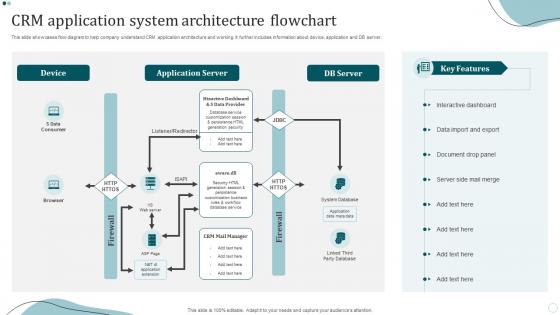
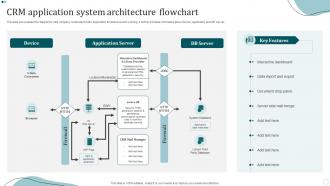
The following slide displays CRM application architecture to help company understand customer requirements. It further includes details such as developer user, apex compiler and runtime, key derivation server, database, etc.
People who downloaded this PowerPoint presentation also viewed the following :
CRM Application System Architecture Flowchart with all 6 slides:
Use our CRM Application System Architecture Flowchart to effectively help you save your valuable time. They are readymade to fit into any presentation structure.





FAQs for CRM Application
So basically you've got three main layers - your customer database at the bottom, then the actual CRM software in the middle, plus the interface you actually click around in. APIs handle connecting to your other tools, and there's reporting stuff built in too. Workflow automation is honestly the best part though, saves so much tedious work. Security's baked in obviously. Most are cloud-based now so you don't have to worry about servers and all that headache. When you're shopping around, just focus on what plays nice with whatever systems you're already using instead of getting distracted by all the shiny bells and whistles.
Your database choice is literally what makes or breaks everything else. PostgreSQL and similar relational databases are solid for consistency, but they'll struggle when you're dealing with huge datasets. MongoDB and other NoSQL options scale way better horizontally - though honestly, the learning curve sucks. If you're planning to grow fast or already drowning in customer data, distributed storage is probably your best bet. Otherwise your system will just crawl to a stop. I'd start by running some benchmarks on your current queries first - that's where you'll actually see what's choking your performance.
Honestly, cloud-based CRM is where it's at these days. Your data syncs instantly across teams, you can access everything from your phone, and updates happen automatically - no IT headaches. The integration with other tools is so much smoother too. I'd definitely go with something cloud-native rather than those older systems that are just trying to slap cloud features on top. Real-time collaboration is huge. Plus you get all those AI features that just wouldn't work with old-school on-premise stuff. Way less maintenance stress overall.
So basically, connecting your CRM to other apps is a game-changer. Think email tools, accounting software, project management stuff - whatever your team actually uses. No more copying data between systems (seriously, who has time for that?). You'll see everything about each customer in one spot. The cool part? Set up automations so things happen automatically - like turning leads into support tickets. My advice is to start with the tools you use most. Don't try to connect everything at once or you'll go crazy.
Start with encryption - you want both stored data and stuff moving around protected with solid protocols. Multi-factor authentication everywhere, no exceptions. Role-based access is huge too, only give people what they actually need to do their jobs. Honestly, most companies are terrible at this part - when you audit current permissions you'll find people with crazy amounts of access they don't use. Regular security audits will save your ass, trust me. Oh, and if you've got APIs talking to other systems, lock those down tight. Secure backups are obvious but somehow people still mess it up.
Honestly, go with something modular like React or Angular. The framework you pick now will either save you or screw you later when you need changes. I've watched teams get completely stuck because they chose some rigid system that made even tiny updates a nightmare. Microservices are clutch here - each part works separately so you're not rebuilding everything constantly. Yeah, it might take more time upfront, but trust me, you'll be so glad when you can actually pivot without wanting to throw your laptop. Pick something that's well-supported too.
So CRM architecture usually has three main layers - your UI, business logic, and data storage. Microservices are everywhere now because you can scale pieces separately. Event-driven stuff works really well since customer actions need to trigger workflows constantly. Enterprise places love SOA, and honestly everything needs to be API-first these days. Every CRM has to talk to email systems, marketing platforms, you name it. The integration nightmare is what gets most people though. I'd definitely map out your data flows and what external systems you're dealing with first - that's gonna drive everything else you build.
So basically CRM automation works through workflow engines that watch for specific triggers. Hit certain lead criteria? Boom - auto-assigns to the right rep, fires off emails, updates deal stages. No manual work needed. The cool part is how everything connects - sales, marketing, customer service all talk to each other. Data just flows between them naturally. You can build approval chains, automate boring repetitive stuff (thank god), plus create custom workflows that actually fit how you work. Oh and definitely start by figuring out which tasks you do over and over first.
Three main things to nail down: encrypt everything (data sitting around and stuff being transferred), set up role-based access so random people can't peek at customer info, and do regular compliance checks. Encryption used to be such a pain but most CRMs handle it automatically now, thank god. Also set up data retention policies to auto-delete old records and give customers easy ways to update or delete their info. Oh, and definitely audit what data you're actually collecting first - I bet there's tons of random stuff you don't even need anymore just sitting there taking up space.
Honestly, you gotta bake UX thinking into your architecture from the start. Map out those user journeys first, figure out where people get stuck, then build your APIs and data flows around that. Performance matters most for everyday tasks - like seriously, nobody's got patience for slow-loading contact records. Build modular components that work across different user roles without creating a mess later. Get your UX people in technical planning meetings so they get your constraints and you get their user insights. Oh and definitely go mobile-first with your API strategy. Progressive disclosure is your friend here too.
Database optimization is huge - indexing will save your life when you're hitting millions of records. Caching strategies and load balancing across servers are equally critical. Honestly, horizontal scaling beats just buying beefier hardware every time, even though that's the easy route. Don't let your active tables get bloated with old data - archive that stuff regularly. If you're building from scratch, microservices architecture is worth considering. CDN integration matters if you've got users everywhere. Oh, and start performance testing early in the build process, not when everything's already done. Trust me on that one.
Honestly, AI transforms your CRM from just storing data to actually predicting which leads will convert. The automation handles all that boring repetitive stuff you hate doing. Chatbots can knock out most basic customer questions - I've seen teams save hours daily on that alone. You'll get real-time insights into customer mood and even dynamic pricing that adjusts automatically. Oh, and personalized experiences become way easier to scale up. My advice? Don't go crazy trying to implement everything at once. Pick one feature first and see how it goes.
So basically you split your CRM into separate pieces - contact management lives on its own, sales pipeline gets its own space, email stuff runs independently. Pretty smart actually. When you need to tweak lead scoring, you're not messing with customer support at all. Peak reporting season? Just beef up that one service instead of the whole damn system. Each piece handles its own data and they all talk through APIs. Different dev teams can work on their sections without stepping on each other's toes (which honestly saves so much drama). I'd start by mapping out your main CRM functions and figuring out what needs its own deployment schedule.
Definitely track uptime and response times first - those are your bread and butter metrics. User adoption rates matter too, plus how long people actually stay logged in. Database queries are critical because waiting forever for customer records will drive everyone nuts. I'd also watch integration success with other systems and API response times. Storage trends, error rates, peak concurrent users - all that stuff. Oh and set up alerts so you're not finding out about problems from angry sales people later. Trust me on that one, learned it the hard way. Session duration's another good one that shows if your architecture actually works for real workflows.
CRMs are way more flexible than people think. You can totally customize modules and workflows for whatever industry you're in. B2B companies focus on lead scoring and those endless sales cycles, but retail is all about customer segments and purchase data. Healthcare needs HIPAA compliance (such a headache), fintech has completely different regulatory stuff. Manufacturing cares more about supply chain integration than social media features - makes sense. Here's the thing though: map out your actual customer journey first. Then build your modules around that instead of cramming your team into some cookie-cutter setup. Don't let the CRM dictate how you work.
-
Professional and unique presentations.
-
The templates are easy to get, and the chat customer support is excellent.