

Crm application pitch deck ppt template




Try Before you Buy Download Free Sample Product
 Impress Your
 Audience
 100%
100% Editable
 Save Hours
 of Time


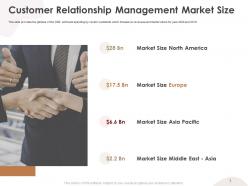
Customer relationship management PPT presentation is a system that manages a companys interactions and relationships with current and potential customers. It enhances customer bond by managing client interaction, lead tracking, and process streamlining. This deck covers the customer relationship management application slides, which focuses on the problem faced by the company along with solutions offered by the CRM software company. In this template, we have discussed the global industry outlook, CRM market, and the customer relationship management market size. Additionally, this deck incorporates template that talks about regional growth rate, CRM software spending by vendor, and state of the CRM market. We have also catered the software revenues forecast, services offered by CRM software companies, top competitors, and team structure in this amazing pitch deck. Some of the other useful slides are CRM application funding, pricing sheet, and customer testimonials. Download this editable template now and retain your customers now.
People who downloaded this PowerPoint presentation also viewed the following :
Content of this Powerpoint Presentation
Slide 1: This is the cover slide of CRM Application Pitch deck.
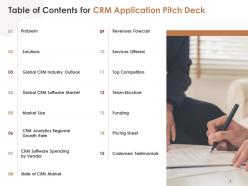
Slide 2: This is the table of content slide that lists out the elements covered in the deck.
Slide 3: This slide provides the glimpse about the problem faced by companies such as poor salesforce, low sales representative, manual data entry, slow support response, etc.
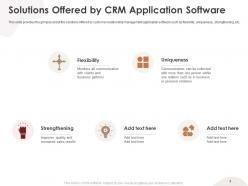
Slide 4: This slide provides the glimpse about the solutions offered by customer relationship management application software such as flexibility, uniqueness., strengthening, etc.
Slide 5: This slide provides the glimpse of the CRM industry outlook which focuses on market overview which covers market size, key drivers, KPIs in CRM, cost saving opportunities.
Slide 6: This slide provides the glimpse of the global CRM market which focuses on forecasted SaaS CRM, combined market share of vendors, etc.
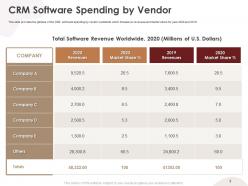
Slide 7: This slide provides the glimpse of the CRM software spending by vendor worldwide which focuses on revenues and market share for year 2020 and 2019.
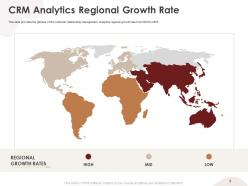
Slide 8: This slide provides the glimpse of the customer relationship management analytics regional growth rate from 2020 to 2025.
Slide 9: This slide provides the glimpse of the CRM software spending by vendor worldwide which focuses on revenues and market share for year 2020 and 2019.
Slide 10: This slide provides the glimpse of the CRM market which focuses on customer experience, productivity, increasing business demand, etc.
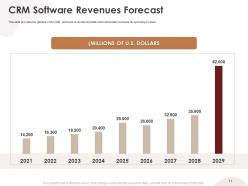
Slide 11: This slide provides the glimpse of the CRM software revenues forecast which showcase revenues for upcoming 9 years.
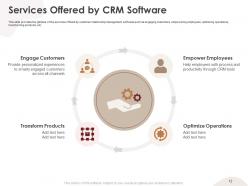
Slide 12: This slide provides the glimpse of the services offered by customer relationship management software such as engaging customers, empowering employees, optimizing operations, transforming products, etc.
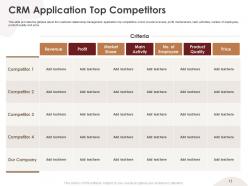
Slide 13: This slide provides the glimpse about the customer relationship management application top competitors which covers revenues, profit, market share, main activities, number of employees, product quality and price.
Slide 14: This slide provides the glimpse about the customer relationship management application team structure which focuses on members involved in a team and their designations.
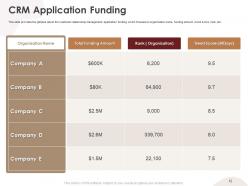
Slide 15: This slide provides the glimpse about the customer relationship management application funding which focuses on organization name, funding amount, trend score, rank, etc.
Slide 16: This slide provides the glimpse about the customer relationship management application pricing sheet which focuses on different plans such as standard, professional and enterprise.
Slide 17: This slide provides the glimpse about the customer relationship management application customer testimonials along with their designation and company name.
Slide 18: This is an icon slide. Use it as per your needs.
Slide 19: This is an Additional Slide
Slide 20: This is Our Mission Our Vision slide to state your mission, vision etc.
Slide 21: This is Our Team slide with name and designation to fill.
Slide 22: This is About us slide that can be used to give an overview of your business.
Slide 23: This is a Post it Notes slide that can be used to keep important data at one place.
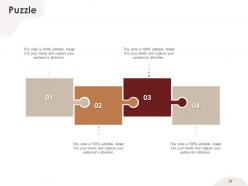
Slide 24: This is creative Puzzle image slide to state information, specifications etc.
Slide 25: This slide can be used to jot down any motivational quote.
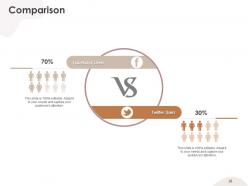
Slide 26: This is a comparison slide that can be used to conduct a comparative analysis between two elements.
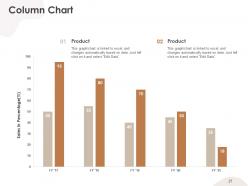
Slide 27: This is a column chart slide that can be used to compare two products.
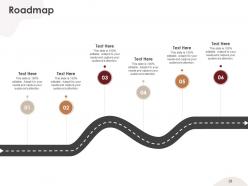
Slide 28: This is a roadmap slide that can be used to showcase chronological sequence of events.
Slide 29: This is a Timeline slide that can be used to present series of events.
Slide 30: This is a 30,60,90 Days Plan slide that can be used to formulate robust plans.
Slide 31: This is Financial scores slide. State your financial aspects etc. here.
Slide 32: This is a Thank you slide for acknowledgment. You can share your contact details here.
Crm application pitch deck ppt template with all 32 slides:
Use our CRM Application Pitch Deck Ppt Template to effectively help you save your valuable time. They are readymade to fit into any presentation structure.









FAQs for Crm application pitch
Honestly, start with the basics - contact management and pipeline tracking are non-negotiable. You need something that pulls all your customer info into one place and handles follow-ups automatically. The interface has to be intuitive though, because if your team hates using it, you're screwed. Email integration is huge, plus mobile access for when you're running between meetings. Oh, and reporting that doesn't require a PhD to understand. I'd say pick whatever feels natural for how you actually work - don't force your process to fit some overcomplicated system. Make sure it grows with you too.
Look, CRM basically gives you the full picture of every customer - what they bought, complained about, all their weird preferences. So you can actually personalize stuff instead of sending generic garbage everyone ignores. The real win though? You'll catch people who are about to bail before they ghost you completely. I mean, nobody wants those awkward calls where you're like "sorry, what was your problem again?" Automated follow-ups handle the boring stuff so customers don't get forgotten. Honestly, just start with alerts for inactive customers - it's simple but saves tons of relationships.
So CRM software tracks everything - first contact through sale to support, all connected. Other tools are way more specialized, like just email marketing or contact lists. The cool thing about CRM is it links your sales pipeline, support tickets, marketing stuff, and customer data so they actually work together. Honestly, if you're just getting started, a basic contact manager might be enough. But once you need to see how customers really interact with your business (and trust me, you will), that's when CRM becomes a game-changer. It's like having the full story instead of random pieces.
Dude, you should totally try a CRM app. They're lifesavers for keeping track of customers instead of having leads just disappear into the void. Your team can finally see who talked to who and when - no more awkward "wasn't someone gonna call them back?" situations. The automated follow-ups are clutch too. You'll start spotting weird patterns in how you sell stuff that you never noticed before. Honestly, most people see their money back pretty fast since they stop losing sales to being disorganized. I'd say start with HubSpot's free version first - can't hurt to try it.
Your CRM data can actually predict customer behavior pretty well once you dig into it. I'd start simple - look at conversion rates and customer lifetime value first. That'll show you which leads convert and what customers are worth. From there you can spot patterns like who's about to churn or what people really want to buy. Honestly the segmentation stuff is where it gets interesting - you'll personalize outreach way better. Takes some time to set up but beats trying to catch trends manually. Work up to the fancy predictive models later once you're comfortable with basic reports.
So basically, CRM apps connect through APIs, webhooks, and those built-in connectors that sync everything up. Email platforms, marketing tools, accounting software - most stuff plays together pretty well these days. Some integrations are super easy (honestly the best ones just work), but others need custom dev work. If your systems don't talk to each other naturally, Zapier or Power Automate can usually fix that gap. I'd map out what tools you're already using first, then figure out which connections will actually stop your team from doing the same data entry twice. That duplicate work is such a time killer.
Oh man, the user adoption thing is brutal - your sales team will fight you tooth and nail on entering data into another system. Data migration is where things get messy too, way messier than anyone expects. Plus integration with whatever tools you're already using? Total headache. Training always costs more than budgeted (shocking, I know). But honestly, if you get people involved in picking the system and actually show them it'll make life easier instead of harder, you've got a shot. Buy-in upfront saves so much pain later.
Track your sales conversion rates and how much faster deals close - that's where you'll see the biggest wins. Time saved on data entry and admin stuff adds up too, plus keeping customers longer obviously helps the bottom line. Honestly, most companies don't bother getting baseline numbers before they start and then wonder why they can't prove ROI later. Don't be those guys. You're probably looking at 12-18 months to see real returns, but check your numbers monthly. Course corrections are way easier when you catch things early instead of waiting a year to realize something's off.
Dude, mobile CRM is a total game changer for sales teams. Your reps can update customer stuff and log calls right from wherever they are instead of forgetting to do it later at their desk (which happens way too often, trust me). The best part? They'll have all that customer history right there during meetings and can follow up instantly while it's still fresh. I've seen teams get like 20-30% productivity boosts from this. Honestly, if you're not doing mobile CRM yet, just start with your tech-savvy people first and go from there.
Dude, your CRM is sitting on a treasure trove of customer info - use it! Segment people by what they actually buy and how they behave on your site. Those "Dear Valued Customer" emails are trash, honestly. Instead, send stuff based on their real browsing history or past purchases. Track everything from age to how often they click your emails. Set up basic groups first - maybe frequent buyers or people who ditched their carts. Then automate targeted sequences and product recommendations. The timing matters too. Start simple and you'll see your open rates actually improve. It's way better than spray-and-pray marketing.
Start with encryption - both stored data and stuff moving around your system. MFA is absolutely essential, no exceptions there. Set up role permissions so your sales team can't accidentally browse financial records. Honestly, most data breaches happen because someone clicked a bad email link, so train your people. Regular security audits will spot problems early. Automated encrypted backups are smart too. Have a response plan ready just in case. If you're doing this in phases, hit encryption and MFA first - they'll protect you the most right away.
So basically, a CRM puts all your customer stuff in one place instead of hunting through random spreadsheets (been there!). It'll automate the boring tasks like follow-ups and reminders, plus you can track every lead from start to finish. Your whole team sees the same info, which is honestly a game-changer. The system handles scheduling and email templates too, so you're actually selling instead of doing admin work. I'd start by writing down how your sales process works now, then set up the CRM to match that flow.
Oh dude, CRMs are game-changers for this stuff. Your whole team can see the same customer history, notes, deal progress - all of it in one spot. No more "hey what did they want again?" conversations every five minutes. Sales can see what marketing promised, support knows about ongoing deals, that kind of thing. You can set reminders, assign tasks, track who's doing what. Honestly the shared dashboards are clutch - saves you from so many pointless check-in meetings. Way better than having customer info scattered across everyone's random spreadsheets and sticky notes.
Honestly, AI is making CRM so much smarter than it used to be. Your system can now score leads automatically and predict which customers might bail before they even realize they're unhappy. The chatbots actually get context now too, which is huge. What's really cool is how it analyzes your conversation patterns - like it'll tell you the perfect time to reach out or what message will actually land. Feels like having a brilliant assistant who doesn't need coffee breaks. Just start small with basic automation in whatever CRM you're using. You'll save hours every week, I promise.
Honestly, skip those boring generic demos and use your actual data instead - people connect way better with stuff they recognize. Focus on what they'll really use day-to-day, not every random feature. Different roles need different training though, so don't lump sales and support together. Keep sessions short, like 30-45 minutes tops because attention spans are terrible these days. Make it interactive too. The real trick? Have some internal champions ready to help when people inevitably forget everything after the formal training ends. Oh, and build in practice time right after while it's still fresh.
-
Content of slide is easy to understand and edit.
-
Easily Editable.
-
Awesome presentation, really professional and easy to edit.