

C4 Model For Salesforce Diagram Architecture




Try Before you Buy Download Free Sample Product
 Impress Your
 Audience
 100%
100% Editable
 Save Hours
 of Time


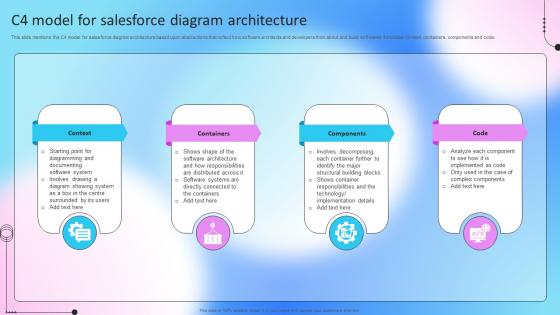
This slide mentions the C4 model for salesforce diagram architecture based upon abstractions that reflect how software architects and developers think about and build softwares. It includes context, containers, components and code.
People who downloaded this PowerPoint presentation also viewed the following :
C4 Model For Salesforce Diagram Architecture with all 6 slides:
Use our C4 Model For Salesforce Diagram Architecture to effectively help you save your valuable time. They are readymade to fit into any presentation structure.





FAQs for C4 Model For
So the C4 model basically splits your Salesforce setup into four layers. Context shows how it fits with everything else in your company. Containers are your big apps - Sales Cloud, Service Cloud, whatever custom stuff you've built. Then Components get into the actual triggers, flows, classes inside those apps. Code level is just the detailed implementation stuff (honestly, I skip this one half the time). Start with Context diagrams first - you'll see all your integrations mapped out and it makes dependencies way clearer. Trust me, it's worth the upfront work. Game-changer for documentation.
Look, the C4 model is like having different zoom levels for your Salesforce architecture - kinda genius actually. Start with Context diagrams for the executives who just want the big picture. Then you can go deeper into Containers and Components when your dev team needs the nitty-gritty details. What's cool is everyone gets exactly what they need without getting lost in technical weirdness or dumbed-down explanations. I'd definitely kick off your next architecture review with that high-level Context view first. Let people ask for more detail if they want it - saves everyone time.
So the C4 model is actually perfect for Salesforce stuff. Context diagrams show how it connects to your other systems - super helpful for the big picture. Then you break it down with container diagrams for Sales Cloud, Service Cloud, whatever you're using. Component level gets crazy detailed though, probably too much unless you've got some seriously complex custom apps going on. I always tell people to start with just the context and container views first. They're honestly the most useful and stakeholders actually get it. Plus it makes those technical handoffs so much less painful when everyone's on the same page about dependencies.
So the C4 model is basically like having different zoom levels for your Salesforce setup. You start with the big picture, then drill down to individual components. Super helpful when new people join your team - no more confused staring at complex org structures (we've all done it). Honestly, it's one of those things that seems like extra work upfront but pays off huge later. You'll catch bottlenecks and messy dependencies before they bite you. Plus it makes you actually think through how everything connects instead of just winging it. Next time you're doing a big implementation, sketch out that context diagram first. Your future self will thank you.
Context diagrams are like your bird's eye view of how Salesforce plugs into everything else at your company. Show all the external stuff - ERP systems, marketing tools, APIs, different user types. Honestly, I'd argue it's the most critical diagram you'll make because it sets up everything that comes after. Your stakeholders need to see how Salesforce actually connects to their world, otherwise they won't get why you're making certain choices. Oh, and definitely start with this one when you're documenting. Trust me, it makes explaining the technical details way less painful later.
So the C4 model is basically a way to document your Salesforce setup at different levels without everything being a mess. You've got Context (how Salesforce connects to other systems), Container (your orgs and big pieces), Component (individual apps and flows), and Code for when you need to get into the weeds. Business people can stick with the high-level stuff while devs go deeper. Honestly, just start with a Context diagram of what you have now - you'll probably be shocked at how tangled everything actually is. Way better than having random diagrams floating around that nobody understands.
So C4 is way more visual than those typical Salesforce docs we usually deal with. You get four clean zoom levels - Context all the way down to Code - instead of those monster solution diagrams that make your eyes bleed. Most frameworks just dump you into technical details right away, but C4 makes you start with the big picture first. Pretty smart approach honestly. You can show Context to stakeholders without confusing them, then your dev team gets the detailed Component and Code views. Oh and it actually forces people to think about how Salesforce fits into the whole business ecosystem first - which is something we skip way too often. Try it on your next project.
So basically, the C4 model breaks down your Salesforce integrations into these neat layers - you go from the big picture stuff down to actual code details. Start with the Context diagram though, trust me on this one. You'll spot integration gaps you never even realized were there. It maps out how Salesforce talks to your APIs, external systems, all that jazz. For orgs with crazy complex setups, it's honestly perfect. Forces you to actually document your integration patterns and data flows too. Makes debugging so much less of a headache down the road.
Yeah, C4 works great for Salesforce stuff. Start basic with just context and container views - don't go crazy documenting everything upfront like some teams do (learned that the hard way). Focus on the big picture first: how Salesforce talks to your other systems and key internal pieces like custom apps. You can always drill down into components and code later when things get messier. The whole point is starting light and adding detail when you actually need it. Honestly, most small projects never need those deeper layers anyway, so why waste time building them out?
Don't dive into the weeds right away - that's the biggest mistake I see. You'll create these crazy complex diagrams that just confuse everyone. Start with the big picture first, then zoom in later. Also, stop thinking of Salesforce as one giant blob. Break it up into Sales Cloud, Service Cloud, whatever makes sense for your setup. External integrations matter too - honestly, people forget about those all the time but they're huge for showing how data actually moves around. Your executives don't care about component details anyway. Save that technical stuff for when you're talking to developers.
Honestly, C4 is great for Salesforce teams doing agile stuff. Start with those high-level context diagrams when you're planning sprints - way better than creating some monster doc nobody will ever look at again. Then you can get into the weedy container and component details as things change. Updates happen bit by bit instead of these massive overhauls that make everyone groan. The visual thing really works during standups too. People actually get what you're talking about! Try doing context diagrams for your next user story. Trust me, it'll keep everyone on the same page without the usual documentation drama.
So I've been down this rabbit hole before - Structurizr is your best bet since it's literally made for C4 models. The free version should get you started with your Salesforce stuff. If you need something quick and dirty, draw.io works but you'll be doing everything manually (which honestly gets old fast). Lucidchart's pretty good too if you've already got access. Some people get really into PlantUML because you can generate diagrams from code, though that might be overkill depending on what you're doing. Oh, and Miro's surprisingly decent for brainstorming sessions with your team. I'd just try Structurizr first.
Honestly, the C4 model is a game-changer for stakeholder buy-in. You can tailor what you show each group - business folks get the big picture context diagram to confirm you're tackling the right problem, while devs can dig into component details. The container level is perfect for Salesforce work since it shows how all your custom apps and integrations connect (which, let's be real, can get messy fast). Start with the high-level view, then go deeper based on what questions come up. Different diagrams for different audiences - way better than overwhelming everyone with technical details they don't need.
Context diagrams first - show stakeholders how Salesforce connects to everything else. They usually miss this big picture stuff. After that, drill into containers (your orgs, external systems, main integrations) then zoom in on components within each org. The real pain point? Getting your team to agree on what counts as a "system" versus a "component" in Salesforce. Honestly drove me crazy on my last project! But don't overthink it initially. Document what you've got, then gradually add C4 notation for new work. Pick one critical business process to start with and expand once you've shown it actually helps.
Honestly, C4 works great with TOGAF and Zachman - they're not competing at all. TOGAF handles your enterprise governance stuff, Zachman gives you that big picture framework, but C4 is where you actually draw things people can understand. Here's the thing - TOGAF tells you what to document and when, but C4 shows you how to make diagrams that don't look like spaghetti. For Salesforce projects, you can use C4's levels to break down those crazy org designs within your TOGAF phases. Start with C4's context and container views to map your current Salesforce setup. Trust me, it'll make your TOGAF deliverables so much clearer instead of those usual confusing architecture docs nobody reads.
-
Designs have enough space to add content.
-
No second thoughts when I’m looking for excellent templates. SlideTeam is definitely my go-to website for well-designed slides.