


CRM Process Flowchart For Retail Banking




Try Before you Buy Download Free Sample Product
 Impress Your
 Audience
 100%
100% Editable
 Save Hours
 of Time


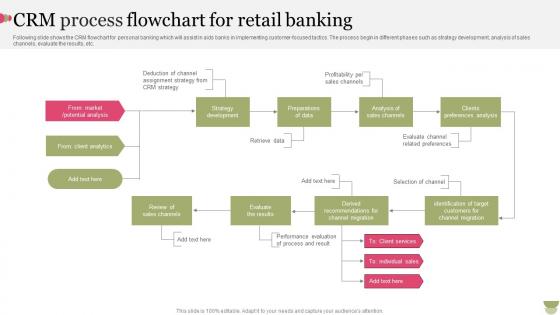
Following slide shows the CRM flowchart for personal banking which will assist in aids banks in implementing customer focused tactics. The process begin in different phases such as strategy development, analysis of sales channels, evaluate the results, etc.
People who downloaded this PowerPoint presentation also viewed the following :
CRM Process Flowchart For Retail Banking with all 6 slides:
Use our CRM Process Flowchart For Retail Banking to effectively help you save your valuable time. They are readymade to fit into any presentation structure.





FAQs for CRM Process Flowchart
So you'll need lead capture, qualification stages, nurturing touchpoints, conversion tracking, and retention loops - the usual suspects. Map out how prospects flow from first contact to qualified lead to opportunity to closed deal. Feedback loops are clutch for when deals stall or need follow-up (honestly, most people skip this part). Include clear decision points showing when leads get passed between teams or trigger different actions. Oh, and build in metrics at each stage so you can actually see what's working. Otherwise you're just guessing. That way you can tweak the process as you go.
So basically, a CRM flowchart stops stuff from slipping through the cracks - you know how that always happens. It shows your team exactly when to follow up and what info to grab at each step. Think of it like a roadmap for moving people through your sales pipeline. The cool thing is everyone stays consistent, which customers actually notice. You can also spot where people are getting stuck or bailing out. Honestly, I'd start by just sketching out what you're doing now first, then see what's missing. Makes way more sense than starting from scratch.
Honestly, the trickiest part is when teams go overboard mapping out every single scenario right away. You end up with these monster flowcharts that just sit there gathering dust. Getting departments on the same page is brutal too - like sales screaming they need leads NOW while marketing's all "wait, we need three more qualification steps first." Classic office drama, right? Plus your CRM's gonna change constantly anyway, so that perfect flowchart? Useless in two months. Just start with the basics of how customers actually move through your system. Figure out what's broken, then fix it piece by piece.
Honestly, automation is a total game-changer for CRM workflows. Your system starts handling all the tedious stuff automatically - follow-up emails, status updates, lead assignments based on whatever rules you set up. No more manual handoffs slowing everything down. The best part? Leads stop falling through cracks because computers don't get distracted or forget like we do. I'd start with whatever tasks you're doing over and over again - those are usually the easiest wins. Your whole process becomes way more consistent and predictable. Plus you'll actually have time for the important stuff instead of just moving data around all day.
Okay so feedback loops are honestly what make your CRM actually work instead of just existing. You're collecting feedback, looking at what it means, then tweaking your processes based on what you learned. Scatter these "check-in" points throughout your whole customer journey - not just slapping one survey at the very end like most companies do (which is kinda lazy if you ask me). Short version: without feedback loops, you'll keep doing the same stuff forever even when it's not working. They help you get better at everything from nurturing leads to keeping customers around longer.
So I'd grab something like Draw.io (it's free) or Lucidchart if you want something fancier. Map out your whole customer journey - lead comes in, what happens next, then what, all the way to closing the deal. Use those basic flowchart shapes, rectangles for steps and diamonds when there's a decision point. Color-coding is clutch here, trust me. Different colors for each department or stage makes it so much clearer. Oh and honestly? Don't overthink the design - sometimes I spend way too long making things look perfect. Just keep the text short and make sure the arrows actually make sense. Put it somewhere everyone can see it and actually update the thing when stuff changes.
Map out your whole customer journey first - every single touchpoint from hello to post-sale stuff. Get your sales and support people involved because honestly, they know where things actually break down way better than management thinks they do. Make it visual so everyone can actually understand it (those text-heavy documents just sit there gathering dust). Don't forget the decision points and what happens when customers go off-script - because they will. Oh, and test it with real scenarios before you launch. I've seen too many beautifully designed processes that completely fall apart day one.
Yeah, you can totally swap out the touchpoints for your industry! Like retail CRMs are all about purchase history and seasonal stuff, but B2B software companies care more about lead scoring and those super long sales cycles. Healthcare needs compliance checks that e-commerce doesn't even think about. The basic flow stays the same though - capture leads, nurture them, convert, keep them around. But then you add your specific steps like demos or consultations or whatever. Honestly, I've watched companies just grab some random template and then act shocked when it doesn't work for their business. Start basic, then build in your actual customer journey.
Track your conversion rates at each funnel stage, plus customer acquisition cost and sales cycle length - those three are solid gold. Customer lifetime value matters too since it shows if your tweaks actually pay off long-term. Oh, and response time is huge (we were bleeding leads because ours sucked). Pipeline velocity's another good one. Activity stuff like call volume can help, but honestly the outcome metrics matter way more. Pick maybe 3-4 that directly hit your revenue and build your tracking around those. Don't overcomplicate it.
Honestly, CRM flowcharts are game-changers for getting everyone on the same page. No more Sarah doing follow-ups her way while Mike does something totally different. You get standardized steps that actually work. Think of it like a roadmap that stops those "wait, wasn't that YOUR lead?" disasters from happening. When you map everything out visually, spotting where things usually fall through the cracks becomes super obvious. My advice? Start by having your team walk through what you're doing now - I guarantee you'll find weird gaps nobody even realized were there. Makes the whole customer journey so much smoother.
Honestly, there's a bunch of stuff you can hook up to CRM flowcharts. HubSpot and Marketo work great for triggering marketing campaigns when customers hit certain stages. Salesforce, Pipedrive, Zoho - they'll all auto-update lead statuses as people move through your workflow. Email platforms sync up nicely too. Even project management tools like Asana can connect (though I'm not sure why you'd need that unless you're running complex campaigns). Analytics stuff plugs right in. Best bet? Look at what tools you're already using for customer interactions and start there.
Every 6 months is the general rule, but honestly? Don't be rigid about it. When you roll out new tools or your team keeps complaining about the same bottlenecks, just update it then. I do a quick 15-minute check quarterly too - way easier than letting problems pile up. Your flowchart should match what actually happens, not some fantasy version from ages ago. Oh, and definitely loop in the people who use it daily when you're reviewing. They'll spot the weird gaps you totally missed. Set that calendar reminder right now or you'll forget!
So high-level CRM flowcharts are like the 30,000-foot view - just the main stages like lead gen, qualifying prospects, closing deals, keeping customers happy. Detailed ones get into the weeds with every single step and decision point. Honestly, you need both. Executives love the big picture version when you're pitching ideas or getting budget approval. But your actual team? They'll use the detailed flowcharts daily to figure out what happens next when a lead comes in at 2pm on a Tuesday. I'd start high-level first - way easier to get people on board that way.
Think of it as giving your new hire a GPS for customer interactions. Way better than dumping a pile of training manuals on their desk! You can literally walk them through each step - lead comes in, gets qualified, moves to sales, closes, then follow-up happens. Shows them exactly where their role fits and who they pass things off to. Honestly beats trying to explain it all in a meeting where half the info gets forgotten anyway. When they're working alone later, they've got this visual guide to check whenever they're like "wait, what comes next?"
So basically, customer segmentation tells you how many different paths to build in your CRM flowchart. You don't want one boring generic flow for everyone - that's just lazy. VIP clients should get fast-tracked support, while new leads need more hand-holding through nurturing sequences. Think of it like highway lanes, each one designed for different types of traffic. Your segmentation stuff - purchase history, how engaged they are, demographics - those become the decision points that send customers down the right path. I'd start by figuring out your main segments first, then build specific workflows for each group.
-
The team is highly dedicated and professional. They deliver their work on time and with perfection.
-
Much better than the original! Thanks for the quick turnaround.