Customer relationship management process flow powerpoint presentation slides
Try Before you Buy Download Free Sample Product
Audience
Editable
of Time
Download our customer relationship management process flow PowerPoint deck to present the information related to the concept of customer service. This 18 slides presentation deck has been crafted by the team of experienced and innovative designers who understand the importance of client service. Customer relation management is a planning for managing company’s relationships and interactions with existing and prospect customers. CRM is a tool that assists businesses to stay associated to their customers and interact with them on regular basis. Our PPT deck enables you to portray the information in the most organized way related to the value of CRM tool as how it assists the people working in the customer service department to manage their day to day operations. Every valuable aspect related to the concept has been included in the PowerPoint deck so that you don’t have to spend time to do research and find information from other resources. With this presentation deck, you will get all the required information at one place. Download Customer Relationship Management PowerPoint Templates. Do the maths on ballpark figures. Derive conclusions with our Customer Relationship Management Process Flow Powerpoint Presentation Slides.
People who downloaded this PowerPoint presentation also viewed the following :
Content of this Powerpoint Presentation
Slide 1: This slide introduces customer Relationship Management Process Flow. State Your Company Name and proceed.
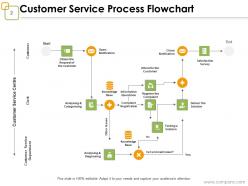
Slide 2: This slide shows Customer Service Process Flowchart. You can make the use of this process for you business needs.
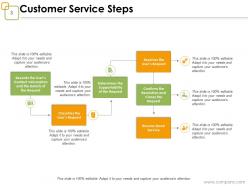
Slide 3: This slide presents Customer Service Steps with this flowchart- Resolves the User’s Request, Confirms the Resolution and Closes the Request, Ensures Good Service, Classifies the User’s Request, Records the User’s Contact Information and the Details of the Request, Determines the Supportability of the Request.
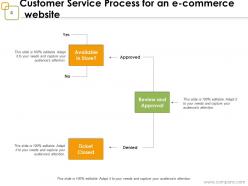
Slide 4: This slide showcases Customer Service Process for an e-commerce website. Use this for your business.
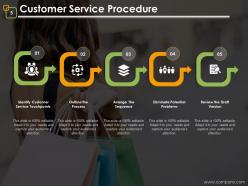
Slide 5: This slide shows Customer Service Procedure with these five points- Identify Customer Service Touchpoints, Outline the Process, Arrange The Sequence, Eliminate Potential Problems, Review the Draft Version.
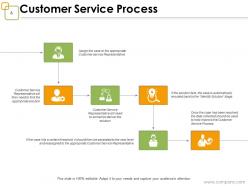
Slide 6: This slide presents Customer Service Process with these points- Customer Service Representative will then need to find the appropriate solution, Customer Service Representative will need to somehow deliver the solution, If the solution fails, the case is automatically rerouted back to the “Identify Solution” stage, If the case hits a certain threshold, it should then be escalated to the next level and reassigned to the appropriate Customer Service Representative, Once the case has been resolved, the data collected should be used to help improve the Customer Service Process Assign the case to the appropriate Customer service Representative.
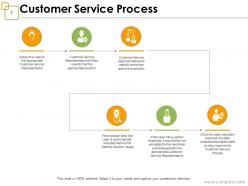
Slide 7: This slide displays Customer Service Process. Use this or edit it as per requirement.
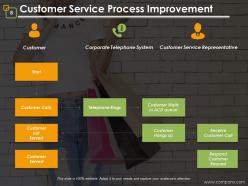
Slide 8: This slide presents Customer Service Process Improvement with these characteristics- Corporate Telephone System, Customer Service Representative, Customer, Telephone Rings, Customer Hangs up, Receive Customer Call, Respond Customer Request, Customer Waits in ACD queue, Customer Calls, Customer not Served, Customer Served, Start.
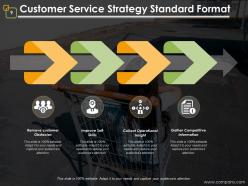
Slide 9: This slide showcases Customer Service Strategy Standard Format with these points - Remove customer Obstacles, Improve Soft Skills, Collect Operational Insight, Gather Competitive Information.
Slide 10: This slide presents Customer Service Process Flow Icon Slide.
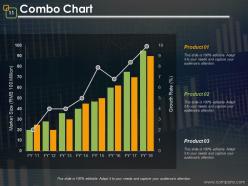
Slide 11: This slide shows Combo Chart. You can compare product with this chart.
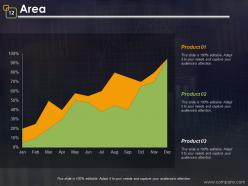
Slide 12: This slide presents Area chart and use it for two product comparison.
Slide 13: This slide is titled Additional Slides.
Slide 14: This slide represents Our Mission. State your mission, goals etc.
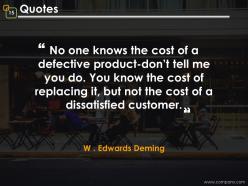
Slide 15: This is a Quotes slide to convey message, beliefs etc.
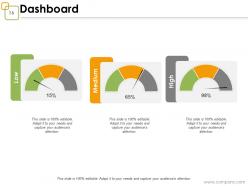
Slide 16: This is a Dashboard slide to show- Strategic System, Success, Goal Process, Sales Review, Communication Study.
Slide 17: This slide shows Target image with text boxes.
Slide 18: This is a Thank You image slide with Address, Email and Contact number.
Customer relationship management process flow powerpoint presentation slides with all 18 slides:
Conquer constraints with our Customer Relationship Management Process Flow Powerpoint Presentation Slides. Gain control over all difficulties.
FAQs for Customer relationship management process flow
You'll want contact management and pipeline tracking for sure. Marketing automation is huge too - saves so much time. Don't forget customer service tools and reporting dashboards, because honestly, how else will you know if your strategy is actually working? Integration is non-negotiable though. Trust me, manually copying data between systems gets old fast. Analytics and mobile access are must-haves since your team's never at their desk anyway. My advice? Map out how you currently handle customers first. Then find a CRM that fits those needs instead of getting distracted by all the bells and whistles.
Ok so here's the thing - CRM tools basically let you see everything about each customer in one spot. Purchase history, support stuff, what they like, all of it. Makes personalizing way easier since you can actually anticipate what they need. The automation part is clutch too - you can set up follow-ups after people buy without having to remember everything manually. Honestly, I'd start there first with the automated purchase follow-ups. You'll catch problems before customers bail and your retention will go up. Once you get the hang of it, you can do more targeted campaigns and timing becomes less of a guessing game.
Look, there are five main things you gotta track to know if your CRM's actually worth it. Customer acquisition cost versus lifetime value - that's your bread and butter for ROI. Retention and churn rates tell the real story about loyalty. Sales cycle length shows if deals are moving quicker (or getting stuck somewhere annoying). Don't forget customer satisfaction scores either. Here's the thing though - if your sales team isn't even using the CRM properly, all your data's gonna be useless anyway. Start tracking these and you'll spot problems fast.
So basically, your CRM can split up customers by what they've bought before and how they act on your site. Way better than sending the same boring email to literally everyone. Like, you could push winter coats to people in Minnesota while showing your big spenders the fancy stuff. Track which messages actually work for each group - trust me, the data tells a story. I'd start simple with maybe 3 segments and test personalized campaigns against whatever generic thing you're doing now. You'll probably be shocked at how much better people respond.
Dude, the patterns you can find in customer data are insane. Like, you'll start seeing who's about to bail on you before they even know it themselves. Pick something simple first - maybe customer lifetime value - and just run with that. I got distracted doing this with purchase timing once and realized people buy way more stuff on Thursdays for some reason. Anyway, you can figure out which customers are actually worth your time and energy. Plus you'll nail the timing on when to reach out. Honestly, most companies are sitting on goldmines of data they're not even using.
Just grab HubSpot or Zoho's free version to start. Both handle contacts and basic automation without any upfront costs. I swear, so many small businesses get caught up in shiny features they'll never touch and waste money. Get your customer data sorted first - that's the real foundation. Then slowly connect it to your email and calendar stuff. You can upgrade once you're actually making money from it. Oh, and whatever you pick? Actually use it consistently. A basic CRM your team checks daily beats some expensive system that sits there doing nothing.
Honestly, user adoption is your biggest headache - way worse than any technical stuff. People hate changing how they work, especially if they're married to their Excel sheets. Data migration from multiple sources? Total mess. Integrations always take forever too, like double whatever timeline you're thinking. Oh and training takes way longer than anyone expects. Start small though - find the people who actually want to use it first. Let them sell it to everyone else instead of forcing a company-wide rollout. Trust me on this one.
So CRM automation just takes care of all that boring repetitive stuff for you. Follow-up emails get sent automatically, leads go to the right people, contact info updates itself - you know the drill. Honestly saves so much time it's ridiculous. My old team used to spend hours on data entry every week. Now that happens in the background while you focus on actually talking to customers and bigger picture stuff. I'd say start with whatever your team does most often - like if you're always manually sending the same email, automate that first and see how it goes.
Oh man, CRM integration is actually pretty sweet these days. Most systems connect with your email, marketing tools, accounting stuff, e-commerce platforms - basically whatever you're already using. APIs handle most of it automatically, which is nice because switching between apps all day is the worst. You'll see everything in one spot - purchase history, email chains, support tickets, the whole deal. Honestly though, I'd figure out what apps your team actually uses first (not just what they're supposed to use, lol) then check if your CRM plays nice with them.
Honestly, AI automation is the big one to watch right now. It's getting crazy good at handling basic customer stuff and catching sales leads your team might miss. Voice features and mobile optimization are everywhere too since we're all on our phones 24/7 anyway. Predictive analytics is another game-changer - tells you what customers want before they even know it. Plus everything connects now. Your CRM talks to literally every other tool you use. I'd mess around with AI features in whatever platform you're using because customers expect that instant, personalized experience everywhere they go.
Set up triggers in your CRM to automatically send surveys after purchases or support tickets. All that feedback data gets saved to customer profiles, which is honestly pretty handy for spotting trends. Here's the key part though - don't just collect it and forget about it. Create alerts for low scores so your team can jump on issues fast, like within 24 hours. I'd also track who actually responded to surveys. That way you can personally follow up with anyone who had problems. It's way more effective than just hoping angry customers will come back on their own.
Dude, social media basically flipped CRM on its head. Customers expect you to respond in like 2 hours max now - gone are the days of waiting around. They're talking about your brand constantly whether you're listening or not (which is honestly pretty wild if you think about it). The upside? You can get instant feedback and actually build relationships through Twitter, Facebook, all that stuff. But here's the thing - you've gotta connect everything to your main CRM or you'll lose your mind switching between platforms. Set up some social listening tools first, then automate what you can.
Honestly, mobile CRM is a total game-changer. Your sales people can update stuff right after meetings instead of forgetting half the details later. They'll check contacts while traveling, close deals from random coffee shops - it's pretty crazy how normal that's become. Field teams love having customer history right there on-site. Real-time sync means nobody's working with old info anymore. Get your team actually using the mobile app consistently and you'll see the difference immediately. Oh, and managers can finally check pipeline stuff without being stuck at their desk all day.
Definitely do hands-on training - way better than PowerPoint death. Split people by what they actually need to know, like sales vs customer service features. Honestly, cramming everything into one giant session is brutal and nobody retains it. Short focused sessions work better, spread over a few weeks. Oh and pick your tech-savvy people early to be helpers later - that's huge. The main thing is letting people mess around with real data before you throw them into the deep end. Practice time makes all the difference.
Look, instead of blasting everyone with the same pitch, figure out your different customer types first. I usually tell people to start with 3-4 main groups - maybe by company size, buying patterns, whatever makes sense. Then create separate playbooks for each. Your enterprise folks need completely different conversations than startups, obviously. The messaging hits way better when it actually speaks to their specific problems. Plus your team can focus on the high-value segments instead of wasting time on long shots. Honestly, it's one of those things that seems obvious once you start doing it, but most people just... don't.
-
Helping hand