


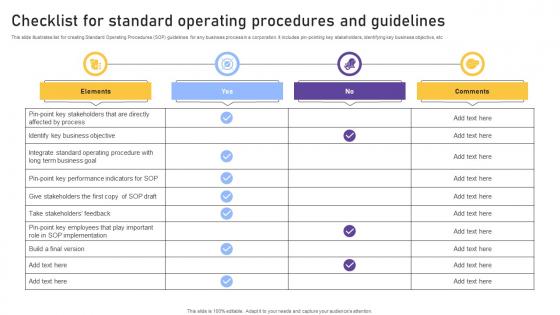
Checklist For Standard Operating Procedures And Guidelines




Try Before you Buy Download Free Sample Product
 Impress Your
 Audience
 100%
100% Editable
 Save Hours
 of Time


This slide illustrates list for creating Standard Operating Procedures SOP guidelines for any business process in a corporation. It includes pin-pointing key stakeholders, identifying key business objective, etc
People who downloaded this PowerPoint presentation also viewed the following :
Checklist For Standard Operating Procedures And Guidelines with all 6 slides:
Use our Checklist For Standard Operating Procedures And Guidelines to effectively help you save your valuable time. They are readymade to fit into any presentation structure.





FAQs for Checklist For Standard Operating
So for your SOP checklist, start with step-by-step procedures that are super detailed - like, someone's-first-day-on-the-job detailed. Include who does what, what tools they'll need, and safety stuff. Approval signatures and revision dates are boring but necessary. Quality checkpoints throughout will save your butt later, trust me. Don't forget contact info for when people inevitably have questions. Reference any related forms or procedures too. Keep a master list somewhere - I learned this the hard way when we lost track of half our SOPs last year.
Honestly, a good SOP checklist is a game-changer because it takes all the guesswork out of processes. Your team gets a clear roadmap for everything. New hires train way faster since they're not bugging everyone with questions every five minutes. Even your veterans won't skip steps or wing it anymore. Think of it as catching mistakes before they cost you money - which has saved my butt more times than I can count. You can also track where things get stuck in your workflow. My advice? Start with whatever process gives you the biggest headaches first.
Dude, training is everything when it comes to SOPs. Like, you could write the world's best checklist but if nobody knows how to use it properly, what's the point? People need to understand the why behind each step, not just blindly follow instructions. Plus when stuff goes sideways (which it will), they'll know how to think on their feet. I've seen too many companies just do boring slideshow sessions. That doesn't work. You want hands-on practice where people actually mess around with the real processes. That's how they'll remember it and actually feel confident using your system.
Honestly, just bake compliance checks into your regular SOP updates - quarterly works for most stuff. Someone's gotta actually read the new regs when they drop (not the fun job, but whatever). Set up alerts so you don't miss anything. Then just cross-check against your current checklists and mark what needs fixing. Way better to stay on top of it than panic when auditors show up. Oh, and keep a log of which regs tie to which checklist items - you'll thank yourself later when everything changes again.
Don't go overboard with details - nobody needs to know every mouse click. Get your team involved from the start, honestly this is where most places mess up. They'll just create some checklist in a conference room without asking people who actually do the work. Keep it simple at first. Also, you can't just make it once and forget about it (learned that the hard way at my last job). Things change constantly, so maybe check it every few months? Your checklist becomes totally useless if it doesn't match reality.
Honestly, ditch the paper checklists - they're such a pain. Digital apps like Monday or Asana let you track who's actually doing what in real-time. You can set up automatic reminders and even make people upload photos for certain steps. The visibility thing is huge - you'll be shocked at how many people skip stuff when they think no one's watching. Google Forms works too if you want something super simple. I'd probably start with just one important checklist and see how your team handles it before going crazy with the whole system.
Start with quarterly reviews, but honestly? The real magic happens when you're actually using the thing and spot problems in real-time. Your team will catch outdated steps way faster than any formal schedule - just ask them what's annoying or confusing. Track which parts people always skip or mess up, then figure out why. Date your versions and keep a simple change log so nobody's working off old info. Oh, and if something's obviously broken, don't wait around for the next review cycle. Fix it now and jot down what you changed.
Think of SOP checklists like having a backup brain for your team. They stop people from forgetting crucial steps, which cuts down on expensive screwups and keeps you compliant. Your processes become way more predictable when everyone's doing things the same way. Plus, you can spot problems before they actually blow up. Honestly, the documentation aspect is huge too - if something goes wrong, you've got proof you followed protocol. Oh, and start with whatever processes scare you the most. Those are usually where checklists make the biggest difference.
Get your frontline people involved right away - they actually know where stuff breaks down. Run some working sessions where everyone walks through what they're currently doing vs what's missing. Honestly, people will actually use checklists if they help build them instead of getting them dumped on their desk. Test your drafts with a few team members first. You'll be shocked at what they catch that you'd never think of. Their feedback is gold - way better than trying to figure it out from your office. Makes the whole rollout smoother too.
Honestly, start simple with just 2-3 things that actually matter for your process. Completion rates are obvious - are people even finishing the damn thing? Then compare error rates before vs after you rolled it out. Time tracking helps too, see if tasks are faster now. Oh, and compliance scores if you're dealing with regulations (auditors eat that stuff up). User feedback is critical though - people will absolutely find ways around checklists they hate using. I learned that one the hard way at my last job. You can always add more metrics later once you've got the basics down.
Start with your base SOP template, then tweak it for each department's stuff. Finance needs those approval steps and audit trails, obviously. Operations cares more about safety protocols and equipment checks. Honestly, I always grab coffee with department heads first to figure out their actual pain points - saves so much headache later. Customize your checklist fields after that, decide what's required vs optional, assign the right people. Oh, and definitely test with a small pilot group before you roll it out everywhere. Trust me on this one - you'll catch gaps you never saw coming. Way better than dealing with confused teams later.
Manufacturing SOPs are way more rigid - like, crazy detailed about safety checks and equipment procedures because someone could literally get hurt. Service industry ones focus more on customer interactions and keeping people happy. You'll see tons of "check this gauge" and "inspect for defects" in manufacturing, but service checklists are all about response times and communication stuff. Honestly, manufacturing ones are longer and way more technical since machines don't forgive mistakes like people do. Service SOPs have wiggle room for different situations. Manufacturing = compliance docs, service = relationship stuff.
Honestly, you gotta connect SOPs to stuff your team actually cares about - their daily headaches and wins. Show real examples of how checklists stop those annoying mistakes that make everyone's life hell, like missed deadlines or having to redo work. Teams buy in way more when you pitch it as "this saves you time" instead of some boring company rule. Quick demos work great so people see it in action. Get your early adopters talking about their wins - that peer pressure is gold. I learned this the hard way at my last job. Focus on how it cuts their stress, not adds more busy work to their plate.
Honestly, Process Street and Nintex are your best bet if you want something built specifically for SOPs - they handle version control without being a pain. But if you're just starting out? Google Docs or Notion work fine. I'm obsessed with Notion lately, probably use it way too much lol. Monday.com and Asana are solid too, especially if your team's already using other project management stuff. Here's the thing though - doesn't matter how fancy the tool is if nobody actually uses it. I'd start with whatever feels familiar to your team, then move up if you need more bells and whistles.
Get feedback from whoever actually uses the checklist - they're the ones who know what sucks about it. Document their suggestions with reasons, then run it by your team lead before making changes. Trust me, random edits without approval always mess things up somehow. Update your master version once it's approved and tell everyone what changed. Archive the old one with dates so you can track versions. Oh, and set regular review meetings instead of doing this stuff constantly - way less stressful that way.
-
SlideTeam is the way to go when you are in a time crunch. Their templates have saved me many times in the past three months.
-
SlideTeam, Please don’t stop sharing discount coupons! I love your occasional discounts and tend to buy your products around that corner.