

Cloud Migration Framework Powerpoint Ppt Template Bundles




Try Before you Buy Download Free Sample Product
 Impress Your
 Audience
 100%
100% Editable
 Save Hours
 of Time


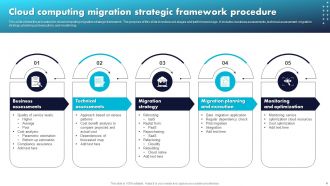
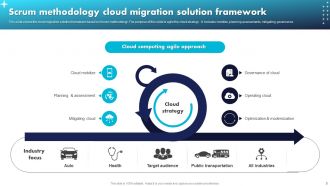
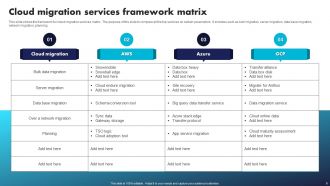
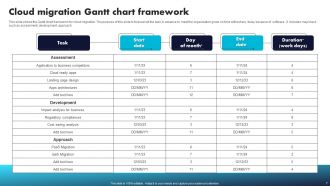
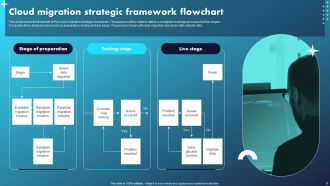
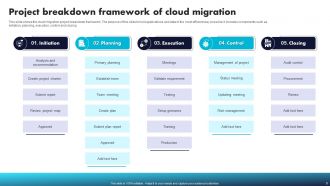
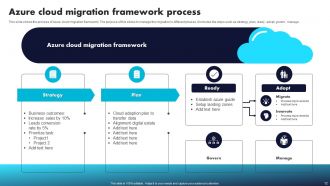
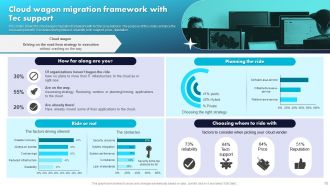
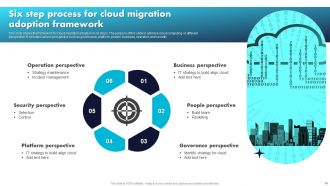
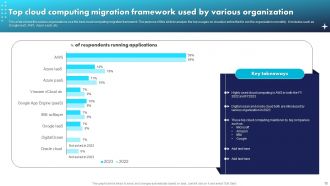
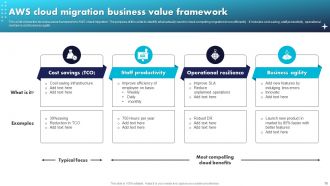
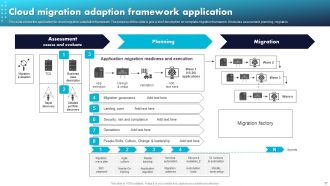
Introducing our comprehensive Cloud Migration Framework PowerPoint presentation, designed to streamline and optimize your migration journey to the cloud. This all inclusive deck encompasses key aspects such as the Cloud Migration Assessment Framework, Google Cloud Migration Framework, Microsoft Cloud Migration Framework, Cloud Migration Framework Azure, and AWS Cloud Adoption Journey Phases. The presentation offers valuable insights into each framework, guiding you through the process of assessing your organizations readiness for migration, selecting the most suitable cloud provider, and outlining a step by step plan for a successful migration. Whether you are a small business or an enterprise, this PowerPoint equips you with the knowledge and strategies to make informed decisions, minimize risks, and ensure a seamless transition to the cloud. Embrace the power of the cloud with our Cloud Migration Framework presentation today.
People who downloaded this PowerPoint presentation also viewed the following :
Cloud Migration Framework Powerpoint Ppt Template Bundles with all 27 slides:
Use our Cloud Migration Framework Powerpoint Ppt Template Bundles to effectively help you save your valuable time. They are readymade to fit into any presentation structure.







FAQs for Cloud Migration Framework Powerpoint
Start with a thorough audit of what you've got now - apps, infrastructure, the whole mess. Planning's gonna take forever (seriously, budget way more time than you think), but map out your timeline and risks upfront. Don't try migrating everything at once - do it in waves or you'll hate your life. Once you're moved over, keep tweaking for better performance and costs. Oh, and get your leadership on board early because they can totally derail things if they're not bought in. The optimization part never really ends, just so you know.
Okay so first thing - check out your tech setup and see what systems you're actually working with. Some of those old legacy apps are gonna be absolute hell to move over, trust me. Your team's cloud skills matter too, plus how good they are at handling change. Don't forget the security stuff and compliance requirements. Budget-wise, you need solid cost management processes in place. Here's the thing though - most companies think they're way more ready than they really are. Grab a proper assessment framework to score everything objectively. That'll show you the real gaps you need to fix first.
Start with your low-hanging fruit - apps that won't break everything if something goes wrong but still give you solid business value. Look for stuff that's already documented well and doesn't have a million dependencies tangled up with other systems. I'd definitely hit the standalone ones first since they're way less scary to move. Mission-critical legacy stuff? Yeah, save that nightmare for later once you've gotten some wins under your belt. Honestly, I always forget about compliance requirements until the last minute, but factor those in early. Create some basic scoring system and try 2-3 pilots first - you'll learn a ton from those initial migrations.
Honestly, you'll save yourself a massive headache if you build compliance right into your migration plan from day one. Map out whatever regulations hit your industry first - GDPR, HIPAA, all that fun stuff. Then match those to actual cloud controls before picking services. Include data classification and security assessments as you go. Trust me, retrofitting compliance later is a nightmare I wouldn't wish on anyone. The documentation trail you build becomes gold when auditors come knocking. Oh, and don't even think about migration planning until you've listed your specific requirements. That's step zero.
Dude, you absolutely have to nail down the cost analysis first. Map out what you're spending now, then estimate cloud costs - don't forget the sneaky stuff like data transfer fees. Migration effort costs too, obviously. I swear, half the teams I know got totally blindsided by ongoing operational expenses because they rushed this part. Build out detailed cost models for different scenarios. That way you can pick the cheapest route and actually set a realistic budget instead of just winging it and hoping for the best.
Honestly, encryption is your best friend here - both while moving data and storing it. Don't mess around with access controls either; lock down who can touch what during the migration. Real-time monitoring is clutch so you can see everything happening as it moves. Skip the public internet if you can and use VPN tunnels instead (way more secure). Oh, and keep logs of everything - I mean everything. Who accessed what, when they did it, all that stuff. Really depends on what kind of data you're dealing with though. Start with a security checklist based on your specific requirements and you'll be golden.
Honestly, data transfer speeds will kill you first - moving everything takes forever. Then your costs blow up because nobody calculated bandwidth right. Legacy apps? Good luck getting those ancient systems to play nice with modern cloud stuff. Security compliance becomes this whole nightmare, especially in finance or healthcare. Finding devs who actually get cloud architecture is brutal these days - everyone claims they know it but most don't. Your team will hate the new workflows too. Just do a small test run first, trust me. Figure out what breaks before you migrate everything.
Honestly, automation will save your sanity during migration. Discovery tools are clutch - they'll map out your whole infrastructure automatically instead of you doing it by hand for weeks. Use something like Terraform for spinning up cloud resources consistently. Database migration tools are pretty solid too, they handle most of the tedious stuff. Oh and definitely set up automated testing pipelines so you know everything actually works after you move it. My advice? Pick maybe 2-3 things to automate first rather than going crazy trying to do everything at once. You'll burn out otherwise.
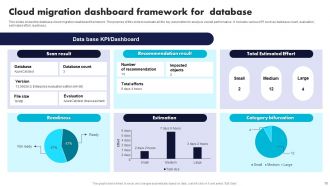
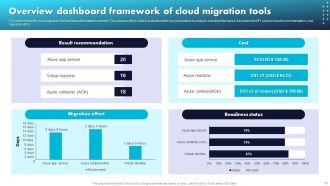
Focus on the basics first - response times, uptime, and how users actually feel about the new system. Monthly cloud costs are huge too because nobody wants a nasty billing surprise (been there). Security incidents matter obviously, plus backup success rates and whether you're burning money on resources you don't need. Honestly, dashboards are your friend here - get them set up in the first month or you'll be scrambling later. User experience scores will tell you pretty quickly if the migration was worth it or if you've just traded old problems for new ones.
So multi-cloud is basically just another decision you gotta make in your migration planning - except now you're spreading stuff across different providers instead of picking one. Makes things way more complicated upfront, not gonna lie. You'll be juggling data residency rules, trying not to get locked into one vendor, figuring out redundancy needs. But honestly? Worth it for risk management if you do it right. Your framework needs provider-specific criteria and you gotta plan how everything talks to each other between clouds. I'd start by figuring out which workloads actually make sense to split up versus keeping together.
Ok so first thing - get monitoring set up ASAP. Dashboards for performance, costs, all that stuff. Right-sizing your instances is huge (seriously, I've watched teams cut 30% off their bill just doing this regularly). Auto-scaling policies are a must too. Storage tiers need tweaking based on how you're actually using things, not how you thought you would. Oh and networking costs can bite you - check those data transfer fees. CDNs might help depending on your setup. Honestly just start with monitoring everything, then go after whatever's costing you the most.
So cloud migration frameworks are honestly game-changers for keeping your business running. Your systems get automatic failover and data gets copied across different regions - way better than most on-premise stuff. Recovery times shrink big time since you can spin up new resources instantly instead of waiting around for hardware. The cloud providers deal with most infrastructure nightmares (thank god). Just make sure you map out your critical systems during planning and build in redundancy from the start. Trust me, it's worth the upfront work.
Definitely get your team trained on whichever cloud platform you're picking - AWS, Azure, whatever. Security and compliance basics are huge too. Here's the thing though: don't try learning every single service they offer. That's honestly just overwhelming and you'll never use half of it anyway. Stick to what you actually need. Migration strategies, cost management, monitoring tools - all critical stuff. Oh, and change management training! People hate when their workflows get messed with. Start with the free cert programs from your cloud provider. Maybe bring in some external trainers for intensive sessions if budget allows. Just make sure everyone gets sandbox time to actually mess around with things.
Honestly, just pick your cloud provider first and design everything around that. AWS migration tools are completely different from Azure or GCP - like, not even close. So your whole game plan changes depending where you're going. Each one has their own quirky "best practices" too. Netflix probably doesn't care, but for us regular folks, you've gotta match their specific networking stuff and security requirements from day one. Way easier than trying to build some universal framework that kinda works everywhere but excels nowhere. Trust me on this one.
Honestly, blue-green deployment is your best bet - run both systems at once, then flip the switch once you've tested everything. Set up database replication so your data syncs in real-time. That part's crucial. Do it during off-peak hours obviously, and get your load balancers configured to route traffic smoothly. I learned this the hard way, but always have a rollback plan because something will inevitably go sideways. Test the whole process in staging first to catch any weirdness. Oh, and don't rush the cutover - better to take an extra hour than deal with angry users.
-
Excellent template with unique design.
-
Thank you for showering me with discounts every time I was reluctant to make the purchase.