

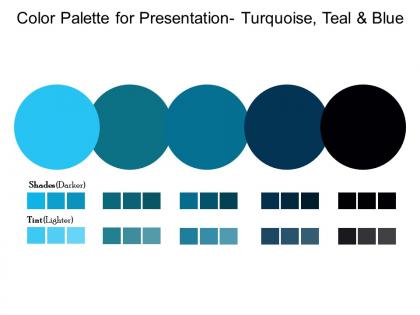
Color palette for presentation turquoise teal and blue




Try Before you Buy Download Free Sample Product
 Impress Your
 Audience
 100%
100% Editable
 Save Hours
 of Time


Ensure folks are correctly informed with our Color Palette For Presentation Turquoise Teal And Blue. Enable them to build an authentic impression.
People who downloaded this PowerPoint presentation also viewed the following :
Color palette for presentation turquoise teal and blue with all 2 slides:
Increase your credibility with our Color Palette For Presentation Turquoise Teal And Blue. Insist on highlighting facts.
FAQs for Color palette for presentation turquoise
Honestly, start with who's gonna see this - corporate folks or can you be more fun with it? Make sure there's enough contrast so people can actually read it (vision stuff matters). Oh and projectors are the WORST for washing out colors - I've been burned by that before. Stick to like 2-3 colors tops or it'll look chaotic. Test it on the real screen if you can because what looks good on your laptop might be terrible projected. Trust me on that one.
Yeah, colors totally matter more than people think! Blues make you look trustworthy and professional. Red grabs attention but can stress people out - I bombed a presentation once using way too much red and everyone looked uncomfortable lol. Green's pretty safe, feels balanced. You want good contrast so people can actually read your slides. Short sentences work better than cramming everything together. Match the vibe to your content though - calming blues for boring data stuff, maybe orange if you're trying to pump people up. It's weird how much difference it makes.
Honestly, just go with high contrast - dark blue on white or white on dark navy works great. Black on white is the classic choice but it's kinda harsh if people are staring at your slides forever. Dark gray on cream is way easier on the eyes. Skip red and green together since colorblind people can't tell them apart. Blue and orange are solid if you want something that pops. My rule? Keep it simple - one dark for text, one light background, maybe throw in an accent color. Oh and definitely check your slides from the back of the room beforehand!
Oh totally, colors mean completely different things depending on where people are from. Like red screams "danger" to most Americans but it's actually super lucky in China. White's another weird one - we think weddings, they think funerals in some Asian cultures. Blue's pretty much your safe bet everywhere (thank god), but even green can be tricky since some cultures see it as "newbie" instead of "nature." Honestly? If you know your audience, just look up their color associations beforehand. Mixed crowd though, I'd stick with blues and grays, maybe throw in white. Boring but won't accidentally offend anyone's grandma.
Okay so contrast is basically what makes people actually able to read your slides. Think gray text on white background - nobody can see that mess, especially people in the back or on video calls. You want strong contrast between your text and background colors. Low vision people really depend on this too. I learned this the hard way after making slides that looked fine on my laptop but were completely invisible on the projector. Quick test: can you read it on your phone outside? If not, change those colors.
Grab your brand colors from your style guide and use those as your base. Your slides should scream "this is ours" the second people see them. I'd stick to maybe 3-4 colors tops - any more and it looks like a kid went crazy with crayons. Put your brand colors on headers and important stuff, then use grays or white for backgrounds and regular text. Oh, and definitely save your exact color codes somewhere so you're not playing the "does this blue match?" guessing game every time you make a deck.
Dude, Adobe Color and Coolors.io will literally save your life here. Coolors is weirdly addictive though - fair warning. You can auto-generate palettes or build your own from scratch. Canva's got a decent one too if you're already using their stuff. Pro tip: upload your company logo to pull colors directly from it. Keeps everything looking cohesive without the guesswork. Stick to maybe 3-4 colors tops for presentations. More than that and it starts looking like a rainbow threw up on your slides.
Stick to 2-3 colors tops. Pick one as your "pop" color for the really important stuff - maybe red for urgent things or blue for key points. Your body text should stay neutral (black or dark gray) so the colored bits actually stand out. I made this mistake once and created slides that looked like a craft store threw up everywhere. Total disaster. Oh, and test your colors on whatever projector you're using because those things are notorious for making everything look wonky. Consistency's gonna make you look way more professional than going crazy with every color in existence.
Don't go crazy with colors - 3 or 4 tops. I learned this the hard way after creating what looked like a rainbow threw up on my slides lol. Make sure there's enough contrast so people can actually read your text. Light yellow on white? Nope. Also, those neon combos that look "cool" on your laptop screen will probably look terrible when projected. Oh and about 8% of guys are colorblind, so test different color combinations beforehand. Pastels seem safe but they disappear under most projectors. Always check your slides on a different screen first - you'll thank me later.
So there's basically three ways to do this - complementary colors are opposite each other on the color wheel and give you high contrast. Analogous ones sit next to each other and look way more chill. Then triadic colors are evenly spaced apart if you want something bold. I'd probably go with analogous though, it's just easier on people's eyes during presentations. Pick one main color then use the others as accent colors. Oh and Adobe Color is actually pretty useful for this - you can just mess around with their color wheel tool until something looks right.
Ugh, learned this one the hard way using hot pink in a budget meeting once - total disaster! Corporate presentations need boring colors honestly. Navy, charcoal, muted blues work best since they scream "trust me with your money." Creative stuff though? Go wild with bright oranges, purples, even neon if you're feeling it. The audience basically decides everything - suits expect conservative palettes while creative types actually want to see you take risks. Oh and definitely test your colors on whatever screen you're using first. Colors look totally different on those ancient office projectors.
Ugh, lighting is such a pain for presentations! Blues turn all muddy under warm lights, and those awful fluorescents wash out reds completely. I learned this the hard way my first time presenting - my slides looked terrible. Try to get into the actual room beforehand if you can swing it, or at least test your colors under different lighting on your laptop. Conference rooms are the worst for this honestly. If you can't check ahead of time, just go with really high contrast colors and don't get fancy with subtle differences that'll disappear anyway.
Honestly, everyone's going crazy for those earthy, muted colors right now - sage greens, terracottas, dusty blues. Way better than those awful corporate blues we've been drowning in. Monochromatic stuff is huge too, where you just pick different shades of one color. Makes designing so much easier, trust me. High contrast combos are everywhere, partly for accessibility but also they just look clean. Oh, and definitely think about dark mode since we're all staring at screens constantly now. I'd stick to 2-3 colors max and test them on both light and dark backgrounds first.
Honestly, just think about who's gonna be staring at your slides. Executives? Go with blues, grays, whites - boring but they eat that professional stuff up. Creative teams are way more fun to present to since you can throw in some vibrant oranges or teals without anyone clutching their pearls. Tech people want clean, high-contrast colors that won't strain their eyes. Finance and healthcare crowds stick to conservative - they're not there for a color show anyway. Do a quick check on their company culture beforehand if you can. When you're unsure, play it safe and let your actual content do the talking.
Make sure your text has good contrast - shoot for 4.5:1 ratio against the background. Here's the thing: don't rely just on color for important info since like 8% of guys can't see certain colors (wild how common it is). Pair colors with icons or text labels instead. Red-green combos are terrible for this. I always use WebAIM's contrast checker - saves me from looking like an idiot later. Oh, and definitely run everything through a colorblind simulator first. Trust me on this one.
-
Perfect template with attractive color combination.
-
Innovative and attractive designs.