


Communication strategy template powerpoint images




Try Before you Buy Download Free Sample Product
 Impress Your
 Audience
 100%
100% Editable
 Save Hours
 of Time


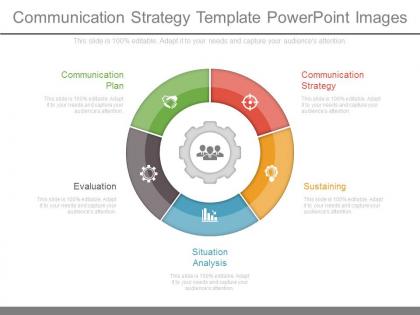
Looking for a communication plan to convey ideas, goals and other related features? We share with you Communication Strategy Template PowerPoint Images, pre designed slide to help in evaluation, situation analysis, sustaining, communicating strategy and communication plan feature icons. The presentation visual supports features of good communication strategy like objectives, audience, message, tools and activities, timelines, available resources, assessment and modification. The PPT diagram is best suited for strategic communication plan development, to design and organize ideas with the objectives. The PowerPoint presentation features to enter text for identifying stakeholders, design a plan with supplementary strategies supporting it. The priorities can be set and resource use can be planned accordingly for attaining an actionable communication strategy. The additional advantage of PPT design is that one can easily and regularly re-access the plan while taking in loop the resources available or supporting budget. The PowerPoint slide can be used as a platform to set barometers for tracking process and evaluating the services. Strike a pose with our Communication Strategy Template Powerpoint Images. Get perceived as a man of confidence.
People who downloaded this PowerPoint presentation also viewed the following :
Communication strategy template powerpoint images with all 7 slides:
Our Communication Strategy Template Powerpoint Images are designed for heavy duty. No assignment is a burden for them.
FAQs for Communication strategy
So you'll want to nail down your objectives first - what are you actually trying to do here? Then figure out who you're talking to (like actual personas, not just "customers"). Each group needs different messaging, obviously. Pick your channels, set a timeline with real deadlines, and definitely assign who's doing what - I've seen too many projects die because nobody knew whose job it was. Oh, and build in ways to measure if it's working. Budget stuff and risk planning too, but honestly? Start simple. Make a basic one-page version first, then beef up whatever sections you actually need. Templates are pretty useless if they're too complicated to follow.
Break down your template by age, job level, and how people like to get info. Younger folks usually want quick videos, but executives? They're all about those detailed write-ups. The generational gap is honestly wild when you look at the actual numbers. Mix up your tone and channels for each group. Go formal with senior people, keep it chill with frontline teams. Test different stuff and just ask what people prefer - sounds obvious but most companies skip that step entirely.
So your brand voice is basically how your company "talks" to people - like, is it funny and casual or more serious and professional? You gotta nail this down early because it affects literally everything you write. Social posts, emails, even how you handle angry customers (ugh, fun times). I'd pick maybe 3-4 words that describe your vibe - could be "friendly but expert" or whatever fits. Then write some examples so your whole team knows what you mean. Without this stuff documented somewhere, your messaging gets all over the place and people get confused about who you actually are.
Honestly, visuals are a game-changer for communication templates. People scan charts and icons way faster than blocks of text - like 60,000 times faster, which sounds crazy but makes sense when you think about it. I'd throw in flowcharts for your workflows and timelines to show campaign phases. Color coding works great too for different audiences or channels. Just don't go overboard with decoration - your visuals should actually help explain stuff, not just look pretty. Start with whatever sections feel most confusing and figure out what visual format would clear things up.
Oh totally! Slack's been a lifesaver for our team's day-to-day messaging and file sharing. For project stuff, I'd go with Asana or Trello - they're super clean for tracking deadlines and who's doing what. Google Docs is clutch when multiple people need to edit the same content at once (way better than emailing versions back and forth, ugh). Zoom works fine for bigger strategy calls. If you're doing social media, Hootsuite keeps everything organized in one place. Just don't go crazy with too many tools - seriously, pick like 2-3 max that everyone already knows how to use.
Quarterly reviews are the bare minimum, but honestly? Don't wait if something big shifts. New audience, different goals, hot new platform everyone's obsessing over - update it right away. I've watched so many teams cling to ancient templates then act shocked when nobody responds to their messages. Also throw in a deep dive once a year to see what actually moved the needle. Your template needs to stay alive, not rot in some forgotten folder. Oh and set those calendar reminders now or you'll definitely forget.
Track your reach and engagement stuff - open rates, click-throughs, social engagement, website traffic. Survey responses and brand sentiment are super valuable too, way more than follower counts tbh. Most people get obsessed with vanity metrics but those don't tell you if your message actually works. Set up conversion tracking for specific actions you want. Oh and timeline matters - decide when you'll check these numbers. Stick to maybe 3-5 key metrics or you'll drown in data. Quality over quantity with this stuff.
Build feedback loops into every stage, don't just slap them on later. Coffee chats are honestly where you get the real tea - way better than formal surveys sometimes. Set up automatic checkpoints: pulse surveys, stakeholder check-ins, whatever works. The trick is making it scheduled so it actually happens instead of getting forgotten. Someone needs to own analyzing the responses though. And here's the big thing - actually USE what people tell you. Change your approach based on their input, then circle back and show them what shifted. People stop giving feedback when they think you're ignoring it.
Honestly, the worst thing you can do is make it super rigid. You need wiggle room for different teams and situations. I've watched templates turn into these bloated monsters nobody wants to touch - so don't add sections just because they sound good on paper. Keep your messaging guidelines specific too. Vague instructions mean everyone does their own thing anyway. Oh, and please test it first! Pick one project, see what breaks, then fix it. Way better than discovering problems after you've forced it on everyone. Start small and actually listen when people complain about what doesn't work.
Okay so basically turn your messages into mini-stories with a problem-journey-solution flow. Don't just dump features on people - wrap them in scenarios they actually relate to. Honestly, the "before and after" thing is like my secret weapon, works ridiculously well. Throw in real characters, get emotional, use specific details instead of vague concepts. Your template needs spots for the hero (that's them), their struggle, and how you flip their world around. Oh and definitely build a "story bank" - just collect customer examples and case studies you can grab from later. Way more engaging than boring bullet points.
Honestly, having a template ready is a total game-changer when crisis hits. You'll already know who to contact and how, instead of running around like a headless chicken trying to figure out basic stuff. It maps out your stakeholders - employees, customers, media, whoever matters to your situation. The approval process is laid out too, which saves so much time. Plus you can think through different scenarios beforehand rather than making it up as you go. I learned this the hard way at my last job - we had nothing prepared and it was chaos. Keep yours updated and somewhere everyone can actually find it when things go sideways.
Honestly, just bake the cultural stuff right into your template from day one. I'm talking dedicated sections for audience context, regional communication preferences, tone guidelines - the works. Trust me on this one - we had a campaign completely bomb in APAC because we treated culture like an afterthought. Super embarrassing. Make sure you're covering holidays, business customs, visual sensitivities, local regulations. The trick is making these required fields, not optional boxes people skip. Do your homework on how different markets actually communicate first. Then build those insights into your planning framework so nobody can ignore them.
Start by mapping out who does what - like who writes, reviews, and gives final approval. Document your current process first so you can spot the gaps. Set up clear approval workflows and stakeholder review stuff, plus version control so nothing gets lost. The approval stage is honestly where most teams completely fall apart if you don't get it right from the start. Build in a content calendar process and figure out your crisis communication plan. Don't forget feedback loops to track if your messaging actually works. Also nail down your brand voice guidelines and key messaging pillars everyone can reference.
Think of it like giving everyone the same sheet music. Your marketing, sales, and customer success teams won't be playing different songs anymore. Nobody's contradicting each other or confusing customers with mixed messages. The template keeps your tone and key points consistent across departments. Honestly, it's such a time-saver too - teams stop starting from scratch every single time. I'd create one master version that departments can tweak for their specific stuff while keeping the main messaging the same. Way less headache than the current free-for-all situation you've probably got going on.
Check out how Airbnb handled COVID messaging - they made templates that local teams could tweak but kept the brand voice consistent. Smart move. Spotify's Wrapped campaign is genius too, honestly. They basically turned their whole user engagement thing into a repeatable template system. Their social team probably gets so much time back each year because of those frameworks! For your templates, build in spots where people can personalize stuff and make the approval process super clear. Both companies nail that balance between keeping things standardized but not sounding like robots wrote everything.
-
Use of different colors is good. It's simple and attractive.
-
Innovative and attractive designs.