


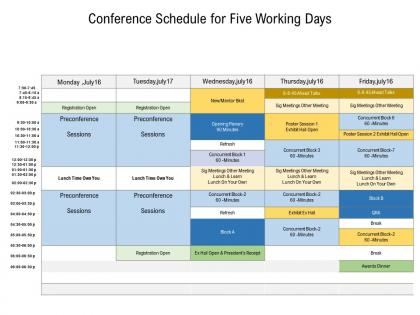
Conference schedule for five working days




Try Before you Buy Download Free Sample Product
 Impress Your
 Audience
 100%
100% Editable
 Save Hours
 of Time


Our Conference Schedule For Five Working Days are explicit and effective. They combine clarity and concise expression.
People who downloaded this PowerPoint presentation also viewed the following :
Conference schedule for five working days with all 2 slides:
Give your audience a fulfilling experience. They will find our Conference Schedule For Five Working Days elevating.
FAQs for Conference schedule for
Start with the basics - session titles, times, locations, speaker names and their credentials. Buffer time is crucial because honestly, everyone always runs late. Room capacity and tech needs for each session matter too. Include meal/break schedules and brief session descriptions. Oh, and add special notes like "bring laptops" when needed. Emergency contacts and venue maps are lifesavers. Color-coding different tracks helps people navigate quickly. The whole thing should be easy to scan - consistent formatting is your friend. Have a couple people review it first to catch anything confusing.
Ditch those PDFs! Interactive apps with QR codes are game-changers for conference schedules. Attendees can build custom agendas and get push notifications for sessions they want to hit. Real-time updates are clutch when things inevitably change last minute. Some events go overboard with AR maps (cool but unnecessary IMO). Digital feedback collection is super useful too - you'll see which talks actually draw crowds. Start with a basic mobile-friendly app that syncs across devices. Trust me, people hate carrying around those paper programs that become useless the second a speaker cancels.
Honestly, just keep it super clean and easy to scan. Bold those session titles and use clear time blocks - nobody wants to squint at messy layouts. Color coding different tracks helps a ton, but don't go crazy with it. Speaker names should be easy to spot, plus add quick session descriptions so people know what they're getting into. Here's the thing though - always pad extra time between sessions because literally everything runs late. I learned that the hard way! Make sure it looks good printed AND on phones since everyone will be constantly checking it.
Ugh, time zones are such a pain for international stuff. You'll never find a perfect slot that works for everyone - someone's always getting the 6am or 10pm meeting. I just pick times that work for wherever most attendees are, even if it means screwing over a few regions. Honestly, rotating the schedule across different events helps spread the misery around lol. Always put the time zone in every email though - people forget that part constantly. Oh and definitely record everything since there's always someone who literally can't make it work with their schedule.
Start with your keynotes and biggest draws - they're gonna dictate everything else. Once those are locked in, build around them. Trust me on this one, I made the mistake of double-booking two huge sessions once and it was a nightmare. Next up, tackle anything that needs weird room setups or special equipment - those workshops are always a pain to move later. Focus on stuff your main audience actually cares about, and here's something people forget: leave breathing room between popular sessions. Nobody wants to sprint to the bathroom or miss networking because sessions are back-to-back. Fill in smaller stuff after.
Honestly, your post-conference surveys are probably sitting there with tons of useful stuff. People get really blunt about timing issues - like when lunch was basically nonexistent or sessions ran back-to-back with zero breathing room. Check which sessions had killer attendance too, since those time slots obviously worked. I'd start tracking this in a basic spreadsheet now (boring but helpful) - note timing complaints, break feedback, format preferences. Don't just look at one event though. Patterns across multiple conferences will actually tell you what consistently bombs versus what people love.
Dude, you really gotta know who's coming before you plan anything. Working parents? Skip those 7am sessions - they're already exhausted. International crowd means thinking about jet lag (learned that one the hard way). Veterans want meaty back-to-back content, but newbies need breathing room and coffee breaks to actually network. Honestly, age is a factor too - younger people can power through marathon days while older attendees prefer a sane pace. Just survey people ahead of time instead of guessing what'll work. Way better than creating some fancy schedule that nobody can actually handle.
Twitter polls are honestly perfect for this - people eat up having a vote on session topics. I'd start teasing your schedule like 6 weeks early to build some real momentum. LinkedIn works well for testing different tracks or time slots too. Instagram Stories are clutch for quick updates when things inevitably change last minute. Get your conference hashtag going early so you can see what's getting people hyped. That helps you figure out what to prioritize. Oh, and don't sleep on letting people vote on speakers - creates way more buzz than just announcing them.
Start by figuring out your must-attend sessions, then build networking time around those. Coffee breaks and lunch are honestly where you'll have the best conversations anyway. Skip like 30% of the presentations - trust me, you'll get way more value focusing on fewer things and actually talking to people. Show up early to the sessions you do go to since everyone's just standing around chatting beforehand. Oh, and definitely hang back after presentations end. Speakers usually love continuing the discussion one-on-one when they're not rushed. Download their app first to see who's going.
Honestly, color coding is a game changer - use different colors for tracks or session types. Icons help too, like little symbols for workshops vs panels. People are literally sprinting between rooms, so anything that saves them from squinting at tiny text is clutch. Speaker photos make it feel less corporate and more like actual humans you might want to meet. Oh, and mix up your font sizes! Big headers, smaller details. Maybe add some kind of timeline or progress bars? I always forget how overwhelming these things look until you're actually there with your coffee trying to figure out where to go next.
Don't cram everything in - seriously, people's brains just shut off after a while. I made that mistake at our first big event and it was painful to watch. Skip the back-to-back sessions thing too. Your keynote speaker right after lunch? Recipe for disaster - everyone's in a food coma. Here's what actually works: spread your heavy tech stuff across different days, build in real breaks (not just 5 minutes), and give yourself buffer time between speakers. Oh, and setup time! Always takes longer than you think. Trust me, attendees would rather have fewer sessions they can actually absorb than be treated like robots.
Ugh, learned this one the hard way when our keynote got stuck in traffic for THREE HOURS. So here's what actually works: build in buffer time between sessions - like, seriously don't pack things tight. Get your tech people ready to update those digital boards instantly. Keep backup speakers on standby because Murphy's Law is real. Your event app better do real-time updates too. Pick specific staff to run around telling people who missed the notifications. Oh, and just be straight with attendees - they'd rather know early than get blindsided. Always have Plan B ready to go!
Honestly, Whova's been a lifesaver for me - the interface actually makes sense and people can spot scheduling conflicts easily. Eventbrite's solid too if you need registration handled. Cvent works but feels a bit clunky sometimes. For smaller stuff (like under 50 people), Google Calendar or Calendly might be enough. Really depends on what you're working with already. I'd say try Whova's free trial first since it plays nice with most tools and won't make you feel like an idiot trying to figure it out. Way better than some of the other platforms I've wrestled with.
Dude, breaks are SO important - honestly maybe more than the actual sessions. Your audience will be totally fried after like 2 hours without them. People need to chat, grab coffee, actually process what they just heard. I've watched conferences try to cram everything together and it's painful to see everyone just zone out. Give them 15-20 minutes between talks, longer for lunch obviously. Oh and your speakers need those resets too - they'll be way better in their next session if they can breathe for a sec.
Oh man, there are some really cool formats you should try! Lightning talks work amazing - just 5 minutes each so people stay engaged. I'm obsessed with reverse keynotes where attendees actually pitch ideas TO the speakers instead. Speed networking is solid too, plus those "fishbowl" discussions where a small group chats while others listen and rotate in. Walking meetings beat sitting every time. "Unconference" blocks are genius - you build the agenda on the spot based on what people want to talk about. Interactive workshops where everyone builds something together are way better than just sitting there listening to someone drone on. Don't go crazy though - test maybe 1-2 new things first.
No Reviews