

Construction Management Powerpoint Presentation Slides





Try Before you Buy Download Free Sample Product
 Impress Your
 Audience
 100%
100% Editable
 Save Hours
 of Time


Our Construction Management Powerpoint Presentation Slides are topically designed to provide an attractive backdrop to any subject. Use them to look like a presentation pro.
People who downloaded this PowerPoint presentation also viewed the following :
Content of this Powerpoint Presentation
Construction accounts for 4.3% of the total US GDP. This industry is among the world’s largest employers. VINCI (France), Actividades de Construcción y Servicios (Spain), and Bechtel (USA) are examples of the leading construction companies.
Infrastructure development, repair, and maintenance are critical to the growth of modern society and advancement. A well-thought-out construction management manual is required to complete building projects on time and on budget. This covers everything from tasks to activities that occur during the construction process.
Need to give an overview of your construction project management? Check out our pre-designed PowerPoint Presentations.
If you need help planning construction projects, check out SlideTeam’s Construction Management PowerPoint Deck. This set is the ideal toolkit for overseeing construction activities, including planning, coordination, control, and supervision, from the end to the finish. Our ready-to-download templates will help in establishing systems and procedures to ensure that construction tasks are finished on schedule.
Click here to view our ready-to-download PPT Template for presenting your company’s management summary.
Template 1: Construction Project Requirements and Deliverables

Are you a construction project manager? Use this PowerPoint Template to explain the project’s requirements and deliverables. This presentation describes the project need of building a residential complex. It also divides the construction process into five phases, ensuring that each deliverable fits the success criteria.
Template 2: Construction Project Scope and Description

This PPT Slide presents an overview of your construction work. Use it to highlight the summary, primary objectives, location, cost, duration, and a brief project description. This is a great tool for ensuring that stakeholders are informed of the project’s needs, goals, deadlines, constraints, etc.
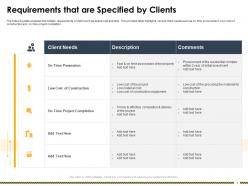
Template 3: Requirements that are Specified by Clients

Clients have a significant impact in the development of the construction project. This PPT Layout proposes specific requirements set by the client. The tabular structure helps in identifying and analyzing clients’ needs, laying the groundwork for a well-defined and effective building project. Use this presentation to discuss construction costs, procurement methods, and the features or equipment that the construction must accommodate.
Template 4: Construction Project Cost Analysis

This PPT Framework aids in breaking down the construction cost of a project. It displays expenses involved with the construction project in the sales price and construction cost breakdowns. This will help you manage and control your costs. Use this download to keep track of project expenditures and improve efficiency.
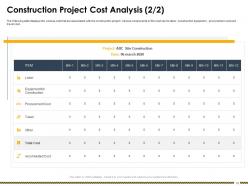
Template 5: Construction Project Cost Analysis 2

Here's another design for a detailed cost analysis of your construction project. This slide provides the comprehensive evaluation of project expenditures such as labor, construction equipment, procurement costs, and so on, to optimize procedures and identify areas for savings.
Template 6: Structural Details of Construction Project

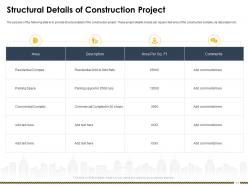
This PPT Preset covers the structural design for the construction project. This helps detail a building’s structure by providing information such as dedicated area, per square foot area, description, etc. Use this presentation to give complete plans and specifications for your building project to all parties.
Template 7: Power and Electricity Requirement for Construction Project

Use this PPT Template to review your new construction project’s power and electrical requirements. This presentation offers a table that displays sources of power, such as geothermal power and solar panels. It is an excellent tool for calculating load requirements and other electrical equipment.
Template 8: Electricity Provider Rate Comparison for Construction Management

This PPT Slide is the ideal tool for comparing multiple electricity providers in an area. This will help you in determining which plan is the most cost-effective depending on your average monthly energy consumption. It allows you to compare the cost per kilowatt hour, rate flexibility, minimum consumption fees, and other factors. Use this template to improve your energy management and cut expenditures.
Template 9: Certificate Checklist for Construction Project

This PowerPoint Presentation outlines certificate requirements for a construction project. This serves as a checklist for evaluating requirements of a project. This will aid in evaluating the quality of a company’s construction work.
Template 10: Construction Permit Application Process

Use this PPT Template to show the application process for a construction permit. This guide will help you through the steps necessary to obtain clearance from the appropriate agencies. It helps track the application.
Managing your day-to-day operations of a construction site.
Construction management is critical to the effective completion of a construction project. Use SlideTeam’s PPT Templates to plan and coordinate a construction project from beginning to end.
P.S. Explore this PPT Template to get a complete visual overview of the construction process from beginning to end.
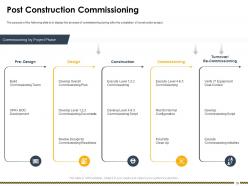
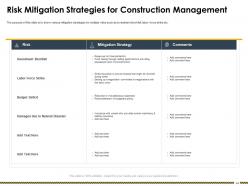
Construction Management Powerpoint Presentation Slides with all 63 slides:
Use our Construction Management Powerpoint Presentation Slides to effectively help you save your valuable time. They are readymade to fit into any presentation structure.



















FAQs for Construction Management
There are three main phases and honestly, they'll make or break your whole project. Pre-construction is where you handle planning, design, permits, budgeting - all that fun stuff. Then execution kicks in with daily ops, quality control, scheduling, coordinating everything. Finally closeout covers inspections, paperwork, and handing it over. Rush the planning phase? You'll absolutely hate yourself during execution. I can't stress this enough - pour your energy into pre-construction. Yeah it feels like you're not "doing" anything yet, but trust me, it saves massive headaches later. Each phase directly hits your timeline, budget, and how good the final result turns out.
Look, good communication tools are game-changers for construction. Your team stays synced up, mistakes drop way down, and decisions happen faster. I've watched projects crash because nobody told the electrician about design changes - it's painful. Apps like Procore or PlanGrid let everyone grab the latest drawings right from their phone. Field crews, architects, subs - they're all looking at the same stuff. The trick is getting one platform that people will actually use (not just download and ignore). Start with your main guys and make sure they're on board first. Once they see how much smoother things run, the rest follows.
Honestly, start with really solid planning upfront - it'll save your butt later. Build buffer time and budget into everything because stuff always goes sideways. Set up regular check-ins to catch problems early before they snowball. Get good insurance coverage and have backup contractors ready to go. Communication is everything - people need to know how to flag issues fast. Oh, and keep a risk list that you actually update weekly (not just create once and forget about it). I learned that one the hard way. Weekly team meetings work great for this stuff.
Dude, BIM is a game changer for construction projects. You get this shared 3D model that your whole team can actually work from - architects, engineers, contractors, everyone. No more dealing with stacks of 2D drawings that are probably outdated anyway. The cool thing is you can catch clashes between systems way before they turn into expensive headaches on-site. Real-time updates mean fewer nasty surprises during construction. Plus coordinating with subs becomes so much smoother. My advice? Try it on one project first and you'll see what I mean.
Dude, you really can't skip this part. Accurate cost estimates are what separate successful projects from total disasters. I've seen contractors get halfway through jobs and realize they're short like $150k - absolute nightmare. Start with detailed estimates upfront, even though it's boring as hell. They help you set realistic budgets, get proper funding, and actually evaluate subcontractor bids properly. Plus when changes inevitably come up (and they will), you can make smart decisions instead of just guessing. Trust me, spending extra time on estimates now saves you from major headaches later.
Three things you gotta nail: documentation, training, and inspections. OSHA changes rules constantly - it's honestly annoying but whatever. Do daily safety briefings and write down literally everything that happens. Small violations turn into massive headaches later, trust me on this one. For bigger jobs, get dedicated safety officers. Random spot checks work way better than scheduled ones too. Oh, and keep everyone's certifications updated or you're screwed. Don't just think about safety when inspectors roll up - make it part of what you do every single day.
Honestly, most headaches come from not being clear enough at the start. Do your homework on subs before hiring - check references, all that. Then get everything in writing: what they're doing, when it's due, payment schedule, the works. Here's what I learned the hard way: don't just assume things are going smoothly. Weekly check-ins and random site visits save your butt. Seriously, I've watched so many jobs implode because the GC was basically MIA until disaster struck. Oh, and pay them when you said you would. Makes a huge difference in how much they actually care about your timeline.
Honestly, start with just one thing or you'll go crazy trying to change everything. Materials are usually the easiest - grab local stuff or recycled options when you can swing it budget-wise. The waste thing is huge though, like you wouldn't believe how much crap gets thrown out on a typical job. Set up sorting bins and find a good recycling partner early. Energy's trickier but worth it - efficient equipment obviously, maybe some solar for temporary power if that's realistic. Oh and definitely track your numbers as you go. Otherwise you're just guessing if any of this actually matters.
Track four main things to keep your project from going sideways. Check schedule progress weekly - where you're at vs where you should be. Watch your spending against budget religiously (cost overruns are the worst). Quality stuff matters too - rework rates, safety incidents, inspection results. Don't forget resource utilization either - are teams actually productive or just busy? Honestly, I'd set up some basic dashboard that updates weekly. Way easier to fix small problems than dig out of a massive hole later. The weekly check-ins are key though.
Your delivery method basically controls your whole timeline. Design-bid-build is the slowest since everything runs one after another. Design-build can cut months off by running phases together - honestly my favorite for most mid-size jobs. CM at-risk sits in the middle. Fast-track stuff like phased construction saves tons of time but man, the coordination gets messy and risky. You've gotta match what you pick to your constraints though. Need speed and budget's flexible? Go design-build or fast-track. Tight on money but have time? Stick with traditional. Pretty straightforward once you think about it.
Honestly, just talk to them constantly from the start. Get everyone in a room (or Zoom, whatever) and lay out timelines, budget, all that stuff so nobody can claim they didn't know later. Weekly check-ins are your friend. Don't let problems fester - I learned that the hard way on a project last year. The second someone starts asking for extra features or pushing deadlines, shut it down with a conversation. Document everything too, seriously. People have selective memory when things go sideways. Over-communicate early and you'll thank yourself later.
Dude, construction disputes are such a pain but there's ways to deal with them. Try talking it out first - super obvious but works more than you'd think. Mediation's next, where some neutral person helps you guys figure it out. Arbitration gets more formal but it's way faster than actual court. Litigation? Only if you're really screwed and have deep pockets because lawyers aren't cheap. Oh, and make sure your contracts spell out how disputes get handled beforehand. Trust me on this one - I've seen too many projects go sideways because nobody thought about it until they're already fighting.
Dude, the construction labor shortage is absolutely insane right now. We're talking 20-30% of positions just sitting empty, especially for electricians and plumbers. Your timelines? Gonna be way longer. Costs are through the roof too - like 15-20% more than last year, which is nuts. You'll have to work around whenever crews can actually show up, not when you want them to. My advice? Book your skilled trades super early and pad your schedule with extra time. Oh, and maybe look into hooking up with trade schools or starting apprenticeship programs if you're doing this long-term.
Break your project down into individual tasks first, then figure out how long each one takes and which ones can't start until others finish. Critical Path Method helps you map the longest chain of tasks - that's what sets your timeline. For software, Microsoft Project and Primavera P6 are what most people use. Primavera's honestly overkill unless you're doing something massive though. Gantt charts make everything visual and way easier to follow. Smaller projects? Smartsheet or Monday work fine. Here's the thing everyone screws up - you have to update weekly with real progress. Otherwise you're just making fancy charts that mean nothing.
You've gotta over-communicate like crazy and get your tech right. Daily video check-ins are non-negotiable. Platforms like Procore or Buildertrend keep everyone synced up with real-time updates from the field. I've watched too many jobs crash because people thought they were all on the same page - spoiler alert, they weren't. Cloud-based docs so nobody's working off old plans. Set response time expectations since your office folks might be working from their couch while crews are out there sweating. Oh, and do regular all-hands meetings with both remote staff and field supervisors. That two-way communication is everything.
-
Excellent work done on template design and graphics.
-
Awesomely designed templates, Easy to understand.
-
Use of different colors is good. It's simple and attractive.
-
Informative design.