

Core product template





Try Before you Buy Download Free Sample Product
 Impress Your
 Audience
 100%
100% Editable
 Save Hours
 of Time


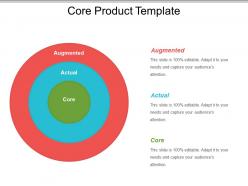
Describe the utility that a consumer derives by using the product by employing this Core Product Template. Explain the five levels of the product including core benefit, generic product, expected product, augmented product, and potential product. Showcase the core benefits that consumer gets from the actual product. Highlight the features used to create augmented products such as free delivery or in-home installation of a service. Utilize this content-ready marketing strategy PPT graphic to determine the core benefit proposition. This core competencies PowerPoint layout describes use, benefit, or problem-solving service for which the consumer is purchasing the product. Highlight the new product development process by focusing on idea generation that defines the core product. There are various high-grade icons to make your presentation eye-catching and attention-grabbing. Thus, understand a product in a better way by downloading this professionally designed core benefit PowerPoint presentation.
People who downloaded this PowerPoint presentation also viewed the following :
Core product template with all 5 slides:
Exhibit your grand designs on our Core Product Template. They will get fantastic exposure.
FAQs for
So you need five main things sorted out: what you're actually selling (product name/description), who's buying it (target user), the key features that matter, how much you're charging, and how you'll know if it's working. Make sure the description is dead simple - seriously, if your mom wouldn't get it immediately, rewrite it. Your target user should be specific enough that you could pick them out of a crowd. Features need to fix real problems these people have. Oh, and don't overthink the template thing - start basic and tweak it as you figure out what users actually want.
So basically, the template locks down all your brand stuff—fonts, colors, where the logo goes, all that. Nobody can go rogue with weird fonts or random colors (seriously, I've seen some tragic presentations). Sales, marketing, whoever's presenting will look consistent and way more professional. Clients start recognizing your brand better when everything matches. Plus you just copy the template each time instead of rebuilding from scratch. Honestly saves so much headache and keeps your company looking legit instead of like some startup that can't get its act together.
Focus on accessibility, cultural sensitivity, and flexibility - but honestly, most people screw this up because they design for themselves instead of their actual users. Your template needs to work across devices, languages, and skill levels. Think about different attention spans too. Make your content hierarchy super clear with multiple navigation options. Oh, and definitely build in customization so different segments can personalize things. I'd say test with real users from each group early on - saves you headaches later.
Your colors and fonts aren't just decoration - they actually shape how people use your template. Bad color choices mess with where users look first, and crappy typography kills readability. Trust me, I've watched templates bomb just because the text was too faint or the colors felt "off" somehow. Good combos make everything click naturally. Test your current setup with real people doing actual tasks. Watch where they pause or seem lost - that's usually your color/font combo screwing things up. Short sentences work. Longer ones need to flow without sounding robotic. It's honestly one of those things you don't notice until it's wrong.
User feedback is basically gold for improving your product templates. It shows you what's actually broken vs what you think might be broken. I've seen teams make huge improvements just from customers complaining about tiny annoyances - stuff the internal team would never notice. Pain points, missing features, clunky workflows... users will tell you everything if you ask. Set up feedback loops through surveys or user interviews. Support tickets are underrated too. Don't do some massive annual overhaul - treat templates like they're alive and should change based on how people actually use them.
Yeah, definitely stick to industry standards when building your templates. ISO 9001 is the big one for quality stuff, plus you'll want industry-specific ones like FDA guidelines if you're in healthcare or IEEE for tech. Honestly, all the acronyms make my head spin sometimes, but they'll save you from expensive screw-ups later. I'd start by figuring out which standards actually apply to your industry - don't go overboard. Build those requirements right into your template structure. Trust me, when audit season rolls around you'll be so glad you did this upfront work.
Honestly, just put your multimedia stuff where it actually makes sense - like videos for product demos or audio for testimonials. Don't go crazy with it though. I made the mistake once of loading up a template with huge files and it took forever to load (never again lol). Make sure everything looks good on mobile too, and throw in some alt text for screen readers. The trick is making it feel natural, not like you just randomly dumped images everywhere. Oh, and definitely test it with real content first - what looks good with placeholder stuff sometimes falls apart with actual copy.
Focus on three main things: proper HTML structure, keyboard navigation, and good visual hierarchy. Use actual heading tags (h1, h2, etc.) instead of just making text look bigger - screen readers need that structure to make sense of your content. All interactive stuff should work with tab navigation. Seriously, you'd be shocked how many sites fail this basic test. Don't forget alt text for images and check your color contrast. WAVE or axe are solid tools for testing this stuff. Oh, and if you can get actual users with disabilities to test it, that's gold - way better than just guessing what works.
Okay so here's what works really well - frame your whole product template like a customer story. Think about the messy "before" situation they're dealing with, then show how your features actually solve that stuff step by step. Way better than those boring bullet point lists everyone does! Map out transformation moments like "Sarah used to spend 3 hours on this every week, now it takes her 20 minutes." I've seen this work so much better than the traditional approach. End with where they are now - the goal they actually hit. Oh and pick one real customer's journey to thread through the entire thing. Makes everything hang together instead of feeling like random features thrown at a wall.
Don't make it too rigid - that's the killer mistake right there. You'll just end up cramming every product into this weird box that doesn't actually fit anything. Keep fields simple but specific too. Like, "product details" means absolutely nothing to anyone trying to fill it out. Oh, and definitely talk to the people who'll use it every day before you build the whole thing. I'd test it on maybe 2-3 real products first? See what's annoying or confusing. You can always add more complexity later, but starting simple saves you so much headache. Nobody wants to fill out 47 different fields just to add one product.
So here's what I'd do - take your main template and tweak it for each crowd. Pitches should hit the problem/solution right away with lots of visuals since investors want the big picture fast. Reports? Flip it around - data first, then dive into features and timelines. I've watched people bomb presentations because they used identical decks for both (huge mistake honestly). Think about it this way: pitches sell the dream, reports prove you can actually pull it off. Make two versions from your core template. One that's all story, another that's numbers-heavy. The rhythm totally changes between them.
You'll want Figma for sure - way better than Sketch since everyone can edit at once. Notion's great for tracking all your specs and requirements. I swear, watching people build templates in PowerPoint makes me want to cry lol. Airtable works too if you're more of a spreadsheet person. Framer or Adobe XD are solid for prototyping the interactive stuff. Start with just Figma and Notion though. That'll cover most of what you need and you won't get overwhelmed trying to learn five tools at once.
Honestly, adding visuals to your product templates is a game changer - I'm talking 2-3x better engagement rates. Icons break up those massive text blocks that nobody wants to read. Plus people scan pages in this Z-pattern thing, so you can literally guide their eyes where you want them to go. Just don't use those awful generic stock photos that look like every other template out there. Try swapping out 30% of your bullet points for simple icons instead. You'll notice the difference right away. Makes complex product info so much easier to digest too.
Honestly, just make separate versions instead of trying to force one template to work everywhere. Online stuff needs to load fast and look good on phones - plus you can add cool interactive bits like clickable buttons or videos. Print is totally different though. You'll need high-res images and use CMYK colors instead of RGB (learned that the hard way once). Don't forget the boring SEO stuff for digital - proper headings and meta descriptions actually matter. For print, keep layouts super clean since they need to work as brochures or whatever. Figure out which channels you're actually using first, then optimize each one properly.
So you wanna know if your template's actually working? Check engagement first - are people staying awake or bailing halfway through? Then look at conversions (did they actually do what you wanted after). Templates should make life easier, so track how much time you're saving vs building slides from scratch every damn time. See if different people using your template stay consistent with messaging too. Oh, and obviously get audience feedback ratings. But here's what really matters - do presentations with your template beat the random custom ones? Run a simple before/after test. That'll tell you everything.
-
Design layout is very impressive.
-
It saves your time and decrease your efforts in half.