


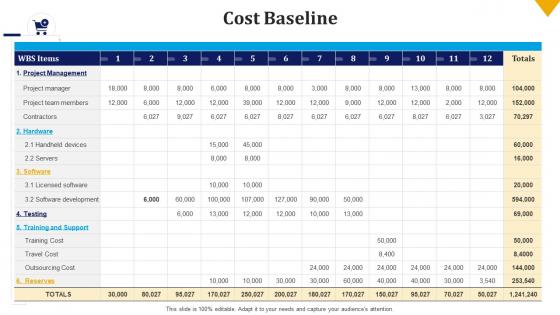
Cost baseline build the schedule and budget bundle ppt file background images




Try Before you Buy Download Free Sample Product
 Impress Your
 Audience
 100%
100% Editable
 Save Hours
 of Time


Our Cost Baseline Build The Schedule And Budget Bundle Ppt File Background Images are topically designed to provide an attractive backdrop to any subject. Use them to look like a presentation pro.
People who downloaded this PowerPoint presentation also viewed the following :
Cost baseline build the schedule and budget bundle ppt file background images with all 6 slides:
Use our Cost Baseline Build The Schedule And Budget Bundle Ppt File Background Images to effectively help you save your valuable time. They are readymade to fit into any presentation structure.





FAQs for Cost baseline build the schedule and budget bundle ppt
You'll need your approved budget broken down by time periods, plus work packages from your WBS. Don't forget contingency reserves - trust me on this one. The tricky part is mapping costs to your project schedule timeline. Include both direct stuff (labor, materials) and indirect costs like overhead. This baseline becomes your benchmark for measuring performance later. Honestly, most people rush through this step, but you really shouldn't. Get your WBS nailed down first, then build everything else around it. Oh, and once it's set, any changes need formal approval through change control.
So the cost baseline is your approved budget plus contingency money - that's what you're officially on the hook for. Your regular project budget? Just estimated costs for the work you've planned out. Here's why it matters: once your project starts, you'll measure performance against the baseline, not that original budget. Kind of like how your grocery estimate might be $100, but you set your spending limit at $120 just in case. I learned this the hard way on my first project - always build in realistic contingencies before you finalize that baseline, because that's what everyone will hold you accountable to.
Think of your WBS like breaking down your grocery budget - way easier to estimate what you'll spend on produce, meat, etc. than guessing the whole trip, right? Start at the bottom with work packages and slap dollar amounts on each piece. Then just add it all up. Honestly, anyone trying to estimate costs without a decent WBS is just making their life harder. You can track spending against each chunk later too, which saves you from that awful "where did all the money go?" moment. Get the breakdown right and the rest basically falls into place.
So basically, inflation totally screws up your cost baseline over time. Material and labor prices jump way beyond what you budgeted for originally. Long-term projects get hit the hardest - there's just more time for everything to go sideways economically. Your baseline starts looking like ancient history pretty quick. What I'd do is build escalation factors right into your initial baseline, or at least schedule regular reviews to update things. Otherwise you're gonna look like you're constantly over budget when really it's just the market being weird. Trust me, I learned this the hard way on a project last year.
Stakeholders totally mess with your cost baseline in a bunch of ways. During planning, they'll add scope requirements - more features obviously costs more money. Budget approval is huge too since they can just say "nah, that's too high" and force you back to the drawing board. Resource allocation gets tricky because they might push for expensive consultants or crazy tight deadlines. Both drive costs up fast. Oh, and risk tolerance matters - if they're super conservative, you'll need bigger contingency buffers built in. Honestly the worst part is when they change their minds halfway through. Get their input early and document everything so you can track what changed and why.
Honestly, I'd go with bottom-up estimating if you have time - break everything into small tasks and add it up. Super tedious but you'll get the most accurate numbers. Three-point estimating is solid too since it factors in best/worst case scenarios. For quick estimates, analogous works great if you've done similar projects before. I actually mix methods most of the time because why not? Like, start with analogous to get a ballpark, then do bottom-up for the tricky parts. Just write down your assumptions so you don't forget your logic later when things inevitably change.
Honestly? I check mine way more than I probably should - like whenever something feels sketchy. But for *actual* updates, stick to major milestones or when scope changes get approved. Don't just update it every time you're over budget or you'll be chasing your tail constantly. The real trick is knowing when you're just monitoring vs. when you actually need to revise the whole baseline. Save that for genuine scope changes or those "oh crap" moments that nobody saw coming. Set some reminders though - I always forget to do the formal reviews otherwise.
Honestly, the two big ones that always get people are being way too optimistic with timelines and forgetting buffer time. Don't use old data either - I learned that one the hard way. Scope creep will destroy your baseline if you're not careful, and people always forget about the boring stuff like overhead costs. Get your team involved when you're estimating because they'll spot things you totally missed. Oh, and write down why you made each assumption - trust me, you'll need those notes later when everything inevitably goes sideways and someone's asking questions.
Your cost baseline is just your budget plotted over time - it has to match your schedule since you need to know when stuff happens to predict spending. Resource allocation feeds right into this because you're basically saying "we need X people and materials at Y times for Z dollars." It's like a financial roadmap that mirrors your project timeline. Here's the annoying part though - keeping all three in sync when changes hit (which they always do). Honestly, if you don't update your baseline after approving scope or schedule changes, your budget tracking becomes useless fast. I've seen too many projects where people forgot this step.
Most companies I've worked with use stuff like Microsoft Project, Primavera P6, or Smartsheet for tracking cost baselines. They're pretty solid for comparing your planned vs actual spending. Honestly, Excel is still huge too - especially on smaller projects where you don't need the fancy features. If you're dealing with really complex, multi-phase stuff, maybe look into Deltek or Oracle's project suite. Just make sure whatever you pick actually talks to your accounting system. Trust me on this one - you don't want to be entering the same data twice all the time. I'd start with whatever your team already knows how to use.
Look, think of your cost baseline like a GPS for your budget - without it you're basically flying blind. It gives you something concrete to compare your actual spending against. You'll catch cost overruns way earlier this way, plus you can calculate stuff like cost variance and performance metrics. Honestly, I've seen too many projects go sideways because people skipped this step. The baseline helps you spot weird spending patterns and fix small issues before they blow up into major budget disasters. Just make sure you include ALL project costs and get approval before you start tracking against it.
So you'll want to focus on Cost Variance and Cost Performance Index mainly. CV just shows the dollar gap between budget vs actual spend - pretty straightforward. CPI is where it gets interesting though, it's your efficiency ratio (earned value over actual costs). Anything under 1.0 means you're bleeding money. Budget at Completion variance and Estimate at Completion are solid for seeing the big picture too. Honestly? CPI's gonna be your go-to metric since it's like a quick pulse check. Oh, and definitely set up some kind of weekly dashboard - catching cost issues early beats scrambling later when everything's already gone sideways.
Risk analysis makes your cost baseline way more accurate because you're spotting potential problems early. Monte Carlo sims let you model different scenarios. Sensitivity analysis shows which variables hit your costs hardest. Three-point estimating covers your optimistic and pessimistic ranges - super helpful. Most baselines crash and burn because people are unrealistic from day one, honestly. These techniques force you to actually think through what might go sideways and build in proper buffers. Run the analysis early in planning, then update your baseline with realistic contingencies based on what you find.
Dude, public projects are a whole different beast when it comes to cost baselines. All those regulatory requirements basically control everything - can't just freestyle it like private work. You're stuck following specific accounting standards, procurement rules, tons of reporting formats. It gets expensive fast because of all the administrative overhead. Since it's taxpayer money, everything's way more rigid. Audits, compliance activities, mandatory reviews - you gotta budget for documentation that private companies would totally skip. Honestly, the red tape is kind of insane. Best move? Figure out every regulatory touchpoint upfront and build those compliance costs right into your baseline immediately.
Honestly, it's all about knowing your audience. Executives just want the big picture - total budget and major milestones. Your project team? They need the nitty-gritty details they can actually use. Don't make my mistake of sending massive spreadsheets to everyone - it just creates chaos! Charts and dashboards work way better. Always explain what the baseline means for their specific stuff. Be super clear about what's in vs out of scope (learned this one the hard way). Document everything so people can't claim confusion later. Oh, and set up regular check-ins to catch problems early.
-
Unique and attractive product design.
-
Innovative and attractive designs.