


Annual Schedule Calendar Powerpoint Ppt Template Bundles




Try Before you Buy Download Free Sample Product
 Impress Your
 Audience
 100%
100% Editable
 Save Hours
 of Time


Our Annual Schedule Calendar Powerpoint Ppt Template Bundles are topically designed to provide an attractive backdrop to any subject. Use them to look like a presentation pro.
People who downloaded this PowerPoint presentation also viewed the following :
Annual Schedule Calendar Powerpoint Ppt Template Bundles with all 19 slides:
Use our Annual Schedule Calendar Powerpoint Ppt Template Bundles to effectively help you save your valuable time. They are readymade to fit into any presentation structure.
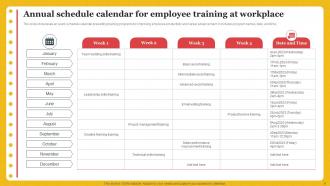
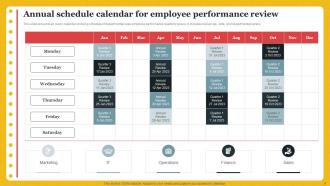
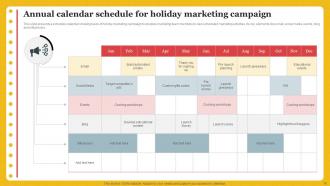
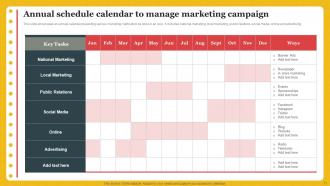





FAQs for Annual Schedule Calendar Powerpoint
Honestly, I'd grab a few free templates first and test them out with your real schedule. Monthly/weekly views are essential - you need that big picture plus the daily details. Color-coding is a game changer for different projects or event types. Built-in holidays save you so much time (trust me on this one). Goal tracking sections are nice if you're into that stuff. Make sure whatever you pick works with your go-to software - Excel, Google Sheets, whatever you actually use. Oh, and customizable layouts matter more than you'd think. Don't overthink it though, just download a couple options and see what clicks.
Honestly, annual calendar templates are a game changer. You can see everything coming at you from miles away - no more surprise deadlines or double-booked weeks. I'd start with your big project milestones and anything that happens every month/quarter. The whole team stays in the loop, which cuts down on those awkward "wait, when was this due?" moments. You'll also figure out when you need extra help or when someone's about to get buried. My old boss used to say visibility = accountability, and she wasn't wrong. It's basically project management without the fancy software.
Good fonts are everything - make sure dates are actually readable. Don't go crazy with colors either, I've seen way too many that look like a kindergarten art project lol. White space is your friend so it doesn't feel cluttered. Make weekends pop somehow, maybe a different shade? Month names should be big and obvious. Start simple with clean grid lines first. You can always add seasonal stuff later if it matches your vibe. Oh and use hierarchy - guide people's eyes from the big picture down to individual dates. Trust me, less is more here.
Yeah, absolutely! Ditch those generic holidays nobody cares about and swap in dates that actually affect your business. Trade shows, compliance deadlines, seasonal rushes - that's the stuff your team needs to see coming. Retail companies throw in Black Friday and inventory cycles. Manufacturing might track regulatory reporting periods. Most templates let you mess with colors and add custom fields anyway - honestly, the default setups are pretty boring. Just think about what dates make your team scramble when they sneak up. Then build those right into the calendar so you're not caught off guard again.
Honestly, digital's probably your best bet if you're always on the go or working with other people. You can update stuff instantly and it syncs everywhere - phone, laptop, whatever. The notifications are clutch too. But I'll be real, there's something satisfying about writing stuff down on an actual paper calendar. My mom still swears by hers hanging in the kitchen lol. Problem is you can't exactly text your paper calendar to your coworkers. If you're super visual and like seeing everything laid out physically, go print. Otherwise digital just makes life easier.
Yeah, most PM tools will let you import your calendar template as a CSV or just sync with Google Cal/Outlook directly. You can copy-paste the important dates into your project timeline too. Here's the thing though - you've gotta actually connect those calendar milestones to real deliverables, not just have random dates sitting there looking nice. Built-in calendar views are pretty handy for overlaying everything. I'd start with your big quarterly deadlines first, then work backwards to build out realistic project phases. That way everything actually ties to your annual goals instead of just... existing.
Okay so colors and fonts are basically everything for calendars. High contrast is key - you need to actually read those tiny date numbers without going blind. I always use sans-serif fonts because they're way cleaner at small sizes. For colors, stick to maybe 2-3 max for different event types or whatever. Trust me, I've made the mistake of going crazy with pastels before and couldn't find anything. Those "aesthetic" calendars look cute but they're useless when you're trying to spot your dentist appointment at a glance. Keep it simple and your eyes will thank you later.
Honestly, most people just copy the same template forever and wonder why they're always scrambling. Do a proper refresh in December before the new year hits. Look at what actually worked this year and what was a total mess. Add those new company holidays, update your industry events, ditch the old campaign deadlines that don't matter anymore. If you're in a seasonal business or dealing with tons of projects, maybe do another quick update mid-year too. Trust me, spending an hour on this in December beats the chaos later. Block some time for it now while you're thinking about it.
Honestly, just throw it on Google Drive or SharePoint so everyone's looking at the same thing. Email attachments will make you want to scream after like two weeks. Set up permissions so people can only edit what they need to - some folks love to "help" by changing everything lol. I always keep a master template locked down, then people work from copies for their stuff. Oh and please pick a naming system early! Something like "2024_ProjectName_Calendar" saves so much headache later. Random tip: pin the template link in your team chat. New people always ask where it is.
Honestly, annual calendars are clutch for tracking KPIs. Map out your quarterly reviews first, then work backwards from there. Color-coding different metrics makes everything way clearer - trust me on this one. Don't go overboard though, stick to maybe 3-5 key numbers or it gets messy fast. The visual layout helps you spot patterns you'd totally miss otherwise. Mark seasonal stuff that impacts your data, plus any big milestones. Oh, and set specific dates for measuring each KPI so you're not scrambling later trying to remember what you were supposed to track when.
Definitely add the big holidays from wherever your team's based - Diwali, Chinese New Year, Ramadan, not just the usual Christmas stuff. Different countries do weekends weird too, like Friday-Saturday instead of our thing. Oh and time zones obviously matter for meetings. I totally bombed once scheduling something right during Golden Week in Japan - nobody told me! Local holidays can mess with business too, so mark those. Honestly, just make a shared doc where people can add their own regional dates. Way easier than trying to research everything yourself.
Honestly, Canva's your best bet to start - I'm basically obsessed with it at this point lol. Adobe Express works great too if you want something similar. Both have tons of templates you can tweak without going crazy. Want more control? InDesign or Illustrator are amazing but expect to spend some time figuring them out. PowerPoint actually works pretty well for calendars too, which sounds weird but it's true. Google Drawings is free and gets the job done for basic stuff. I'd definitely go with Canva first though - you can always upgrade to fancier tools once you get the hang of it.
Honestly, you'll love having the whole year spread out in front of you. I used to be that person scrambling when deadlines snuck up on me - not fun. With an annual template, you can spot those crazy busy months coming from miles away. Map out your big stuff first: vacations, major work deadlines, that cousin's wedding you can't skip. Then fill in around those. The best part? You can actually block time for things that matter before all the urgent stuff swallows your calendar whole. It's way better than flying blind week to week.
Honestly, color coordination is huge - match your brand or whatever theme you're going for. Throw your logo on there too. Different fonts can totally change the vibe (though don't go crazy with like 5 different ones). Photos work great, and I love when people highlight special dates with little icons or borders. Oh, and quotes or messaging throughout keeps it interesting. If it's for an event, maybe do countdown stuff or feature different parts each month? Start with one thing you really like and build from there. The whole point is making it actually feel like *yours*, you know?
Honestly, annual calendars are a game-changer for big goals. You get the whole year laid out in front of you, which makes it way easier to break stuff down into quarterly chunks. I'm weirdly obsessed with using them for habit tracking - there's something so satisfying about seeing those patterns emerge over months. The visual aspect helps you catch conflicts too, like when three major deadlines somehow end up in the same week (why does that always happen?). Start with maybe 3-5 big things and work backwards from your target dates. Trust me, it'll save you from that last-minute panic mode.
-
Crisp and neat slides. Makes it fun and easier to curate presentations.
-
What a stunning collection of customizable templates! Really a time-saver..