


Critical path analysis for new product launch




Try Before you Buy Download Free Sample Product
 Impress Your
 Audience
 100%
100% Editable
 Save Hours
 of Time


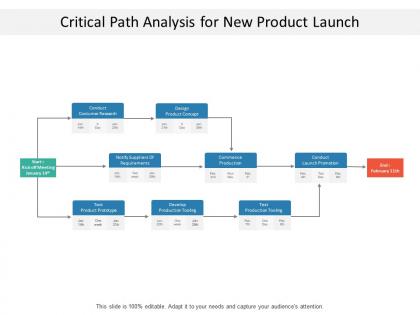
The critical path analysis PowerPoint template intended for summarizing the project’s key tasks and milestones when the user wants to present all of them in a straightforward way. The new product launch path analysis slide act as a network model and a statistical tool that keep account of uncertainty in completion times owing to the newly launched project activities. The product path analysis diagram template can possibly lessen the time that needed to finish a specific task and thus directly influence cost of the project as well. A presenter can take help of the new product analysis chart PPT slide to illustrate various factors related to launching of new product such as identifying the activities as well as their respective milestones, figure out the best possible succession of the activities, design the network diagram, estimated time that needed for every activity and describe the critical path. The user can take help of the critical path analysis project management tool slide to manage randomness in task completion time and keep a tab on each activity of project. Our Critical Path Analysis For New Product Launch cherish your company. They are delighted to be by your side.
People who downloaded this PowerPoint presentation also viewed the following :
Critical path analysis for new product launch with all 5 slides:
Convince folks that change will improve conditions with our Critical Path Analysis For New Product Launch. Be able to handle entrenched beliefs.


FAQs for Critical path analysis for
So critical path analysis is just figuring out which tasks in your project can't be delayed without screwing up the whole timeline. You map out everything, see what depends on what, then boom - there's your critical path. Other tasks have some buffer time (float), but these ones? Zero flexibility. Honestly, once you do it a few times it becomes second nature. List your tasks first, guess how long each takes, then connect the dots based on what needs to happen before what. Those critical tasks are the ones that'll keep you up at night if they fall behind.
So critical path analysis basically shows you which tasks can't be delayed at all - zero buffer time. Those are your danger zones. Any delay there pushes back everything. Pretty nerve-wracking when you see it laid out! But here's the thing - it also shows which tasks DO have slack time, so you know where delays won't actually hurt you. Smart move is putting extra resources on those critical path tasks upfront. You can also spot good places for backup plans. Honestly saves so much stress later when things inevitably go sideways.
Honestly, Microsoft Project is still the best if you can handle the learning curve - though fair warning, it's kind of a beast when you first open it. Smartsheet and Monday.com are way friendlier for beginners. ProjectLibre works fine if you don't want to spend money, but the interface feels pretty dated (just being real). My take? Start simple with what your team already knows. You can always switch later when projects get more complex. I've watched too many teams pick fancy software they never actually use because it was too complicated from day one.
So float time is basically your wiggle room - how long you can delay stuff without messing up the whole project. Critical path tasks have zero float, which honestly sucks because any delay there pushes everything back. Other tasks? They've got breathing room since they're not bottlenecking anything. Just subtract earliest start time from latest start time for each task. Super handy for juggling people around - move folks from tasks with float to the critical ones when things get tight. Oh, and definitely watch that critical path like a hawk!
So basically, the critical path is your project's longest chain of tasks - that's what sets your minimum timeline. Delay anything on that path? Your whole deadline shifts back. Pretty annoying, honestly. Non-critical tasks have wiggle room called "float time." You can mess up there without screwing over the end date. Picture it this way: critical path stuff is your real bottleneck. Task A runs a week late on the critical path = entire project delayed a week. But some random non-critical task running behind? No sweat, as long as it doesn't eat up all its float. Watch those critical path activities like a hawk - that's where things actually matter.
Yeah, you can totally do this! Focus on critical paths within each sprint instead of the whole project. During sprint planning, map out dependencies between your user stories - you'll catch bottlenecks way earlier. I know mixing waterfall stuff with agile sounds backwards, but it actually works pretty well. Short sprints make it easier to spot which tasks can't be delayed. Just run through your backlog real quick and see what depends on what. You might be surprised how many dependencies you missed. The key is keeping it lightweight - don't overthink it or you'll waste time you don't have.
Honestly, the math part isn't too bad once you get used to it. What'll really mess you up is time estimates - everyone's way too optimistic about how long stuff takes. Dependencies are another pain point because you'll either miss some or can't tell if they're actually required or just "nice to have." The whole method assumes you have unlimited resources, which is obviously not reality. You're constantly dealing with people being unavailable or pulled onto other projects. I'd definitely get your team involved when estimating durations though. And build in some cushion time because something unexpected always pops up. Trust me on that one.
Dude, Gantt charts are a game changer for critical path stuff. Instead of drowning in spreadsheets, you can actually see what's happening with your timeline. The critical path tasks jump out at you (usually in red), plus you'll spot where things might get messy before they do. I was terrible at this until I went visual - now it makes sense. You can see slack time for non-critical tasks too, which is huge. Oh and resource conflicts? Way easier to catch when everything's mapped out. Seriously, just throw your next project into a visual tool and watch how obvious the problem areas become.
So CPA is amazing for messy projects with tons of moving parts - think construction or big software builds where everything depends on something else. You'll spot exactly which delays will screw you over. Honestly, I've seen it save projects that were heading straight into disaster. But skip it for creative stuff or basic step-by-step work where the timeline's pretty flexible anyway. The real magic happens when deadlines are non-negotiable and you need to squeeze every bit of efficiency out of your schedule.
Yeah so changing task durations totally messes with your critical path in ways you wouldn't expect. Shorten a critical task? That parallel work stream you ignored might suddenly become your new bottleneck. Extend critical tasks and you're just making things worse. But here's what's sneaky - mess with non-critical tasks too much and they'll eat up their float time, boom, now they're critical too. I learned this the hard way on a project last year. Always rerun your analysis after tweaking durations because small changes can completely flip your timeline.
So you'll want to start by listing out all your tasks and figuring out what depends on what - like which things can't start until others are done. Estimate how long each one takes. Draw it out as a network with arrows showing the flow (or honestly, just use software because doing this by hand is kinda painful). Calculate earliest start times going forward through the diagram, then work backwards for the latest times. Whichever path has zero wiggle room? That's your critical path. Those tasks will totally screw your timeline if they're late, so watch them like a hawk.
So basically, critical path analysis tells you which tasks absolutely can't slip without screwing up your whole deadline. Put your best people and money there first - those are the make-or-break activities. Everything else has buffer time, which is nice because you can use cheaper resources or work around your main priorities. Honestly, most people mess this up by spreading resources evenly across everything. Map out your critical path first. Then plan everything else around protecting those key pieces. It's way better than guessing what matters most.
Your stakeholders know things you don't – like how Sarah's team actually needs two weeks for testing, not one. They'll catch dependencies you missed and tell you when Task A really has to wrap before Task B starts. Honestly, skipping their input is asking for trouble. Get them involved during planning, then circle back mid-project when you're reviewing everything. Yeah, it's extra meetings, but their on-the-ground view helps you spot bottlenecks before they mess up your whole timeline. Much better than finding out the hard way.
You'll want to check your critical path weekly at minimum - daily if things are moving fast. Most teams totally skip this part because it feels tedious, but tracking actual vs planned progress is where you catch problems early. When tasks slip or jump ahead, update your schedule right away instead of waiting for the next big review meeting. Your PM software should auto-flag delays and recalculate everything when stuff changes. Oh, and scope creep or new dependencies? Update immediately. I've seen too many projects crash because people put off schedule updates.
So critical path analysis is like your secret weapon for risk stuff. Map out which tasks absolutely can't be delayed without screwing your whole timeline. Those are where you dump your energy - not everywhere else. I learned this the hard way on my last project tbh. Run some "what if" scenarios on just those critical activities. What happens if your key developer gets sick? Or that vendor is late? Then you can stick your best people on those tasks, build in buffer time, whatever. Way smarter than trying to plan for every possible thing that could go wrong. Just overlay your risk planning right on top of your critical path and you're golden.
No Reviews