

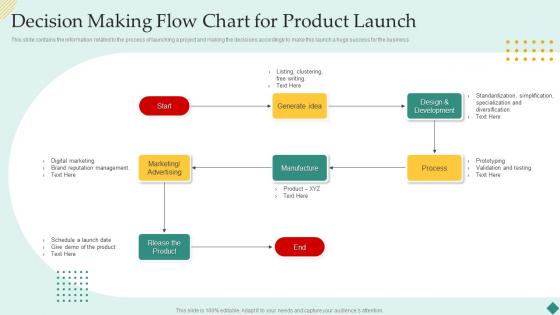
Decision Making Flow Chart For Product Launch




Try Before you Buy Download Free Sample Product
 Impress Your
 Audience
 100%
100% Editable
 Save Hours
 of Time


This slide contains the information related to the process of launching a project and making the decisions accordingly to make this launch a huge success for the business.
People who downloaded this PowerPoint presentation also viewed the following :
Decision Making Flow Chart For Product Launch with all 6 slides:
Use our Decision Making Flow Chart For Product Launch to effectively help you save your valuable time. They are readymade to fit into any presentation structure.





FAQs for Decision Making Flow Chart
Start with your main problem, then map out yes/no decision points and what happens next. Don't forget the endpoints - where does this thing actually end? Here's what I've learned the hard way: write down all your constraints upfront. Trust me, it saves headaches later when you're wondering why nothing makes sense. Walk through different scenarios before you launch it. I always test mine with at least 2-3 cases because there's always some weird path you didn't think of. Short sentences work great for actions. Longer flows need more explanation so people don't get lost. Avoid loops unless you actually want them - they're usually accidents that'll confuse everyone.
Honestly, visual aids are a game changer for decisions. Like when you draw out a flowchart or something, you actually catch all the logical gaps you'd normally miss. Your brain just processes it better visually I think? Plus if you need to explain your reasoning to someone else, they can follow along way easier than if you're just rambling through your thought process. I started sketching out big decisions last year and wow - you discover angles you hadn't even considered. Way better than keeping everything jumbled up in your head.
Don't overcomplicate it - that's the
-
I looked at their huge selection of themes and designs. They appeared to be ideal for my profession. I'm sure I'll grab a few of them.
-
SlideTeam was so customer-centric and quick service-provider that I doubted the amount I was paying and literally re-checked the transaction.