

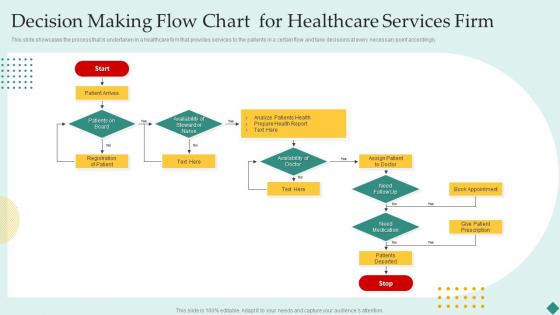
Decision Making Flow Chart For Healthcare Services Firm




Try Before you Buy Download Free Sample Product
 Impress Your
 Audience
 100%
100% Editable
 Save Hours
 of Time


This slide showcases the process that is undertaken in a healthcare firm that provides services to the patients in a certain flow and take decisions at every necessary point accordingly.
People who downloaded this PowerPoint presentation also viewed the following :
Decision Making Flow Chart For Healthcare Services Firm with all 6 slides:
Use our Decision Making Flow Chart For Healthcare Services Firm to effectively help you save your valuable time. They are readymade to fit into any presentation structure.





FAQs for Decision Making Flow Chart For
Start with where the decision kicks off, then add your yes/no branches and action steps. Honestly, the arrow direction always trips me up - just pick one way and stick with it. You'll want to spell out what criteria someone should use at each decision point. Every path needs to actually go somewhere that makes sense, otherwise people get stuck. Keep it simple enough that your coworker could follow it without bugging you with questions. Oh, and definitely test it with a real example before you're done - saves you from looking dumb later.
Dude, visual elements are a game changer for decision charts. Different shapes help tons - diamonds for yes/no stuff, rectangles for actions, circles to start/end. Color coding works great too (green for good outcomes, red for stops). Honestly, I spend way too much time making sure my arrows look perfect and point the right way. Keep everything lined up nicely so it doesn't look sloppy. Brief text is key - nobody's gonna read paragraphs in boxes. I usually sketch mine out first, then clean it up digitally later.
Keep it simple - too many branches and people will just give up halfway through. Test your "what if" scenarios because that's where everything usually breaks down. Don't write wishy-washy decision points like "is it acceptable?" Be specific so anyone can follow the same logic. Honestly, you'll drive yourself crazy trying to cover every possible edge case. Focus on the main scenarios first - maybe 80% of what actually happens. Oh, and definitely have someone else walk through it before you launch. You'll miss obvious gaps that are super clear to fresh eyes.
Think about who's actually gonna use this thing first. Executives doing big picture stuff? Keep it simple with major decision points. But if it's for the team doing day-to-day work, they'll need way more detail and specific steps. Honestly, I treat it like recipe writing - you wouldn't explain knife skills to Gordon Ramsay, you know? Test it with a few people from your target group. When they look confused or start asking questions, that's where you need more info. If their eyes glaze over... yeah, you've overdone it.
Flow charts are clutch when you've got messy processes with tons of different paths. Customer service stuff, troubleshooting, compliance things - basically anywhere you need everyone doing the same thing consistently. High-stakes decisions? Definitely use them. New team members love having that step-by-step roadmap too. I'm kinda obsessed with them now, probably make charts for way too much stuff lol. But they actually work! Start with whatever decisions you're making over and over again. Those repetitive processes are perfect for mapping out first.
Honestly, just bake the data collection right into each decision point. Like when you hit a major fork in your process, add a step that says "grab these specific metrics first" - conversion rates, customer scores, whatever matters. Then actually use those numbers to decide which path to take instead of just guessing. Set clear thresholds too, like "under 3% conversion = path A, over 3% = path B." I've seen way too many flowcharts that look great but nobody follows them because the decisions are too vague. This way your whole team uses the same logic every time.
Honestly, Lucidchart is probably your safest bet - super intuitive with decent templates already built in. Visio's solid too if you need the heavy-duty features. I've actually just used Google Drawings for quick stuff and it works fine in a pinch. Miro's worth checking out if your team's already on there for other projects. yEd is free and surprisingly good for complex flows, but fair warning - it's kind of a pain to learn at first. Canva works too for simple charts. Really depends what you're building, but I'd start with Lucidchart and see how it feels.
Definitely keep it simple - plain language is your friend here. Skip the jargon because honestly, acronyms just make people's eyes glaze over. Clean visuals matter too: clear arrows, obvious decision points, fonts you can actually read. I'd test it with a few different people first - you'll be surprised what trips them up. Oh, and if you're sharing it digitally, throw in some alt text for accessibility. The whole point is someone should be able to pick it up and figure out your process without having to ask you what the hell you meant.
Think of feedback as your flowchart's truth test - it reveals where things actually fall apart when people use it. Real users will hit snags you never saw coming, or get confused by steps that made perfect sense to you. I've watched "foolproof" charts completely baffle people! Short sentences work better than you'd think. Collect feedback as you go and tweak the chart based on what breaks. Don't just build it once and walk away - treat it more like a rough draft that keeps getting better.
Okay so flowcharts are actually pretty clutch for this stuff. Map out your current process step by step, then you'll spot where things get messy - like bottlenecks or places where nobody knows who's supposed to decide what. It's wild how much clearer everything becomes when you can see it visually. From there, cut the unnecessary steps and figure out better handoffs between teams. I'd honestly start with whatever process is driving you most crazy right now, then tackle others once you get the hang of it. Share the chart with everyone so they're not just winging it anymore.
Amazon's return process flows are actually genius - their reps can solve problems way faster when everyone follows the same steps. Hospitals figured this out too with emergency triage, using decision trees to sort patients properly. McDonald's (okay, random example but whatever) cut down contamination big time with food safety flowcharts. The thing is, these aren't just nice-looking diagrams sitting in a folder somewhere. They help teams make smart, consistent calls when things get crazy. I'd start by mapping whatever decision your team makes over and over again first.
You've got to tailor everything based on who's looking at it. Executives just want the big picture stuff - outcomes, business impact, major decision points. Skip all the detailed steps because honestly, they don't care about the how. Your team though? They need every single operational detail and who does what. I made this mistake once presenting a crazy detailed flowchart to our CEO and it was awkward lol. Also switch up the language depending on the audience - what works for tech people won't work for leadership. Pro tip: run your flowchart by a few folks from each group first to see what actually makes sense to them.
So you'll want ovals for start/end, rectangles for processes, and diamonds for decisions. Parallelograms handle your inputs/outputs. Arrows show the flow - pretty straightforward stuff. Here's the thing though: I've watched people obsess over getting every symbol "right" when honestly, clarity beats perfection every time. Keep your text short inside each shape, space things evenly, and make sure those decision diamonds have obvious yes/no paths. Oh, and test it on someone else first. If they can't follow it without you explaining, something's off. That's usually my litmus test anyway.
Decision flow charts are honestly a lifesaver for this stuff. Map out who weighs in when and what criteria you're actually using - no more endless meetings where everyone talks past each other. The visual thing works great for remote people too. What I love most is how they surface all those hidden assumptions everyone has. You think you're aligned until you write it down, then suddenly Karen from marketing has completely different priorities than dev team. Try making one together at your next kickoff. Sets clear pathways upfront.
Dude, you're missing out if you don't connect those decision flowcharts to your other project tools. Link them to your Gantt charts and boom - you'll actually see how decisions mess with your timeline. Risk matrices help too, catches problems early. I learned this the hard way after way too many "wait, who was supposed to decide this?" moments with my team. The timeline connection alone is a game changer. Communication gets so much smoother when everyone can see the decision path. Honestly, just try linking your flowchart to your main schedule first - you'll be shocked how much clearer everything gets.
-
I was never satisfied with my own presentation design but SlideTeam has solved that problem for me. Thank you SlideTeam!
-
I am extremely pleased with these PPT slides that we used for our event. They were easy to modify and came out great in all aspects!