

Product Launch Timeline Powerpoint Presentation Slides





Try Before you Buy Download Free Sample Product
 Impress Your
 Audience
 100%
100% Editable
 Save Hours
 of Time


Our Product Launch Timeline Powerpoint Presentation Slides are topically designed to provide an attractive backdrop to any subject. Use them to look like a presentation pro.
People who downloaded this PowerPoint presentation also viewed the following :
Content of this Powerpoint Presentation
Slide 1: This slide Product launch Timeline. State Your Company Name and begin.
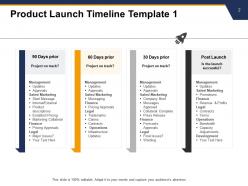
Slide 2: This slide shows Product Launch Timeline Template 1 describing 90, 60 and 30 days prior launch and post launch.
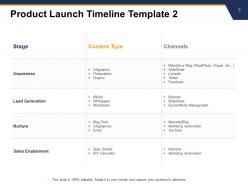
Slide 3: This slide presents Product Launch Timeline Template 2 with stage, content type and channels.
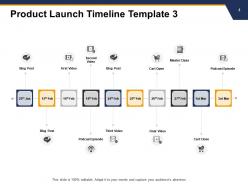
Slide 4: This slide displays Product Launch Timeline Template 3 describing- Blog Post, First Video, Second Video, Podcast Episode, Master Class, Cart Open, Final Video, Cart Close etc.
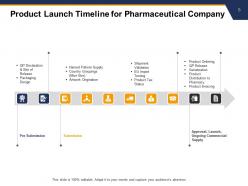
Slide 5: This slide represents Product Launch Timeline For Pharmaceutical Company with stages as pre-submission, submission and Approval, Launch, Ongoing Commercial Supply.
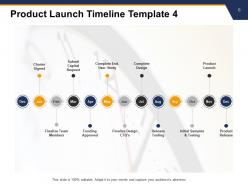
Slide 6: This slide showcases Product Launch Timeline Template 4 describing- Finalize Team Members, Funding Approved, Finalize Design CTQ’s, Release Tooling, Initial Samples & Testing, Product Launch, Charter Signed, Submit Capital Request, Complete End-User Study, Complete Design, Product Launch.
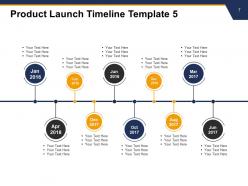
Slide 7: This slide shows Product Launch Timeline Template 5 with text boxes to show information.
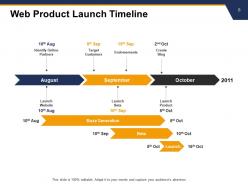
Slide 8: This slide presents Web Product Launch Timeline as- Identify Online Partners, Target Customers, Endorsements, Create Blog, Launch Website, Launch Beta, Launch Product, Buzz Generation.
Slide 9: This slide shows Product launch Timeline Icons.
Slide 10: This slide is titled Additional Slides for moving forward.
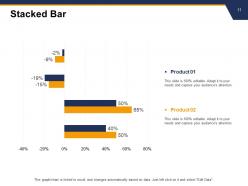
Slide 11: This slide shows Stacked bar graph with two products comparison.
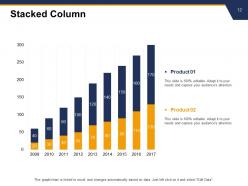
Slide 12: This slide displays Stacked column chart with two products comparison.
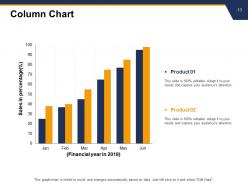
Slide 13: This slide presents Column Chart with two products comparison.
Slide 14: This is a Financial slide. Show your finance related stuff here.
Slide 15: This is Quotes slide to highlight or state anything specific.
Slide 16: This is a Thank You slide with address, contact numbers and email address.
Product Launch Timeline Powerpoint Presentation Slides with all 16 slides:
Use our Product Launch Timeline Powerpoint Presentation Slides to effectively help you save your valuable time. They are readymade to fit into any presentation structure.




FAQs for Product Launch Timeline
Okay so product launches basically break down into four phases. Pre-launch is where you do all your research, build the product, and start creating some hype. Then there's soft launch - basically testing with a smaller group first (which honestly saves your ass so many times). Full launch is the big push with all your marketing. Post-launch you're watching how everything performs and tweaking stuff. Pre-launch is where you really make or break everything though. I'd start planning at least 6 months out, but definitely pad your timeline because something always breaks at the worst possible moment. Oh, and set clear milestones for each phase - it keeps you sane.
Honestly, market research can either speed things up or completely derail your timeline. Strong demand signals? You're golden - fast-track everything. But if you discover you've been targeting the wrong people (ugh, the worst), you'll need to stop and rebuild your whole strategy. I learned this the hard way on my last project. Build in buffer time from the start so research surprises don't wreck your launch date. Do the heavy lifting 3-4 months out, trust me on this one.
Honestly, cross-departmental collaboration can make or break your launch. Marketing needs to know what product is actually building and when. Sales has to get the messaging right. Customer support can't be caught off guard when users start asking questions about features they've never seen before. Engineering should be looped in too - trust me, there's always some last-minute crisis. I'd say start doing regular check-ins early and have someone from product own the timeline. Otherwise you get those nightmare situations where marketing is promising stuff that doesn't exist yet, or worse, support is dealing with pissed off customers about things nobody told them about.
Honestly, timelines are lifesavers because they stop people from constantly asking "so when's this gonna be done?" You just point them to the dates and boom - done. They're also great for shutting down crazy requests since you've got proof of why something can't happen faster. I learned this the hard way after way too many impossible deadlines lol. Just make sure you update it weekly and don't wait to tell people about delays - that always backfires. Pro tip: send a weekly email update so you're not answering the same questions individually all week long.
Honestly, just pick 2-3 metrics per phase or you'll go crazy with all the data. Before launch, I'd watch email signups and social engagement - gives you a decent read on actual interest. Launch week is pure chaos (been there), so stick to conversion rates and traffic. Oh, and sales velocity if you can track it properly. After launch, flip to retention stuff - customer satisfaction, support tickets, repeat buyers. That's where the real money is anyway. Set up your dashboards early though, because when your boss starts asking for numbers mid-launch, you don't want to be digging through spreadsheets at 2am.
Honestly, timelines are like your safety net - they help you catch problems before they become disasters. You'll spot resource conflicts and dependencies way earlier. Buffer time is everything, especially when dealing with outside vendors (those guys ALWAYS run late). Teams coordinate better when everyone knows the plan. Quality issues get fixed cheaper upfront rather than during crunch time. Start with your critical path, then pad anything external by 20%. Stakeholders eat this stuff up too - they love having concrete milestones to obsess over. Trust me on the padding thing though, something weird always pops up.
Honestly, basic project management stuff won't cut it for product launches. Asana or Monday.com are your best bet - they're actually good at handling dependencies so you can see what's holding everything up. Gantt charts look scary but they're perfect for this kind of planning. Microsoft Project is solid if you're already using their other tools, though it's kind of a pain to learn. The main thing is finding something that plays nice with whatever you're already using and that your team won't hate. I'd start with Asana's free trial - their timeline view is pretty decent and won't overwhelm anyone.
Honestly, outside stuff will mess with your timeline no matter what, so just plan for it upfront. I'd check what competitors are doing every week - last year I watched a team completely panic when someone launched something identical like two weeks before they did. Market shifts happen too and suddenly you're repositioning everything. Build in buffer weeks specifically for this chaos. Maybe set up checkpoints where you'll stop and decide if you need to speed up or slow down based on what's happening. Oh, and have backup plans ready because something unexpected always pops up.
Dude, always pad your timeline with like 20-30% extra time on big milestones. Something WILL go wrong - vendor drama, tech breaking, approvals taking forever. Just accept it now lol. Have backup plans ready for the stuff most likely to explode. Keep everyone in the loop about risks so they don't freak out later. Oh and document everything! Sounds boring but you'll thank me when things get messy. The key thing though? Set up clear rules for who decides what when delays hit. Otherwise you'll waste days just trying to schedule a meeting to talk about the problem.
Honestly, pilot feedback is like getting a sneak peek at everything that'll break later. Users always find the weirdest bugs you never thought of, and fixing those takes way longer than you'd expect. If people are confused about certain features or adoption sucks, you'll need extra time for tweaks and maybe more training materials. I'd suggest adding buffer weeks based on what comes up - but here's the thing, whatever extra time you think you need? Add another 20% on top. Sounds excessive but trust me, you'll be grateful when crunch time hits and you're not scrambling.
Dude, pre-launch is everything - seriously don't rush it. That's when you catch all the stuff that'll blow up in your face later. Final messaging tweaks, team training, getting people hyped with teasers. Test your product AND your whole order process too. I swear, half the failed launches I've seen could've been avoided if they just took this part seriously. Oh and make sure everyone knows what they're doing on launch day - coordination is huge. Give yourself like 4-6 weeks minimum. Trust me on this one.
Honestly, visual timelines are a game changer because they stop all that "wait, what did you mean by next week?" confusion. People remember pictures way better than boring project documents anyway. Your team can actually see how stuff connects - like why the design review has to finish before developers can jump in. I swear, half the problems on projects come from people being on different pages about timing. Just make sure everyone can access it easily. We used to print ours out and stick it on the conference room wall, which sounds old school but actually worked pretty well. Keep it updated though or it becomes useless fast.
Honestly, the worst thing you can do is underestimate timing. Everything takes way longer than expected - I learned this the hard way. Build in extra time for approvals and dependencies, trust me on this. Get your key stakeholders involved early or you'll be scrambling with new requirements mid-project (been there). Oh, and check for holiday blackouts or big industry events that could mess with your launch. My rule? Add at least 20-30% buffer time to whatever you initially think.
Check your timeline a few times a week minimum - more if you're in crunch mode. Monday/Wednesday/Friday works well for me. Honestly, launches are chaos and stuff breaks constantly. Suppliers flake, priorities shift, tasks take forever. The closer you get to launch, the more paranoid you should be about checking in. I do quick pulse checks throughout the week, then deeper team reviews weekly. But don't wait for scheduled reviews if something feels off. Set up a shared doc where people can immediately flag risks. Trust me, small delays become massive headaches if you don't catch them early.
Honestly, rushing launches is such a trap. You'll hit quality problems, users won't love it, and your team gets completely fried from all the crunch time. The annoying part? Fixing stuff after launch usually costs way more than just planning properly upfront. When you give yourself breathing room, you can actually test things and - wild idea - listen to user feedback. Your team won't hate you either. Yeah, slower launch means competitors might move first, but I'd rather ship something that works. Oh, and always add like 20-30% buffer time because something will definitely break unexpectedly.
-
Amazing product with appealing content and design.
-
Presentation Design is very nice, good work with the content as well.
-
Top Quality presentations that are easily editable.