


Daily schedule and tasks example of ppt




Try Before you Buy Download Free Sample Product
 Impress Your
 Audience
 100%
100% Editable
 Save Hours
 of Time


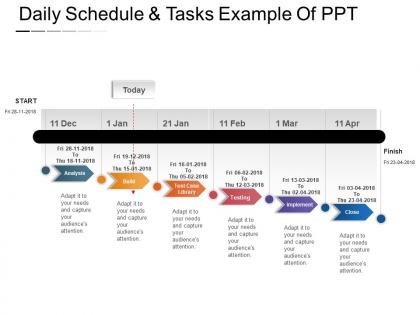
Are you looking for presentation designs to manage daily tasks in the organization? Here, we come up with confident, content ready daily schedule and tasks example of PPT design template. You can download this PPT diagram for project planning, project management or other project scheduling related presentations. Use this awesome slideshow to plan agenda or detailed schedule to complete business-related tasks. Design template consists of a table to represent weekly or monthly schedule along with the daily task, which gives your team members an idea about the task assigned to them. This daily routine PowerPoint template is mainly used by project managers, business process managers, team leaders to assign tasks and discuss detailed agenda with their internal team members. You can also use this daily schedule activity template to discuss the daily plan with your seniors and build business strategies accordingly. The design layout is wonderful. So, download this time and task management PPT slide and attract your viewers with your unique ideas. Our Daily Schedule And Tasks Example Of Ppt are good for canvassing. Become the candidate of their choice.
People who downloaded this PowerPoint presentation also viewed the following :
Daily schedule and tasks example of ppt with all 5 slides:
Our Daily Schedule And Tasks Example Of Ppt give you something different. They help you create a new look.

FAQs for Daily schedule and tasks
Honestly, start with 15-30 minute chunks and work from there. Block out your meetings, work stuff, and breaks - but here's the thing, always leave buffer time between appointments because back-to-back meetings will destroy your soul. Add priority levels so you know what's actually urgent vs what can wait until tomorrow. Oh, and don't forget to schedule time for interruptions and checking messages. Most people mess this up by being way too optimistic about timing. Like, that "quick" task? It's gonna take twice as long. Be realistic about what you can actually get done.
Honestly, having a daily schedule is like having GPS for your day. You stop wasting mental energy deciding what's next because you already figured it out. Work becomes way more focused - instead of just responding to emails all day, you tackle the stuff that actually moves the needle. Plus it forces you to carve out time for personal things (otherwise I'd never work out, let's be real). The key is starting small though. Just pick 3-4 main things for tomorrow and block them out. You don't need some fancy system right away.
Honestly, digital wins for me because I can change stuff instantly and get reminders so I don't forget meetings like an idiot. The syncing across devices is clutch too - saves me from rewriting everything constantly. But paper has its perks. Never dies on you, zero distractions from notifications buzzing every five seconds. Some people just focus better writing things down by hand, which I totally get. My advice? Test both for a week. Your brain will probably tell you pretty fast which one doesn't annoy you. I'm team digital but my mom swears by her paper planner, so really depends on your style.
Honestly, just brain dump everything you need to do first. Then use that Eisenhower thing - urgent vs important, you know? Time-blocking is a game changer though, seriously. It makes you face reality about how long stuff actually takes (spoiler alert: way longer than you think lol). Pick your top 2-3 things when you're not dead tired. Buffer time is clutch because random crap always comes up. Oh, and check your priorities the night before - saves you from that morning "wtf do I do first" panic.
Honestly? Google Calendar's probably your best bet - syncs everywhere and just works. Outlook's solid too if you're already in that ecosystem. I've been messing around with Notion lately and it's pretty cool for combining schedules with to-do lists, but fair warning, it can get overwhelming fast. Time blocking is a game changer though - group similar stuff together and your whole day flows better. Oh, and don't judge me but I still keep a paper planner sometimes. There's just something about physically crossing things off, you know?
So basically, time-blocking stops you from writing "finish report" on your to-do list and then wondering why it never gets done. Block out actual hours - like Tuesday 9-11am for that report. You'll realize tasks take way longer than expected (they always do, it's annoying). But here's the thing - you can't overbook yourself when you see your day mapped out visually. Fewer random interruptions too since you know exactly what you should be working on. Just try blocking your three biggest tasks tomorrow. You'll feel way more focused, I promise.
Ugh, don't pack your schedule like I used to! Biggest mistake is thinking you can actually do everything you planned. Build in buffer time or you'll feel like crap every day. Block time for annoying stuff too - emails, that one coworker who always needs "just five minutes." Trust me on this one. Also leave room for random fires because something always comes up. I start with maybe 75% of my day scheduled max, then add more if it's working. Way better than being stressed constantly.
Okay so first thing - figure out when you naturally crash during the day. For most people it's like 10am and 3pm ish. That's when you want your breaks, not just whenever. And actually step away from your desk! I used to think scrolling Instagram counted as a break but it totally doesn't. Try doing 90-minute chunks of work then take 15-20 minutes off - apparently that matches how our brains work or something. Going outside helps way more than you'd think. Oh and track your energy for a week first so you know your actual patterns instead of just guessing.
Dude, flexibility saved my sanity. I used to make these perfect schedules that would implode the second a meeting ran over - so frustrating! Now I only plan about 70% of my day and leave buffer time between stuff. When something unexpected hits, you can just shuffle things around instead of watching everything crumble. Put your big tasks during your best hours, but don't pack every minute. Oh, and treating it like a loose framework rather than some sacred schedule? Game changer. You'll actually stick with it.
Honestly, I always block out 15-30 minutes between big stuff - meetings, important tasks, whatever. When random things come up (which they will), you won't feel totally screwed. Each morning I figure out what absolutely HAS to get done and knock that out first while I still have brain power. Other stuff can wait until tomorrow if needed. Oh, and keep a list of flexible tasks you can throw in when your original plan falls apart. I learned this the hard way - trying to stick to perfect schedules just makes you miserable. Being adaptable wins every time.
Honestly, don't try to plan every single minute - that's a recipe for burnout. Just pick 2-3 things that absolutely have to happen each day. Morning routines are seriously a game changer though, like having that one anchor point makes everything else fall into place. Always give yourself way more time than you think you'll need because literally everything takes longer than expected (learned this the hard way). Try grouping similar stuff together instead of jumping between different types of tasks all day. Phone reminders work great, or just a basic checklist. Start with nailing your morning routine for a week before adding more structure - baby steps actually work.
Honestly, visuals are a game-changer for schedules. Color-coding different tasks makes everything so much easier to scan - like blue for work stuff, green for personal time. Icons help too. I started using little symbols for meetings and workouts, and now I don't have to actually read everything to know what's coming up. Progress bars are pretty satisfying when you're checking things off. The whole point is avoiding that wall-of-text nightmare that makes you want to ignore your schedule completely. Even just using 2-3 colors for priority levels will make you actually want to look at it. Trust me on this one.
Honestly, having a set schedule saves my sanity when working from home. Block out time for your biggest tasks first - that's when you'll actually get stuff done. It also helps you tell teammates when you're available vs. when you're in the zone (trust me, random Slack pings are productivity killers). The structure thing is huge too since you don't have that natural office rhythm anymore. I learned the hard way to add buffer time between meetings... like, everything takes longer than you think it will. Just start by time-blocking tomorrow's top priorities and see how it feels.
Honestly, it's super simple - just grab any template and swap stuff around to fit your actual life. Figure out your non-negotiables first: work, sleep, commute times. Then slot everything else around those. Have kids? Throw in school pickup and bedtime chaos. Work from home? Skip the commute padding but definitely keep those breaks (trust me on this). Students can just switch "meetings" to "classes" and call it a day. The structure stays the same, but make the activities actually yours. And please don't force yourself into someone's crazy 5am routine if you're not wired that way.
Honestly, the trick is piggybacking on stuff you already do. Morning coffee time? Perfect for reading instead of doom-scrolling. I'm obsessed with doing "power hours" where I tackle work planning and personal stuff together - saves so much mental energy. Your commute's great for language podcasts, or you could squeeze in stretches between meetings. It's all about finding those random pockets of time that are just... sitting there. Don't overthink it though. Pick one tiny thing to try this week and see what happens. Sometimes the smallest changes stick the best.
-
Illustrative design with editable content. Exceptional value for money. Highly pleased with the product.
-
Easily Understandable slides.