

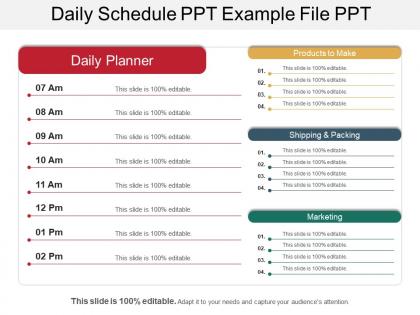
Daily schedule ppt example file ppt




Try Before you Buy Download Free Sample Product
 Impress Your
 Audience
 100%
100% Editable
 Save Hours
 of Time


Put on the daily schedule PPT example file PPT PowerPoint presentation to make a business presentation and discuss the daily schedule by including a list of employees of your company and its associated information which can be; location, working times, responsibilities for a given time period. As it is widely known that the schedule is very necessary and basis for the day to day operation of many businesses such as; retail store, manufacturing facility, the usage of the daily routine PPT slide helps the user to initiate the process in designing a business schedule to create an effective workplace schedule in order to balance the needs of stakeholders such as; management, employees and customers. Successfully create and maintain the schedule for your employees, workers, team members as well by using our professionally designed business workflow timetable PPT slide. The design of the template enables the user in assisting the organization for the better management staff scheduling, manage shifts, entrusting assignments and employee preferences. The inserted features and components of the slideshow provides the user the innovative ways to connect with the staff, ask for their preferences and communicate the schedule to them for getting far more better results. Great Daily Schedule Ppt Example File Ppt are the right combination of quality graphics quality animations few words and limited transitions; we have them all and even more.
People who downloaded this PowerPoint presentation also viewed the following :
Daily schedule ppt example file ppt with all 5 slides:
Campaign for the big cats with our Daily Schedule Ppt Example File Ppt. Elaborate on their feline grace.

FAQs for Daily schedule ppt
Track what you're actually doing for a week first - that's the game changer. Block your biggest priorities during peak energy hours. Leave 15-20 minutes between meetings so you're not sprinting everywhere like a maniac. Be honest about how long stuff really takes you (we're all terrible at this). Three things that matter: time blocks for priorities, buffer time, and realistic expectations. I learned this after burning out from cramming my schedule too tight. Oh and protect deep work time - that's where the real progress happens. Start small though.
Honestly, visual templates are so much better than those boring text lists. Your brain can actually process what's happening when you see time blocks and gaps between meetings laid out visually. Color coding is where it gets really good though – I use different colors for work stuff vs personal tasks, and it makes everything click instantly. Short sentences work great, but templates with little icons or progress bars help you understand your day's rhythm way faster. Oh, and pick something that matches how you actually think about time – there's no point using a fancy hourly grid if you're more of a "morning/afternoon/evening" person, you know?
Honestly, prioritizing changed everything for me. I used to just randomly attack my to-do list and wonder why I felt so scattered. Now I rank tasks by actual impact before diving in. Handle your biggest, most important stuff when you've got the most energy - mornings work best for most people, though I'm weirdly productive around 2pm sometimes. The trick is separating real priorities from just urgent busywork that feels important but doesn't actually move you forward. Once you start being more intentional about what gets your attention first, you'll notice how much more focused your whole day feels.
Dude, Gantt charts are actually game-changers for scheduling when you've got a lot going on. They show you everything laid out visually - like what depends on what and when stuff needs to happen. Super helpful for spotting where things might get backed up before it actually happens. I mean, they're probably overkill if you're just planning like three simple tasks, but with multiple projects? Total lifesaver. You can finally plan realistic timelines instead of just winging it and hoping for the best. My cousin swears by them for her consulting work. Try it for your next crazy week - you'll be shocked how much clearer everything becomes.
Honestly, I swear by keeping buffer time between stuff - like 15-30 minutes so one thing running late doesn't mess up everything else. Been there too many times! What really helps is having a "flex list" of tasks that matter but aren't super urgent. Morning meetings get cancelled? Perfect, tackle something from that list. I always figure out my non-negotiables each morning too. The rest can get shuffled around if needed. Oh, and don't pack your schedule too tight - I used to do that and it was brutal when anything unexpected came up.
Honestly, just start with Google Calendar or something simple and actually use the time-blocking feature - it's a lifesaver for focus work. Time-tracking apps will show you where your hours really disappear (spoiler: probably social media lol). The sync thing across devices is clutch when you're bouncing between your phone and laptop constantly. Smart calendars can auto-decline double bookings and remind you about stuff. Oh, and some even suggest meeting times based on when you're most productive. Don't go crazy adding every feature at once though - pick one pain point and solve that first.
Oh man, don't pack your schedule like a game of Tetris with zero gaps between stuff. Trust me on this one - I used to do it all the time and would be stressed out of my mind when one thing ran long and destroyed everything else. Leave some breathing room! Also, don't be crazy rigid about it. Life's messy and meetings always go over. The other thing I wish someone told me earlier - pay attention to when your brain actually works. Like, I'm useless for creative stuff after 3pm, so why was I scheduling writing then? Start small with your top 3 things and build from there.
Honestly, most people I know just figure out when they're actually productive and build around that. My developer buddy blocks off morning hours for heavy coding since that's when his brain works best. Sales people usually jam-pack their mornings with calls - apparently that's when everyone's still optimistic lol. Creative folks are super protective of their flow time. This designer I know literally schedules "DO NOT DISTURB" blocks and gets genuinely annoyed if people interrupt. Teachers obviously work around classes, but consultants group similar stuff together so they're not constantly switching gears. Really it comes down to knowing your energy peaks and what absolutely can't move, then fitting everything else around those.
Honestly, having a routine has been a game-changer for my anxiety. Your brain stops constantly deciding what to do next, which is exhausting without you even realizing it. Sleep gets better too since your body knows what to expect. I swear those little checkmarks when you finish planned tasks actually release dopamine - sounds nerdy but it's true! Don't go overboard though. Maybe try planning just 3-4 main things tomorrow and see if it helps. Oh, and mornings are usually easiest to stick with routine-wise.
So presentation templates are actually perfect for this stuff - they break everything into bite-sized pieces that don't feel overwhelming. I'd start with basic daily/weekly schedule templates where people can plug in their real tasks and see what's actually eating their time. Way better than just talking about it, you know? The visual thing really works. Templates with goal sections and deadline spots are gold because they force you to get organized whether you want to or not. Oh, and you can make fake scheduling scenarios too - like practice rounds. Honestly, just grab a simple day-blocking template first and let them mess around with it.
Dude, I used to think taking breaks was just being lazy, but I was totally wrong. Your brain actually needs those resets to focus better afterward. I usually do like 10-15 minutes every couple hours now and it's crazy how much sharper I feel. Plus your eyes get a break from staring at screens all day (mine were getting so dry lol). It prevents that awful burnout feeling and honestly helps with creativity too - sometimes the best ideas come when you're not even trying. Just step away for a bit and you'll come back way more productive.
Dude, you need way more structure at home than you think. There's literally nothing stopping you from working until midnight when your computer's just sitting there. I'd block out real start/stop times and stick to them - trust me on this one. Schedule your calls and deep work, but keep things flexible since that's the whole point of WFH. The game changer though? Create actual rituals that flip your brain between work and home mode. Get dressed (even if it's just real pants instead of pajamas) and do the same morning routine every day.
Honestly, just do a weekly check-in where you compare what you planned vs what actually went down - you'll quickly see where your time estimates are completely off. I rate each time block 1-10 for energy levels, which sounds nerdy but actually helps tons. Track if you're hitting your daily priorities and write down what keeps derailing you. Oh, and mood tracking if that's your thing. Pick one method and stick with it for like two weeks. Then tweak your schedule based on whatever patterns jump out. Don't overthink it though.
Honestly, I just build in buffer time everywhere - like 15-20% of my day is "flex time" between meetings. Sounds excessive but trust me, something urgent always comes up. Keep certain tasks moveable too - emails, admin stuff, whatever can wait. I actually keep a list of quick 30-minute tasks for when my schedule suddenly opens up (rare but it happens). Oh and don't aim for the perfect schedule - that's a trap. You want something that bends without breaking. Way less stressful when you're not constantly playing catch-up because one meeting ran long.
Look for templates with clear time blocks and decent white space - nobody wants their day looking like a nightmare at 7am. Clean fonts work best, maybe some color coding for different stuff. I always add space for notes too, super helpful. Don't get sucked into those crazy fancy designs though, they're more distracting than useful honestly. Simple beats pretty every time. Oh and make sure you can adjust the time slots - some templates are weirdly rigid about that. You'll want sections for both your actual appointments and the flexible tasks that inevitably pile up.
-
Illustrative design with editable content. Exceptional value for money. Highly pleased with the product.
-
Best Representation of topics, really appreciable.