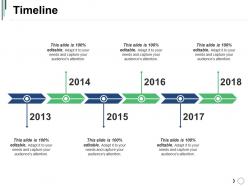
Timeline example of great ppt
Try Before you Buy Download Free Sample Product
Audience
Editable
of Time
Encourage folks to act in a contemporary fashion with our Timeline Example Of Great Ppt. Be able to jettison the baggage.
People who downloaded this PowerPoint presentation also viewed the following :
Content of this Powerpoint Presentation
Storylines, phases, milestones, due dates, and steps can be easily illustrated with a timeline diagram. For instance, you can use a timeline to inform your students of key events preceding a historical event or to comprehend the project's outputs and outcomes as a project manager.
Simply put, a timeline helps us see the big picture, make predictions, and learn from the past, present, and future.
You can use a timeline to see the big picture and get a glimpse of what's to come by answering the "what," "why," "where," and "when" questions about your life's events. SlideTeam covers everything you want to know about timelines, examples of great PPTs, and how to make them.
However, if you wish to easily construct a winning strategy to present to investors, business partners, and other key stakeholders in your company, giving you a leg up on the competition. Get hold of the strategic roadmap timeline PowerPoint slide to present your company's plan for reaching its objectives.
Template — Timeline Example Of A Great PPT

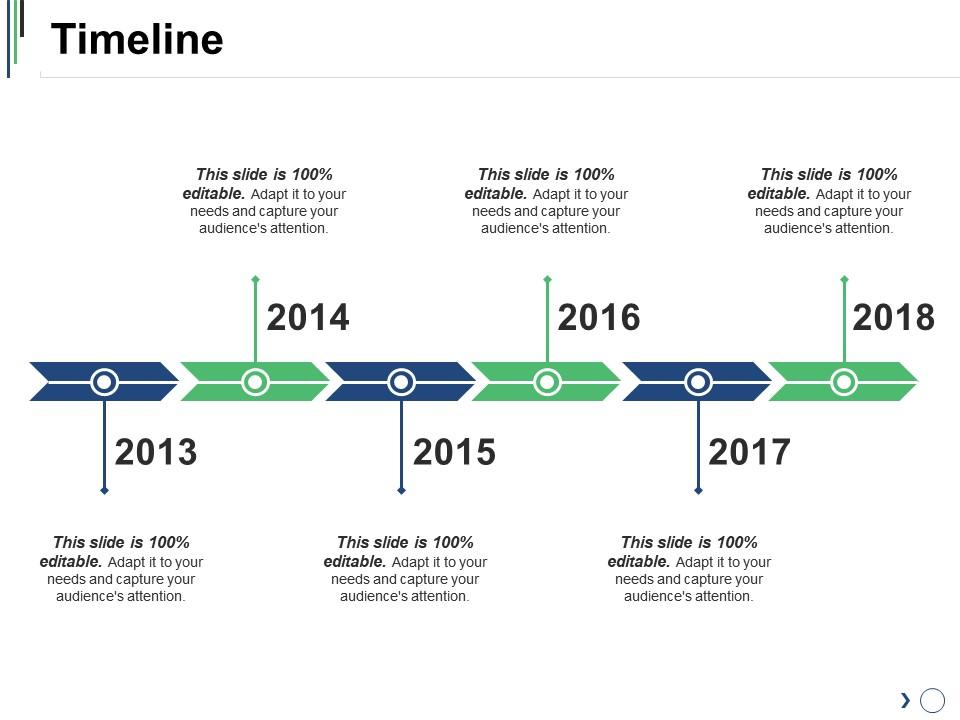
Make your annual company plans or project summaries a reality with the help of this Timeline PowerPoint Template. There are six steps to this procedure, and it provides a thorough illustration of a larger project's time-framed events or milestones. Experts, students, and workers can use timeframes to make realistic projections about their professional and personal development plans. Upon incorporating this presentation diagram into your business strategy, it can benefit you in many ways, including lowering the likelihood of project failure, cutting expenses, and connecting to overarching company objectives. Not only that, this PowerPoint Layout also lets you map out your company's future, which is useful when you need to make adjustments to the way you manage your employees' assignments.
Conclusion
Slide Team's highly visual representation of timelines can be an effective means of communicating regardless of your planning level. With this PPT Tool at your aide, you can keep your audience engaged and motivated. This is possible when a clear route is laid, whether you're reporting on past actions, defining future goals, or painting a picture.
PS–Project managers can use the Project Management Timeline Gantt Chart PowerPoint template to delegate tasks, track their progress, and even share information with upper management.
Timeline example of great ppt with all 5 slides:
Address the committee with our Timeline Example Of Great Ppt. You will recieve approving looks.
FAQs for Timeline example
Make sure you've got solid start and end dates first. Then map everything chronologically - sounds obvious but you'd be surprised how many people mess this up. Keep your milestone descriptions short and sweet. Design-wise, don't go crazy with colors and fonts. Nobody wants to squint at your timeline. Add who's responsible for each phase and build in some buffer time between big milestones. Trust me on this one - things always take longer than expected. Call out your major deliverables and decision points clearly so execs know when they actually need to show up. Dependencies are huge too - flag anything that could tank your whole schedule. Oh, and definitely include a risks slide at the end.
Honestly, people zone out so fast when you just throw text at them. Icons and colors are like little memory hooks - they'll actually remember your stuff later. I learned this the hard way after watching people scroll Instagram during my last presentation lol. Colors can group different time periods together, and little illustrations make those big milestones pop. Way better than boring bullet points. Your brain processes visuals faster anyway, so you can show how events connect without explaining every single relationship. Trust me, once you start using a decent color scheme, you'll never go back to plain text timelines.
Okay so the main thing is don't cram everything onto one slide - people literally can't read tiny text. Also keep your time intervals consistent! Like don't jump from weeks to decades randomly, it's super jarring. I always mess up the visual hierarchy part tbh - make sure your big milestones actually pop instead of getting lost in all the details. Oh and test your slides beforehand because what looks fine on your laptop might be unreadable on the projector. Keep it simple, focus on key moments. Your audience will thank you.
Know your audience first - that's everything. Executives want clean, simple milestone views without all the clutter. Your tech teams though? They can handle way more detail and complexity. I swear, half the presentations I've seen bomb because someone picked some overly fancy template that just confused everyone. External clients need something that looks good but stays easy to follow. Students might actually like the more colorful, interactive stuff. Oh, and definitely test your template first with actual content - you'll quickly see if everything fits or if you're cramming too much in there.
Honestly, just go with Canva - it'll save you so much time and actually looks good. PowerPoint works too if you're already comfortable with it, and the SmartArt thing isn't terrible for basic stuff. Google Slides is basically the same deal. Prezi's cool if you want that weird zooming thing (though it might make people dizzy lol). Lucidchart's better for complicated project timelines. Adobe Illustrator gives you total control but you'll spend forever learning it. Unless you're a design person already, I'd stick with Canva. Way less frustrating.
Honestly, less is more with timelines. Use bullet points instead of chunky paragraphs - just hit the key dates and milestones. Let your visuals carry most of the weight here. Icons and color coding work great for showing different phases. White space is your friend - don't cram everything together. Here's my test: can someone scan it and get the gist in 30 seconds? If not, you've probably got too much text cluttering things up. Oh, and definitely show it to someone who doesn't know the project. They'll spot confusing bits you missed.
Honestly, you can find timeline inspo everywhere! Apple does those slick iPhone evolution presentations that always look clean. Healthcare orgs map out clinical trials and patient journeys. Construction companies are probably the best at this since their whole business is about project phases and deadlines. Marketing teams do campaign timelines all the time. Oh, and nonprofits are really good at the storytelling angle - showing their impact over years. I'd check your industry first for examples, then totally steal design ideas from whatever looks cool elsewhere. Software companies also do solid release timeline visuals.
Honestly, start with just the big milestones - don't throw every little detail on there. I made that mistake once and it looked like someone threw up a box of crayons everywhere lol. Keep your colors and spacing consistent so people can actually follow along. White space is your friend here - nobody wants to stare at a wall of text and tiny icons. Oh, and definitely test it on someone fresh. If they squint at it for more than 10 seconds trying to figure out what's happening, you've probably overcomplicated things. Group similar stuff together and you'll be good.
Okay so timelines can actually be super engaging if you approach them right. Start with something that grabs attention - like a crazy statistic or pivotal moment that hooks people. Introduce key characters as they become relevant and show how they changed over time. Build up tension around conflicts and turning points, then reveal how things got resolved. Oh and definitely connect the dots between events - show how one thing led to another. Honestly, the "what if" moments are my favorite part. Wrap it up by tying everything together and highlighting the bigger impact or lessons.
Make your key dates stand out with bold text or colors - I'm obsessed with red for hard deadlines and green for the flexible stuff. Always build in buffer time so your team isn't losing their minds at the last second. For each milestone, add quick context about why it matters and what's actually due. Oh, and put names right on the timeline itself! Nobody wants to waste time figuring out who's supposed to do what. Trust me, your stakeholders will thank you when they can actually follow what's happening instead of squinting at some confusing chart.
Dude, interactive timelines are honestly so much better than regular slides. You can click through events and zoom into specific periods - keeps people actually paying attention instead of zoning out. When someone asks about a random date, you just jump right there instead of that awkward "um, let me find that slide" moment. I've watched the most boring historical stuff suddenly become interesting this way. Short sentences work. Longer ones let you show those cause-and-effect relationships as they happen in real-time. TimelineJS is solid for this, or you could mess around with PowerPoint's morph transitions if you're feeling lazy.
Getting feedback on your timeline presentations is seriously worth it. You'll catch stuff you'd never see - like when your milestone dates are confusing or colors don't work. I thought my color-coded system was perfect until someone said they couldn't read it! Ask specific questions though, not just "thoughts?" Try "Was the sequence clear?" Also weird tip but record yourself presenting once. You'll notice awkward pauses and unclear explanations that people won't tell you about. Different stakeholders care about different things too, so feedback helps you figure out what actually matters to each group.
Colors totally make or break timeline presentations. Blues and greens work great for showing progress and building trust. Red's perfect for urgent stuff or major milestones. Yellow highlights important points without being too aggressive. I once made an entire timeline red thinking it looked cool - big mistake! Everyone assumed we were in crisis mode lol. Try using color progression, like light blue fading to darker blue as you move through phases. It visually shows advancement over time. Just pick a scheme that actually matches your content's vibe and stick with it throughout.
Live presentations? Go interactive - pause for questions and use actual props if you can. Keep timelines simple since people will just ask if they're confused. Virtual is totally different though. You need way more detail on your slides because interaction sucks on Zoom. Use those annotation tools to highlight stuff and break long timelines into smaller pieces. Honestly, I've bombed so many virtual presentations by using my in-person approach! Do a quick practice run first - the pacing feels completely different depending on format.
Honestly, just watch how people react in the moment - are they asking questions or staring at their phones? That tells you everything. Do a quick poll afterward about the main milestones to see if they actually got it. The real win though is when people start referencing your timeline in later meetings without you having to bring it up. Did they approve what you needed? Commit to deadlines? Sometimes I'll casually ask someone to walk through the phases a week later - you'd be surprised how much people forget. But if your timeline becomes their go-to reference, you nailed it.
-
Awesome presentation, really professional and easy to edit.
-
Unique design & color.
-
Thank you for sharing this timeline template.