

Daily schedule activity example ppt presentation




Try Before you Buy Download Free Sample Product
 Impress Your
 Audience
 100%
100% Editable
 Save Hours
 of Time


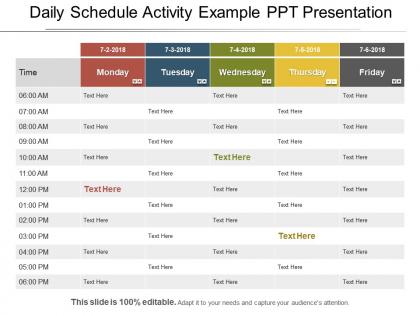
When you like to be organized, want to reduce stress, and accomplish personal or business goals, you can surely go for our professionally designed daily schedule activity PowerPoint slide diagram. The daily schedule PPT template acts as a simple yet effective time-management tool template for keeping track of any daily activity. Whether you want to manage a busy work schedule, family chores or academic assignments, you can take the help of the readily available daily activity planner presentation slideshow. Moreover, it helps you in saving your time as you get an effective schedule PPT slide design without doing anything. The business daily schedule agenda slide for PowerPoint acts as a powerful tool for the user to highlight employee shifts, meeting agendas, etc. The daily planner calendar presentation template diagram helps to enhance work performance, keep projects on task, as well as motivate audience to work hard to achieve the goals. With this daily agenda activity PowerPoint slide design, you can create an employee schedule, sales report as well as other detailed reports. Our daily work schedule PPT presentation template enables a user to plan a day, a week or a month at a glance. Our Daily Schedule Activity Example Ppt Presentation ensure really fast growth. They enable you to gallop away.
People who downloaded this PowerPoint presentation also viewed the following :
Daily schedule activity example ppt presentation with all 5 slides:
Increase the chances of greater communal harmony with our Daily Schedule Activity Example Ppt Presentation. Campaign for integration.
FAQs for Daily schedule activity
Key elements include time slots with clear intervals, task categories for different activity types, priority indicators, buffer time allocations, and visual progress tracking sections. These components streamline workflow management by enabling better time allocation, reducing scheduling conflicts, and enhancing productivity monitoring, with many professionals finding that structured templates deliver improved work-life balance and operational efficiency.
Visuals enhance daily schedule presentations by improving comprehension, increasing engagement, and facilitating quick reference through color-coding, icons, and clear time blocks. Interactive elements like progress bars, priority indicators, and visual hierarchies enable teams to process scheduling information faster, track completion rates more effectively, and maintain better focus throughout their workday, ultimately delivering improved productivity and streamlined time management.
Effective daily schedules vary by audience, with students benefiting from structured study blocks and break intervals, professionals requiring time-blocked calendars with meeting clusters, and families needing coordinated routines balancing work, school, and household responsibilities. These tailored approaches enhance productivity by minimizing transitions, maximizing focused work periods, and reducing scheduling conflicts, with many organizations finding that audience-specific scheduling ultimately delivers better outcomes and improved work-life balance.
Color psychology impacts daily schedule design by influencing mood, productivity, and task prioritization through strategic color choices like blue for focus-intensive work, green for balanced activities, and red for urgent deadlines. Many professionals find that color-coded scheduling systems enhance visual organization, reduce cognitive load, and improve time management efficiency, ultimately delivering clearer workflow patterns and increased daily productivity across personal and professional environments.
Common mistakes when creating daily schedule templates include overestimating available time, failing to include buffer periods, neglecting energy level variations, and creating overly rigid structures without flexibility. Many professionals find that unrealistic time blocks, missing break periods, and ignoring priority-based task sequencing ultimately reduce productivity and increase stress, while templates incorporating realistic timeframes and adaptive scheduling deliver better work-life balance and sustainable performance outcomes.
Technology can be integrated into daily schedule presentations through interactive dashboards, real-time calendar syncing, automated task tracking, mobile accessibility, and AI-powered scheduling optimization. These digital solutions streamline schedule management by enabling instant updates, cross-platform synchronization, and data-driven insights, with many organizations finding that automated scheduling reduces administrative overhead while enhancing productivity and team coordination.
**INPUT**: What are some examples of unique layouts for daily schedules that capture attention? **OUTPUT**: Unique daily schedule layouts include visual timelines with color-coded priorities, kanban-style task boards, circular clock formats, and infographic-style designs with icons and progress bars. These innovative approaches enhance productivity by improving visual clarity, streamlining task prioritization, and increasing engagement, with many organizations finding that creative scheduling formats ultimately deliver better time management and higher completion rates. **Word count: 58 words**
Daily schedule templates accommodate both timeframes by incorporating dedicated sections for immediate tasks, weekly goals, monthly objectives, and quarterly milestones within a unified framework. Through strategic time-blocking and priority matrices, professionals can seamlessly balance urgent daily responsibilities with progressive long-term projects, with many organizations finding that this integrated approach enhances productivity while maintaining strategic focus and momentum.
Digital daily schedule templates should include interactive elements, automated reminders, cloud synchronization, recurring event settings, and integration with calendar applications. Printable versions focus on clear layouts, ample writing space, time blocking sections, and priority indicators, with many professionals finding that combining both formats enhances productivity by enabling seamless transitions between digital planning and offline execution.
Interactive elements enhance daily schedule presentations by incorporating clickable agenda items, embedded timers, poll integration, and real-time collaboration features. These tools transform static schedules into dynamic experiences, enabling participants to actively engage with content, provide instant feedback, and collaborate on time management decisions, ultimately delivering higher attention retention and more productive meeting outcomes.
Time management serves as the foundation for effective daily schedules by enabling strategic task prioritization, realistic time allocation, and buffer creation for unexpected demands. Through proper time management techniques, professionals streamline workflow efficiency, minimize stress levels, and maximize productivity outcomes, with many organizations finding that structured scheduling ultimately delivers enhanced work-life balance and competitive operational advantage.
Daily schedule templates support work-life balance by establishing clear boundaries between work and personal time, prioritizing tasks effectively, and preventing overcommitment to professional obligations. Through structured time blocking, professionals can allocate dedicated periods for family activities, personal wellness, and leisure pursuits, while many organizations finding that employees with defined schedules demonstrate improved productivity and reduced burnout rates.
Effectiveness metrics include task completion rates, time spent per activity, goal achievement percentages, energy levels throughout the day, and overall productivity scores. These measurements enable professionals to identify peak performance periods, optimize resource allocation, and streamline workflows, with many organizations finding that data-driven scheduling ultimately delivers enhanced operational efficiency and competitive advantage.
Cultural differences significantly influence daily schedule design through varying work hours, religious observances, family priorities, communication styles, and time perception across regions. Global organizations find that adapting templates for different cultures—such as incorporating siesta periods in Mediterranean markets, prayer times in Middle Eastern offices, or flexible family time in Nordic countries—ultimately enhances employee engagement and productivity.
Simplifying complex schedules involves using visual hierarchy, color coding by priority or department, consolidating similar tasks, and breaking lengthy timelines into digestible phases or milestones. These design strategies streamline information by reducing cognitive load, enhancing readability through strategic white space, and enabling quick decision-making, with many project managers finding that simplified schedule presentations ultimately deliver clearer stakeholder communication and faster approvals.
-
Excellent work done on template design and graphics.
-
Presentation Design is very nice, good work with the content as well.