


Defining The Journey Map For Target Customer Structuring A New Product Launch Campaign




Try Before you Buy Download Free Sample Product
 Impress Your
 Audience
 100%
100% Editable
 Save Hours
 of Time


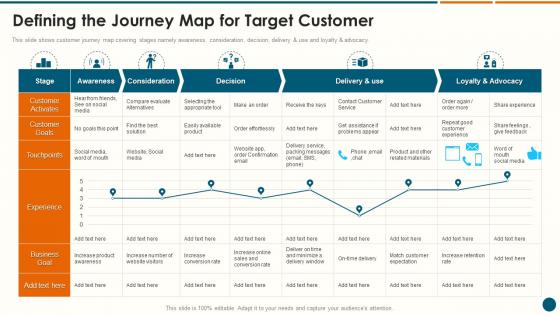
This slide shows customer journey map covering stages namely awareness, consideration, decision, delivery and use and loyalty and advocacy.
People who downloaded this PowerPoint presentation also viewed the following :
Defining The Journey Map For Target Customer Structuring A New Product Launch Campaign with all 7 slides:
Use our Defining The Journey Map For Target Customer Structuring A New Product Launch Campaign to effectively help you save your valuable time. They are readymade to fit into any presentation structure.





FAQs for Defining The Journey Map For Target Customer Structuring A New
So you'll want to focus on these main stages: Awareness (how people find you), Consideration (when they're comparing you to competitors), Purchase (the actual buying moment), Onboarding (their first experience), and Advocacy (when they become fans who refer others). Honestly, some businesses throw in a "Retention" stage between onboarding and advocacy too - depends on what you're selling really. The main thing is catching all those moments where customers actually interact with your brand. My advice? Pick whichever customer journey impacts your biggest business goal right now and start there.
So customer journey mapping is basically like following users around and seeing where they get stuck or annoyed. You trace their whole experience - first time they hear about your product all the way to actually buying it. Honestly, it's kind of eye-opening because you'll find problems you had no clue existed. Like watching someone try to navigate your house in the dark, you know? Once you spot these friction points, you can actually fix stuff that matters instead of just guessing. Way better user experience, less people abandoning ship. Oh, and start small - just pick one main user flow first.
Honestly, Miro and Mural are probably your best bets here - super collaborative and they've got journey map templates built in. Lucidchart's solid too if you want something more structured. But here's the thing - I've watched teams crush it using basic stuff like Figma or even Google Slides when money's tight. The tool really doesn't matter as much as getting everyone in the same room to hash it out together. My old manager used to say the magic happens in the conversation, not the software. Start with whatever you already have access to. You can always upgrade later if this becomes a regular thing for your team.
Honestly, just map out every step your customers take with your business and see where they're hitting walls. Surveys are your best friend here - straight up ask people what sucked about their experience. Check your analytics for stuff like cart abandonment or pages where people sit forever (probably confused as hell). Heat maps are clutch too, they'll show you where users are clicking around like lost puppies. I'd start with one customer type and follow their whole journey. The trick is mixing real data with what people actually tell you. Way more telling than you'd think.
Get everyone in the room from day one - don't just loop them in later to rubber-stamp your work. Pull in sales, support, product, marketing, ops. They each see totally different slices of the customer journey. Support teams are honestly gold mines for this stuff since they deal with angry customers constantly. Mix up who runs the sessions so marketing doesn't steamroll everyone (you know how they are). The whole point is getting buy-in so people actually use the thing afterward instead of letting it collect dust.
Personas are huge for journey mapping - they literally decide whose story you're telling. Skip this step and you'll end up with some bland, generic path that doesn't match how people actually behave. A millennial who's super comfortable with tech? Their buying journey looks nothing like what a baby boomer goes through. Honestly, the differences can be pretty dramatic. Each persona hits different pain points and uses totally different touchpoints. You'll want to map out separate journeys for each one. I'd start with your top 2-3 personas, then build distinct maps from there.
Start with conversion rates at each stage - that's your foundation. Then track time-to-conversion and customer satisfaction scores. Drop-off points between touchpoints are huge too. Oh, and support tickets - when journeys work better, people stop calling confused. Honestly though? Don't go overboard with metrics at first. Pick 3-4 that actually connect to your business goals. I've seen teams drown in data they never use. Monthly dashboard reviews work great. You'll spot pretty quickly where your journey map is making a real difference versus just collecting dust.
Start by collecting feedback at every touchpoint - surveys, interviews, support tickets, whatever you can get. The real trick is using their exact words when you're mapping out emotions and pain points. Don't guess what pisses them off, let them tell you. I actually love running sessions where customers review your draft map and call out what's totally wrong (happens more than you'd think). The biggest mistake? Treating this like a one-and-done project. You've gotta keep updating it as customer experiences change, or your map becomes useless pretty quick.
Dude, emotional mapping is where you'll find the good stuff. Track how customers *feel* at each step - are they pumped when they find your product? Pissed off during checkout? Most teams I know just look at clicks and conversions, totally missing why people actually bounce. Short sentences work here. You gotta survey people about their feelings at different moments, then slap that emotional data right onto your journey map. Honestly, it's kinda obvious once you see it - like, of course the "why" matters more than just tracking what buttons people press.
Definitely don't make these once and forget about them. Check yours every quarter or so - assign someone to actually own the updates. Fresh customer feedback, support tickets, sales convos, all that stuff needs to get folded back in. The pandemic really scrambled how people behave online, so what worked in 2019 might be totally off now. Get your team in the habit of calling out when something feels wrong between the map and what they're seeing. Oh, and actually use them when making decisions - you'll spot outdated parts way faster that way.
Dude, the worst thing you can do is just guess what customers are thinking instead of actually asking them. Start with real data, not assumptions. Also don't go crazy with details right away - I've watched entire teams disappear down rabbit holes for like a month straight. Multiple customer types will take totally different paths, so map those out too. Oh and here's what kills me - people spend forever making these gorgeous maps then literally never touch them again. You gotta keep updating the thing or it's just pretty wall decoration.
Oh totally segment first! You can't just throw everyone into one journey map - it's useless. I'd pick your 2-3 biggest customer types and map them separately. Like, enterprise clients need tons more hand-holding than small businesses, right? And good luck getting a millennial on a phone call lol. My last project was a mess because we tried the one-size-fits-all approach. You end up with this watered-down average that doesn't actually help anyone. Demographics, behavior, needs - whatever makes sense for your business. Trust me, you'll spot the real pain points way faster this way.
Dude, journey mapping is a game changer. You literally see where people get stuck or pumped up about your stuff. Say someone bounces after hitting your pricing page - boom, you know to run retargeting that tackles their money worries. No more spraying generic ads everywhere and hoping something sticks (seriously, such a waste). You'll actually put your budget where people need that extra push. Short version: map their path, then hit them with the right message at exactly the right moment. Way better than guessing what works.
So when you map out different channels side by side, you'll catch all the spots where customers hit walls or bounce around between platforms. It shows you which touchpoints actually work vs the ones that suck. Honestly, the messaging inconsistencies alone will probably surprise you – same company, totally different vibes depending where people land. Look for drop-off points and see where your strongest channels are crushing it. The real magic happens when you spot friction that only shows up in the bigger picture. Start small though, just pick your top 2-3 channels and focus on the obvious gaps first.
So CRM integration is honestly a total game-changer for mapping customer journeys. Instead of guessing where people drop off, you'll see the actual data. Real touchpoints, real pain points - not just what you think is happening. The best part? Everything updates automatically, which saves you from manually tracking stuff (ugh, who has time for that). Your maps stay current as customer behavior shifts. Plus you can personalize based on someone's actual history with your company. Just connect your CRM to whatever mapping tool you're using and let the numbers do the talking. Way better than flying blind.
-
Thank you SlideTeam for such an excellent service.
-
Such amazing slides with easy editable options. A perfect time-saver.