


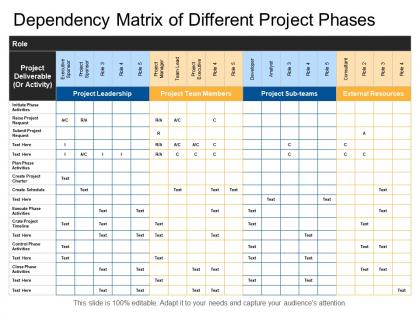
Dependency matrix of different project phases




Try Before you Buy Download Free Sample Product
 Impress Your
 Audience
 100%
100% Editable
 Save Hours
 of Time


Greet your guests heartily with our Dependency Matrix Of Different Project Phases. Express your genuine gratitude to them.
People who downloaded this PowerPoint presentation also viewed the following :
Dependency matrix of different project phases with all 5 slides:
Encourage accord with our Dependency Matrix Of Different Project Phases. Get folks to engage in dialogue.

FAQs for Dependency matrix of
So a dependency matrix is just a grid that shows how all your project tasks connect to each other. Basically which ones need to finish before others can start. You put activities on both rows and columns, then mark where the dependencies are. Makes it super easy to spot your critical path and see what can run at the same time. Honestly, I wish I'd learned about these sooner - would've saved me from some major scheduling headaches. The visual aspect is what makes it click, you know? Way better than trying to keep track of everything in your head. Definitely make one early in planning.
So basically a dependency matrix shows you how all your tasks connect to each other. Super helpful for catching problems early. Like, you'll see when one person has way too much on their plate and everything's waiting on them. Also spots those weird circular situations where task A needs task B, but task B also needs task A – total nightmare. The visual part makes bottlenecks really obvious. Plus you can find those domino-effect scenarios where one delayed thing screws up everything else. Honestly made me realize how fragile some of my timelines were! Just start by writing down your main deliverables and what they need.
So you'll need tasks on both axes, plus all the dependencies between them. Timeline stuff and resources too, obviously. I always throw in risk levels because honestly some dependencies will screw you way harder than others. Capture what type each one is - hard blocker vs soft dependency vs nice-to-have ordering. Oh and definitely add who owns each piece so you know exactly who to hunt down when stuff breaks. My advice? Start with something basic first, then build it out once you figure out what actually moves the needle for your project.
So a dependency matrix is basically like a reference table that shows which tasks rely on other tasks - kind of like a cheat sheet for "what depends on what." Gantt charts are totally different though. They're more visual timelines with bars showing how long each task takes and when stuff happens. Honestly, I find the matrix way better for catching bottlenecks early when you're still planning everything out. But once you're actually running the project? Gantt charts are your friend for tracking progress and keeping everyone on schedule. You'll probably end up using both.
Dependency matrices are clutch for complex projects where tasks connect in ways that aren't super obvious upfront. I'd start using one once you hit 10-15+ interconnected tasks. They're perfect for big software releases or anything involving multiple teams - one delay screws everything up otherwise. The matrix helps you spot bottlenecks fast and shows stakeholders what's blocking what without getting into all the technical details. Honestly wish someone had told me about these sooner - would've saved me from so many "wait, why is everything behind schedule?" moments. Super helpful for visualizing critical path stuff too.
Yeah, they work pretty well together actually! I'd start simple - just map out which stories depend on each other in a basic grid. During sprint planning, you can spot the bottlenecks before they mess up your timeline. Your standups become way more useful when everyone can see what's blocking what. We started doing this after getting burned by surprise dependencies (learn from our mistakes lol). Keep it updated though - otherwise it just becomes another useless doc nobody looks at. Review how things went in your retros and tweak your approach. Don't overthink it.
Honestly, just start with Excel or Google Sheets if it's a simple project - I probably use these way too much but they work. Lucidchart's pretty solid for anything more complex, or Visio if your company has it. Monday.com and Smartsheet have matrix features built right in which is nice. Oh, and if you're tracking software dependencies specifically, GitHub's dependency graphs are actually really helpful. There's also dedicated DSM software but that might be overkill. I'd just use whatever you already have access to first - you might be surprised how far a basic spreadsheet gets you.
So basically you map out all your tasks and show which ones depend on each other - think of it like a relationship chart but for work stuff. Everyone can see what's blocking what, which stops people from working in silos. The cool part is when teammates start giving you heads up about delays because they actually know who's waiting on them. It helps catch bottlenecks early too, before they mess up your whole timeline. Honestly, I've seen projects go way smoother once teams start using these. Just start with a simple spreadsheet listing tasks and their dependencies - nothing fancy needed.
Don't get too detailed – you'll burn hours mapping every tiny connection when you should focus on what actually blocks progress. Get your whole team involved too, since one person never sees everything. Half the matrices I've worked with just collect dust because nobody updates them regularly. During planning meetings, review dependencies at a decent level of abstraction. Business relationships matter as much as technical ones, which people forget sometimes. Most crucial part? Actually use the thing for decisions instead of treating it like paperwork nobody reads.
Start with anything that has zero dependencies - those are easy wins. Next, prioritize stuff that blocks the most other tasks. Honestly, these dependency chains can get messy fast if you're not careful. I always flag the high-impact blockers since they'll become bottlenecks later. Resource availability matters too, obviously. Oh, and scan for circular dependencies first - learned that the hard way on a project last year where we went in circles for weeks. Short tasks can fill gaps between bigger items. The whole thing's basically about clearing roadblocks in the right order.
Honestly, a dependency matrix is a game changer for figuring out where your resources are getting stuck. Like when Sarah's team keeps holding up three other projects (why is it always Sarah's team lol). You'll see exactly who's overloaded and what's actually on your critical path vs just busy work. The best part? You catch those resource conflicts way before they tank your timeline. I'd start by just mapping out what you have now - it's wild how stretched thin people actually are once you see it all laid out. Makes prioritizing so much clearer.
So basically a dependency matrix maps out which tasks are stuck waiting on other ones to finish. You can see where bottlenecks might hit before they actually mess up your timeline. Mark down all your deliverables and show how they connect - it's like predicting where things will go sideways (but in a useful way). Really helps when you're trying to explain to stakeholders why Phase 2 can't magically start early. Plus you'll have backup when arguing for buffer time in those planning meetings where everyone thinks everything can happen faster than it actually can.
So the dependency matrix comes first - it shows which tasks can't start until others wrap up. Then your critical path analysis uses that info to figure out the longest chain of work that'll dictate your timeline. You can't really do critical path stuff without mapping dependencies first. It's like GPS trying to route you somewhere but not knowing which streets actually connect, you know? I learned this the hard way on a project last year - skipped the dependency mapping and my timeline was completely off. Build your matrix first, then run the critical path analysis. Way easier that way.
Weekly updates work best when things are moving fast. During sprints or crazy project phases, I'd do it after hitting major milestones or when new dependencies pop up. Slower periods? Bi-weekly is totally fine. The real trick is making it automatic - like brushing your teeth or whatever. Set a calendar reminder and just do it. Don't wait until everything's tangled up because wow, untangling that mess later is the worst. I learned this the hard way on a project last year. You'll definitely thank yourself when crunch time hits and you're not frantically trying to figure out who's blocking who.
Yeah, definitely! Dependency matrices work for way more than just project stuff. I used one recently when planning which programming languages to learn - had to map out what I needed to know first before jumping into the advanced topics. They're great for anything with interconnected pieces, like business workflows or even figuring out team roles. The visual aspect really helps you catch bottlenecks you might miss otherwise. Sometimes I overthink these things, but honestly? Just drawing boxes and arrows between related items can save you tons of headaches later. Worth trying next time you're stuck on something complex.
-
Design layout is very impressive.
-
Colors used are bright and distinctive.