


Digital Marketing Report Powerpoint Ppt Template Bundles





Try Before you Buy Download Free Sample Product
 Impress Your
 Audience
 100%
100% Editable
 Save Hours
 of Time


Our Digital Marketing Report Powerpoint Ppt Template Bundles are topically designed to provide an attractive backdrop to any subject. Use them to look like a presentation pro.
People who downloaded this PowerPoint presentation also viewed the following :
Digital Marketing Report Powerpoint Ppt Template Bundles with all 21 slides:
Use our Digital Marketing Report Powerpoint Ppt Template Bundles to effectively help you save your valuable time. They are readymade to fit into any presentation structure.

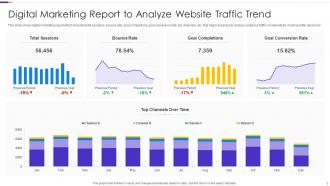
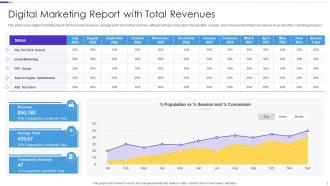
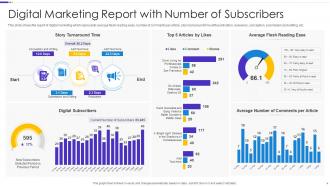
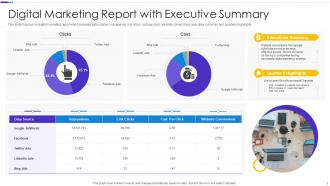
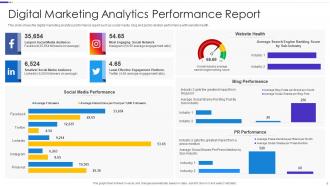
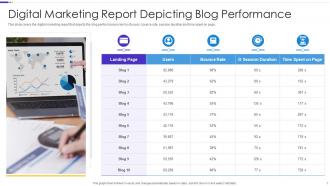
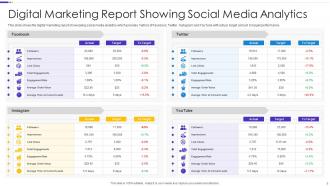
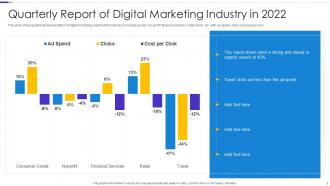
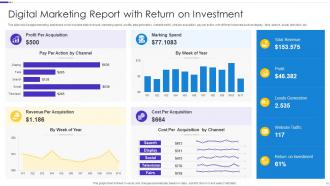
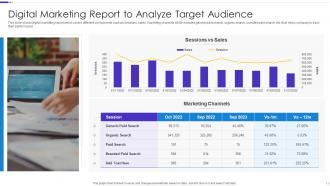
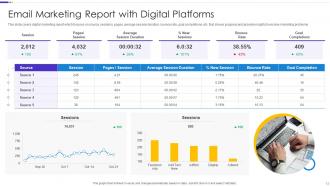
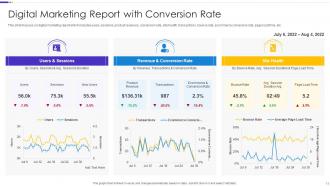





FAQs for Digital Marketing Report Powerpoint
Stick with the essentials: traffic stuff (sessions, visitors, bounce rate), conversions (leads, sales, rates by channel), engagement (time on site, pages per session), and ROI metrics like cost per acquisition. I used to dump everything into reports but honestly? Total mistake. Pick what actually matches your goals - like if you're doing brand awareness, focus more on reach than immediate sales. Oh and definitely customize based on what your boss or clients obsess over, because that's what they'll actually read. Start simple then build from there.
Honestly, just ditch the generic stuff and focus on what actually moves the needle for your business. E-commerce? Track conversion rates and cart abandonment - way more useful than basic traffic numbers. B2B should care about lead quality, not how many Instagram likes they got (though those do make the boss happy sometimes lol). Throw your brand colors and logo on there obviously. But here's the thing - structure everything around what your stakeholders actually want to see. Figure out your top 3-5 business goals first, then build the whole template around tracking those. Makes the reports so much more relevant.
Stick with clean bar charts for comparisons and line graphs for trends - those always work. Pie charts are fine but they get weird when you have too many slices. Keep your colors consistent throughout (blue for organic traffic, green for conversions, whatever). Heatmaps are perfect for website stuff. Those big KPI boxes with huge numbers? Stakeholders eat that up. Oh, and don't forget brief annotations explaining what you're actually showing them. Nobody wants to stare at a chart wondering what it means. Trust me, uncluttered beats fancy every time.
You definitely need separate sections for each channel - they're measuring totally different stuff. SEO tracks organic traffic and keyword rankings. PPC is all about cost-per-click and conversion rates. Social media focuses on engagement and follower growth. Honestly, I made the mistake of trying to jam everything together once and it was a mess. Create individual dashboards for each channel's KPIs, then build a summary page that shows how they're all hitting your main business goals. Way cleaner that way.
Think about who's actually gonna read your report first. The CMO just wants those big ROI numbers at a glance, but your social media person needs all the engagement breakdowns. Different people care about totally different stuff. Executives are looking for quick wins and what's hitting the bottom line - they don't have time for the weeds. Meanwhile, the specialists need those detailed metrics to actually improve things. I'd build around your main audience first, then maybe add some extra sections for everyone else. Just make a quick list of who sees this and what they're trying to figure out from it.
Dude, you've gotta try automation tools for your reports. I used to spend like 3 hours every week copying numbers from Google Analytics and Facebook - now it takes maybe 10 minutes? Tools like Databox or Supermetrics just pull everything automatically and fill in your templates. Set it up once, then schedule reports to run weekly or monthly. Your stakeholders get their updates without you doing anything. I'd start with something simple first - social media metrics worked well for me. Once you see how much time you get back, you'll wonder why you waited so long. Trust me on this one.
Set up separate spots for customer quotes, survey responses, and social media stuff right next to your regular metrics. Honestly, I'm terrible at this balance myself - the numbers show what's happening but you really need the "why" part too. Drop key insights into callout boxes that back up your data. Like if your conversion rate tanks, throw in some actual customer gripes about your checkout being broken. Keep quotes punchy and connect them to your KPIs. Oh, and don't go crazy at first - maybe just 2-3 qualitative bits per section until you get the hang of it.
Yeah totally doable on a shoestring budget! Google Analytics is free, same with social media insights - just dump that stuff into Canva templates or even Google Slides. I've literally seen people create killer reports with fancy spreadsheets lol. Don't go crazy tracking everything though. Pick like 3-5 metrics that actually move the needle for your business. Once you automate the data collection (where you can), you'll have monthly templates to reuse forever. Start with one solid template and get good at it first. Way easier than jumping around between different formats.
Ugh, the worst thing people do is jam everything into one dashboard - total information overload. Generic metrics that don't actually connect to business goals? Pointless. Make sure your key insights aren't buried where people have to dig for them. Also, tiny fonts are evil lol. Pick maybe 3-5 KPIs that actually matter to whoever's reading it. Start with the "so what" first, then show the numbers. I learned this the hard way - people zone out if you don't give them the punchline upfront. Keep everything scannable and tell them what to DO with the info.
Monthly reports are usually your sweet spot for most campaigns. But honestly? It depends on what you're trying to do and how much you're spending. If you're running something super active or testing new stuff, weekly makes more sense - you need to catch problems fast. For those big picture brand awareness campaigns, quarterly works fine, though waiting that long always makes me antsy. The trick is matching how often you report to how often you can actually do something about it. I'd start monthly and see how that feels. You can always change it up later based on what your team actually looks at.
Definitely go mobile-first since everyone's scrolling through reports on their phone now. Video metrics and social commerce tracking are absolutely essential - can't believe how much that's blown up. With all the privacy stuff happening, you'll need more first-party data sections too. Think email engagement and website behavior instead of relying on third-party attribution. ROI breakdowns by channel are what every client wants to see these days, honestly gets a bit repetitive but whatever. Keep everything visual with charts. Nobody reads paragraphs anymore. I'd start by looking at your current template and just swap out the old metrics for this new stuff.
Look, nobody wants to wade through spreadsheets full of numbers - trust me on this one. What works way better is turning your data into an actual story. Like, walk them through the customer's journey or explain what went wrong with that one campaign (we've all been there). Our brains just process stories differently than raw metrics. I usually go with a simple flow: where things started, what happened along the way, where we ended up. Keeps people reading instead of skipping to the end. Try opening your next report with a real customer example - you'll be surprised how much more engaged everyone gets.
Dude, Canva is honestly where it's at for marketing reports - their templates are amazing and you don't need a design degree. If you're dealing with tons of data though, Google Data Studio pulls straight from your analytics which saves so much time. Adobe Creative Suite is obviously top tier but kinda overkill unless you're already comfortable with it. PowerBI works well if your company uses Microsoft stuff. Oh, and Tableau's solid too but can get pricey. I usually just export to PDF for sharing, though interactive dashboards are pretty slick when stakeholders want to dig around themselves. Start with Canva - seriously, you'll have something professional done in like 20 minutes.
Yeah totally, start basic and build from there. When you're small, just track the obvious stuff - website visits, leads coming in. Don't overthink it early on (I've watched people waste weeks perfecting templates for like 3 customers lol). Once you're doing social, paid ads, email campaigns - that's when you split things into sections. Review it every few months and ask what your team actually needs to see. The trick is only adding metrics that'll change how you make decisions. Otherwise you're just collecting data for the sake of it, which gets overwhelming fast.
Honestly, surveys work pretty well - just ask specific stuff like "is this data useful" instead of vague questions. One-on-ones are where you'll get the real tea though, people are way more honest when it's just you two. You could also throw the templates in a shared doc and let everyone comment directly on sections. Oh, and don't overthink it - just bring it up in your regular meetings too. The trick is making it super easy for them to give feedback. Nobody wants to write an essay about your templates, you know?
-
SlideTeam is my one-stop solution for all the presentation needs. Their templates have beautiful designs that are worth every penny!
-
It's always a delight to see new templates from you! I am extremely pleased with the fact that they are easy to modify and fit any presentation layout in seconds!