

Digital Transformation Tools Powerpoint Presentation Slides





Try Before you Buy Download Free Sample Product
 Impress Your
 Audience
 100%
100% Editable
 Save Hours
 of Time


Bring your viewers attention towards aspects of digitization with our content ready Digital Transformation Tools PowerPoint Presentation Slides. Digital change is the transformation of business processes through technology initiatives. The foundation tools of digital change PowerPoint complete deck contains professionally designed templates such as components and barriers of digital change strategy, ways to achieve digital transformation, transformation roadmap, task distribution, transformation budget, value-added from the transformation, pie charts, bar chart, combo chart, etc. All digital transformation ppt slides are fully editable and can be edited as per your need. Furthermore, emerging digital tools PowerPoint presentation slides are also suitable to present concepts like digitization, IT integration, digital transformation, key technologies of digital transformation, the digital revolution, information revolution to name a few. This enterprise transformation PPT design includes infographics slides that help you to make an inclusive and comprehensive presentation. Download this creatively designed presentation deck to showcase essential tools to support digital transformation. Delve on the importance of fair coverage with our Digital Transformation Tools Powerpoint Presentation Slides. Elaborate on journalism.
People who downloaded this PowerPoint presentation also viewed the following :
Content of this Powerpoint Presentation
Slide 1: This slide introduces Digital Transformation Tools. State Your Company Name and begin.
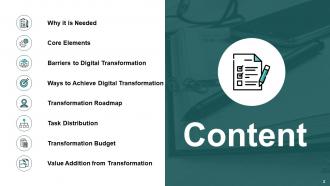
Slide 2: This slide shows Content of the presentation.
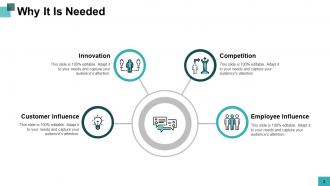
Slide 3: This slide shows Why it is Needed describing- Innovation, Customer Influence, Competition, Employee Influence.
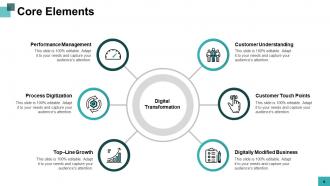
Slide 4: This slide presents Core Elements describing- Customer Understanding, Customer Touch Points, Digitally Modified Business, Performance Management, Process Digitization, Top – Line Growth.
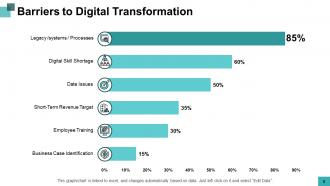
Slide 5: This slide displays Barriers to Digital Transformation in a graphical form.
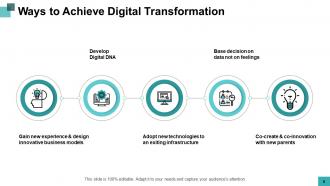
Slide 6: This slide represents Ways To Achieve Digital Transformation.
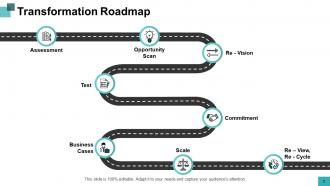
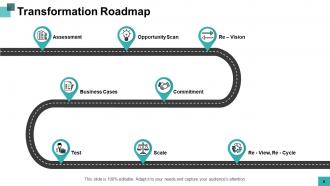
Slide 7: This slide showcases Transformation Roadmap describing- Opportunity Scan, Re - Vision, Business Cases, Commitment, Test, Scale, Re - View, Re - Cycle, Assessment.
Slide 8: This is another slide on Transformation Roadmap.
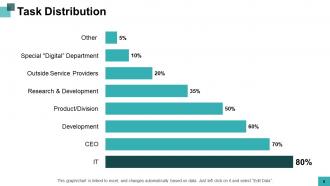
Slide 9: This slide shows Task Distribution in graphical form.
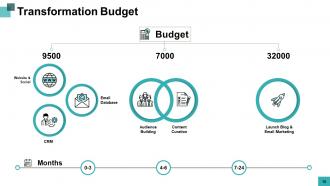
Slide 10: This slide presents Transformation Budget with related icons and text boxes.
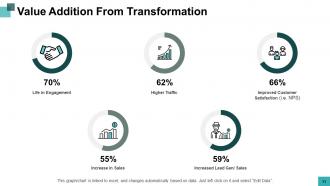
Slide 11: This slide represents Value Addition from Transformation.
Slide 12: This slide displays Digital Transformation Tools Icons.
Slide 13: This slide is titled as Additional Slides for moving forward.
Slide 14: This is About Us slide to show company specifications etc.
Slide 15: This slide is titled as Post It. Post your important notes here.
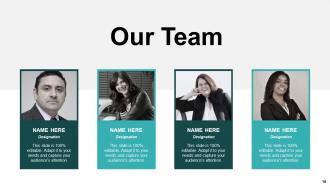
Slide 16: This is Our Team slide with names and designation.
Slide 17: This is a Puzzle slide with text boxes to show information.
Slide 18: This is Our Goal slide. Show your goals here.
Slide 19: This is a Comparison slide to state comparison between commodities, entities etc.
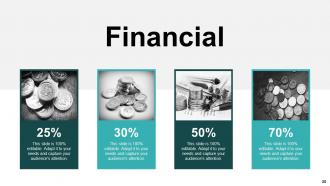
Slide 20: This is a Financial slide. Show your finance related stuff here.
Slide 21: This is a Timeline slide to show information related with time period.
Slide 22: This is Our Mission slide with related imagery and text.
Slide 23: This is a Bulb or Idea slide to state a new idea or highlight information, specifications etc.
Slide 24: This is a Thank You slide with address, contact numbers and email address.
Digital Transformation Tools Powerpoint Presentation Slides with all 24 slides:
Use our Digital Transformation Tools Powerpoint Presentation Slides to effectively help you save your valuable time. They are readymade to fit into any presentation structure.


FAQs for Digital Transformation Tools
Honestly, there are four things you can't skip if you want this to actually work. Figure out what business problems you're solving first - sounds obvious but most people jump straight to buying shiny tools. Then pick tech that plays nice together because nobody has time for systems that don't talk to each other. Your team needs proper training too, otherwise they'll just ignore whatever you roll out (been there). Oh, and set up good data tracking so you know if it's actually helping. I'd start by looking at your current setup and finding the biggest headaches - those are your quick wins right there.
Start with baseline numbers - revenue per employee, customer acquisition costs, process times. Track how they shift when you add new tools. Honestly, figuring out what's actually causing improvements is kind of a nightmare because so many variables are at play. Don't just focus on the obvious stuff like cost savings. Employee satisfaction and customer experience matter too, even if they're harder to measure. Here's what I'd do: pick 3-5 metrics that actually connect to your business goals. Then track them for at least a year - anything shorter won't tell you much.
Honestly, you can't go wrong starting with Tableau or Power BI for visualizations. SQL is unavoidable - trust me, I tried avoiding it for way too long! Python with pandas handles the heavy lifting really well. Cloud-wise, most people pick AWS QuickSight, Google Analytics, or Azure based on whatever they're already using. Smaller teams often just start with Excel or Google Sheets, which isn't glamorous but works. Oh, and Power Query is actually pretty solid too. My take? Don't try learning everything at once. Pick one viz tool, get decent at it, then see what gaps you actually have.
Honestly, cloud computing is like having a digital swiss army knife for your business. You can spin up new apps super fast and scale things when you need to without buying a ton of expensive servers (my last company spent way too much on hardware that just sat there half the time). Remote work becomes way easier too. The cool part is getting access to all these AI and analytics tools that would cost a fortune to build yourself. I'd probably start small though - pick something that won't break everything if it goes wrong and use that to get your team comfortable with the whole process.
So AI basically turns digital transformation from just moving stuff online to actually making it smart. Instead of digitizing the same old processes, you're automating complex decisions and predicting customer behavior before they even know what they want. The data analysis alone is insane - stuff that would take people weeks gets done instantly. Honestly, I think most companies are still thinking too small about this. Don't just scan your paper forms and call it digital. Pick one process and see how AI can completely reimagine it, not just speed it up.
Honestly, tools like Slack or Teams are game-changers for keeping everyone on the same page. No more digging through endless email threads to find that one decision from last week. They create these shared spaces where departments can actually talk to each other instead of working in their own little bubbles. Real-time updates mean you'll catch problems before they blow up into major headaches. The transparency thing is huge too - everyone can see what's happening with deliverables and feedback. Just pick ONE main tool though, because having conversations scattered everywhere defeats the whole purpose.
First things first - figure out what problem you're actually trying to solve before you start browsing software. I learned this the hard way lol. Don't pick something that'll break your existing setup or need a rocket scientist to run it. Honestly? Most of these "revolutionary" platforms are way too much for small businesses anyway. Test it out with just a few people first. You want something that'll grow with you so you're not stuck switching again in six months. Make sure they have decent customer support since you probably don't have IT people on standby. Oh, and get your team on board early - they're the ones using it daily.
So here's the thing - regulatory requirements basically narrow down your options before you even start looking. You're stuck picking from compliant tools instead of whatever's new and exciting. Healthcare, finance, government? You'll need HIPAA, SOX, GDPR stuff. Some platforms just can't handle the security requirements or give you proper audit trails. Pretty annoying tbh. Most major tools do have compliance certifications now though, which helps. I'd say list out what regulations you need to follow first, then see which tools actually meet those standards.
Honestly, start by figuring out where your customers are getting annoyed first. CRM systems are clutch for tracking what people actually want based on their history. Chatbots can handle the basic stuff 24/7 which is nice. Analytics will show you exactly where people bail - that data's pretty eye-opening. Mobile apps and self-service portals speed things up big time. Don't try to fix everything at once though, that's overwhelming. Pick one major pain point and nail that first. Automated follow-ups help too, but focus on eliminating friction step by step.
Oh man, the biggest pain is your old systems just weren't designed for today's APIs and cloud stuff. Data won't play nice together, security gets messy, and workflows clash with newer tools. Your IT folks know the legacy stuff cold, but now they're scrambling to learn totally different integration approaches - kinda like going from stick shift to electric overnight, honestly. Costs add up fast too. I'd say test some small pilot projects first to see what breaks before you go all-in on a massive overhaul.
Honestly, social media analytics is like having customers tell you exactly what they think when they don't know you're listening. Way better than surveys where people just say what sounds nice. You can spot which features are actually bugging them and catch problems early. Plus tracking sentiment over time shows you patterns you'd totally miss otherwise. I'd start with basic listening tools for your brand mentions - oh, and definitely check what people say about competitors too. Helps you figure out which digital projects are worth doing vs just shiny objects. The insights that come up are pretty wild sometimes.
Honestly, you gotta get people involved from the start instead of just dropping changes on them. Show them why these tools will make their lives easier - I can't tell you how many times I've watched this stuff crash and burn because bosses thought everyone would just roll with it. Find your early adopters first, especially the people others actually listen to. They'll do half the selling for you. Give everyone real training, not just a quick demo, and actually listen when they complain about something. Oh, and be upfront about timelines - nobody likes surprises. Start small with pilot groups and let success stories spread naturally.
So cybersecurity basically throws a wrench in everything - you'll be doing endless audits and risk assessments before rolling out any new tech. Your IT folks will want to sandbox and pen test everything first, which I get but man it slows things down. The real pain is when security requirements clash with actually useful features. You end up choosing between something that works well or something that's locked down tight. Oh, and compliance checks... don't get me started on those. Best move? Get your security team involved from the start instead of springing it on them later.
Oh man, change management is HUGE - seriously, it'll make or break your whole project. I've watched so many good ideas completely tank because leadership got obsessed with the shiny tech stuff and forgot about their people. Your team needs to actually understand what's happening and why. Train them properly, listen to their complaints (there will be complaints), and get them involved from the start instead of just dropping changes on them later. Best tech in the world won't save you if everyone's fighting it. Trust me on this one.
Dude, break it into small chunks instead of trying to change everything at once - that's where most companies mess up. With agile you can test stuff out, see what works, then fix what doesn't before rolling it out wider. Way smarter than the old school "let's change everything on Monday" disaster approach. Your teams actually get time to learn the new tools properly. Start with maybe one department as your guinea pigs, get their honest feedback (and trust me, they'll have opinions), then expand from there. It's honestly just common sense but somehow half the corporate world still hasn't figured this out.
No Reviews