

Flujo de trabajo de revisión y aprobación de documentos




Try Before you Buy Download Free Sample Product
 Impress Your
 Audience
 100%
100% Editable
 Save Hours
 of Time


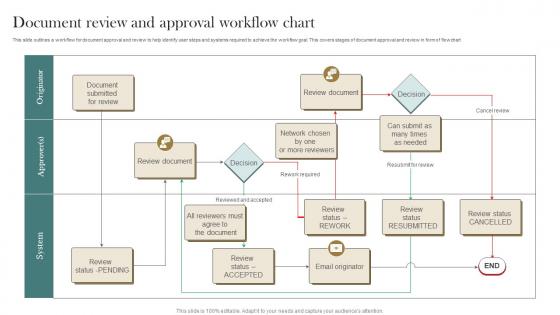
Flujo de trabajo para la aprobación y revisión de documentos
People who downloaded this PowerPoint presentation also viewed the following :
Revisión de documentos y flujo de trabajo de aprobación Diapositiva 1: Inicio Diapositiva 2: Enviar documento para revisión Diapositiva 3: Revisar documento Diapositiva 4: Aprobar documento Diapositiva 5: Rechazar documento Diapositiva 6: Fin
Utilice nuestro Diagrama de flujo de revisión y aprobación de documentos para ahorrar su valioso tiempo de manera efectiva. Están listos para adaptarse a cualquier estructura de presentación.





FAQs for Document Review And
So basically you've got four main steps: create, review, approve, then distribute and store. First you draft the thing, then everyone and their mom needs to weigh in with feedback. That's honestly the worst part - reviews drag on forever because people procrastinate or keep changing their minds. Once that nightmare's over, decision-makers finally approve it. Then you send it out and file it somewhere you'll actually find later. My advice? Set deadlines upfront or you'll be stuck in review hell. Also figure out who's doing what before you even start writing. Trust me on this one.
Honestly, automation tools are a game changer for document stuff. They handle all the boring tasks - routing approvals, sending those annoying reminder emails, updating statuses. I probably save like 3-4 hours a week not having to manually drag files around or bug people for signatures. Way fewer mistakes too, which is clutch for compliance docs. The coolest part? You can set up triggers so the next step automatically starts once someone finishes their part. Oh, and definitely map out your current process first - sounds obvious but you'd be surprised how many steps you forget about. Then just pick the most tedious manual stuff to automate.
Dude, you NEED version control - it tracks every single change so you can see who did what and when. Never lose work again. If someone screws up the doc, just roll back to an earlier version. No more "oh crap I accidentally deleted the whole thing" moments. Multiple people editing? No problem, it prevents those annoying conflicts. Honestly, I wish I'd started using it sooner - would've saved me from so many late night panic sessions. Just turn on automatic versioning in whatever system you're using. Trust me on this one.
You'll want to bake the controls right into your workflows instead of hoping people remember stuff. Automated approvals and version tracking are clutch. Also lock down who can actually touch sensitive documents - access permissions will save your butt. The whole thing gets messy fast depending on what industry you're in (healthcare is brutal for this). Start with basic workflow templates that force compliance checkpoints. Get software that logs everything automatically. When auditors show up, you'll have all the documentation ready to go. Trust me, that paper trail matters way more than you think it will.
Start by mapping out where stuff gets stuck - that's usually your biggest win. Set up automated routing so documents hit the right people based on type and dollar amounts. Don't make everything go through one person at a time though. Run approvals in parallel when you can, saves tons of time. Templates are clutch for common stuff. Set 48-hour deadlines with auto-escalation if people ignore it (trust me, they will). Oh and not every purchase order needs the CEO's signature - conditional routing is your friend there. Honestly, most approval processes are way more complicated than they need to be.
Honestly, pick one person to own the whole thing or it'll be chaos. Have everyone use track changes - I can't stress this enough because people editing random versions is the worst. Set up deadlines for feedback rounds too, otherwise it just sits there forever. For the actual editing part, use comments to tag people instead of letting everyone mess with each other's sections directly. And if there's too much back-and-forth happening? Just hop on a quick call. Way easier than endless comment threads that go nowhere.
Honestly, cloud storage is a total game changer - you can access your stuff from literally anywhere with wifi. Working from home? No problem. Need to check something on your phone while you're out? Done. The collaboration thing is pretty sweet too since everyone can edit at the same time without that annoying back-and-forth email chain (you know the one). Version control keeps track of changes so nobody accidentally deletes important stuff. I was skeptical at first, but once you set it up for your main workflows, you'll be kicking yourself for not doing it sooner. Trust me on this one.
Ugh, where do I even start? Version control is a nightmare - everyone's working on different files, stuff gets buried in email threads, and good luck finding the right document later. Approval processes take forever too. Half the time you can't even track who signed off on what, which is terrible for compliance. Oh, and departments love using totally different systems that obviously don't work together. Manual handoffs between teams? Painfully slow. Honestly, I'd map out your whole current process first so you can actually see where things are breaking down the most.
So I'd start by just tracking how long stuff takes - like where documents get stuck and for how long. Processing time is probably your biggest win right there. Then add approval cycles and error rates once you get the hang of it. Honestly, rejection rates tell you a lot too. Nobody talks about this enough, but user satisfaction scores can be super revealing about what's actually broken in your process. Don't go crazy measuring everything though - pick maybe 3 metrics max and stick with those. Build some simple dashboards so people can see what's happening. Way better than trying to track fifteen different things and getting overwhelmed.
Dude, you gotta check out AI document processing - it's seriously changed everything for me. These tools can actually read and route stuff automatically instead of you doing it by hand. OCR tech has gotten ridiculously good at pulling data from PDFs too. My workflow barely needs me anymore since I started using automation for approvals and signatures. Cloud collaboration makes version control way less of a headache. Though honestly? Start small with just one AI tool first. Don't go crazy and overhaul everything at once.
Honestly, just start by scanning everything - get a decent scanner or use your phone apps. Cloud storage is your best friend here, but organize those folders properly from day one or you'll hate yourself later. Document management systems are kinda overwhelming at first, but pick one that does approvals and version control. Google Workspace or Office 365 work great for the collaborative stuff. Here's the thing though - map out what you're actually doing on paper first. Then find digital versions of each step. Don't go crazy and try to convert everything at once. Pick one department, test it out, see what breaks. Way less painful than discovering problems company-wide.
So first thing - map out who actually needs access to what documents. Role-based permissions are your friend here, trust me on this one. Encrypt anything sensitive, both when it's moving around and just sitting there. Audit trails might seem boring but they'll literally save you during compliance checks. Oh, and don't forget digital signatures for approvals - makes everything way more legit. Backup procedures too, obviously. I'd honestly start with the access mapping since that's gonna inform everything else you build on top of it.
Dude, training is literally what makes or breaks these document systems. Seriously, I've watched entire workflows crash because nobody knew what they were doing - people just randomly clicking stuff or skipping steps. When your team actually understands how to route documents and handle approvals, things move way smoother. Fewer mistakes too. Plus people stop fighting the system once they get it. My advice? Start with hands-on training for the stuff they'll use most. Don't overcomplicate it, just focus on their daily scenarios first.
Think of metadata as all the useful info attached to your docs - creation dates, who approved what, version numbers, that kind of stuff. Without it, you're basically playing detective every time you need to find something specific. Your workflow becomes way smoother when documents can route themselves based on their properties instead of you manually sorting through everything. I learned this the hard way after spending hours hunting down approval statuses. Start tagging consistently now. Trust me, you'll save yourself major headaches later when you need to pull reports or figure out which version is actually the final one.
Oh this is actually pretty straightforward! Survey your team monthly about what's annoying them - like where they get stuck or what feels pointless. Track stuff like approval times and how many revisions things go through. Honestly, most people skip this part, but you gotta actually DO something with the feedback. Set up quarterly reviews to go through everything and make changes. Don't try to fix it all at once though - that's overwhelming. Pick one annoying thing per month to tackle. Way more manageable that way.
-
I can always count on your designs for my professional needs. I believe I found a one-stop-shop for PPTs.
-
Templates are beautiful and easy to use. An amateur can also create a presentation using these slides. It is amazing.