

Employee Management System Training Administration Personal Data Management





Try Before you Buy Download Free Sample Product
 Impress Your
 Audience
 100%
100% Editable
 Save Hours
 of Time


Our Employee Management System Training Administration Personal Data Management are topically designed to provide an attractive backdrop to any subject. Use them to look like a presentation pro.
People who downloaded this PowerPoint presentation also viewed the following :
Content of this Powerpoint Presentation
Slide 1: This slide introduces Employee Management System. State Your Company Name and get started .
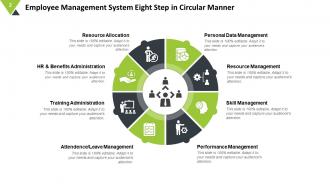
Slide 2: This slide shows Employee Management System Eight Step in Circular Manner which further showcases- Resource Allocation, HR & Benefits Administration, Training Administration, Attendence/Leave Management, Performance Management, Skill Management, Resource Management, Personal Data Management.
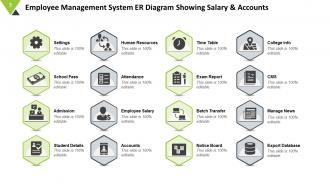
Slide 3: This slide showcases Employee Management System ER Diagram Showing Salary & Accounts with these of the following parameters- Settings, School Fees, Admission, Student Details, Human Resources, Attendance, Employee Salary, Accounts, Time Table, Exam Report, Batch Transfer, Notice Board, College info, CMS, Manage News, Export Database.
Slide 4: This slide presents Employee Management System Icon.
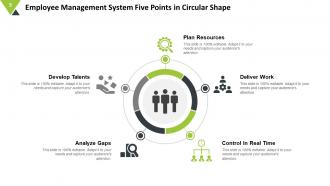
Slide 5: This slide showcases Employee Management System Five Points in Circular Shape with these of the five- Plan Resources, Deliver Work, Control In Real Time, Analyze Gaps, Develop Talents.
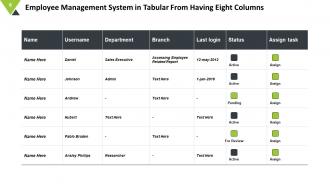
Slide 6: This slide shows Employee Management System in Tabular From Having Eight Columns.
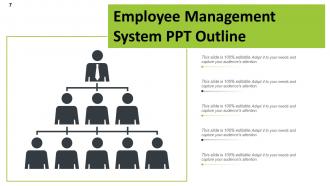
Slide 7: This slide presents Employee Management System PPT Outline.
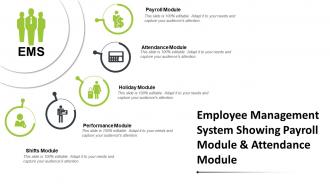
Slide 8: This slide shows Employee Management System Five Module in Linear Manner with these of the following- Payroll Module, Attendance Module, Holiday Module, Performance Module, Shifts Module, Employee Management System.
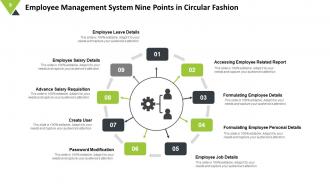
Slide 9: This slide showcases with Employee Management System Nine Points in Circular Fashion with these of the following- Employee Leave Details, Employee Salary Details, Advance Salary Requisition, Create User, Password Modification, Employee Job Details, Formulating Employee Personal Details, Formulating Employee Details, Accessing Employee Related Report.
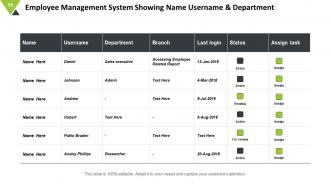
Slide 10: This slide shows Employee Management System Showing Name Username.
Slide 11: This slide showcase Employee Management System Showing Payroll Module & Attendance Module with these of the follow- EMS, Payroll Module, Attendance Module, Holiday Module, Performance Module, Shifts Module.
Slide 12: This slide presents Employee Management System PPT Slide.
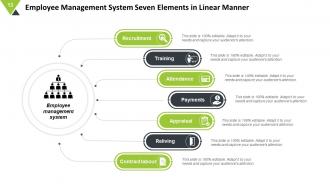
Slide 13: This slide showcases Employee Management System Seven Elements in Linear with these of the following- Employee management system, Appraisal, Reliving, Contract labour, Attendance, Recruitment, Training Payments.
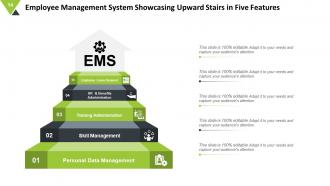
Slide 14: Employee Management System Showcasing Upward Stairs in Five Features those are- Training Administration, Employee Leave Request, HR & Benefits Administration, Skill Management, Personal Data Management, EMS.
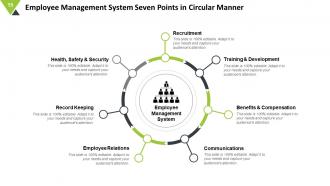
Slide 15: This slide presents Employee Management System Seven Points in Circular Manner Health, Safety & Security, Recruitment, Training & Development, Benefits & Compensation, Communications, Record Keeping, Employee Relations, Employee Management System.
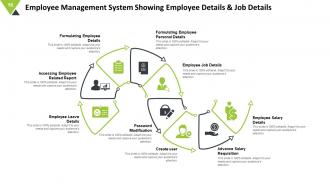
Slide 16: This slide shows Employee Management System Showing Employee Details & Job Details with these of the following factors- Employee Leave Details, Accessing Employee Related Report, Formulating Employee Details, Formulating Employee Personal Details, Employee Job Details, Password Modification, Create user, Advance Salary Requisition, Employee Salary Detail.
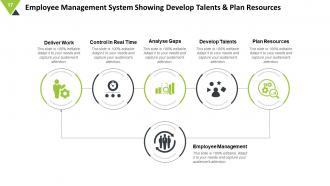
Slide 17: This slide presents Employee Management System Showing Develop Talents & Plan Resources which further presents - Deliver Work, Control In Real Time, Analyse Gaps, Develop Talents, Plan Resources, Employee Management.
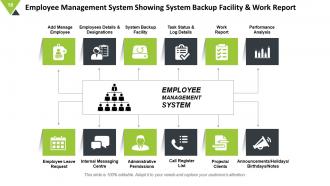
Slide 18: This slide showcases Employee Management System Showing System Backup which further presents EMPLOYEE MANAGEMENT SYSTEM Facility & Work Report, System Backup Facility, Task Status & Log Details, Work Report, Performance Analysis, Add Manage Employee, Employees Details & Designations, Announcements/Holidays/ Birthdays/Notes, Projects/ Clients, Call Register List, Administrative Permissions, Internal Messaging Centre, Employee Leave Request.
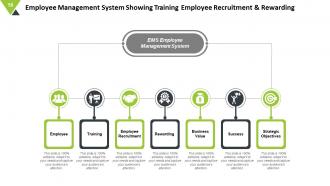
Slide 19: This slide showcases Employee Management System Showing Training Employee Recruitment & Rewarding, EMS Employee Management System, Training, Employee, Employee Recruitment, Rewarding, Business Value, Success, Strategic Objectives.
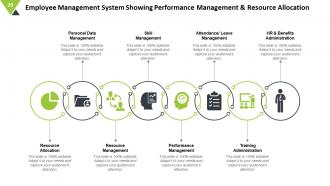
Slide 20: This slide presents Employee Management System Showing Performance Management & Resource Allocation, Resource Allocation, Resource Management, Performance Management, Training Administration, Personal Data Management, HR & Benefits Administration, Attendance/ Leave Management. Skill Management.
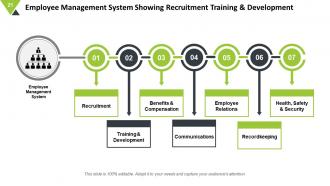
Slide 21: This slide showcases Employee Management System Showing Recruitment with these of the following Training & Development Recruitment, Training & Development, Benefits & Compensation, Communications, Employee Relations, Recordkeeping, Health, Safety & Security, Employee Management System.
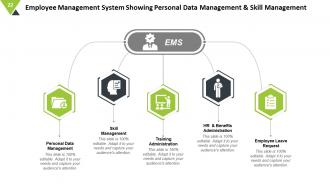
Slide 22: This slide shows Employee Management System Showing Personal Data with these of the following- Management & Skill Management, Personal Data Management, Skill Management, Training Administration, HR & Benefits Administration, Employee Leave Request, EMS.
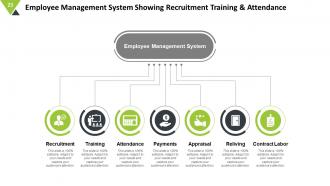
Slide 23: This slide presents Employee Management System Showing Recruitment Training & Attendance which further presents Employee Management System, Recruitment, Training, Attendance, Payments, Appraisal, Reliving, Contract Labor.
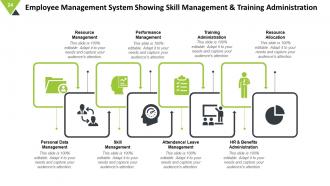
Slide 24: This slide shows Employee Management System Showing Skill Management & Training Administration which further presents- Personal Data Management, Skill Management, Attendance/ Leave Management, HR & Benefits Administration, Resource Management, Performance Management, Training Administration, Resource Allocation.
Slide 25: This is a Thank You slide with Address:# street number, city, state, Contact Numbers and Email Address.
Employee Management System Training Administration Personal Data Management with all 25 slides:
Use our Employee Management System Training Administration Personal Data Management to effectively help you save your valuable time. They are readymade to fit into any presentation structure.


FAQs for Employee Management System Training Administration
So you'll want employee data management and payroll integration for sure. Time tracking is huge too - saves so much headache. Performance evaluations, benefits admin, compliance reporting... the usual stuff. But seriously, get one with self-service portals or you'll be drowning in vacation requests and address changes. Role-based access is clutch so managers can't see everyone's salary info (learned that one the hard way at my last job). Oh, and whatever you pick needs to play nice with your current payroll system. Double data entry will make you want to quit.
So basically, an EMS gives you real-time feedback tools and tracks career development - makes people actually feel appreciated, you know? The automated check-ins are clutch for spotting who might quit before they do. Self-service features let employees handle their own time-off requests and skill updates, which cuts down on those admin tasks that drive everyone nuts. You'll get solid data on what's working across different teams too. Honestly though, I'd start with feedback and recognition modules first - they're gonna give you the best results for keeping people around. Those other features can wait.
Dude, automation is seriously clutch for onboarding. It handles all the boring stuff - welcome emails, setting up accounts, equipment assignments, document requests. New hires get the same smooth experience every time instead of things falling through the cracks (which happens way too often tbh). Your workflows can auto-enroll people in training and block out their first-day schedule. HR stops drowning in paperwork and can actually talk to new employees. Set it up once and you're golden. Trust me, it makes everything way less chaotic.
Honestly, using data for performance reviews is a game changer. Instead of relying on memory or bias, you're looking at real numbers - productivity stats, how often people hit their goals, feedback patterns. Way more fair that way. You'll catch high performers and people who need help much earlier, which is huge for promotions and coaching. The cool part? Trends become super obvious when you track stuff over time. I'd say start simple though - maybe just 2 or 3 metrics you can actually keep up with consistently.
Honestly, most data breaches come from people screwing up internally, not some hacker in a hoodie. Start with role-based permissions - like HR shouldn't see everyone's salary info unless they actually need it. Encrypt your sensitive stuff obviously. Don't be one of those companies hoarding random personal data "just in case" - only collect what you actually need. Set up automatic purging for old employee records so they don't sit around forever. Oh, and audit who's accessing what regularly. I'd probably start by doing a privacy audit of whatever system you're using now to see where the gaps are.
Honestly, an EMS is a lifesaver for remote teams. Everything lives in one spot - project assignments, deadlines, who's doing what. No more endless Slack messages asking "wait, what's the status on this?" Your team can share files and give feedback right in the tasks themselves. Real-time workload visibility means you'll spot when Sarah's drowning in work while Tom's twiddling his thumbs. Just set up shared project boards first and actually get people to update their task status (good luck with that part, lol). The collaboration tools alone make it worth it.
Start with HRIS - that's your main employee database. Payroll's obviously crucial unless you want to manually sync everything (nightmare). I'd also connect your calendar system since people are always in there anyway. Slack or Teams integrations are pretty clutch too. Oh, and if you're using project management stuff or expense tools, definitely hook those up - saves so much busy work. Honestly just make a list of what your team actually uses every day and start there. The integrations nobody touches aren't worth the headache.
Ugh, labor law changes are such a pain - they mess with your Employee Management System's core stuff like overtime calcs and leave policies. Your system has to handle new minimum wage rules or family leave requirements automatically, otherwise payroll breaks or you're suddenly non-compliant. Build modular components from the start so you're not doing complete overhauls every time politicians decide to change things. Make your data models flexible too. Honestly the compliance reporting part stresses me out the most, but if you design it right you won't hate yourself later when new regulations drop.
Honestly, the biggest pain is gonna be your employees fighting the new system - they're so attached to their old ways it's ridiculous. Data migration is a nightmare too, especially from those ancient legacy systems. Then you've got integration headaches with whatever HR tools you're already using. Training takes forever (seriously, plan for like 3x what you think), and everyone acts like their company is sooo special they need custom everything. Downtime during rollout sucks but it happens. Get your key people on board first, have a backup plan ready, and maybe stock up on coffee. You'll need it.
Honestly, just start with one thing - maybe quick pulse surveys or those little feedback widgets people can click anytime. Don't overthink it at first. Make sure it's dead simple though, because nobody's filling out long surveys every week (learned that the hard way). Once you get data flowing, set up dashboards to track how people are feeling over time. The trick is actually doing something with the feedback and telling people what changed. Otherwise they'll stop participating pretty quickly. You can always add 360 reviews and fancier stuff later, but get the basics working first.
So track both engagement stuff and efficiency - employee satisfaction, retention, time-to-hire are the main ones. Also look at how long performance reviews take, absence rates, that kind of thing. But honestly? The metric I care about most is adoption rates - are people actually using the self-service features or still bugging HR for everything. That tells you way more than you'd think about whether the system actually works. Don't go crazy measuring 15 different things right away though. Pick like 3-4 metrics first, see how those look.
Honestly, tracking demographic data is where EMS really shines - hiring, promotions, pay equity, all that stuff. You can spot patterns you'd totally miss otherwise. Set up workflows so you get diverse interview panels automatically (saves so much hassle). The retention tracking by group is clutch too. What I love most? The reporting actually shows if your D&I programs are working or just sitting there looking pretty. Oh, and you can tie unconscious bias training to performance reviews which is smart. Start with auditing what data you have now - that's your baseline. Build out from there once you see the gaps.
Dude, mobile is everything now. Your people want to check PTO balances and submit expenses from their phones - not hunt down a computer every time. I mean, who even wants to log into desktop HR stuff in 2024? Managers can approve requests super fast since they're always on their phone anyway. Remote workers especially need this or they're totally left out. Honestly, test the mobile app first when you're shopping around. A crappy mobile experience will have everyone complaining within a week.
Honestly, get an EMS if you're still drowning in spreadsheets – it'll save your sanity. Everything gets centralized: payroll data, benefit tracking, automatic salary reviews. Your employees can actually check their own benefit info instead of bugging you constantly. The compliance headaches? Gone. Well, mostly. You can spot pay gaps before they become problems, and bonus tracking becomes automatic. I spent way too much time last week helping someone set theirs up, but once you migrate your current data, you'll wonder how you lived without it. Trust me on this one.
Honestly, the biggest pain will be the upfront costs - especially if you need custom integrations. Your team's gonna hate learning new software at first, trust me on that one. There's also ongoing maintenance headaches and you're basically stuck with whatever vendor you pick for support. Oh, and data security becomes a real concern since you're storing everyone's personal info. System downtime is another fun surprise that'll pop up eventually. My take? Try it with just one department first. Work out all the annoying bugs before you subject the whole company to it.
-
Awesome use of colors and designs in product templates.
-
Great experience, I would definitely use your services further.