

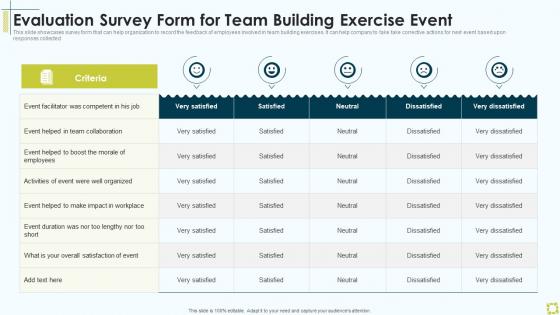
Evaluation Survey Form For Team Building Exercise Event




Try Before you Buy Download Free Sample Product
 Impress Your
 Audience
 100%
100% Editable
 Save Hours
 of Time


This slide showcases survey form that can help organization to record the feedback of employees involved in team building exercises. It can help company to take take corrective actions for next event based upon responses collected.
People who downloaded this PowerPoint presentation also viewed the following :
Evaluation Survey Form For Team Building Exercise Event with all 6 slides:
Use our Evaluation Survey Form For Team Building Exercise Event to effectively help you save your valuable time. They are readymade to fit into any presentation structure.





FAQs for Evaluation Survey Form For Team
You'll need clear rating criteria first - that's the foundation. Then add specific examples for each rating level so managers aren't just guessing. A consistent 1-5 scale works great, way less confusing than mixing different rating types. Include both job-specific stuff and general skills like communication. Written comment sections are huge - numbers alone don't tell the whole story. Oh, and strengths plus development areas together. People hate getting only criticism. Employee self-assessment is smart too if you have space. Honestly, start simple and test it with a couple managers first. They'll tell you what's actually useful versus what sounds good on paper.
Honestly, evaluation forms are game-changers for getting real feedback. Instead of those awkward "any questions?" moments where nobody says anything, you'll actually get useful data on your clarity, engagement, all that stuff. People are brutally honest when they can write anonymously - way different than speaking up in a room full of people. I'd start with maybe 3-5 key areas you want to track. The cool part is you can see your improvement over time since you're measuring the same things each presentation. Oh, and always throw in one open-ended question - sometimes that's where the gold is.
Look at content first - did they organize everything well and get their main points across clearly? Supporting evidence matters too. Delivery wise, check voice projection, eye contact, body language, and pacing (seriously, terrible pacing ruins everything). Track how engaged people seem through questions they ask and participation levels. Oh and definitely include time management since everyone goes over. Use a 1-5 scale for each thing you're measuring. Makes it way easier to stay consistent when you've got multiple people doing evaluations.
Honestly, your form's design makes or breaks whether people actually finish it. Spacing matters way more than you'd think – cramped layouts just frustrate everyone. Use clear fonts and group related stuff together so people can scan through quickly. A little color coding helps guide them, but don't make it look like a kid's coloring book. Keep your buttons consistent and label everything clearly. White space is clutch here – it lets people breathe while they're filling things out. Oh, and visual hierarchy? That's what separates the pros from amateur hour. People bail on messy forms instantly.
Honestly, the right tech stack will save you so much time. Digital forms that auto-fill from your HRIS are clutch - no more typing the same info over and over. Automated reminders are probably the biggest win though, people actually submit stuff on time for once. Mobile access helps too since people can knock these out from anywhere. Analytics dashboards let you pull reports instantly instead of living in Excel hell. My advice? Start by just digitizing what you have now, then add the fancy automation once people aren't freaking out about change.
Look, if nobody fills out your evaluation form, you're just burning money on fancy confetti. Engaged people give you real feedback instead of clicking through random boxes. We've all done it - rushed through some terrible survey because it was boring as hell, right? Make yours feel like an actual conversation. Ask stuff they genuinely want to answer, keep the language simple, and don't make it crazy long. Also maybe don't ask 47 questions about the coffee temperature or whatever. Treat people like humans instead of walking data machines and you'll actually get useful stuff back.
Honestly, open-ended questions are where you get the good stuff. Like yeah, someone gives your training a 3/5 - but then they tell you the content was great, just couldn't hear the presenter. Now you've got something you can actually fix. Plus people will mention random issues you never thought to ask about. WiFi problems during virtual sessions, weird room temperature, whatever. Takes forever to go through all those responses compared to just looking at numbers, but it's so worth it. I'd throw a "What made you choose this rating?" after every rating question. Super simple but gets people talking.
Keep your forms short - nobody wants to fill out a novel. Skip vague scales like "satisfactory" since that means different things to everyone. Don't make every question required either, that's just irritating honestly. Leading questions are terrible too because they push people toward answers you want rather than honest feedback. Test it with a couple friends first - they'll catch weird wording or broken links you missed. Focus on stuff that actually matters for what you're measuring. I learned this the hard way when I created this monster survey once and got like three responses.
How you word things totally changes what responses you'll get back. Use normal, conversational language and people will be way more honest with you. But throw in a bunch of corporate speak or make it sound super formal? People either rush through it or just tell you what they think you want to hear. I've actually seen feedback forms that were so intimidatingly worded that basically no one bothered finishing them. Keep questions feeling safe to answer - that's honestly where the good stuff comes from. Don't use judgey language either. The whole point is getting real insights you can actually use to fix things.
Send those evaluation forms out right after your presentation - like within 24 hours max. People's memories are terrible and honestly, nobody wants to fill out forms once they've moved on to other stuff. Keep it short though, maybe 5-7 questions tops. Oh, and include a quick recap of your main points in the email since they probably zoned out at some point. Give them a real deadline too - "get this back to me by Friday" works better than leaving it open-ended. One thing that actually gets people to respond? Tell them you'll share the feedback summary with everyone. They're curious what others thought.
Honestly, you gotta match your evaluation to what you're actually presenting. Technical demos? Focus on whether people understood the functionality. Keynotes need feedback on engagement - did you inspire anyone or just put them to sleep? I made this mistake once using the same boring form for everything. Total waste of time. Sales pitches are different too - you want to know if you were persuasive and if your call-to-action worked. Also think about who's giving feedback. Peers can handle detailed technical questions, but customers just want simple language and overall satisfaction stuff. Figure out your main goals first, then build your evaluation around those.
Honestly, timing is everything - send those forms right after the event while it's still fresh in people's minds. Keep them short too, like 15 questions max. Nobody wants to fill out a novel on their phone. Be upfront about how long it'll take. Throw in some incentives if you can swing it. Clear, relevant questions only - skip the fluff. Here's the thing though: you gotta close the loop. Tell people what you actually did with their feedback from last time. I swear, once people see their opinions matter, they'll keep responding. Oh, and gentle reminders help too, just don't be annoying about it.
Honestly, the feedback tells you everything you need to know. Look for patterns - if three people say you rushed through slides, that's your answer right there. Yeah, some comments might sting but those are usually the most helpful ones. I'd focus on recurring themes first. Like if everyone loved your stories but couldn't follow the pace, keep the storytelling but slow way down next time. You could track this stuff in a basic spreadsheet if you're doing lots of presentations. Sounds nerdy but it actually helps you see improvement over time instead of just guessing what works.
Look, fairness and transparency are huge here. Don't let your questions favor certain groups - I've honestly seen forms that were basically designed to screw over specific people, which is messed up. Be upfront about who sees the data and why you're collecting it. Keep everything tied to actual job performance, not random personal stuff. Protect people's privacy and give them space to add context if needed. Test it with different types of people first - you'll catch biases you didn't even realize were there. Most important thing? Build in protections so nobody can weaponize the results later.
Honestly, timing is everything with feedback forms. Send them out right after the event while it's still fresh - like same day if you can swing it. People actually remember details then instead of giving you those useless "it was fine" responses. I learned this the hard way after waiting a week once and getting total garbage feedback. Within 24-48 hours is your window. After that? Good luck getting anything useful. Plus way more people will actually fill them out when they still care about whatever just happened. Trust me on this one.
-
I've been looking for a good template source for some time. I'm happy that I discovered SlideTeam. Excellent presentations must try!
-
“Detailed and great to save your time.”