


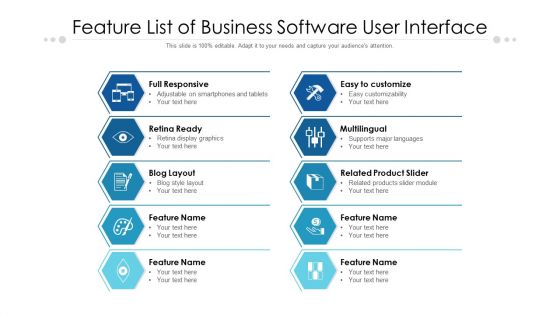
Feature list of business software user interface





Try Before you Buy Download Free Sample Product
 Impress Your
 Audience
 100%
100% Editable
 Save Hours
 of Time


Convert groans to grins with our Feature List Of Business Software User Interface. Ensure the event becomes a fun-filled one.
People who downloaded this PowerPoint presentation also viewed the following :
Content of this Powerpoint Presentation
Description:
The image is a PowerPoint slide titled "Feature List of Business Software User Interface," designed to present key features of a software product. The slide has a two-column layout, each with hexagonal icons and corresponding descriptions. The left column lists features like "Full Responsive," "Retina Ready," "Blog Layout," and additional unnamed features, suggesting adaptability to mobile devices, high-resolution display compatibility, and customizable content layout options. The right column includes "Easy to customize," "Multilingual," "Related Product Slider," and other unnamed feature placeholders, highlighting user-friendly customization, language support, and product navigation.
Use Cases:
This slide is useful across various industries for professionals detailing the features of software products tailored to their sector-specific needs. Here are seven industries where this slide can be effectively utilized:
1. Technology:
Use: Showcasing software product features during a tech startup pitch.
Presenter: Product Manager.
Audience: Investors, Customers.
2. E-commerce:
Use: Highlighting online store platform capabilities.
Presenter: E-commerce Strategist.
Audience: Retailers, Marketers.
3. Education:
Use: Describing features of an educational app or platform.
Presenter: EdTech Developer.
Audience: Educators, Institutions.
4. Healthcare:
Use: Explaining patient management system functionalities.
Presenter: Health IT Specialist.
Audience: Healthcare Administrators, Practitioners.
5. Real Estate:
Use: Detailing real estate CRM software advantages.
Presenter: Real Estate Broker.
Audience: Sales Team, Brokers.
6. Marketing:
Use: Presenting digital marketing tools and analytics features.
Presenter: Marketing Director.
Audience: Marketing Professionals.
7. Finance:
Use: Outlining fintech application features for personal finance management.
Presenter: FinTech Innovator.
Audience: Financial Advisors, Clients.
Feature list of business software user interface with all 2 slides:
Our Feature List Of Business Software User Interface create the fun factor. They convert groans into grins.

FAQs for Feature list of business
Honestly, just focus on making it stupid-easy for people to find stuff. Good navigation is everything - don't make users hunt around like they're on a treasure quest. Search bars should be obvious, and please use icons that actually make sense (I'm so tired of those weird geometric shapes that mean nothing). Make sure it works on phones too since everyone's glued to those. Keep workflows simple - if someone needs more than 3 clicks for basic tasks, you've probably overcomplicated it. Stick with UI patterns people already know, and when something breaks, give them real error messages instead of "Error 404XYZ." Map out what users do most and build around that first.
Honestly, customizable dashboards are pretty clutch. People can actually see their important stuff upfront instead of scrolling through tons of random data they don't care about. You'll be able to move widgets around, filter by your specific role, whatever works for your brain. It's like finally organizing your desk the way that makes sense to you - sounds obvious but most people never bother doing it. Once you set it up though? You'll catch problems way faster. The trick is making sure the whole customization thing isn't a pain to figure out.
Oh man, typography can totally make or break your software. I'd go with clean sans-serif fonts - Inter or Roboto are solid choices that scale well. Keep body text at 14px minimum and make sure you've got good contrast ratios. White space is your friend here. Honestly, I've watched too many teams pick these "stylish" fonts that look amazing in mockups but become torture during actual work sessions. Users need to scan info quickly, so consistent hierarchy matters way more than looking trendy. Test everything on screens packed with real data - that's where bad font choices really show themselves.
Honestly, colors can totally make or break whether people actually want to use your software. Dark themes are a lifesaver for long work sessions - way easier on the eyes. You'll want high contrast so users can spot important stuff quickly. Blues and greens feel trustworthy (literally every bank ever uses blue, which is kinda funny). Save red for warnings or "oh shit" moments. Don't forget accessibility either - bad contrast ratios will annoy users with vision issues. My advice? Test your colors with real people early on. What looks good to you might be terrible for actual users.
Don't make people dig through a million submenus to find basic stuff. Group things that actually go together and label them how normal people would think about it - not how your company is organized internally. Honestly, I've watched so many apps crash and burn because of this mistake. Just use standard layouts everyone knows, like sidebars or top menus. Getting fancy with navigation usually backfires. Test with real users constantly. The goal? People shouldn't even think about your navigation. When it works smoothly, nobody notices it's there.
Feedback mechanisms are like giving users a heads up - "yep, that worked" or "hold on, something's off." You need instant visual stuff: loading spinners, success messages, error highlights. Otherwise people just sit there wondering if they broke your site (honestly, I've watched users spam-click submit buttons because nothing happened). Real-time field validation is clutch. Progress bars for uploads. Clear next steps after any action. Just go through your current user flows and ask yourself - where might someone feel lost? Add feedback there. Makes a huge difference.
Dude, mobile responsiveness isn't optional anymore. People are constantly jumping between their phones, tablets, whatever - if your business software doesn't work smoothly on all of them, you're basically telling users to stay glued to their desks. That's terrible for productivity. Remote work made this even more obvious, honestly. Your employees need to approve stuff, check dashboards, update records when they're not in the office. Test on different screen sizes regularly. Oh, and definitely go mobile-first when you're planning new features - it'll save you headaches later.
Honestly, accessibility features help way more people than you'd think. Sure, they're crucial for disabilities, but they also save older coworkers with vision issues, anyone squinting at screens in bright offices, or someone nursing a broken wrist who can't use a mouse properly. Voice commands end up speeding things up for everyone too - I actually use them more than I expected. High contrast modes and keyboard navigation just make software smoother overall. You should probably audit what you've got now to see where the gaps are.
Honestly, dark mode is everywhere now (thank god). Micro-interactions are getting way smoother too - like those little animations when you check something off. White space is huge right now since everyone's brain is fried from staring at screens all day. Mobile-first is pretty much mandatory with hybrid work. Clean designs are winning - fewer buttons, better visual hierarchy. Voice stuff is creeping in but it's still kinda janky for work apps, not gonna lie. I'd say fix your current workflows before getting fancy with new features. Your users will actually use it then.
Honestly, onboarding is make-or-break time. Users who get it right away? They stick around. But if someone's confused from day one, good luck getting them back later. Don't overwhelm people with every feature upfront - that's where most companies mess up. Focus on getting them to that first "oh cool, this actually helps" moment as fast as possible. Once they feel confident using the basics, they'll explore more on their own. I've seen so many apps lose users just because the first experience was clunky. It's like... you get one shot at this.
Ugh, loading times are such a pain point for business apps. Your users aren't browsing Instagram - they're trying to actually get stuff done. Anything over 3 seconds and you'll start losing them. Business people are the worst when it comes to patience (probably because they're always swamped). Even one extra second can drop satisfaction by 16%. Wild, right? Focus on the screens people use most - make those super fast first. The other stuff can wait. Studies show slow apps literally hurt how much work people can finish.
Dude, data viz tools are game changers. You know how you stare at those massive spreadsheets and your brain just shuts off? These turn all that into actual charts and graphs you can digest. Suddenly you're seeing trends and weird outliers that would've taken forever to spot otherwise. My manager loves when I bring heat maps to meetings now - way better than drowning everyone in numbers. Bar charts work great too for basic stuff. It's wild how much clearer everything gets when it's visual instead of just rows of data.
Get a solid design system going first - standardized components, colors, fonts, spacing that works everywhere. Seriously, build a shared component library because recreating the same button 50 times gets old fast. Your designers and devs need to actually talk to each other regularly (shocking concept, I know). Document stuff clearly so new people aren't totally lost. Test on real devices early - not just your laptop screen. Oh, and do regular design reviews to catch weird inconsistencies before they go live. Trust me on this one.
Honestly, user testing will save your ass. You think people will navigate your app one way, but they'll do something completely different and break everything. I've seen users miss giant buttons that seemed super obvious to the dev team. Testing shows you the real problems before you launch - not the ones you're worried about in your head. Do it early with actual users, not just people on your team (they already know how it works, so they're useless for this). Watch someone struggle with your interface for 10 minutes and you'll learn more than months of internal discussions.
Honestly, focus on the obvious stuff first - solid multi-factor auth and clear session timeouts. Your login flow needs to be rock solid because sketchy auth makes everyone paranoid (learned that the hard way). Role-based permissions should be visible to users, not hidden. Data masking for sensitive stuff is crucial. Oh, and throw in audit trail indicators so people know you're tracking things - builds trust weirdly enough. Secure connection badges help too. The whole point is making security feel natural, not like a hurdle. Start by testing your current flows - if they're confusing, users will hate them.
No Reviews