

Flow Diagram For Interaction Of Processes In Organization




Try Before you Buy Download Free Sample Product
 Impress Your
 Audience
 100%
100% Editable
 Save Hours
 of Time


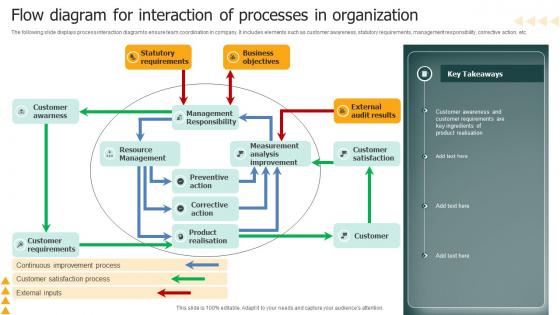
The following slide displays process interaction diagram to ensure team coordination in company. It includes elements such as customer awareness, statutory requirements, management responsibility, corrective action, etc.
People who downloaded this PowerPoint presentation also viewed the following :
Flow Diagram For Interaction Of Processes In Organization with all 6 slides:
Use our Flow Diagram For Interaction Of Processes In Organization to effectively help you save your valuable time. They are readymade to fit into any presentation structure.





FAQs for Flow Diagram For Interaction Of
These diagrams basically show you how all your processes connect and hand off to each other. You can see who does what, where things typically get stuck, and which steps depend on others. Honestly, they're way better than trying to remember everything in your head - I learned that the hard way. Map out your current workflow first, then you'll spot the redundancies and gaps pretty quickly. Short sentences work great for finding bottlenecks too. Use it as your roadmap to figure out where stuff usually goes wrong, then redesign from there.
Honestly, these diagrams are game-changers for team communication. Everyone can actually see how their work fits with everyone else's instead of just guessing. You know those meetings where people talk in circles? This stops that mess. When you need to explain a handoff, just point at the diagram instead of sending novel-length emails back and forth. New team members love them too - they get the whole picture right away instead of being confused for weeks. Even a crappy whiteboard sketch works better than trying to explain everything with words. Trust me on this one.
So you'll need the main steps, decision points, inputs/outputs, and who does what. I always mess up and forget those decision diamonds - they show where stuff branches off. Capture flow direction with arrows and any parallel processes happening at once. Also grab key handoffs between departments. Honestly, don't go crazy with details though. Start with your happy path scenario first. Once that's solid, then add the weird edge cases and exception handling. The whole point is making it clear, not cramming in every microscopic detail.
First thing - map your customer journey start to finish, that's your foundation. Look for those annoying handoff points between teams where stuff usually breaks down. I always do this over coffee, just brain-dumping all the "if this happens, then that" scenarios. Don't get too perfectionist about it yet. Zero in on processes that actually move the needle or involve multiple people. Honestly, the tiny internal steps are just noise at this stage. Get your main flows down first, then you can dig into whatever details actually matter later.
Don't overthink it at the start - too much detail early on and you'll just confuse yourself. Map out the basic happy path first. Then add your decision points and what happens when things go wrong. I always forget the error handling part tbh, but it's super important. Make sure you're clear about who's doing what at each step. Get input from people who actually use the process - I've made that mistake before where everything looked great on paper but missed obvious real-world stuff. Keep your symbols consistent throughout. You can always add complexity later once the foundation makes sense.
So regular flowcharts just map out steps in one process - like how you'd fulfill an order from start to finish. Process interaction diagrams are different though. They show how separate systems actually connect with each other. Your order system talking to inventory, then payment, then shipping - that whole web of handoffs. Traditional ones focus more on decisions and linear steps, but interaction diagrams are about data exchanges between departments. Honestly, if you're trying to spot where things break down across multiple teams, the interaction diagram wins every time. Way better for seeing the big picture dependencies.
These diagrams work great in manufacturing, healthcare, software dev, and finance - pretty much anywhere processes get tangled up. Manufacturing teams use them for supply chains, hospitals map patient workflows, and fintech companies track transactions. Honestly, they're a game-changer for those annoying cross-department handoffs that make everyone's life harder. Software folks also dig them for system integrations. My advice? Find your biggest process headaches first - like where things always seem to break down or get delayed. That's where you'll actually see results from mapping everything out.
Honestly, if you're already using Microsoft stuff, just go with Visio. Lucidchart's pretty great for web-based work though – way better for sharing with people. Oh, and diagrams.net (used to be draw.io) is actually surprisingly decent now and it's free, which is nice. Miro or Figma work if your team wants to collaborate in real-time on more visual stuff. Whatever you do, don't use PowerPoint for this. Trust me, the alignment tools will make you want to throw your laptop. Just start with whatever your company already pays for, then switch to Lucidchart if you need better sharing.
For feedback loops, I always use curved arrows going back to earlier steps. Make them look different from your main flow though - dashed lines work great, or just pick another color. Otherwise everything gets messy and confusing. Put the feedback arrows around the outside edges so they don't interfere with your main process. And definitely label what actually triggers the loop back, like "quality check fails" or whatever. That way people won't have to guess why you're suddenly jumping backwards in the process instead of moving ahead.
Dude, color-coding will save your sanity with those flow diagrams. I usually do blue for automated stuff, green for manual tasks, red for decisions - whatever works. Just pick a system and stick with it across all your diagrams. Otherwise people get confused every single time. Trust me, without colors everyone just stares at identical boxes trying to decode what does what. Keep it simple though - like 3 or 4 colors tops. More than that and it gets messy fast. Honestly wish someone had told me this when I started making these things.
Dude, these flow diagrams are actually game-changers for project management. They map out how all your project pieces connect, so you can catch bottlenecks early and see who needs to talk to who. If something gets delayed, you'll know exactly what else gets screwed up downstream. I used to think they were just busy work, but honestly? They help everyone understand how their part fits in. Teams stop working in silos when they can visualize the whole thing. Just start by sketching out your main project touchpoints - you'll be surprised what dependencies pop up that you totally missed before.
Dude, standardized symbols are a game-changer for process diagrams. Everyone instantly gets what they're looking at - no confusion about whether that box is a decision or just random decoration. It saves you time too since you're not making up new shapes every single time. The best part? Anyone can jump into your flow and actually follow it without asking "wait, what does this mean?" I'd go with basic BPMN symbols if you haven't already - honestly wish someone told me this earlier because now my old diagrams look like hieroglyphics. Your teammates will actually understand your work for once.
You've gotta actually walk through it with the people who do this stuff daily - that's where the magic happens. I can't tell you how many "perfect" diagrams I've seen that completely miss the random workarounds everyone uses. Shadow someone if you can, because honestly? The official docs are usually outdated garbage. Here's a trick: grab someone who's never seen the process before and have them follow your diagram. They'll immediately call out the confusing parts you're blind to. Also talk to the actual end users, not just managers - they know where the real hiccups are.
Make your diagrams interactive instead of just showing slides. Walk them through a real scenario they'd recognize - trace each step so they see how their actual work connects. Different colors help highlight what's broken (and trust me, people LOVE finding problems). Don't just ask "any questions?" at the end. Ask specific stuff about each handoff point. Give them sticky notes or whatever to mark bottlenecks they spot. Suddenly it's a workshop where they're fixing things, not another boring meeting they're sitting through. Way more engaging.
Honestly, at least once a year but that's bare minimum. When big stuff happens - new tech, org changes, process overhauls - you gotta update them right away. I've watched teams waste so much time following diagrams that were totally wrong because nobody bothered updating them. Most dynamic companies do quarterly reviews. More stable places can probably get away with twice a year. The whole point is making sure they actually show how things work now, not some outdated version from ages ago. Oh, and definitely assign someone to own this - otherwise it'll never happen. Set a calendar reminder or you'll forget.
-
Extremely professional slides with attractive designs. I especially appreciate how easily they can be modified and come in different colors, shapes, and sizes!
-
Great quality product.