

Flowchart defining sprint process flow psm process it ppt diagrams




Try Before you Buy Download Free Sample Product
 Impress Your
 Audience
 100%
100% Editable
 Save Hours
 of Time


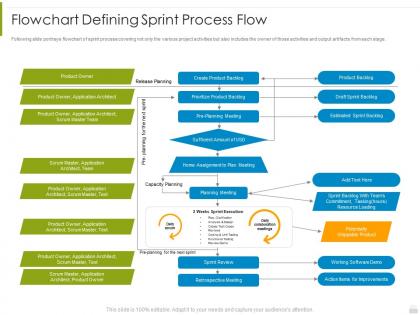
Following slide portrays flowchart of sprint process covering not only the various project activities but also includes the owner of those activities and output artifacts from each stage.
People who downloaded this PowerPoint presentation also viewed the following :
Flowchart defining sprint process flow psm process it ppt diagrams with all 2 slides:
Use our Flowchart Defining Sprint Process Flow PSM Process IT Ppt Diagrams to effectively help you save your valuable time. They are readymade to fit into any presentation structure.


FAQs for Flowchart defining sprint process flow psm process
So there's four main parts: Sprint Planning, Daily Standups, Sprint Review, and Sprint Retrospective. Planning kicks things off - that's where you figure out what to build. Then you've got those quick daily check-ins to keep everyone on track. Reviews are where you show off what you actually shipped, and retros are for talking through what worked (or totally bombed). Oh, and don't let planning meetings run forever - I've seen teams spend like 3 hours planning a 2-week sprint which is just... no. Keep everything time-boxed or you'll burn out before you write a single line of code. Those daily standups get old fast but they're clutch when stuff hits the fan.
Look at your roadmap first - what outcome actually matters this sprint? Skip the backlog fluff. Make it super specific and measurable, like "get checkout down to 3 clicks" instead of some vague "improve checkout" nonsense. I learned this the hard way when my teams kept wandering around aimlessly for two weeks straight. Stick to 1-2 goals max. Here's my test: if you can't explain it to your mom in 30 seconds, you've overcomplicated it. Your whole team should know the goal by heart. Honestly, half the battle is just being crystal clear about what you're actually trying to accomplish.
Okay so basically you've got three people running the show: Product Owner figures out what to build and why it matters, Scrum Master deals with all the annoying roadblocks that pop up, and your Dev Team actually codes everything. The dev crew should have everyone you need - coders, testers, maybe a designer if you're fancy. They're all in it together for the sprint goal, not just doing their own thing. Oh, and don't move people around once you start - I've seen that mess up teams before. Just make sure everyone knows what they're doing upfront and you'll be fine.
Start with a crystal clear sprint goal - seriously, half your problems disappear when everyone knows what you're actually building. Get your PO to explain the "why" behind story priorities during the meeting. Break down the tricky stuff right there too, don't leave it for later. Let people ask questions! Document everything in your shared tools as you go. Oh, and timebox discussions but don't be a drill sergeant about it - spending an extra 10-15 minutes upfront beats having confused devs halfway through the sprint. Trust me on this one.
Track your velocity first - story points done per sprint. Burndown charts show if you're hitting targets mid-sprint. Sprint goal achievement is obvious but still worth measuring. Cycle time is where it gets interesting though - shows how long stories actually take start to finish. Most teams skip this but it catches bottlenecks you'd never see otherwise. Commitment accuracy matters too (what you planned vs what you shipped). Oh and team satisfaction scores, because miserable developers don't ship good software. Start simple with these basics - you can always add more later without drowning in spreadsheets.
Honestly, you gotta push back hard on scope creep mid-sprint. The whole point is protecting your team's focus and what they committed to. New requests? Straight to the backlog for next planning - no exceptions. Sprint scope is locked, period. I mean, sprints become totally pointless otherwise, and your team will burn out constantly shifting gears. Sure, if something's genuinely urgent you can maybe swap equal-effort items, but that's super rare. Write down everything that comes up so you don't forget to discuss it in retro. Be firm but don't be a jerk about it - help them get why these boundaries actually matter for shipping good work.
Honestly, the worst thing is when retros turn into finger-pointing sessions. Focus on fixing processes instead of calling people out - like "our planning sucks" not "Mike always overcommits." Also that one person who talks the entire time? Yeah, shut that down politely. Make your action items super specific with actual owners, or they'll just die in your backlog (learned this the hard way). Oh, and timebox everything so you don't go down weird rabbit holes. But seriously, pick at least one thing to actually change each sprint. Otherwise you're just complaining for an hour every two weeks.
So sprint reviews are clutch because you're getting feedback while you can still do something about it. Instead of building the wrong thing for months, stakeholders see working features and tell you what's off. Way cheaper to fix stuff early, obviously. The key thing - and this took me forever to learn - is actually showing real working software, not just slides. That's when people get it and give you the good feedback. Then you can shuffle your backlog around for next sprint based on what they said. Honestly beats the hell out of surprise launches where everyone hates what you built.
Start with your sprint goal and figure out what absolutely has to get done to hit it. Those are your must-dos. Dependencies come next - some tasks just can't start until others finish, so map that out. I always overthink this part during planning meetings, honestly. But it saves headaches later! Consider when your team has the most energy during the week too. Daily standups are perfect for shifting priorities around since stuff always changes mid-sprint. Don't feel bad about bumping lower-priority items back to the backlog if something more important pops up - happens all the time.
Honestly, just start with Jira for tickets and sprints - it's pretty solid once you get the hang of it. Confluence works great for docs, and whatever chat app your company already uses (Slack, Teams, whatever) will handle daily stuff fine. Don't overthink the video calls either. Zoom, Meet, doesn't really matter as long as everyone shows up consistently. I've watched so many teams waste weeks debating tools when they should've been actually working. Start simple with one main tool, get comfortable with your process first. You can always add fancy stuff later once things are running smoothly.
So velocity is just how many story points your team actually finishes each sprint - nothing fancy. I use it to figure out what we can handle next time around. Like if we've been hitting 25 points consistently, planning for 40 is gonna bite you (trust me on that one). Look at your last 3-5 sprints and average those out. That's your baseline for planning. Don't let anyone turn it into some performance scorecard though - that misses the whole point. It's really just about not overpromising to stakeholders and keeping sprint planning realistic.
Honestly, standups can get super repetitive if you let them. Try adding mid-sprint check-ins or pairing sessions where people actually tackle problems together. Your sprint board should be visible to everyone - that way when someone's stuck, others can jump in and help out. Retrospectives are huge but only if they lead to real changes, not just complaints. Oh and this might sound obvious, but create spaces where your team naturally talks instead of working alone all the time. Pick one thing to try this sprint and see how it goes.
Honestly, just bake feedback into your sprint ceremonies - that's where you'll get the good stuff. Daily standups? Ask what's blocking people or what could be smoother. Sprint reviews are perfect for stakeholder input (not just showing off shiny features). But retrospectives are where it's at - spend real time on what worked, what sucked, and actual changes for next sprint. Here's the thing though: you've gotta implement those changes, not just talk about them. Oh, and start with one improvement per sprint or your team will hate you.
So basically, definition of done is like your team's quality checklist - it stops people from saying stuff is "finished" when it still needs testing or docs or whatever. Trust me, you'll avoid so many awkward sprint reviews where someone's like "wait, this isn't actually ready." Your whole team needs to agree on it upfront and actually stick to it, not just ignore it. Check against it during the sprint too, don't wait until the end. Otherwise you're just asking for scope creep and a mess of technical debt later.
Ugh, this happens all the time. Hit up your product owner first - they'll know if it's actually urgent or just someone panicking. Critical change? Swap out the low-priority stuff from your current sprint. But honestly, be super upfront with stakeholders about what you're dropping because something's gotta give. Document everything so nobody "forgets" what was decided later (trust me on this one). Bring it up in your daily standups too so the whole team knows you're pivoting and why.
-
Very unique, user-friendly presentation interface.
-
Commendable slides with attractive designs. Extremely pleased with the fact that they are easy to modify. Great work!
-
Informative presentations that are easily editable.
-
Nice and innovative design.
-
I discovered this website through a google search, the services matched my needs perfectly and the pricing was very reasonable. I was thrilled with the product and the customer service. I will definitely use their slides again for my presentations and recommend them to other colleagues.