Pmo process flow chart with action plan

Rating:
95%
Pmo process flow chart with action plan
Slide 1 of 2
Favourites Favourites

Try Before you Buy Download Free Sample Product

Audience Impress Your
Audience
Editable 100%
Editable
Time Save Hours
of Time
The Biggest Sale is ending soon in
0
0
:
0
0
:
0
0
Rating:
95%
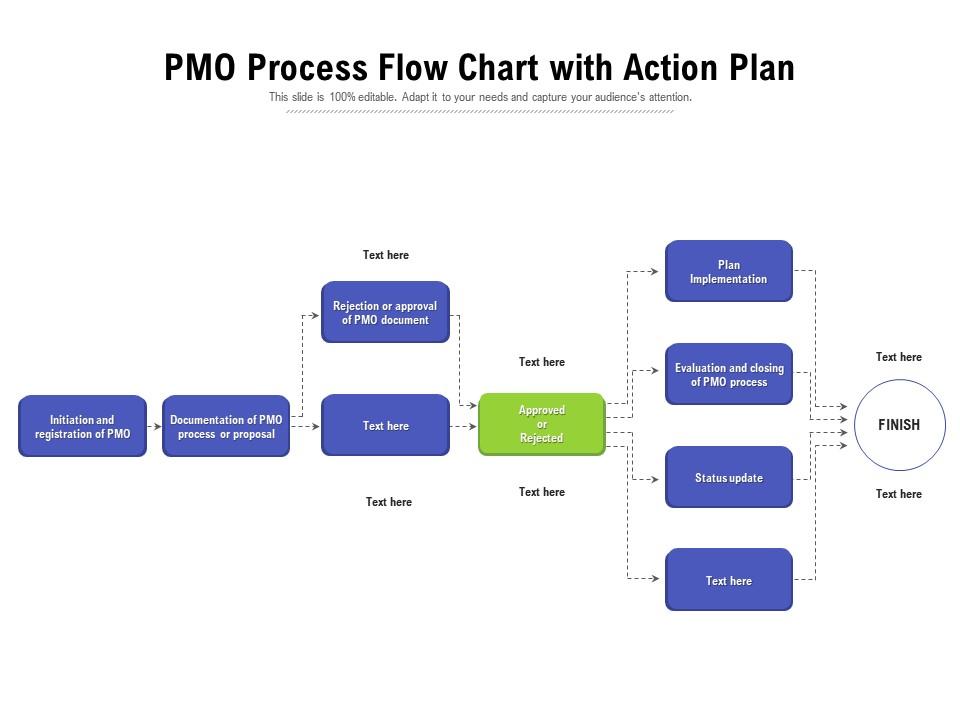
Presenting our set of slides with name PMO Process Flow Chart With Action Plan. This exhibits information on one stages of the process. This is an easy to edit and innovatively designed PowerPoint template. So download immediately and highlight information on Rejection Or Approval Of Pmo Document, Approved Or Rejected, Plan Implementation, Status Update, Documentation Of PMO Process Or Proposal, Initiation And Registration Of PMO, Evaluation And Closing Of PMO Process.

People who downloaded this PowerPoint presentation also viewed the following :

FAQs for Pmo process flow chart

Think of a PMO process flow chart as your project GPS - shows exactly who handles what and when decisions happen. No more "wait, is that my job?" moments that kill momentum. You'll map out initiation, approvals, resources, reviews, the whole nine yards. Short sentences work. Then longer ones that actually flow naturally when you're explaining the handoffs between teams. Honestly, most teams think they can just figure it out as they go, but that's how you end up with three people doing the same task while something critical falls through the cracks. Worth creating one if you don't have it - cuts down on those endless email chains where everyone's confused about next steps.

So basically, PMO process charts are like having a translator for all the different people on your team. Finance folks talk budgets, developers talk sprints - everyone's speaking different languages. The chart gives everyone the same map to follow. No more meetings where people talk past each other because they're focused on totally different phases. When stuff goes wrong (and it will), you can point to the exact step and say "we're stuck here" instead of being all vague about it. Honestly, make one that people can actually read and your status meetings won't suck as much.

So you'll want to map out the main stuff first - project intake, how you divvy up resources, those governance checkpoints, and basic reporting flows. Decision points are huge too. Like approval gates and what happens when projects blow up (spoiler: they will). Also think about stakeholder touchpoints and how info actually moves between your project teams and the big bosses. Really it's about figuring out who's doing what, when it happens, and what kicks off the next step. I'd honestly start simple with your core processes - you can always make it fancier once your PMO finds its groove.

So basically, PMO process flow charts show you exactly who approves what and when. No more guessing games or running in circles when stuff hits the fan. Think of it as your project GPS - tells you which path to take based on whatever situation you're dealing with. Maps out who to escalate to, approval gates, backup plans, all that. Honestly, I keep mine pulled up during most project meetings now. Whenever you hit a wall or need someone's sign-off, just reference the chart. Game changer for avoiding those awkward "um, who do I ask?" moments.

Ugh, scope creep is gonna be your biggest headache - everyone suddenly thinks their random process needs to be mapped. Stakeholders are the worst for this. You'll also spend forever figuring out how detailed to go. Too basic and it's pointless, too granular and people's eyes glaze over. Getting teams to actually explain their workflows clearly? Good luck with that. Oh, and processes change constantly so you're basically playing catch-up forever. Honestly, just start with the main stuff that actually matters. Build in time to review it regularly or you'll hate yourself later.

Honestly, these software tools will change your life when making PMO flow charts. Templates let you skip the whole "staring at a blank page" thing. My team uses Lucidchart and we can all jump in and edit at once - no more emailing files back and forth like it's 2005. The auto-alignment features are clutch because I'm terrible at making things look neat. Visio's solid too, though pricier. You can tweak processes later without starting over, which happens more than you'd think. If you're just getting started, try Draw.io first. It's free and pretty straightforward.

So basically it's your game plan for catching risks before they wreck everything. You map out all the spots where stuff usually goes wrong - team handoffs, phase transitions, you know the drill. Helps you figure out when to do risk checks, who approves the fixes, and when to escalate things up the chain. Think of it as your early warning system built right into the process. Honestly, I'd use it during planning to set up those checkpoints ahead of time. Way better than playing catch-up later when everything's on fire.

Start by mapping out how your projects actually flow right now and spot where your needs are different from those basic PMO templates. Those generic charts are pretty useless tbh - you'll need to customize almost everything. Build in your specific approval processes, governance checkpoints, and how stakeholders actually communicate. Decision gates should match your company's risk appetite and any regulatory stuff you deal with. Also work in whatever tools and systems you're already using. The whole point is matching reality, not some ideal version of how work should happen. Oh, and definitely pilot it first before going company-wide.

A PMO process flow chart is your best friend for getting new PMs up to speed quickly. Show them exactly when approvals are needed, what deliverables they're responsible for, and who they'll work with at each stage. Way better than dumping a massive handbook on them and crossing your fingers! The visual layout helps them spot dependencies and see how their projects connect to everything else. Honestly, I'd have them walk through a real project example using the chart - they'll actually remember it instead of just pretending to pay attention. Makes the whole onboarding thing so much smoother.

Think of a PMO process flow chart like a roadmap for your projects - it shows how each decision connects to what your company actually wants to achieve. Before you waste time and money on random stuff, you can quickly see if a project request makes sense. The chart has built-in checkpoints where you evaluate if things fit your strategy and prioritize based on real business value. Honestly, it's way better than just chasing whatever shiny idea pops up that week. During project intake, you'll spot misalignment issues right away instead of discovering them months later when it's too late.

For your PMO flow chart, I'd focus on project completion rates, budget variance, and resource utilization - those are usually the big ones stakeholders care about. Timeline metrics are perfect since flow charts already show time progression anyway. Quality scores and stakeholder satisfaction can work too, but honestly don't go overboard. Color-coding different performance levels directly on the chart is brilliant - makes spotting problems way easier. Oh, and milestone adherence is another good one. Just stick to 3-4 metrics max that actually matter to your team, then embed them at the right process steps.

So here's the thing - your PMO flow chart starts super basic. Project request, approval, execution, done. But over time it gets way more complex as you figure out what actually works. You'll add decision points, feedback loops, risk stuff running parallel to everything else. Honestly, the governance gates and portfolio prioritization parts come later when you're not just trying to survive each project. Resource checkpoints too. I'd say update it yearly based on reality, not whatever looked impressive in that initial presentation. Short sentences mixed with longer explanations work better than those crazy detailed diagrams nobody follows anyway.

Honestly, I'd say quarterly updates work well, but don't wait if something major changes. Talk to the actual people doing the work - managers usually have no clue what's really happening day-to-day. Document everything you change and why. Version control saves your sanity later, trust me. Use clear file names and keep old versions somewhere safe. Oh, and make sure you're updating based on reality, not how you wish things worked. After each update, do a quick team walkthrough. You'll always catch something you missed.

So market changes can totally mess with your PMO flow chart, right? When regulations shift out of nowhere or budgets get slashed, you're stuck adding new decision points and reworking approval steps. Build in some flexibility from the start - contingency paths are your friend here. Honestly, rigid processes just break when things get crazy. Instead of scrapping everything later, you'll just be tweaking flows as needed. Oh, and set up quarterly reviews to catch this stuff early. Way better than being blindsided by external changes.

Honestly, you'll want to focus on three main things: the PMO methodology, whatever flow chart software you're using, and escalation protocols. Most people think the software part will be hard, but it's actually pretty straightforward - these tools are way more user-friendly than they used to be. The methodology training is where you'll spend most of your time though. People need to understand WHY each step matters, not just go through the motions. Don't forget escalation protocols either - that's usually where everything falls apart. I'd start with a half-day workshop covering everything, then do some hands-on practice with real examples.

Ratings and Reviews

95% of 100
Review Form
Write a review
Most Relevant Reviews
  1. 100%

    by Alexander Ramirez

    Great product with highly impressive and engaging designs.
  2. 80%

    by Chase Howard

    Easy to edit slides with easy to understand instructions.
  3. 100%

    by Dwain Johnston

    Unique design & color.
  4. 100%

    by Claud Hughes

    Very unique and reliable designs.

4 Item(s)

per page: