


Pmp process chart it pmi project management process chart




Try Before you Buy Download Free Sample Product
 Impress Your
 Audience
 100%
100% Editable
 Save Hours
 of Time


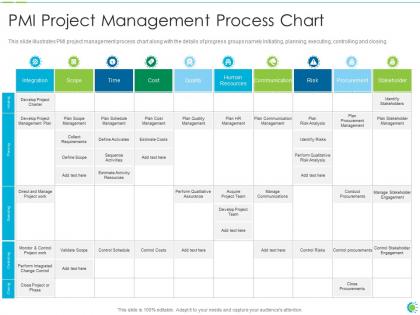
This slide illustrates PMI project management process chart along with the details of progress groups namely initiating, planning, executing, controlling and closing.
People who downloaded this PowerPoint presentation also viewed the following :
Pmp process chart it pmi project management process chart with all 2 slides:
Use our PMP process chart IT PMI project management process chart to effectively help you save your valuable time. They are readymade to fit into any presentation structure.

FAQs for Pmp process chart it pmi project
So PMP has five main stages you gotta know. Initiating is where you define the project and get everyone on board. Planning comes next - this is the big one where you map everything out (seriously, don't rush this part). Then there's Executing when your team actually does the work. Monitoring & Controlling happens alongside it to catch problems early. Closing wraps it all up with handoffs and lessons learned. Honestly, spend extra time in Planning because when stuff goes wrong later (and it will), you'll thank yourself for thinking it through properly upfront.
Dude, get yourself a PMP process chart - it's a game changer. Shows all 49 processes and how they link up, so you're not constantly digging through the PMBOK wondering what connects where. Way better than trying to memorize which outputs become inputs for the next step. Honestly, it's like having GPS for project management (wish someone told me this years ago). Print one out and stick it on your wall during planning. You'll stop second-guessing yourself so much. Trust me on this one.
So the Project Charter is basically your project's official birth certificate. It's what makes your project real instead of just some random idea floating around. Without it, you're nobody - can't spend money, can't assign people, nothing. Your charter gives you actual authority as PM and spells out the high-level scope and objectives. Honestly, I treat mine like a shield when people start questioning my decisions. And here's the thing - when scope creep hits (and it will), that charter becomes your best friend. Just point back to what was originally agreed on. Saves you so much headache later.
Think of it like a grid - knowledge areas go down one side, process groups across the top. So you've got your 10 knowledge areas (Integration, Scope, Schedule, all that stuff) intersecting with the 5 process groups (Initiating through Closing). Some areas are totally loaded in Planning - Scope has like 6 processes just sitting there. Others are scattered around more evenly. The whole thing basically maps out which processes happen when during your project. I actually found it super helpful when I was studying because you can see how everything flows together instead of just memorizing random processes.
So the PMP chart basically shows how each process creates stuff that other processes need. Initiating spits out your project charter and stakeholder register. Planning is honestly where you'll spend most of your time - it creates the project management plan, scope baseline, schedule, budget, risk register, all that fun stuff. Executing produces your actual deliverables plus work performance data and change requests. Then monitoring gives you performance reports and approved changes. Closing wraps everything up with final deliverables and lessons learned. The key thing is seeing how they're all connected - charter feeds into planning, planning feeds execution, etc. Once you map those connections out, the whole thing makes way more sense.
Honestly, it's way more doable than you'd think! Map those traditional PMP processes to your sprints - stuff like stakeholder management and risk monitoring still matter, just on shorter cycles. The monitoring/controlling parts work great since you're already iterating constantly anyway. I'd start by figuring out what happens at epic level vs sprint level. Some processes are too big for individual sprints, you know? Use the PMP chart more like a checklist so you don't accidentally skip important PM stuff while you're focused on delivering. Might feel weird at first mixing the two approaches, but lots of teams make it work as a reference framework rather than following it religiously.
Honestly, the hardest part is getting people to stick with it when things get crazy - everyone abandons process under pressure. Documentation updates? Yeah, that'll be your constant headache because nobody wants to maintain charts when deadlines hit. Plus different people read the same flowchart totally differently, which gets messy fast. Oh, and don't try to map out everything at once - you'll burn out. Start with maybe 2-3 critical processes first. Get your key people on board early, then do regular check-ins to keep things current. Trust me on this one.
Yeah for sure! The PMBOK framework is meant to be adapted - nobody uses it exactly as-is. Construction teams focus way more on resource management, while IT folks obsess over iterative phases. Healthcare has all those compliance checkpoints too. What I'd do is grab your current process and line it up against the standard chart. You'll spot the gaps pretty quick. Keep the core structure but swap in your industry's actual terminology and tools. Some of the best process charts I've seen barely look like the textbook version, but they work perfectly for that specific context. Makes way more sense than forcing generic templates.
Honestly, Lucidchart is probably your easiest bet - their PMP templates are actually decent and you can just drag stuff around. Visio works too if you've got it. Miro's pretty cool for team stuff since everyone can mess around with it at the same time. There's also Draw.io which is free but kinda basic looking. I mean, you could even use PowerPoint in a pinch but that's gonna be a pain. SmartDraw does some automated stuff which is nice. I'd just start with Lucidchart's free trial honestly - saves you from having to build everything from scratch.
So stakeholder engagement is literally everywhere in the PMP process chart - which makes sense since you're dealing with people constantly as a PM. The main ones are "Manage Stakeholder Engagement" in Executing and "Monitor Stakeholder Engagement" in M&C. You've also got "Plan Stakeholder Engagement" and "Identify Stakeholders" in the planning/initiating phases. Those four are really your bread and butter. The chart shows when you're talking to stakeholders, planning your approach, and figuring out if what you're doing is even working. I'd focus on mastering those core four first - everything else kinda builds from there.
Dude, PMP process charts are honestly game-changers. They turn messy project workflows into something you can actually wrap your head around. Dependencies become super obvious, and you'll catch bottlenecks before they wreck your timeline. Your stakeholders won't have to dig through boring docs to get the big picture either. Great for onboarding newbies too - way better than dumping a manual on them. I'd map your current project against the standard processes first. You'll probably find some gaps you didn't even know existed. It's like finally getting GPS instead of squinting at some terrible paper map.
Risk management isn't stuck in just one process group - it spreads across your whole PMP chart. Planning is where you'll identify risks initially, but then you're constantly monitoring them during Executing and Monitoring & Controlling phases. Honestly, it's probably the most interconnected knowledge area (which can be annoying when you're trying to memorize everything). Your risk register becomes this living document that affects procurement decisions, quality stuff, schedule changes - basically everything. Don't treat the processes like they happen in order either. You'll keep looping back to spot new risks as things change. Update that register regularly or you're basically flying blind.
Honestly, the biggest mistake I see people make is treating that process chart like it's set in stone. Don't force every project through the exact same steps - some stuff overlaps or you'll need to circle back. Stakeholders always want to skip planning to move fast, but that'll bite you later (learned that one the hard way). Also, stop obsessing over checking off every single process. Focus on understanding WHY each step matters for YOUR specific project. The chart's a solid roadmap, just don't be afraid to adjust it when reality hits.
Honestly, the PMP process chart is a lifesaver for tracking where you actually are in your project. It shows you what monitoring stuff should be happening right now versus what you might be missing. Think of it like a GPS - not just your destination, but all the stops you need to make. What I really like about it is how you can see what's coming next for control activities, so you're not caught off guard later scrambling around. Oh, and it keeps your monitoring strategy from being all over the place. Definitely bookmark it as your main reference.
So the PMP process chart is basically your team's shared language - everyone sees how processes connect and what flows between them. Prevents those "wait, I thought you were handling that" disasters we've all had! During meetings, you can show stakeholders exactly where you are and what's next. Way easier than explaining everything verbally, trust me. The visual format just clicks better for most people. Oh, and when you're training someone new? Walk them through it first. Honestly saves hours of back-and-forth explanations later.
-
Use of different colors is good. It's simple and attractive.
-
Commendable slides with attractive designs. Extremely pleased with the fact that they are easy to modify. Great work!