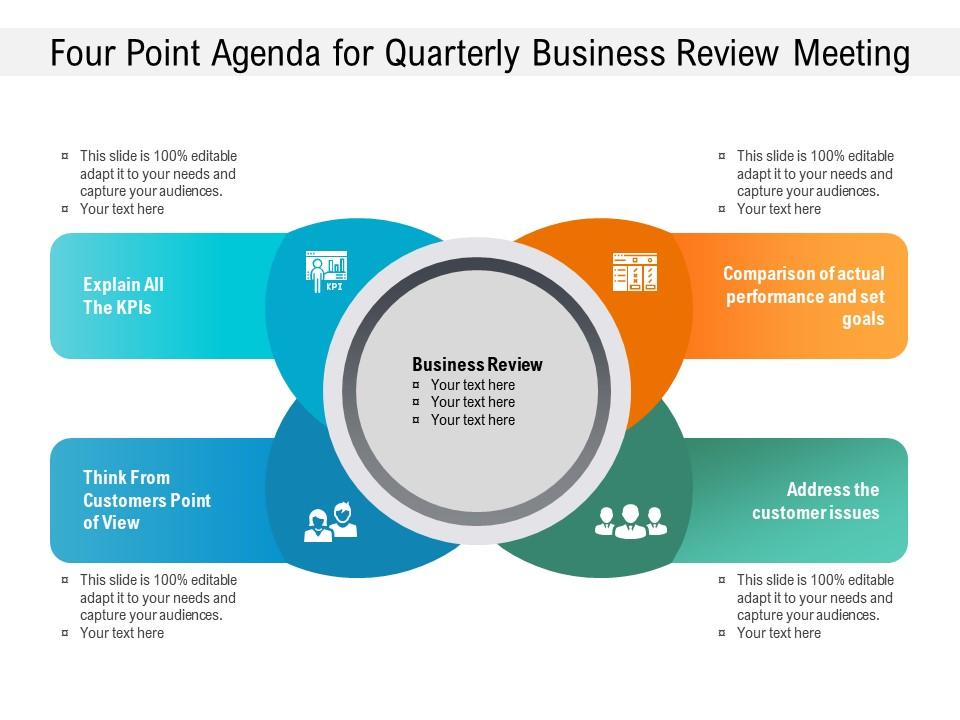
Four point agenda for quarterly business review meeting

Rating:
100%
Four point agenda for quarterly business review meeting
Slide 1 of 2
Favourites Favourites

Try Before you Buy Download Free Sample Product

Audience Impress Your
Audience
Editable 100%
Editable
Time Save Hours
of Time
The Biggest Sale is ending soon in
0
0
:
0
0
:
0
0
Rating:
100%
Presenting our set of slides with name Four Point Agenda For Quarterly Business Review Meeting. This exhibits information on four stages of the process. This is an easy to edit and innovatively designed PowerPoint template. So download immediately and highlight information on Four Point, Agenda Quarterly, Business Review, Meeting.

FAQs for Four point agenda for quarterly

For your QBR, definitely cover performance vs goals - revenue, KPIs, whatever matters to your business. Include wins and challenges from the quarter, plus market insights or customer feedback. Oh, and execs eat up competitive landscape slides, so throw one in. But here's the thing - don't just dump data on them. Tell a story. Connect your wins to actual business impact and be real about what bombed. Charts and graphs keep it visual (nobody wants walls of text). End with clear next steps and what resources you'll need. The storytelling part honestly makes or breaks these presentations.

Before you even touch PowerPoint, just ask people what they want to see. Executives care about big picture stuff and ROI. Team leads? They want the nitty-gritty details about resources and timelines. I made this mistake once - went super deep into operational weeds with a bunch of VPs who just wanted to know if we'd hit our numbers. Awkward silence for days. Board folks need that high-level view with clear action items. Department heads actually want those granular metrics they can use. Send out a quick survey beforehand asking what matters to them. You'll skip hours of guesswork and won't feel like you're just going through the motions.

Honestly, just pick the stuff that actually matters to your bottom line. Revenue growth, customer retention, maybe acquisition costs - whatever makes sense for your industry. Don't go crazy with like 20 different dashboards (I've seen teams do this and it's a mess). Stick to maybe 5-7 metrics that actually tell you if things are going well or if you need to panic. Compare quarter-to-quarter and year-over-year so you can spot trends. The real trick is focusing on what your executives will actually use to make decisions, not just numbers that sound cool in meetings.

Honestly, visuals are a game changer for QBRs. Charts and graphs keep people awake instead of staring blankly at endless spreadsheets. Color-coded dashboards work great for showing how you're hitting goals. Before/after shots really drive the point home too. Oh and throw in some icons to break up walls of text - nobody wants to read paragraphs during a presentation. Your team will actually retain stuff instead of forgetting everything five minutes later. Just don't go crazy with colors though. Two or three max, otherwise it looks like a kindergarten art project.

Ugh, don't dump a million data points on them - your audience will zone out immediately. Tell the story behind your numbers instead. Get team input early too, not the night before when you're panicking. Trust me on this one. Honestly present wins AND the rough patches because execs can spot fake optimism instantly. I've sat through way too many QBRs that were just boring data dumps with zero substance. Come armed with actual next steps and recommendations, not just "here's what we did last quarter." Short sentences work. But mix in some longer explanations when you need them.

Okay so basically your old QBR feedback is gold for the next one. Grab all the specific stuff - like were your charts actually readable, did you drag on too long somewhere, what topics made everyone perk up. Honestly I still cringe at my first few presentations but whatever, that's learning right? After each review just jot down what people said. You'll start noticing patterns super fast. Maybe you always speed through the money stuff or your competitive slides get everyone talking. Once you see those trends, flip your structure around and time things better.

Honestly, storytelling is a game-changer for QBRs. People zone out when you just dump charts on them, but they'll actually listen when you connect the dots. Nobody's gonna remember "revenue up 12%" - but they will remember how your team scrambled to pivot mid-quarter and somehow landed that massive client everyone thought was impossible. It gets executives emotionally hooked instead of just glazing over numbers. The context makes all the difference. For your next one, grab 2-3 key metrics and turn them into mini-stories. Show what happened, why it mattered, where you're headed. Way more effective than spreadsheet overload.

Honestly, just stick with every three months - there's a reason they call them *quarterly* business reviews! Monthly feels like overkill and you'll burn everyone out with constant meetings. Annually? Way too long, problems will snowball by then. Three months gives you enough time to actually see patterns in your data and make real changes. Some teams I know stretch it to four months when things are slow, but the quarterly rhythm really does keep people on track. Oh, and definitely block out all four dates for the year right now while you're thinking about it!

Honestly, get a BI tool like Tableau or Power BI first - that alone will save you hours of making charts manually. Your CRM (Salesforce, HubSpot, whatever) probably already has the metrics you need, so just pull from there directly. Miro's great for those stakeholder alignment sessions where everyone needs to feel heard. Oh, and don't forget to track action items afterward - Asana or Monday work well for that. I learned this the hard way after scrambling through way too many QBRs. Start with the BI tool though, that's your biggest win.

Lead with your wins and actual numbers - show how they moved the needle business-wise. When stuff went sideways (because it always does), don't sugarcoat it but jump straight into lessons learned and your game plan. Honestly, I've watched too many QBRs turn into pity parties without any real solutions. Structure it like: where we started, current state, what's next. Visuals help tons with making the data actually digestible. Come armed with specific next steps and what you'll need to get there. People want the real deal plus a roadmap, not a bunch of excuses.

Ditch the PowerPoint marathon approach - nobody wants that. Ask open-ended questions and get people talking in breakouts about the key stuff. Here's what actually works: share a failure story or weird insight right upfront. Trust me, it hooks people way better than just listing wins. Get them solving problems WITH you instead of just sitting there nodding. The best QBRs happen when attendees start arguing with each other (in a good way) because they're actually invested. Oh, and don't forget to nail down next steps with actual owners before everyone leaves - otherwise it's all just talk.

Definitely do an exec summary up front, then jump into your metrics and how you did against goals. But honestly, don't just dump numbers on people - that's boring as hell. After each big section, actually stop and ask what questions they have. Give them space to think. I'd go with: performance review, wins/challenges, customer feedback, then future stuff. Keep your slides super light on text so you're having real conversations instead of watching people read. Oh, and capture action items right then and there with owners - don't wait until the end or you'll forget half of it.

Get those QBR reports out in 48 hours max - people forget everything otherwise. Start with a summary deck for everyone who attended. Then send the detailed stuff to whoever actually needs all that data. Oh, and don't make the mistake I always do - your CEO doesn't want the same 50-slide deck you're giving department heads. Segment your lists properly. Subject lines matter too, something like "Q3 QBR Summary - Action Items Inside" works great. Most critical thing? Put the next steps and owners right in that first email or stuff just dies.

Oh definitely include a competitive section in your QBR! I always dig into what competitors did that quarter - new launches, pricing changes, market share stuff. SEMrush is great for this, or honestly just creeping on their websites works too lol. Compare their moves against your actual metrics. Did their price cut hurt your conversions? Their new feature make customers expect more from you? That's the real story. I hate when people just list competitor updates without connecting them to business impact. End with 2-3 concrete actions you'll take next quarter based on what you found.

First thing - get those action items written down with names and deadlines before everyone forgets. Send out notes within a day or two max. You know how these things go... those "urgent" deep-dive sessions everyone wanted? Schedule them now or they'll never happen. Update your planning docs with whatever new stuff came up (there's always something). Oh, and throw the next QBR on people's calendars while you're thinking about it. Trust me, keeping that momentum going is everything - once it dies, good luck getting it back.

Ratings and Reviews

100% of 100
Review Form
Write a review
Most Relevant Reviews
  1. 100%

    by Coy Wallace

    Nice and innovative design.
  2. 100%

    by Deon Warren

    Use of icon with content is very relateable, informative and appealing.
  3. 100%

    by Dan Marshall

    Awesome use of colors and designs in product templates.

3 Item(s)

per page: