


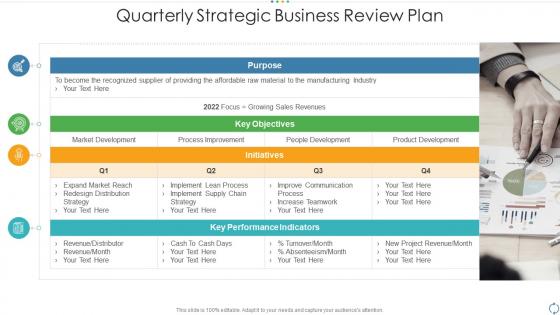
Quarterly strategic business review plan




Try Before you Buy Download Free Sample Product
 Impress Your
 Audience
 100%
100% Editable
 Save Hours
 of Time


Our Quarterly Strategic Business Review Plan are topically designed to provide an attractive backdrop to any subject. Use them to look like a presentation pro.
People who downloaded this PowerPoint presentation also viewed the following :
Quarterly strategic business review plan with all 9 slides:
Use our Quarterly Strategic Business Review Plan to effectively help you save your valuable time. They are readymade to fit into any presentation structure.








FAQs for Quarterly strategic
Okay so for your quarterly review, cover these four things: how you did against Q1 goals, major wins plus what went wrong, financial stuff, and what's next for Q2. The wins/challenges part is honestly where you can shine - don't just throw numbers at them. Tell the actual story behind what happened. Charts help but make them clean, not overwhelming. Oh and definitely include real examples of stuff that worked (and failed, they want honesty). Wrap up with maybe 3-4 concrete priorities for next quarter. That way everyone walks out knowing exactly what you're tackling.
Honestly, turning those quarterly reports into visuals is a game changer. Nobody wants to dig through endless spreadsheets - I learned that the hard way at my last job. Bar charts and trend lines make it so much easier to spot what's working and what isn't. Your stakeholders will actually pay attention instead of glazing over. Color coding helps too, especially for highlighting the important stuff. Quarter-over-quarter growth becomes obvious when you can see it visually. People retain way more information this way, plus they'll make decisions faster. Start basic though - don't overcomplicate it right off the bat.
Honestly, I just map out the whole year first - gives me the big picture, you know? Then I work backwards from December and break everything into 90-day chunks. Each quarter should build toward your annual goal, like actual building blocks. The trick is making sure your quarterly metrics match what you're tracking annually. Don't overthink it though. Write down exactly how each Q connects to your end target, and be ready to pivot mid-year when things inevitably change. Trust me, they always do. Short milestones just feel way less overwhelming than staring at a massive December deadline.
Go with the sandwich method - celebrate wins first, tackle the messy stuff honestly, then wrap up looking ahead. Get specific about what actually worked so your team knows they crushed it. When you hit the problems, focus on fixing them instead of just pointing fingers (nobody wants to get called out publicly, trust me). Frame those rough spots as chances to level up and give people clear next steps. Oh, and prep your examples beforehand! You don't want to be standing there going "uh... well there was that thing..." Balance is everything here.
Honestly, feedback is what makes quarterly reviews actually worth it instead of just another corporate thing you have to sit through. Your manager, coworkers, maybe people under you - they'll all chime in and that input shapes your self-assessment plus whatever goals you're setting next. The reviews where I got really honest feedback? Total game-changers. Don't just nod along though - ask for specific examples when something's vague. You can't fix "communication issues" but you can work on "interrupting people in meetings" or whatever. Being open to hearing stuff you might not love is huge.
So before everyone bolts from the meeting, make sure someone's actually responsible for each thing - with real deadlines. Trust me, I've watched so many "productive" meetings become total wastes because nobody remembered who was doing what. Throw it all in a Google doc or whatever you use, names and dates included. Here's the thing though - don't just hope it happens. Set up quick check-ins every couple weeks to see if people are actually following through. Maybe it's just me, but I think waiting until the next big review is way too long. Put reminders on your calendar to bug people about it.
Send your agenda beforehand - trust me on this one. People actually show up with better questions when they're not seeing everything for the first time. I used to just blast through slides until I realized half the room had mentally checked out. Now I stop every few slides and ask someone specific what they think about whatever we're looking at. Simple charts work way better than cramming in every data point you have. Oh, and save like 15 minutes at the end for actual discussion. If it's a bigger group, maybe split them up for a few minutes first - gets the quiet people talking instead of just hearing from the same three voices every time.
Yeah, so basically tailor it to who's reading. Executives want the big picture stuff - metrics, budget impact, strategic wins. Skip the nitty-gritty details with them. Your team needs the opposite though - actual project updates, who did what, roadblocks they hit, what's next. Honestly? I just make two versions now. Way easier than trying to make one report work for everyone (spoiler: it never does). Keep the exec one to a single page max. Team version can get into the weeds with processes and what we learned. Just start with what each group actually cares about.
Do them every three months, four times a year. Sounds basic but seriously, so many teams let these slide to like every 4-5 months and then wonder why they're losing track of stuff. Pick specific dates - I always do mid-month, like March 15th, June 15th, whatever - and actually stick to them. Once you skip one or push it back, the whole rhythm falls apart and you're screwed. Oh, and set those calendar reminders right now for the entire year. Trust me on this - treat them like you would any other important meeting you can't bail on.
Pick 3-5 metrics that actually matter - revenue growth, customer satisfaction, project completion rates. Don't ignore the "soft" stuff though, like how well your team works together or process improvements. Those end up being huge for long-term success but everyone overlooks them. You want both hard numbers (they don't lie) and feedback from your team or stakeholders. Honestly, most people drown themselves in data instead of just focusing on what tells the real story. Choose ones where you can actually show progress and set realistic targets for next quarter.
Honestly, just treat your quarterly reviews like you're telling a story. Begin with where you left off last quarter, then dive into all the messy challenges and wins that happened, and wrap up with what's coming next. Sounds super basic, but narrative structure actually works way better than boring bullet points. Throw in real examples - like instead of "revenue up 15%," talk about how Sarah's team snagged that massive client everyone thought was impossible. Oh, and try asking a question upfront or ending sections on mini-cliffhangers. Keeps people way more engaged than you'd think.
Honestly, I'd go with PowerBI or Tableau for the data stuff - they're both solid for making dashboards that actually impress people. You can always just use Google Slides or PowerPoint for presenting, though I know that sounds boring. Canva's actually pretty decent if you want things to look nice without spending forever on design. Oh, and if you're already using Asana or Monday.com for projects, they've got some reporting features too. My take? Just pick one tool and stick with it. I see people constantly switching platforms and it's such a waste of time.
Don't try cramming everything into one mega session - your team will hate you and you'll miss stuff. Get your data ready beforehand instead of scrambling around looking for numbers mid-meeting. Oh, and celebrate the wins too, not just what bombed (seriously, people need that). Make sure everyone actually talks. There's always that one person who dominates while the quiet ones sit there with all the good ideas. Set an agenda and stick to it, otherwise you'll end up talking in circles for hours.
Dude, visuals are a game-changer for quarterly reviews. Bar charts work great for showing growth, pie charts for market share stuff. Timeline infographics are solid for project milestones too. Honestly, execs eat this up because they don't have to wade through boring paragraphs - they get your wins instantly. Keep it simple though, like 2-3 major achievements max. Oh, and use your company colors if you can. Each chart needs a headline that basically shouts "look how awesome this is!" Trust me, it's way more memorable than just text.
Honestly, just pick a few key metrics and track them for like 6 months. Build a basic dashboard - revenue, customer happiness, whatever makes sense for your situation. The hardest part? Actually waiting for results instead of panicking after two weeks (guilty of this myself). Compare where you started to where you end up after 2-3 quarters. Document which insights actually led to real changes and what happened next. You'll start seeing patterns in what works versus the stuff that just sounds impressive in meetings but does nothing.
-
Much better than the original! Thanks for the quick turnaround.
-
Amazing product with appealing content and design.
-
Top Quality presentations that are easily editable.
-
Design layout is very impressive.
-
Editable templates with innovative design and color combination.