

Four Quadrant Status Report Powerpoint Ppt Template Bundles




Try Before you Buy Download Free Sample Product
 Impress Your
 Audience
 100%
100% Editable
 Save Hours
 of Time


Unlock the power of streamlined project reporting with our Four Quadrant Status Report PowerPoint presentation PPT. This dynamic tool simplifies project status reporting by employing the proven Four Quadrant Model. Dive into quadrant analysis, where project data is neatly categorized into four distinct boxes, providing a clear snapshot of project performance. Whether youre a project manager, team lead, or executive, this PPT is your secret weapon for concise and effective project status communication. Showcase progress, risks, opportunities, and critical insights with ease. Elevate your reporting game and transform complex project data into actionable information. Harness the simplicity and impact of the Four Quadrant Status Report to drive project success.
People who downloaded this PowerPoint presentation also viewed the following :
Four Quadrant Status Report Powerpoint Ppt Template Bundles with all 24 slides:
Use our Four Quadrant Status Report Powerpoint Ppt Template Bundles to effectively help you save your valuable time. They are readymade to fit into any presentation structure.
-
Four Quadrant Status Report
-
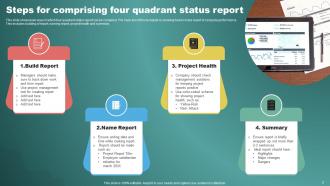
Steps for comprising four quadrant status report
-
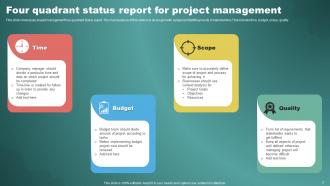
Four quadrant status report for project management
-
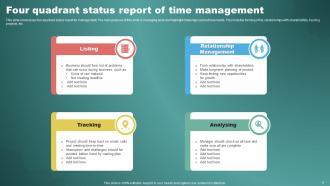
Four quadrant status report of time management
-
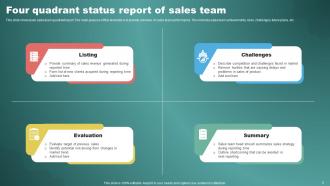
Four quadrant status report of sales team
-
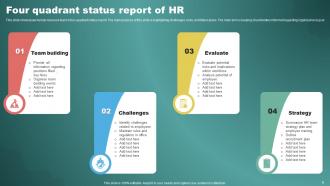
Four quadrant status report of HR
-
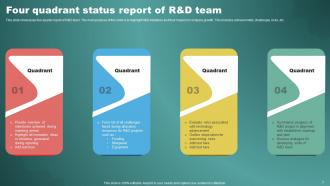
Four quadrant status report of R D team
-
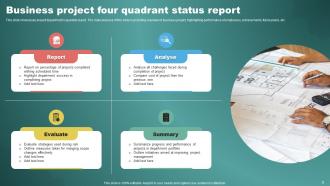
Business project four quadrant status report
-
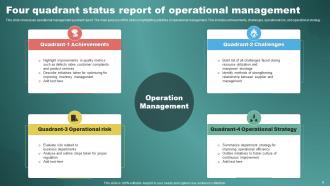
Four quadrant status report of operational management
-
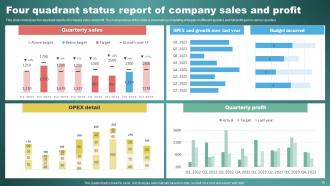
Four quadrant status report of company sales and profit
-
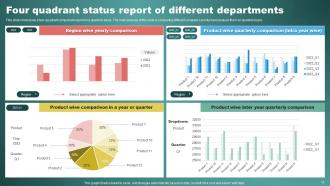
Four quadrant status report of different departments
-
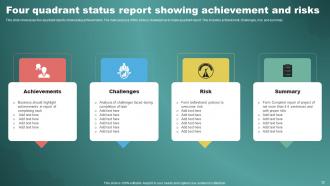
Four quadrant status report showing achievement and risks
-
Four quadrant status report icon for analyzing results
-
Four quadrant status report icon for achieving milestone
-
Four quadrants graphical status report icon
-

Thanks for watching
-

-

-

-

-

-

-

-

FAQs for Four Quadrant Status Report Powerpoint
So basically you've got four sections to cover: what you actually finished, stuff you're working on right now, what's coming up next, and any roadblocks making your life difficult. Keep each part to like 2-4 bullets so your manager doesn't zone out reading it. The real trick is sticking with the same format every week - people get used to scanning for info in the same spots. Honestly, I used to just word-vomit about whatever, but this structure makes you think about the bigger picture of your work instead of listing random tasks.
Yeah absolutely! Forget the basic "Wins/Challenges/Risks/Next Steps" thing. Pick whatever makes sense for your project - like "Budget/Timeline/Quality/Resources" if you're launching something, or "Sales/Marketing/Operations/Customer Feedback" for business stuff. I saw one team use actual emojis as headers which was... interesting lol. The main thing is choosing categories that your stakeholders actually care about when they're making decisions. Oh, and definitely explain what each quadrant means upfront so nobody's confused during the meeting.
Definitely go with color coding - green for good stuff, red for problems, yellow when things need a closer look. Icons are clutch too, like checkmarks or warning signs. Keep everything in bullet points instead of long paragraphs because nobody has time for that. Make sure each section looks the same so people can compare quickly. Bold your headers. Honestly, the goal is making it so someone can figure out what's going on in like 30 seconds max. I always think about how I'd want to see it if I was rushing between meetings - simple and scannable.
Okay so the Four Quadrant thing is actually pretty genius for cutting through meeting BS. You just dump everything into four buckets: what's working, what sucks, what you're tackling next, and what you're ignoring on purpose. Sounds simple but it totally works. Your stakeholders can see the trade-offs instantly instead of drowning in details. Makes decisions way faster too - they're not sitting there confused about priorities or resource stuff. I mean, it's basically a brain dashboard if that makes sense? Try it next time you're doing project reviews. Way less explaining, way more problem-solving. Trust me on this one.
Honestly, the Four Quadrant thing works great in sprint reviews and retros. Just use it to sort out what's working, what sucks, what you finished, and what's coming up next. Perfect match for how Agile already works. Some teams throw it into daily standups but that feels like too much to me - those should stay quick. When you're showing stakeholders stuff, the visual layout is clutch because you don't have to get all technical. Next retro, try running it as a quick 15-minute thing to grab team feelings and next steps all at once.
Honestly, the hardest part is getting people to actually admit what's broken. Nobody wants to be *that person* bringing up problems, you know? Plus figuring out if something "needs attention" vs "at risk" gets messy fast - the categories blur together. My advice? Set super clear rules for each section before you start. Make it feel safe to speak up without getting blamed. Walk through examples as a group first. Oh, and don't just do this once and forget about it - you've got to make it regular or it's pretty much useless.
So basically you split everything into four simple boxes: wins, problems, upcoming stuff, and things you're ditching. Way better than those massive bullet-point dumps that make everyone's eyes glaze over. Your stakeholders can actually see what's happening at a glance. They'll spot trends, get the trade-offs, and - this is key - they can jump into conversations without feeling lost. Honestly, I was skeptical at first, but it works. Decision-making speeds up because people aren't confused anymore. Next review, just try the four-quadrant thing and watch how much more engaged everyone gets.
PowerPoint's probably your best bet - they've got quadrant templates already built in. Excel works great too if you want to play around with charts and stuff. Google Slides or Sheets are solid alternatives if you're more of a Google person. Canva makes things look pretty without much work, though I always forget about that one. Project management tools like Monday.com have quadrant views too, which is handy if you're already using them. Honestly, just go with whatever you know best. The actual content's way more important than making it look perfect.
Dude, the Four Quadrant thing is actually perfect for this! Your traditional PM folks get their usual status buckets - done, on track, at risk, blocked. Makes everyone happy. But here's the thing - it totally works for agile too. We use it in sprint reviews all the time. Match your update schedule to whatever you're doing. Weekly for agile teams, monthly if you're stuck in waterfall hell (sorry, had to). The framework itself doesn't really care what methodology you're using. It's honestly one of those rare tools that doesn't suck regardless of how your team operates.
Look, your Four Quadrant report needs solid visuals or nobody's gonna read it. Executives spend like 30 seconds max on these things between meetings - they need charts and graphs that tell the story instantly. Skip the text walls. Progress bars and color-coded metrics work way better for showing wins and gaps. Each quadrant needs different visual styles though. Current performance? Simple scorecards. Future stuff? Trend lines work great. Honestly, I'd just pick your top 3-5 KPIs per quadrant first and build around those. Makes the whole thing less overwhelming to design too.
Stick to 3-5 bullets per section, tops. Nobody's reading a novel, trust me. Use real numbers and examples instead of vague nonsense. When you're writing, set a 15-minute timer – if it takes longer, you're definitely overthinking it. Cut out corporate BS like "we are currently in the process of." Just be direct about what happened, what's broken, and what's next. Focus on stuff that actually moves the needle or blocks your team. Oh, and use active voice – makes everything sound way less boring. Honestly, most people skim these things anyway, so make it count.
Don't cram everything in there - you'll kill the visual impact. Stick to 3-5 points per quadrant, tops. Watch out for lopsided sections too. People love stuffing accomplishments but barely touch on risks because, honestly, who wants to highlight problems? But that defeats the whole purpose. Skip the fluff like "things are going well" - be specific instead. What's actually happening? Give real examples. Oh, and make sure your quadrants connect somehow. They should tell a coherent story, not just be random bullet points thrown together.
Honestly, getting your team involved makes those Four Quadrant reports so much better. You'll spot things you totally missed - like random blockers or small wins happening that never made it to you. People actually care more when they help write it instead of just getting your take on everything. I usually send a simple template or ask specific questions for each section. Makes it super easy for them. Oh and try switching up who contributes each week - you get different perspectives that way. It's kind of amazing what details people notice that you don't.
Honestly, these work great when you're drowning in multiple projects and need something visual that cuts through the noise. Software teams love them, same with consulting firms and marketing agencies. Construction and manufacturing too - anywhere you've got chaos and bosses wanting updates every five minutes. Healthcare project managers swear by them as well. The whole point is giving people the highlights without writing a novel: what's done, what's broken, what's next, what's going well. I'd probably start with your messiest project first to test it out. Way easier than those endless email chains everyone ignores anyway.
Weekly works best for most projects, though you can stretch it to every two weeks if things aren't crazy busy. I'd say consistency matters more than the exact timing - just pick something and stick with it so people know what to expect. Fast-moving stuff or when everything's on fire? Maybe twice a week. Short sprints too. Don't overthink making it perfect though, you're just tracking what's happening and catching problems early. Set a calendar reminder and actually show up to do it, otherwise you'll forget every time.
-
Very well designed and informative templates.
-
Great templates that you can use in your next keynote or conference. They are perfect for quick and visually-engaging delivery.