

Framework Indicating BDD Test Automation Design




Try Before you Buy Download Free Sample Product
 Impress Your
 Audience
 100%
100% Editable
 Save Hours
 of Time


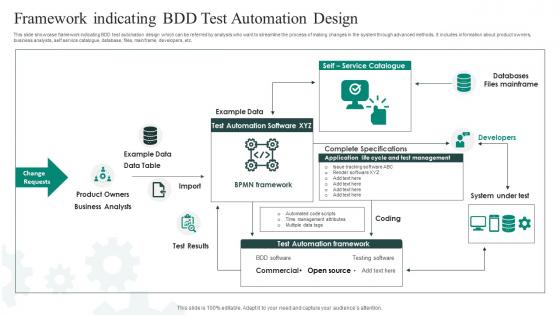
This slide showcase framework indicating BDD test automation design which can be referred by analysts who want to streamline the process of making changes in the system through advanced methods. It includes information about product owners, business analysts, self service catalogue, database, files, mainframe, developers, etc.
People who downloaded this PowerPoint presentation also viewed the following :
Framework Indicating BDD Test Automation Design with all 6 slides:
Use our Framework Indicating BDD Test Automation Design to effectively help you save your valuable time. They are readymade to fit into any presentation structure.





FAQs for Framework Indicating BDD
So BDD is all about writing tests in plain English first - like "Given I'm on the login page, When I enter wrong credentials, Then I see an error." Everyone can read it, even the business people who usually have no clue what's happening in code. It's weird because you're literally writing tests before any actual code exists, but trust me, it works. The whole point is focusing on what users actually do instead of getting lost in technical stuff. Plus your test scenarios become like living documentation that doesn't go stale. Start with describing behaviors, then automate them to guide development.
TDD is all about writing unit tests first, then coding to pass them - pretty technical stuff. BDD flips that around and starts with user behavior instead. You write scenarios in plain English like "Given I'm on the login page, When I enter bad credentials, Then I get an error." Way easier for everyone to understand, honestly. Non-tech people can actually read BDD scenarios and give input, which is huge. The collaboration aspect alone makes it worth trying. Write one user story in Gherkin format and you'll get it immediately - it's like having a translator between developers and business folks.
Look, Gherkin syntax is where you write test scenarios in plain English using Given/When/Then steps. Pretty straightforward stuff. Your feature files hold all the business requirements that everyone can actually read - no more deciphering weird test code. When you map these readable scenarios to actual test code through step definitions, that's where things click. You end up with documentation that doesn't go stale because it's tied to your tests. Honestly, just start with one simple feature file for something users actually do. You'll see how it connects business needs to automated testing way better than traditional approaches.
Get your product owner, devs, and testers in a room together to write those "Given-When-Then" scenarios. We call them "Three Amigos" sessions - way less painful than those email threads that go nowhere. Business people can actually explain what they want in normal language, developers know exactly what to build, and testers understand what they're checking for. Start small with your next user story. Just grab your product owner and walk through some real examples using BDD format. Trust me, once you see how much clearer everything becomes, you won't go back to the old way.
Cucumber's your best bet - works with Java, Ruby, JavaScript and has massive community support. SpecFlow if you're doing .NET stuff, Behave for Python. Most teams I know just stick with Cucumber though, honestly it's kind of the standard at this point. You'll write scenarios in Gherkin format (that Given-When-Then thing). For the actual browser automation, pair it with Playwright or Selenium underneath. Documentation's solid and employers actually look for Cucumber experience. I'd probably start there unless you've got a specific reason not to.
BDD makes you think like an actual user first, which is honestly a game-changer for test design. You write scenarios in plain English with Given-When-Then, and suddenly your tests focus on real business stuff instead of boring technical details. The coolest part? Product owners can actually read your Gherkin scenarios and tell you if you're testing the right things. When requirements change (because they always do), you just update the scenario text without messing with automation code. Try converting a few tests to Gherkin format – you'll be surprised how much clearer everything becomes.
Honestly, getting everyone on the same page is the hardest part - your devs, testers, and business people all need to work together, which is messy at first. Technical stuff gets tricky too, like keeping your test suite from becoming a slow nightmare as it grows. The Gherkin syntax takes some getting used to, and figuring out how detailed to make your scenarios is an art form. Most teams I've seen go overboard with fancy step definitions or write scenarios that are way too technical. Oh, and don't try to boil the ocean right away - pick a few key user flows to start with so people can actually see it working.
So BDD works really well with CI/CD - your Gherkin scenarios just become automated tests that fire off whenever someone pushes code. Plain English features mean everyone can see what's broken without digging through logs. I've found the living documentation part super helpful too, keeps everything in sync. You can run BDD tests at different stages: quick unit-level stuff for fast feedback, then full scenarios during integration. Oh, and definitely start with your most critical user paths first. Don't try to automate everything at once - that's a recipe for burnout. Build it up as your pipeline gets more solid.
Honestly, Gherkin specs are a game-changer because they're just plain English. Like "Given I'm on the login page, When I enter bad credentials, Then I get an error." Your business people can actually read that stuff! No tech translator needed. It forces everyone to think through real scenarios instead of hand-wavy requirements. Super helpful for catching edge cases early too - stakeholders will spot missing pieces when they see the behaviors written out clearly. I'd definitely show some Gherkin examples in your next sprint review instead of just doing the usual demo thing.
Focus on user journeys, not tech details - that's what saves you from broken tests later. During sprint retros, go through your scenarios like you're editing a document. Delete the dead weight! I've watched teams waste so much time on overly technical BDD that breaks every UI tweak. Write about the "what," skip the "how." Regular grooming sessions with your product owner help too - they'll catch when scenarios don't match real user needs anymore. Honestly, treating these as living docs that change with your product makes everything smoother. Don't get attached to old scenarios that serve no purpose.
Track defect rates and how fast you're getting feedback - that's your technical stuff. Business-wise, look at team collaboration and whether you're shipping faster. Honestly, the living documentation thing is where you'll see the biggest wins. Compare how much time your BAs and devs waste on requirement clarification before vs after. I'd start measuring now so you have a baseline. Then check quarterly. But here's the thing - focus on whatever pain points your stakeholders actually care about, not just vanity metrics.
Write them like a user would actually talk, not how the system thinks. Concrete examples beat vague concepts every time. I used to cram everything into one scenario - huge mistake! Keep each one focused on just one thing. Your Given-When-Then steps shouldn't depend on other scenarios running first, which gets messy fast. Skip the technical jargon unless your PM actually codes (spoiler: they probably don't). Most teams forget this part, but review scenarios with your product folks regularly. Half the time you'll find you're testing stuff that doesn't even matter anymore. Simple and readable wins.
Break down those complex interactions into smaller, reusable chunks - way easier to manage. I like using scenario outlines with data tables for this stuff. Write your Given/When/Then steps more abstractly, like "When the user completes checkout" instead of spelling out every click. Honestly, this approach has saved me so much headache. Your scenarios stay clean while the step definitions do the heavy lifting behind the scenes. For edge cases, just create separate scenarios or use example tables to test different data combos. Map out your user journeys first, then build your step library around that. Keep feature files business-focused, let automation handle the technical mess.
So basically automation does all the repetitive test running for you. You write your scenarios in Gherkin, then tools like Cucumber map those to actual code that hits your app. Pretty neat once you figure it out! The flow goes: write scenario → build step definitions → tests run automatically through CI/CD → you get quick feedback on what broke. Your team can spend time writing better scenarios instead of manually clicking through the same stuff every sprint (which honestly gets old fast). I'd start with your most critical user flows first.
Honestly? Just start with the happy path stuff that actually matters to your stakeholders. I've watched teams spiral into documenting every weird edge case right from the start - total nightmare to maintain. Pick scenarios people would actually notice if they broke. Background steps are your friend for cutting down repetition. Don't cram everything into one massive file either - split complex features across multiple scenarios. The whole point is writing something both devs and business folks can quickly scan without their eyes glazing over. You'll add the weird edge cases later once everyone's comfortable with it.
-
I took a chance with SlideTeam. I never looked back. Great products and great service.
-
Professionally designed slides with color coordinated themes and icons. Perfect for enhancing the style of the presentations.