

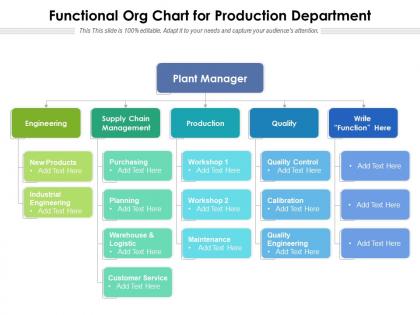
Functional org chart for production department




Try Before you Buy Download Free Sample Product
 Impress Your
 Audience
 100%
100% Editable
 Save Hours
 of Time


Our Functional Org Chart For Production Department are topically designed to provide an attractive backdrop to any subject. Use them to look like a presentation pro.
People who downloaded this PowerPoint presentation also viewed the following :
Functional org chart for production department with all 2 slides:
Use our Functional Org Chart For Production Department to effectively help you save your valuable time. They are readymade to fit into any presentation structure.
FAQs for Functional org chart
So functional org charts are basically departments in their own little boxes - Marketing, Finance, HR, you know the drill. Everyone's got their specialty and reports up through their department to the boss. Works pretty well for most places, honestly. Communication mostly happens up and down within each department instead of across teams (which can be annoying sometimes). When you're making one, just make sure who reports to who is super obvious. Oh, and maybe add some dotted lines if people actually work together across departments regularly - otherwise it gets confusing fast.
Think of it like organizing your contacts by interest - way easier to find who you need, right? Your marketing team all reports up the same chain, so no more playing telephone with random departments about campaign stuff. Decisions happen quicker too since everyone gets the priorities without you having to explain why brand consistency matters to, like, the finance guy. Communication flows better when people speak the same work language. Just don't go full hermit mode - you still need those coffee chats with other teams or you'll end up in your own little bubble.
Honestly, functional structures work great because everyone gets really good at their specific thing - marketing people do marketing, finance handles money stuff, you know? Makes total sense and runs pretty smoothly day-to-day. But here's the catch - departments barely talk to each other sometimes. I've seen companies where getting a simple decision made takes forever because everything has to go up the chain first. Oh, and those silos can get weird. Like, really weird. If you're thinking about this setup, just make sure teams actually meet regularly. Otherwise you'll have departments acting like they work at completely different companies.
Just figure out your main business areas first - sales, operations, finance, marketing, whatever applies to you. Write down who actually does what in each area, even if Sarah handles both accounting AND HR (we've all been there). Don't stress about making it perfect since everyone's juggling multiple roles anyway. Google Docs boxes work fine, honestly - you don't need fancy software. Main thing is everyone knows their primary job and who they report to. I'd update it every few months as things change and you hire more people.
Functional org charts work best when you've got specialized teams that need clear reporting structures. Engineering, marketing, finance, HR - departments where deep expertise matters more than constant collaboration. They're perfect for bigger, established companies that prioritize efficiency over rapid innovation. Honestly, they feel pretty old school these days, but traditional industries still swear by them. If your teams don't collaborate much on projects and you want smooth decision-making within each department, this structure's solid. Just don't expect it to foster much cross-team creativity.
So functional org charts basically put all the same types of people together - engineers with engineers, marketing folks with marketing, you know? Way different from those flat startup structures where there's barely any hierarchy. Matrix ones are honestly a nightmare because you're reporting to like two different managers. The cool thing about functional setups is everyone gets really specialized in their area, plus the reporting structure is crystal clear. Downside though? Getting stuff done across teams takes forever since everything has to go through the proper channels. Really depends if you need your team to move fast or go deep on expertise.
So job specialization is basically how you build functional org charts - you group people with similar skills into departments like marketing, finance, engineering. Pretty straightforward stuff. It lets everyone focus on their strengths, which makes training way easier since you're building deep expertise in each area. Career paths become clearer too. The catch? Departments can turn into silos real quick - I've seen it happen so many times. When you're sketching out your chart, you gotta think about how these groups will actually work together day-to-day, not just how they look on paper.
Honestly, ditch PowerPoint for this stuff - there are way better options now. Lucidchart and Visio are solid, but I'd actually start with whatever HR platform you're already using since most have org chart features built in. The cool thing is you can make them interactive, so people click on boxes to see job descriptions or who reports to who. Some even sync with your employee database automatically, which is clutch when people switch teams. I got a bit carried away with the fancy features at first, but really just pick something drag-and-drop to start. You can always add the bells and whistles later once you figure out what actually works for your team.
Honestly, the biggest trap is overcomplicating it from day one. Skip levels or create messy reporting lines and suddenly everyone's like "wait, who do I actually report to?" Been there, seen that chaos firsthand. Don't try cramming every single person in either - I've literally seen org charts that look like those crazy family trees with second cousins twice removed. Start with your key roles and main functions. Actually spell out what each department does too, not just fancy job titles. Keep it simple, show it to a couple people first, then fix whatever doesn't make sense.
Here's what I'd do - take your org chart and literally draw lines from each department to whatever company goals they're supposed to hit. Sounds simple but you'll probably find some departments that aren't connected to anything meaningful (awkward). Once you see the gaps, sit down with those department heads and figure out KPIs that actually tie back to your big picture stuff. The whole visual thing makes it way easier to spot when teams are working in silos. Plus you can point to the chart when someone asks "wait, who's handling this?" Trust me, it beats those endless strategy meetings where nothing gets decided.
Keep it super simple - clean boxes, straight lines, department heads up top. Don't get fancy with graphics, they just make it confusing. Put major functions underneath with clear reporting lines so anyone can follow who reports to who. Honestly, I've seen way too many org charts that look pretty but are totally unreadable. Use the same colors for related departments and test your font size first - nothing worse than presenting something nobody can actually see. Oh, and keep the text short but descriptive enough that new people get it.
So basically you'll get way more specialized in your area - marketing, finance, whatever your thing is. No more juggling random stuff from different departments. Honestly, it's kinda nice becoming the expert everyone comes to. Your responsibilities get clearer since you're staying in your lane. You'll report up through your department's chain too. The crappy part? You lose that cross-functional exposure you probably had before. My advice - definitely make friends with people in other departments or you'll get stuck in a bubble. Trust me on that one.
Look, places like hospitals and factories are obsessed with functional org charts for good reason. Doctors aren't gonna suddenly start doing accounting, you know? Same with manufacturing - your engineers stay in their lane, HR does their thing. Deep specialization is everything in these industries. Tech companies do this too when they want people to really master specific skills rather than jumping around. Finance and government agencies are probably the worst about it (but honestly, with all their regulations, they kinda have to be). If your company cares more about expertise than teamwork across departments, functional makes total sense.
For remote teams, throw location indicators right on your org chart - home, office, or hybrid for each person. Time zones too if you're spread out. Add their preferred communication methods because honestly, some people are Slack ghosts but answer emails instantly. Mark backup contacts for each department when the main manager's unavailable - trust me on this one. The whole point is making it brain-dead easy for anyone to find the right person fast, no matter where everyone's working from. Otherwise you'll spend half your day hunting people down.
Yeah, tons of big companies use functional org charts and do great with them. McDonald's is probably the most obvious example - they've got separate departments for operations, marketing, finance, all that stuff reporting up the chain. Walmart does something similar to handle their crazy scale. Ford too, though I guess that's kind of expected for old-school manufacturing. The thing is, this setup really shines when you need people who are experts in their specific area and your processes don't change much. Works way better than trying to get everyone collaborating across departments constantly.
-
Excellent Designs.