

Functional org chart for human resource department





Try Before you Buy Download Free Sample Product
 Impress Your
 Audience
 100%
100% Editable
 Save Hours
 of Time


Our Functional Org Chart For Human Resource Department are topically designed to provide an attractive backdrop to any subject. Use them to look like a presentation pro.
People who downloaded this PowerPoint presentation also viewed the following :
Content of this Powerpoint Presentation
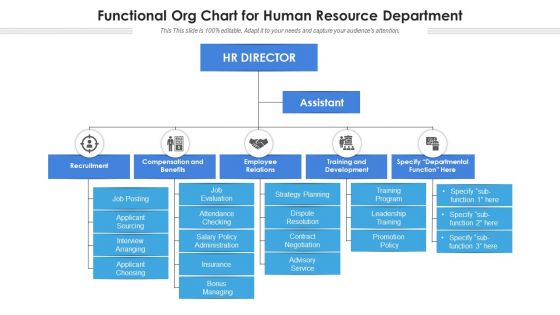
A Functional Organization Chart for the Human Resource Department (HRD) is a managerial efficiency tool. It depicts roles, reporting structures, and responsibilities within this department. As such, the HRD uses it to define and refine its communication channels, assign roles, and improve productivity in the way tasks are assigned and evaluated.
A well-structured Functional Organizational Chart promotes a harmonious work environment by streamlining decision-making processes, encouraging accountability, and facilitating decision-making. Furthermore, clear reporting lines and roles allow for more efficient operations, fewer conflicts, and effective coordination.
A Functional Organization Chart is also very useful in terms of establishing and adding value to the recruitment process. The organization's functions also include talent development and aligning HR strategies with business goals. Our Functional Organization Chart PPT Templates are simple to edit and use, allowing you to improve your presentations and increase understanding and engagement, making our toolkit effective in HR management.
Applying these PPT Decks can transform the way HR data is presented, leading to higher comprehension and participation from the workforce across levels.
Explore how the strategic alignment of your HR department within your organizational structure can be a game-changer for your business with our characteristic HR Department complete deck.
Template 1: Functional org Chart for Human Resource Department
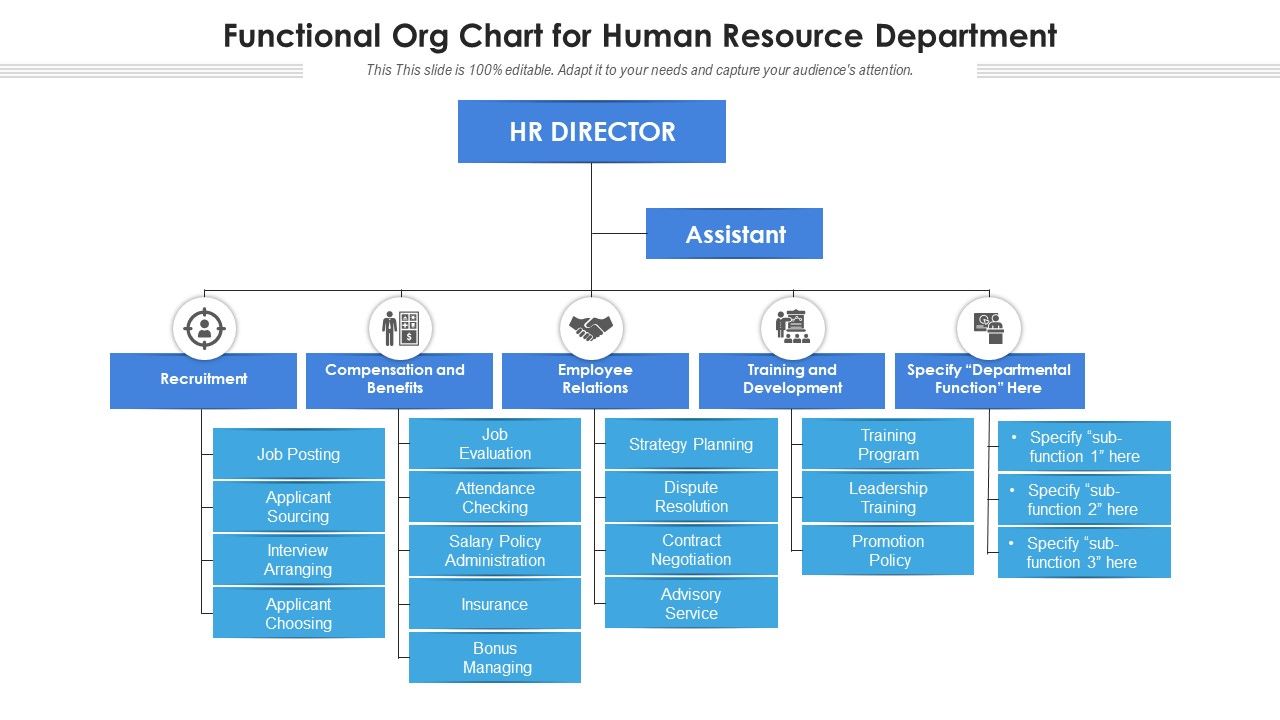
Introducing our Inventory Management Process Flow Chart PowerPoint Template, an effective tool for visualizing and optimizing your company's operations. This PPT Layout provides a visually appealing representation of your inventory management process, increasing operational clarity and efficiency. In this PPT Theme, the HR director is at the top of the organizational hierarchy, followed by assistants, recruiters, compensation and benefits, employee relations, training and development, and other departmental roles. At each level, job advertising, candidate sourcing, interview scheduling, job evaluation, attendance tracking, strategy development, training programs, and a variety of other critical tasks are highlighted.
Help Your HRD with the Right Tools
SlideTeam helps businesses communicate organizational dynamics to stakeholders. An excellent human resources functional organization chart ensures operational efficiency and long-term corporate success. SlideTeam's PPT Preset simplifies HR operations, such as recruitment, employee relations, training and development, and compensation, through appealing visuals and simple modifications. Give your staff the tools they need to succeed with our up-to-date, expert-approved presentation designs.
Seeking to redefine your HR tactics and drive your business towards excellence? Dive into our inclusive HR Structure PowerPoint PPT Template Bundles today!
Functional org chart for human resource department with all 2 slides:
Use our Functional Org Chart For Human Resource Department to effectively help you save your valuable time. They are readymade to fit into any presentation structure.
FAQs for Functional org chart for
Honestly, the best thing about functional org charts is how they group people by what they actually do - marketing sits with marketing, engineers with engineers, you know? Makes reporting super clear and specialists can bounce ideas off each other easily. Skill development happens naturally when all the experts are in one spot. The silo thing can be a problem though - departments sometimes get weird about sharing info. But whatever, most companies deal with that fine. If you're thinking about switching, just map out what functions you already have first. You'll probably see the natural groups are already there anyway.
So basically, functional org charts are the simple version - you report to one boss in your department, like Marketing or whatever. Matrix structures? Total chaos honestly, but sometimes the good kind. You'll have two managers - your department head AND some project lead. It's messier for sure, but actually works pretty well when you need people from different teams working together on stuff. I'd probably go functional if your work stays within one department most of the time. But if you're constantly doing cross-team projects, matrix might make more sense despite the headache of juggling two bosses.
Honestly? Functional org charts are perfect if you've got those classic departments that barely need to talk to each other. Marketing stays in their lane, finance crunches numbers, operations handles the daily chaos - you know the drill. Bigger companies love this setup because everyone becomes crazy specialized and the hierarchy is crystal clear. Sure, you'll get some annoying silos happening (totally inevitable), but if your industry isn't constantly changing and teams don't need to collaborate every five minutes, it actually works really well. Just figure out first whether your people actually need each other day-to-day.
So basically you've got your CEO up top, then all the department heads below - marketing VP, sales director, finance, HR, operations, IT, that whole crew. Under each of those you'd show the regular staff like sales reps, marketing coordinators, accountants, whatever. It's way better than those confusing matrix charts tbh. The whole point is organizing people by what they actually do day-to-day. Start with your main business functions first when you're putting it together, then throw in the support roles after. Clean reporting lines make everyone's life easier.
Honestly, org charts are super helpful for cutting through workplace confusion. When you know who reports to who, you can skip that awkward "wait, who do I even ask about this?" dance we've all done. Quick decisions happen faster since everyone knows who has the authority to approve stuff. Plus you can spot your peers easily - makes collaborating on projects way less weird. The chain of command becomes obvious, so no more guessing games when you need something. I always check our department's section first now when I'm stuck. Saves me from looking clueless in meetings, which happens more than I'd like to admit.
Oh absolutely, functional org charts are like collaboration killers. Everyone gets stuck in their department bubble and barely talks to other teams. Decisions have to travel all the way up the ladder and back down instead of people just... talking to each other directly? It's honestly pretty ridiculous. What works better is mixing things up - throw people into cross-functional projects, schedule regular meetings between departments. Even casual stuff helps, like encouraging people to grab coffee together. Sometimes the best solutions come from random hallway conversations anyway. Break down those walls however you can.
Ugh, the worst thing people do is making these charts ridiculously complicated. Like, you don't need every single reporting line mapped out - just hit the main teams and important roles. Most companies are kind of messy anyway with matrix structures, so don't stress about perfect hierarchy boxes. Oh, and actually include who works together across departments! That's huge. People get so lost when they can't see their day-to-day collaborations on there. Keep it straightforward, focus on what actually matters, and please update the thing when people move around. Nothing's more useless than an org chart from 2019 still hanging on the wall.
So when you're tiny, your "Marketing" person is basically doing everything - social, content, ads, you name it. But once you start growing? That one box explodes into like Content Marketing, Paid Ads, Brand stuff, whatever. New teams pop up too that you never needed before - HR, Legal, Business Dev. Honestly the worst part is when people don't know who does what anymore. Update that chart regularly or you'll spend half your day playing phone tag trying to figure out who handles the random stuff that comes up.
Lucidchart and Visio are probably your best bets - they've got solid templates and work well for team collaboration. Miro's good too if you're already using it. Honestly though? PowerPoint or Google Slides work fine for basic stuff. I know it sounds cheap but I've seen tons of teams use them when they just need something quick. The main thing is making sure everyone can actually access and edit it since these charts change constantly. Oh, and definitely check what you already have licenses for first. No point buying new software if you don't need to.
Oh man, this stuff gets tricky fast. Japanese and German companies? They love their layers and formal chains of command. But try that in Denmark or Australia and people will think you're nuts - they want everything flat and collaborative. Power distance is the real kicker though. Some places expect clear boss-employee lines, others go full matrix-style where everyone reports to everyone. Direct cultures can handle bigger teams under one manager, but in high-context cultures you need smaller, tighter groups or communication breaks down. Honestly, just map out what each region expects first, then design around that instead of forcing the same structure everywhere.
Honestly, start with span of control - like how many people each manager actually has reporting to them. Decision-making speed is huge too, especially when you compare different departments. Track how often teams collaborate across functions and definitely look at engagement scores by department. Those will show you if people actually know what they're supposed to be doing. Oh, and communication bottlenecks - that's where things usually fall apart first. I'd also watch how fast new hires get productive in each area. Are people moving between departments or getting stuck? Start there, then see what other weird patterns pop up in your specific situation.
Functional org charts are actually pretty straightforward - you know exactly where you fit since everyone's grouped by what they do. Think of it like a sports team where everyone has their clear position. The hierarchy's obvious too, so no confusion about who you report to. You'll get really specialized in your area, which is cool for skill building. Downside though? You might end up in a bubble, totally disconnected from other departments. Honestly, matrix structures are way messier in comparison. My take - use that clarity but don't be shy about reaching out to other teams or you'll miss the bigger picture.
Honestly, org charts can be pretty helpful for morale - people actually like knowing exactly who they report to and what their job is. No more awkward "wait, who makes this decision?" moments. The clear hierarchy makes everyone feel more secure about their place. But yeah, there's definitely a downside. Some people hate feeling boxed in by all that structure. Plus it creates these weird department silos where teams stop talking to each other. If you do go with one, just make sure people can still chat informally across teams. That part's crucial.
Dude, communicate like crazy - way more than feels normal. Before you get into the org chart stuff, explain WHY you're doing this restructure. Nobody likes getting blindsided, especially about their job or boss changing. Map out specific impacts for each team, not just the big picture fluff. Give people actual time to digest this - you can't drop it Friday and expect it to work Monday. That's just cruel. Set up regular check-ins while everything's shifting so you catch problems fast. Oh, and find those people who are naturally good at getting others excited about change. They'll do half your work for you.
Honestly, monthly updates work best if you're growing fast, but quarterly's fine for slower companies. Just pick someone to own it - otherwise everyone assumes someone else is handling it. Your HR team's gold for this since they hear about changes first. Don't just track titles either, get the real reporting lines since people switch managers without big announcements all the time. Set a calendar reminder or you'll forget for like six months (been there). Think of it as something that actually changes, not just a slide you made once and never touched again.
-
Informative design.
-
Great experience, I would definitely use your services further.
-
Visually stunning presentation, love the content.
-
Excellent design and quick turnaround.