

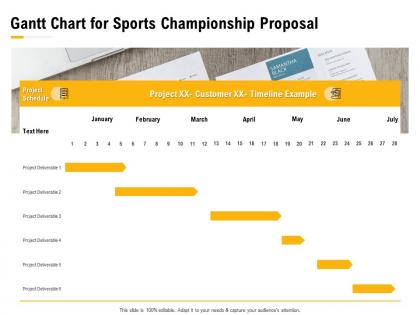
Gantt chart for sports championship proposal ppt powerpoint presentation slides




Try Before you Buy Download Free Sample Product
 Impress Your
 Audience
 100%
100% Editable
 Save Hours
 of Time


Our Gantt Chart For Sports Championship Proposal Ppt Powerpoint Presentation Slides are topically designed to provide an attractive backdrop to any subject. Use them to look like a presentation pro.
People who downloaded this PowerPoint presentation also viewed the following :
Gantt chart for sports championship proposal ppt powerpoint presentation slides with all 2 slides:
Use our Gantt Chart For Sports Championship Proposal Ppt Powerpoint Presentation Slides to effectively help you save your valuable time. They are readymade to fit into any presentation structure.
FAQs for Gantt chart for sports championship proposal ppt
Honestly, start with the basics - task names, start/end dates, and how long each thing takes. Dependencies are crucial too (like which tasks need to finish before others can start). Those diamond milestone markers? Game changer for hitting deadlines. I always assign people to tasks so there's no confusion about who's doing what. Color-coding different phases makes it way less of a headache to read at a glance. Progress bars showing completion percentages help tons with status updates. Oh, and don't overthink it initially - you can always layer in more complexity later as the project evolves.
Gantt charts are basically your project's visual roadmap. They show everyone what's happening when, plus who's doing what. The timeline layout is perfect for catching scheduling conflicts early - way better than digging through endless email chains when someone asks for an update. Your team can see how their work connects to other tasks, which honestly cuts down on so much confusion. I'd throw it up on screen during weekly meetings. You'll notice discussions get way more focused when everyone's looking at the same visual. Just don't go overboard with too many details or it gets messy.
Honestly, Gantt charts are game-changers for keeping timelines on track. You get this bird's-eye view of everything - start dates, deadlines, how tasks link together. I love that you can see instantly if you're behind schedule or cruising along fine. They show your critical path too, which is clutch because those are the tasks that'll actually mess up your deadline if they slip. Dependencies become way more obvious, so you won't get blindsided by cascading delays. Oh, and bottlenecks? You'll spot them coming from a mile away. Update yours weekly though - that's where the real magic happens.
Honestly depends what you're going for! Microsoft Project is like the gold standard but it's kinda intense for basic stuff. I've been using Asana lately and it's pretty solid for team projects - way easier than Project. Monday.com has this really clean interface that doesn't make me want to throw my laptop out the window. If you're already paying for Office 365, Excel can technically do Gantt charts but ugh, it's such a pain. GanttProject is free if budget's tight. Most project management tools these days have Gantt views built in anyway, so maybe just stick with whatever your team already uses?
Yeah, totally doable! Skip the whole massive upfront timeline thing and just do mini Gantt charts for each sprint - like 2-4 weeks max. Show your user stories and tasks in there, but keep the dependencies loose since stuff always shifts around anyway. Honestly, I'd start with just one sprint to test it out first. Your team might love the visual aspect or they might think it's overkill - hard to tell until you try. Update them during sprint planning so they don't get stale. Works pretty well once everyone gets used to the rhythm.
Honestly, Gantt charts are perfect for this stuff. You can see right away who's drowning and who's sitting around twiddling their thumbs. Like when you realize poor Sarah somehow got triple-booked for the same week - nightmare scenario avoided! The timeline view makes redistributing work actually manageable instead of just moving chaos around. Dependencies are clutch too since you'll know exactly when people finish one thing and can jump to the next. I'd start by just mapping what everyone's doing now. You're gonna be shocked at how uneven everything probably is.
Start by figuring out which tasks depend on each other - like you can't paint before the walls are built, you know? Most Gantt tools let you connect these with arrows or lines. Milestones are easy - just make them zero-duration tasks for stuff like "got client approval" or "finished phase 2." They'll pop up as little diamonds on your timeline. Honestly though, resist the urge to link everything together or you'll create this nightmare web that nobody can read. Stick to the really important dependencies first, then drop in milestones for your big deliverables. Gives people clear progress markers without making your chart look insane.
Ugh, don't make it crazy detailed - that's the worst trap. Keep it to major milestones instead of every little task. Update yours weekly or it'll just collect digital dust. Dependencies are huge too - show which tasks actually depend on others finishing first. Oh, and realistic timelines! I swear project managers always think everything takes half the time it actually does. Make sure stakeholders can read it without a magnifying glass - honestly some Gantt charts look like engineering blueprints. Short version: simple, updated, realistic. That's it.
Honestly, Gantt charts work great with both - just differently. PMBOK loves them for schedule management and showing critical paths, especially in waterfall projects. Agile's weirder since you're doing short sprints, but I've seen teams use them for release planning or when they need to show execs the big picture stuff. You just gotta adjust the detail level. PMBOK wants every little task mapped out. Agile? Stick to high-level milestones and feature rollouts. My advice - figure out what your stakeholders actually care about seeing first, then build from there.
Color coding is your best friend here - different colors for teams, phases, or priorities. Throw in some diamond or star shapes for major milestones so they jump out. Most Gantt charts I see are just chaos without proper organization, honestly. Try swimlanes to separate different work streams, and those little progress bars inside tasks are super helpful for showing what's actually done. Short, clear task names work way better than novels. Oh, and make your critical path obvious - like, someone should spot it in two seconds. A legend helps too if you're using lots of colors.
Honestly, Gantt charts are perfect for catching problems before they blow up your project. They show everything visually - which tasks depend on others, your timeline, the whole mess. Critical path stuff jumps right out at you, so you'll know immediately if a delay will push back everything else. Resource conflicts become obvious too, unlike when you're just staring at some boring task list. I always forget how useful the progress tracking is until I'm actually using it - you can spot delays way earlier than you'd think. Update it weekly though, or you'll miss the warning signs.
Dude, Gantt charts are lifesavers for stakeholder meetings. They show project timelines and progress visually so people don't have to decode messy spreadsheets. You can point out what's on track, explain delays, and show how one setback affects everything downstream. Executives eat this stuff up - they get the whole situation in like 30 seconds. I always start meetings with the chart first, then get into the weeds. Oh, and they're great for highlighting critical path stuff that actually matters. Keeps everyone on the same page about timing without boring them to death.
Honestly, skip Gantt charts if you're doing agile stuff or creative projects where everything keeps changing. I've watched teams waste hours just updating those damn things instead of actually getting work done - it's ridiculous. For simple projects with like 3-4 steps? Total overkill. Knowledge work is tricky too since dependencies aren't always obvious upfront. The whole thing ends up feeling way too rigid. Kanban boards work better for that kind of chaos. Or just stick with basic task lists if you don't need anything fancy.
Your old Gantt charts are honestly pure gold for planning better. Pull up your last 3-5 projects and see which tasks always ran over - there's usually a pattern there. Look for those same bottlenecks that keep screwing things up, plus any resource issues that pop up repeatedly. Teams I know have literally halved their planning time just by doing this review (sounds boring but it works). Track your planned vs actual timelines in a basic spreadsheet by task type. Don't forget seasonal stuff too - like how everything slows down in December or whatever your team's quirks are.
Look, Gantt charts turn into a hot mess really quickly. Complex dependencies? Forget about it. Scope changes? They basically break the whole thing. I've seen project managers lose their minds trying to update these things constantly. They're also terrible at showing who's actually overloaded on your team - which is kind of the point, right? My advice? Don't rely on them exclusively. Mix in some Kanban boards for when things need to shift around. Get software that updates dependencies automatically (saves your sanity). Keep the Gantt high-level instead of tracking every tiny detail. They're useful but honestly just one piece of the puzzle.
No Reviews