

HR Dashboard Indicating New Employee Hiring And Introduction




Try Before you Buy Download Free Sample Product
 Impress Your
 Audience
 100%
100% Editable
 Save Hours
 of Time


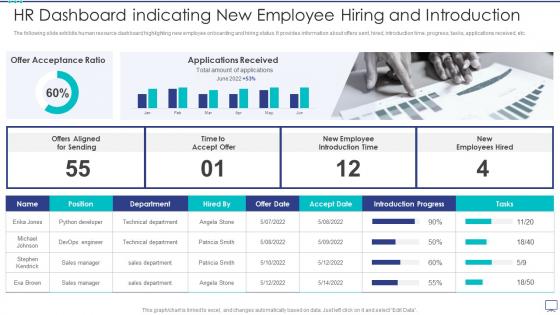
The following slide exhibits human resource dashboard highlighting new employee onboarding and hiring status. It provides information about offers sent, hired, introduction time, progress, tasks, applications received, etc.
People who downloaded this PowerPoint presentation also viewed the following :
HR Dashboard Indicating New Employee Hiring And Introduction with all 7 slides:
Use our HR Dashboard Indicating New Employee Hiring And Introduction to effectively help you save your valuable time. They are readymade to fit into any presentation structure.





FAQs for HR Dashboard Indicating New Employee
Honestly, you want a good mix of hard numbers and the softer stuff. Goal completion rates are obvious - plus productivity metrics for each role and quality scores from reviews. Engagement surveys matter too because miserable employees don't exactly crush it. Track development things like training completions and skill assessments. 360 feedback is solid, and definitely measure how long new hires take to get up to speed. That one's huge but people forget about it. Balance the data with how folks actually feel about their jobs. Just don't go crazy - stick to maybe 5-7 metrics or your dashboard becomes a nightmare to parse.
So instead of staring at endless spreadsheets, HR dashboards turn all that data into actual visuals you can understand at a glance. Like, you'll immediately spot turnover trends or see which departments are bleeding talent. Way better than hunting through rows of numbers! Visual patterns just make more sense - you can track diversity metrics over time or catch hiring bottlenecks before they become disasters. My advice? Start small with maybe 3-5 metrics that actually matter to your leadership team. Once you get those dialed in, you can expand from there.
Honestly, just keep it super clean and visual - nobody wants to hunt around for basic info. Make sure your colors and icons stay consistent throughout. Don't try to shove everything onto one page (trust me on this one). Focus on stuff they actually care about - headcount changes, turnover rates, KPIs they can do something with. Your clickable buttons should be obvious, and throw in quick explanations for the confusing data points. Oh, and definitely test it with real users first. They'll spot weird usability stuff you'd never notice.
Honestly, daily updates work best for the basic stuff - headcount, who showed up, new hires. Weekly's totally fine for the deeper dives like engagement scores. Real-time is just overkill unless you're in some crazy hiring sprint or something. Monthly works for strategic things like comp analysis (that stuff doesn't change much anyway). The trick is figuring out how fast your team actually needs to react to changes. I'd start with daily for your main metrics and see what people ignore - you can always dial it back from there.
Think of engagement data as your crystal ball for HR stuff - it warns you about problems before they blow up. Dropping scores in certain departments? That's your cue to switch up retention tactics or maybe throw some manager training at the issue. Way better than those useless "rate your feelings" surveys everyone ignores. The trick is actually acting on what you see instead of just collecting numbers. I'd start with your worst-performing areas first. Dig into why those scores suck - that's where you'll find the real fixes.
Honestly, HR dashboards are game-changers for this stuff. You can see hiring ratios, promotion rates, pay gaps - all broken down by demographics in real-time. No more guessing if your diversity efforts actually work or if they're just for show. The visual charts make patterns super obvious, like when certain teams are consistently lacking diversity (which happens more than you'd think). Set up 3-4 metrics that actually matter to your company first. Then track progress over time and set realistic goals. Way better than digging through spreadsheets every quarter.
Honestly, the data compatibility stuff is brutal - your new dashboard probably won't play nice with whatever ancient HRIS you're stuck with. Different formats mean you're always mapping fields and dealing with annoying sync delays. IT will scrutinize every integration for security compliance (which takes forever). Budget's gonna be tight too since most of this needs custom dev work. Plus people hate changing their workflows, even when the old system sucks. I'd definitely start small - maybe just payroll or something - then build from there once you figure out what actually breaks.
Your HR dashboard can actually predict who's about to quit before they do it - which honestly blew my mind when I first saw it work. Feed it historical stuff like performance reviews, survey responses, promotion data, and salary changes. Then it flags risky employees with colors or alerts, plus shows you why (low engagement scores, passed over for promotion, whatever). Track patterns across teams too. The game-changer though? Set alerts when someone hits high-risk territory so you can have that coffee chat before they've mentally checked out. Way better than scrambling after they've already given notice.
Honestly, HR dashboards are a lifesaver for managing remote teams. You get real-time visibility into everything - engagement levels, productivity trends, attendance patterns - without having to micromanage people. What I love most is catching problems before they blow up, like when someone's engagement scores start tanking or they're MIA from check-ins. The automation piece is clutch too since you're not constantly bugging people for status updates. Oh, and definitely set up alerts for whatever metrics actually matter to your team. Makes the whole thing way less stressful.
Honestly, cloud HR dashboards are so much better than the old clunky software. You can check everything from your phone or laptop wherever you are - super helpful now that everyone's working remotely. Monthly payments beat dropping like $10k upfront on licenses (who has that lying around?). Updates just happen automatically in the background, so no more waiting for IT to fix things. The coolest part is everyone sees the same data instantly when something changes. BambooHR's free trial is pretty solid if you want to test it out first.
Dude, having real-time HR data is huge because you catch problems immediately instead of discovering them weeks later in some boring monthly report. Like if turnover suddenly spikes or people start calling in sick way more than usual, you'll know right away. Way better than playing catch-up after half your team has already mentally checked out, you know? Set up alerts for the stuff that actually matters so your dashboard basically texts you when things go sideways. It's honestly night and day compared to the old reactive approach.
Okay so for your mobile HR thing - definitely include pay stubs and time-off requests since that's what everyone always needs. Push notifications are huge for approvals because who has time to check email constantly? I'd throw in shift schedules and basic contact info too. Oh and make sure people can view stuff offline - cell service is trash in half our building anyway. Photo expense uploads are pretty standard now. Keep it dead simple though, like maybe just focus on the 5 things people bug you about most. Nobody wants to navigate some complex interface while they're rushing between meetings.
Dude, HR dashboards will literally save your life with compliance stuff. No more digging through spreadsheets for hours when audit time hits. Track your EEO data, training completions, safety incidents - all that fun stuff in real-time. Most can spit out regulatory reports automatically instead of you manually pulling data from like 5 different systems (been there, not fun). Teams I know cut their prep time by 70% or something crazy. Oh, and set up alerts so you don't miss violations before they happen. Trust me on this one.
Time-to-hire data shows exactly where candidates bail or get stuck in your process. You'll catch bottlenecks fast, plus see which job boards actually deliver decent people versus the ones just eating your budget. Cost-per-hire trends tell you if you're overspending, and honestly, tracking diversity stats is pretty crucial these days. The cool part? Patterns emerge everywhere - like when certain departments drag their feet on decisions forever. Oh, and you can finally tell if your recruiting team's hitting their numbers consistently. Source channel performance gets way clearer too.
Ok so first thing - get your data clean from the start. Set up validation rules that catch crap before it even hits your dashboard. Bad data will absolutely wreck your metrics, and I've watched way too many executives make awful calls because the numbers were garbage. Pull everything from your main HRIS system, not some random Excel files people email around (ugh). Do monthly spot checks where someone actually verifies stuff against the original records. Oh and write down who owns what data - sounds boring but you'll thank me later when things break.
-
Wide collection of templates available. SlideTeam has made it easier to create presentations in just a few minutes.
-
Loved the fact that SlideTeam provides clean, high-definition, and professional PowerPoint products.