

Huddle Boards Powerpoint Ppt Template Bundles
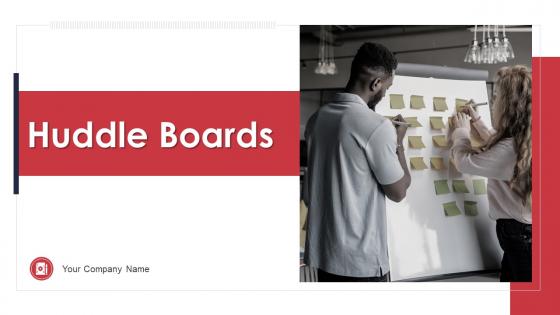




Try Before you Buy Download Free Sample Product
 Impress Your
 Audience
 100%
100% Editable
 Save Hours
 of Time


Our Huddle Boards Powerpoint Ppt Template Bundles are topically designed to provide an attractive backdrop to any subject. Use them to look like a presentation pro.
People who downloaded this PowerPoint presentation also viewed the following :
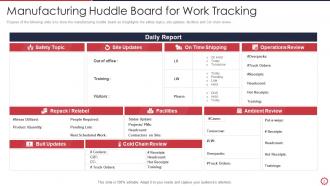
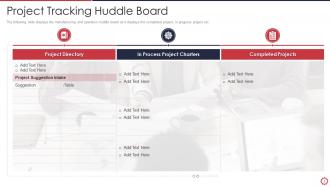
Huddle Boards Powerpoint Ppt Template Bundles with all 19 slides:
Use our Huddle Boards Powerpoint Ppt Template Bundles to effectively help you save your valuable time. They are readymade to fit into any presentation structure.





FAQs for Huddle Boards Powerpoint
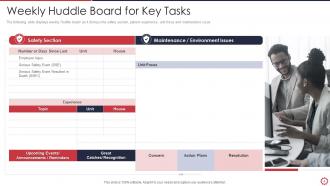
So basically, a huddle board is like your team's daily dashboard where you throw up all the important stuff - key numbers, current problems, recent wins, whatever needs fixing today. Your team gathers around it for quick 10-15 minute check-ins (though let's be real, they usually run longer). It keeps everyone on the same page about what's going well and what's completely broken. Just start with your top 3-5 metrics and biggest issues - don't overcomplicate it from day one. You can always pile on more sections once people actually get used to using the thing.
Honestly, visuals are a game changer for huddle boards. People absorb pictures way faster than text - like, our brains are just wired that way. Red/yellow/green status dots and progress bars let everyone see what's up instantly. Way better than someone droning on about metrics, you know? Charts and simple icons create this shared understanding without anyone having to think too hard. Plus visual stuff actually sticks in your memory better than just hearing updates. I'd start with basic color coding on whatever metrics you're already tracking. You'll be shocked how much faster your huddles move.
Stick to 4-5 metrics that actually matter for your team's day-to-day stuff. Safety incidents, quality scores, productivity, customer satisfaction - the usual ones work but don't just copy everyone else since teams are different. Make them visual and update daily so they're not just decoration on the wall. Mix in last month's results with today's targets. Honestly, the best boards are ones where anyone can walk by and get the whole picture in 30 seconds without squinting at tiny charts. Keep it simple and actionable - if your team can't do anything with the info, what's the point?
Daily updates work best - right when your shift starts or during team meetings. Weekly? Forget it. Things change way too fast and people just tune out when the info's old. I mean, priorities shift constantly and your metrics are probably different every day anyway. Keep those updates super quick though, like 2-3 minutes tops. Just refresh the numbers and call out any big wins or new stuff. The trick is picking a time and actually sticking to it, even when it feels boring some days.
Oh man, biggest thing is don't cram everything on there - people squint at tiny text during standups and it's just painful. Skip the fancy colors too, they're more distracting than helpful honestly. Start simple with like 3-4 metrics your team can actually do something about. Give each section room to breathe instead of cramming it all together. I'd honestly just pick the basics first, see what people look at for a week, then tweak from there. You'll probably end up changing half of it anyway once you see what actually works.
So basically, huddle boards work because everyone can see what you committed to doing. Nobody wants to be that person always posting red updates, you know? The daily check-ins are actually pretty smart too - you can't just ghost your team when you're stuck on something. It's like having your coworkers gently keeping tabs on you (in a good way though). Just don't turn it into some weird blame game. Keep your updates real, help each other out when someone's struggling. Oh, and start small - nobody needs to see you crash and burn on day one trying to be perfect.
Yeah, totally doable! Tools like Miro or Mural work great for this - basically just recreate your physical board digitally with the same sections (wins, blockers, priorities, whatever). Some teams do quick 15-minute video calls where everyone updates their stuff live, others just update async throughout the day. Honestly, the async thing works better sometimes since people aren't all in the same timezone anyway. Google Docs can work too if you want something super simple. Just keep it visual and make sure everyone can actually access it. Start basic and tweak it based on what your team actually ends up using.
Put safety stuff, quality scores, and production numbers up front - that's what actually matters day-to-day. Customer complaints too, since those hit everyone. Honestly, most boards I've seen are a hot mess with random charts nobody cares about. Stick to maybe 4-5 things your team can actually do something about that shift. Oh, and keep it visual and fresh - once people stop looking, it's just expensive wallpaper. The whole point is stuff they can respond to right then, not next quarter's strategic whatever.
Honestly, huddle boards are pretty solid for problem-solving because they get everyone looking at the same thing instead of just rambling about issues. The visual part keeps people way more engaged - no more zoning out during meetings. You can spot bottlenecks faster and actually assign someone to own each problem. I've noticed teams start having better discussions when the data's right there in front of everyone. Plus you'll catch patterns between different issues that you'd totally miss otherwise. Start small though - just spend 10 minutes each huddle on your biggest problem.
Dude, color psychology totally works on huddle boards. Red grabs attention instantly - perfect for overdue stuff or anything urgent. Green feels chill and says "we're good," so use it for completed tasks. Yellow's energizing but honestly gets annoying fast if you go overboard. Blue builds trust and keeps people focused, great for ongoing work. Just stay consistent with what each color means or your team will waste time figuring it out. Oh, and don't mix up your reds and oranges - I've seen that confuse people more than help.
Get everyone involved from the start - sticky notes, updating numbers, suggesting what to track. Otherwise you'll just have one person scribbling while everyone else zones out. Most teams I've seen rotate who handles what each week. Like your sales guy updates revenue while ops handles project stuff. Honestly, if people don't feel like they own part of it, that board becomes pretty useless pretty fast. I'd start by having each person claim one section as theirs. Makes them actually care about keeping it current instead of treating it like the manager's pet project.
So for your huddle board, I'd mix maybe 2-3 methodologies max. Scrum's solid for sprint burndowns and standup stuff. Kanban flows really well with WIP limits and cycle times - probably my favorite combo actually. If you're stuck with SAFe (ugh), at least the PI objectives and dependency tracking make more sense visually on a board. Oh, and lean startup works too if you're doing experiments and tracking what you learned. But honestly? Start with whatever you're already doing and don't overcomplicate it. You can always add more later once the basic stuff clicks.
Honestly, huddle boards are game-changers for team culture. When everyone can see the same metrics and problems, people actually start working together instead of doing their own thing. Your quiet team members finally get a chance to speak up too - they'll share ideas in huddles that they'd never mention in big meetings. The daily check-ins build real trust over time. I've watched teams go from awkward silence to genuine collaboration once they got into the rhythm. Just start small though - maybe 10-15 minutes focusing on wins, roadblocks, and who needs backup. It's weird how something so simple works so well.
For digital huddle boards, I'd start with **Miro** or **Mural** - they're really good for visual stuff and updating in real-time. **Trello** and **Monday.com** work better if you want something more structured around tasks. You could also just use **Microsoft Teams** or **Slack** if you're already living in those apps anyway. Honestly? Don't overthink it. Even a shared Google Sheet does the job when you're testing things out. The main thing is finding something everyone will actually check regularly instead of letting it die after two weeks. I'd mess around with free trials first to see what doesn't annoy your team.
Bright colors are your friend here - plus photos of actual people if you can get them. Keep text crazy short, like a headline and maybe 3 bullet points max. I've watched teams write these novel-length things that nobody bothers reading lol. Put them somewhere people actually look, not buried in a corner. Fresh updates matter too or they get stale fast. The trick is making them feel real to what your team does daily, not some corporate BS. Oh and if there's celebrating happening, snap photos during it - makes everything way more authentic.
-
The content is very helpful from business point of view.
-
Great product with effective design. Helped a lot in our corporate presentations. Easy to edit and stunning visuals.