

Implementing Product Information Management PIM System Powerpoint Presentation Slides





Try Before you Buy Download Free Sample Product
 Impress Your
 Audience
 100%
100% Editable
 Save Hours
 of Time


Product Information Management is the procedure of managing and enriching product information and related digital assets across various teams to facilitate an engaging product experience and successfully sell products across multiple sales and marketing channels. Check out our professionally designed Implementing Product Information Management PIM System PowerPoint presentation, showcasing a brief overview of PIM. It includes details related to PIM data distribution channels, B2B B2C PIM content value chain, latest trends in the PIM sector, PIM market overview, key attributes, and best practices of an effective PIM system, along with benefits offered by them. Additionally, this PIM software deck represents the PIM implementation timeline and workflow. Also, it includes details related to strategies for effectively implementing the PIM system in the enterprise. Furthermore, the module shows PIM implementation strategies such as focusing on outcomes, business alignment, setting up the PIM system, and importing product information. Moreover, our Deploying PIM software PPT covers the roles and responsibilities performed by the PIM implementation team, the budget allocated for implementing the PIM system, and the impact of the PIM system pre and post-implementation. Lastly, dashboards are highlighted to track and manage product information pages of the enterprise. Get access to this powerful template now.
People who downloaded this PowerPoint presentation also viewed the following :
Content of this Powerpoint Presentation
Slide 1: This slide introduces Implementing Product Information Management (PIM) System. State your company name and begin.
Slide 2: This slide states Agenda of the presentation.
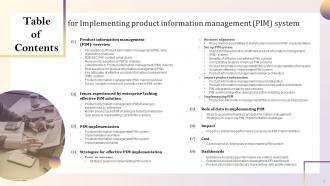
Slide 3: This slide shows Table of Content for the presentation.
Slide 4: This slide highlights title for topics that are to be covered next in the template.
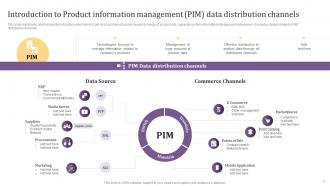
Slide 5: This slide presents Introduction to Product information management (PIM) data distribution channels.
Slide 6: This slide shows the content value chain of system which helps in management of company’s product information.
Slide 7: This slide displays Reasons for adoption of PIM by retailers.
Slide 8: This slide showcases Latest trends in Product information management (PIM) industry.
Slide 9: This slide represents Best practices for product information management (PIM).
Slide 10: This slide shows Key attributes of effective product information management (PIM) system.
Slide 11: This slide presents Product information management (PIM) market overview.
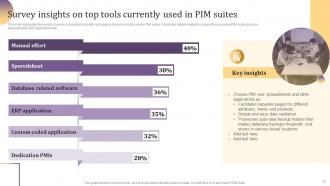
Slide 12: This slide displays Survey insights on top tools currently used in PIM suites.
Slide 13: This slide highlights title for topics that are to be covered next in the template.
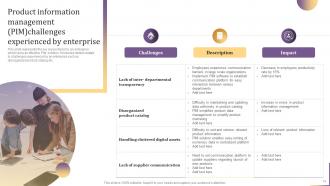
Slide 14: This slide represents Product information management (PIM) challenges experienced by enterprise.
Slide 15: This slide showcases Mobile phone based PIM challenges faced by enterprise.
Slide 16: This slide displays Gap analysis representing current PIM scenario.
Slide 17: This slide highlights title for topics that are to be covered next in the template.
Slide 18: This slide presents Product information management( PIM) system implementation workflow.
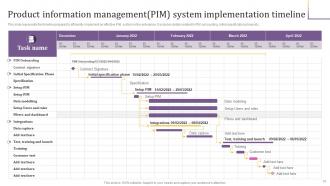
Slide 19: This slide shows Product information management (PIM) system implementation timeline.
Slide 20: This slide highlights title for topics that are to be covered next in the template.
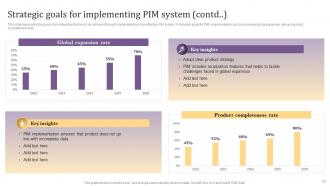
Slide 21: This slide represents Strategic goals for implementing PIM system.
Slide 22: This is another slide continuing Strategic goals for implementing PIM system.
Slide 23: This slide highlights title for topics that are to be covered next in the template.
Slide 24: This slide showcases Roles and responsibilities of stakeholders involved in PIM implementation.
Slide 25: This slide highlights title for topics that are to be covered next in the template.
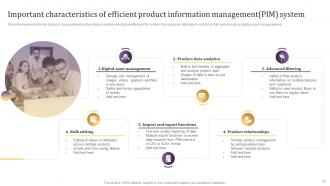
Slide 26: This slide shows Important characteristics of efficient product information management(PIM) system.
Slide 27: This slide presents Benefits of effective and efficient PIM solution.
Slide 28: This slide displays Comparative analysis of various PIM systems.
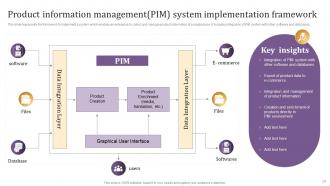
Slide 29: This slide represents Product information management(PIM) system implementation framework.
Slide 30: This slide showcases Solutions offered by implemented PIM system.
Slide 31: This slide represents Product information management solution architecture.
Slide 32: This slide highlights title for topics that are to be covered next in the template.
Slide 33: This slide displays Product information management inbound integration.
Slide 34: This slide presents Product information management outbound integration architecture.
Slide 35: This slide displays PIM integration model for web services.
Slide 36: This slide represents PIM system integration during transaction matching procedure.
Slide 37: This slide highlights title for topics that are to be covered next in the template.
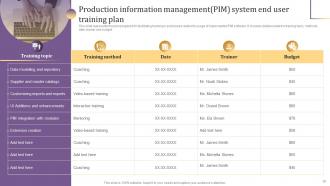
Slide 38: This slide showcases Production information management(PIM) system end user training plan.
Slide 39: This slide highlights title for topics that are to be covered next in the template.
Slide 40: This slide shows Identify important information to be delivered to PIM system.
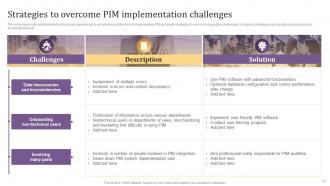
Slide 41: This slide presents Strategies to overcome PIM implementation challenges.
Slide 42: This slide highlights title for topics that are to be covered next in the template.
Slide 43: This slide displays Impact on enterprise performance pre and post PIM implementation.
Slide 44: This slide highlights title for topics that are to be covered next in the template.
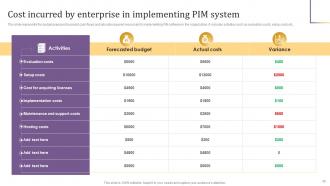
Slide 45: This slide represents Cost incurred by enterprise in implementing PIM system.
Slide 46: This slide highlights title for topics that are to be covered next in the template.
Slide 47: This slide showcases Enterprise product page information key metrics dashboard.
Slide 48: This slide shows Enterprise product information management KPI dashboard.
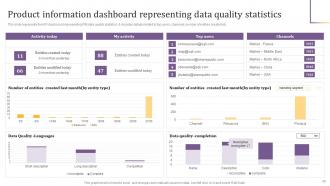
Slide 49: This slide presents Product information dashboard representing data quality statistics.
Slide 50: This slide contains all the icons used in this presentation.
Slide 51: This slide is titled as Additional Slides for moving forward.
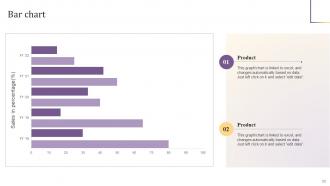
Slide 52: This slide presents Bar chart with two products comparison.
Slide 53: This is Our Mission slide with related imagery and text.
Slide 54: This slide presents Roadmap with additional textboxes.
Slide 55: This is Our Team slide with names and designation.
Slide 56: This is Our Target slide. State your targets here.
Slide 57: This slide contains Puzzle with related icons and text.
Slide 58: This slide depicts Venn diagram with text boxes.
Slide 59: This is a Timeline slide. Show data related to time intervals here.
Slide 60: This is a Thank You slide with address, contact numbers and email address.
Implementing Product Information Management PIM System Powerpoint Presentation Slides with all 65 slides:
Use our Implementing Product Information Management PIM System Powerpoint Presentation Slides to effectively help you save your valuable time. They are readymade to fit into any presentation structure.


































FAQs for Implementing Product Information Management PIM System
Honestly, the best part about PIM is having all your product data in one place - no more digging through random spreadsheets your coworker made six months ago. Update something once and boom, it pushes everywhere automatically. Your website, catalogs, Amazon, whatever. Way fewer screwups too since nobody's copy-pasting the wrong SKU at 5pm on a Friday (been there). Marketing stops bugging you for specs every five minutes, so stuff actually launches on time. I'd probably start by figuring out where all your product info lives right now. That audit's gonna be... fun.
So basically PIM becomes your one master database for everything. No more updating your website, then marketplaces, then print catalogs separately (seriously, who has time for that?). Change something once and it pushes everywhere automatically. You'll avoid those awkward moments where customers see different prices on different channels - been there, super embarrassing. The system catches incomplete data before it goes live too. Short sentences work. Set up your rules at the start and you're golden. One product record rules them all, which honestly makes life so much easier.
Look, PIM keeps all your product info consistent everywhere - your website, app, Amazon, whatever. Customers won't see conflicting specs that make them bounce. Clean data means they get the same descriptions and images across every channel, which honestly makes a huge difference for conversions. You'll also save tons of time since you're not updating product details in like 20 different places manually. Start with your core product attributes first - that's where you'll notice the biggest impact on customer experience right away.
So basically, PIM becomes your single source of truth for all product info. It automatically pushes clean data to both your ERP (for inventory stuff) and CRM (for your sales team). Honestly, once you nail the setup it's incredible how much time it saves. The trick is getting your data fields mapped right between all three systems - otherwise you're back to doing everything manually, which sucks. Oh, and definitely audit what each system actually needs first. There's way more overlap than you'd think, so you might not need to sync as much as you originally planned.
Honestly, data migration is going to be your worst nightmare. Your product info is probably way messier than you think - duplicates everywhere, weird formats, missing details spread across like five different spreadsheets. Staff will fight you hard on this because nobody wants to learn new systems. I swear, some people would rather die than change their workflow. Integration gets messy fast too. Oh, and cleaning everything up? That'll eat months of your life. Do yourself a favor and audit your data first. Figure out what disaster you're working with before you even start shopping for vendors.
So PIM systems are like having a compliance hub for all your product stuff. They let you set up automatic checks for ingredient lists, safety certs, labeling - whatever rules you need to follow. Super helpful when you're juggling different markets with their own weird requirements. The best part? Everything gets tracked with audit trails, so you're covered if regulators show up asking questions. You can even auto-generate compliant product info for different regions. Honestly, I'd start by figuring out your main compliance headaches first, then see how the PIM can handle those checks for you.
Focus on data centralization and bulk editing first - those are game changers. Strong integrations with your existing platforms are huge too. Nobody wants to manually sync product data forever, trust me on that one. Multi-channel publishing will save your sanity when you're pushing updates everywhere. If you've got multiple teams involved, user permissions become pretty critical. Honestly, the workflow automation stuff can make or break your daily operations. Demo 2-3 options with your real product data though - the interface needs to actually make sense for how your team works.
PIM totally changes how you see your inventory - you'll actually know what's sitting around gathering dust. Seasonal trends become super obvious, and you can catch duplicate products hogging warehouse space. The data gets cleaner so your demand forecasting isn't just guesswork anymore. Having everything in one place means you can quickly shift marketing focus to move slow inventory before it dies on you. Honestly, I'd start with just checking how accurate your current data is - that's usually where you see the biggest improvement. Way less stressful than flying blind with inventory decisions.
PIM basically gives everyone the same product info so your teams aren't constantly fighting over who has the "real" data. No more random spreadsheets floating around (thank god). Marketing pulls copy from the same place sales checks inventory - actually works pretty well once you set it up. Your product team can update specs without having to email everyone and their mother. The approval stuff helps too since changes get reviewed first. Honestly, just make sure each team has clear access to their sections but can see what others are doing. Game changer.
PIM basically helps you compete with bigger companies by making your product pages look just as professional. Instead of juggling random spreadsheets everywhere, you get all your product info in one place. Makes launching stuff way faster too. Honestly, customers don't care if you're 5 people or 500 - they just want clean, detailed product info. I'd say start simple though, maybe just standardize your basic data first. You can always add more features later as you figure out what actually works for your business.
Honestly, PIM is a game-changer for launches. You'll cut your timeline by like 40-50% just by having everything in one place instead of digging through random spreadsheets. The accuracy boost is probably even better - no more cringe moments when customers find wrong prices or specs on your site. Your marketing people will actually thank you since they won't be running around asking different teams for basic product info anymore. Oh, and definitely start by mapping out where all your product data currently sits. Trust me, it's messier than you think it is.
So PIM is basically your one-stop shop for all product info - you update everything once and it pushes out everywhere. No more manually changing descriptions on your website, then Amazon, then social media... honestly such a pain when you're juggling tons of SKUs. Everything stays consistent whether people find you on Instagram or some retailer's site. Oh, and definitely map out where you're currently selling first - that'll show you where the biggest data mess-ups are happening. Trust me, it's way better than the spreadsheet chaos most people deal with.
Honestly, skip the data governance stuff at your own risk - I've watched companies crash and burn because they didn't set it up first. You absolutely need clear rules about who can mess with product data and who approves changes. Set your standards and approval workflows before dumping anything into the system. Without proper validation rules and formats, you'll just end up with a hot mess of inconsistent product info. What's the point of a fancy PIM if your data's garbage? Oh, and don't forget regular quality checks - that part's boring but crucial.
Honestly, AI-powered data enrichment is where it's at right now - lets the machines do all that boring data entry stuff. Headless PIM setups are getting popular too since they play nicer with whatever systems you already have. Visual search is pretty cool, customers can just snap a photo to find products. Carbon footprint tracking is everywhere now, so sustainability data management is blowing up. Real-time syndication across all your channels is another big trend. I'd probably start with AI for your data processes first though - seems like that's where most people are seeing results fastest.
Honestly, tracking PIM ROI isn't as complicated as it seems. Start with baseline metrics before you go live - that's key. Time-to-market improvements, fewer returns from bad product info, less manual data entry. The revenue stuff is actually easier to track than the cost savings, weirdly. Better product descriptions boost conversion rates, and you'll see way fewer customer service tickets about basic product questions. I'd focus on quarterly comparisons once everything's running. Oh, and the manual data entry savings alone might surprise you - that time adds up crazy fast when you actually calculate it.
-
Satisfied with the way SlideTeam resolved my query regarding the right business PPTs that I was having difficulty finding. I found the perfect match with their assistance.
-
Nothing beats the well-formatted and professionally designed templates offered. Kudos to SlideTeam for their amazing collection of PPT slides.