

Managing Staff Productivity Powerpoint Presentation Slides




Try Before you Buy Download Free Sample Product
 Impress Your
 Audience
 100%
100% Editable
 Save Hours
 of Time


An efficient performance management system is essential in evaluating overall individual performance. It helps in handling deflated, unmotivated, unengaged, and poor-performing employees. Check out our competently designed Managing Staff Productivity template that caters to details about performance planning, measuring, monitoring, reporting, reviewing, and auditing. It allows improved strategy development, effective risk detection, better decision making, improved accountability, etc. It caters to performance review plan implementation timeline, performance enhancement through performance evaluation measures, strategies to enhance performance, checklist for effective feedback to track performance. The deck covers communication and collaboration initiatives slides by engaging target group members, stakeholders communication plans, and coordination modes for better communication. It covers employee training in existing workforce upskilling plans, department-wise employee training, staff training schedule to enhance productivity and performance management calendar. It caters to slides regarding performance management tools in terms of objectives, 360-degree feedback, assessment center methods, behaviorally anchored rating scale, and psychological appraisals. It also covers dashboards to track team and employee performance and appraisal tracking. Get access now.
People who downloaded this PowerPoint presentation also viewed the following :
Content of this Powerpoint Presentation
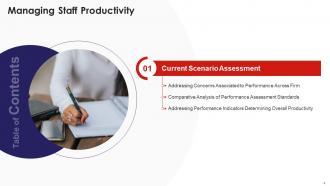
Slide 1: This slide introduces Managing Staff Productivity. State Your Company Name and begin.
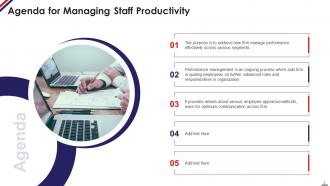
Slide 2: This slide states Agenda of the presentation.
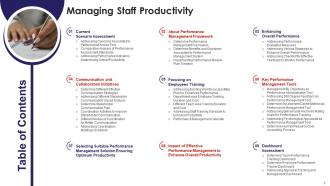
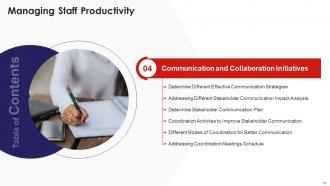
Slide 3: This slide presents Table of Content for the presentation.
Slide 4: This slide displays title for topics that are to be covered next in the template.
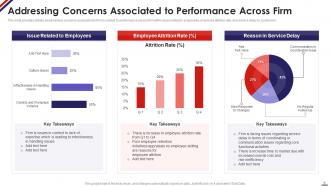
Slide 5: This slide represents various concerns associated to firm in context to performance across firm.
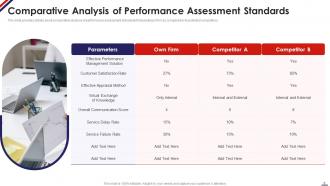
Slide 6: This slide showcases Comparative Analysis of Performance Assessment Standards.
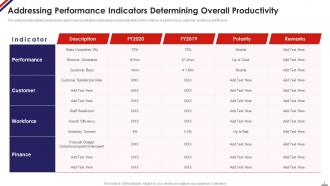
Slide 7: This slide shows Addressing Performance Indicators Determining Overall Productivity.
Slide 8: This slide presents title for topics that are to be covered next in the template.
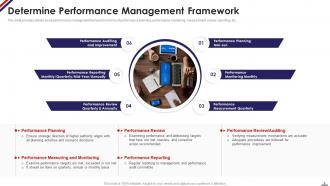
Slide 9: This slide displays performance management framework in terms of performance planning.
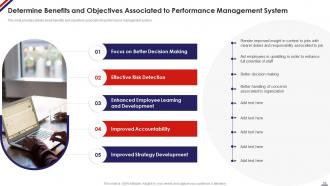
Slide 10: This slide represents Determine Benefits and Objectives Associated to Performance Management System.
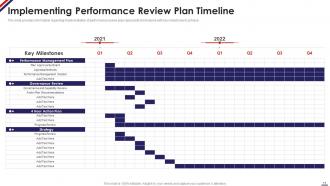
Slide 11: This slide showcases Implementing Performance Review Plan Timeline.
Slide 12: This slide shows title for topics that are to be covered next in the template.
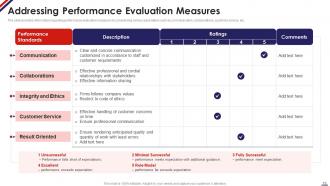
Slide 13: This slide presents Addressing Performance Evaluation Measures.
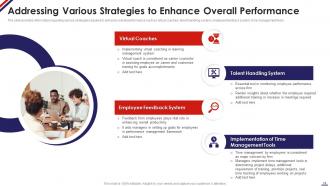
Slide 14: This slide displays various strategies required to enhance overall performance.
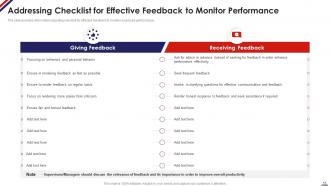
Slide 15: This slide represents Addressing Checklist for Effective Feedback to Monitor Performance.
Slide 16: This slide showcases title for topics that are to be covered next in the template.
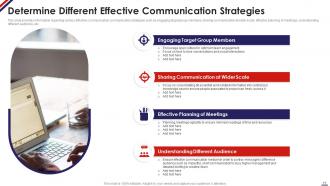
Slide 17: This slide shows various effective communication strategies such as engaging target group members.
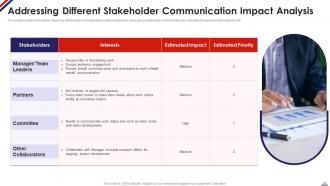
Slide 18: This slide presents Addressing Different Stakeholder Communication Impact Analysis.
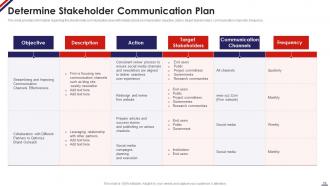
Slide 19: This slide displays stakeholder communication plan with details about communication objective.
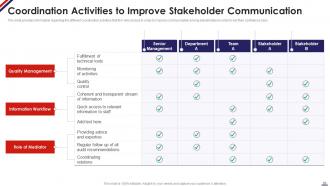
Slide 20: This slide represents Coordination Activities to Improve Stakeholder Communication.
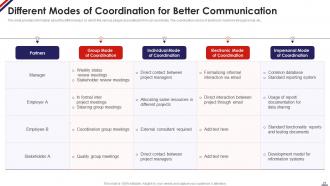
Slide 21: This slide showcases Different Modes of Coordination for Better Communication.
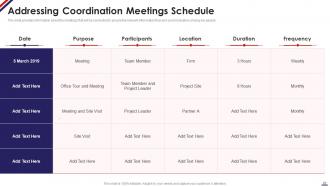
Slide 22: This slide shows Addressing Coordination Meetings Schedule.
Slide 23: This slide presents title for topics that are to be covered next in the template.
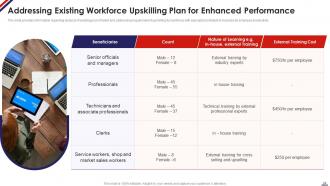
Slide 24: This slide displays Addressing Existing Workforce Upskilling Plan for Enhanced Performance.
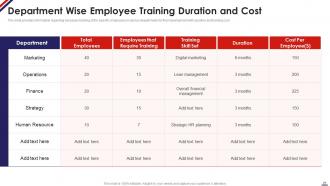
Slide 25: This slide represents Department wise Employee Training Duration and Cost.
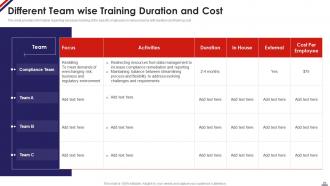
Slide 26: This slide showcases Different Team wise Training Duration and Cost.
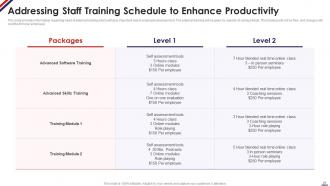
Slide 27: This slide shows Addressing Staff Training Schedule to Enhance Productivity.
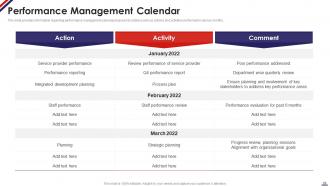
Slide 28: This slide presents performance management calendar prepared to address various actions and activities performed.
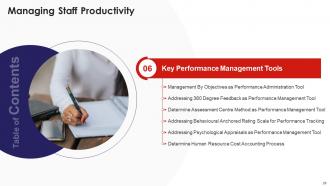
Slide 29: This slide displays title for topics that are to be covered next in the template.
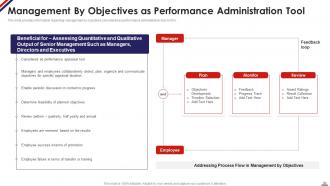
Slide 30: This slide represents Addressing Process Flow in Management by Objectives.
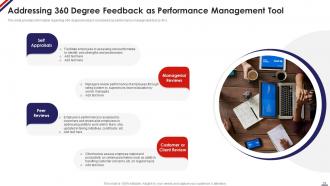
Slide 31: This slide showcases Addressing 360 Degree Feedback as Performance Management Tool.
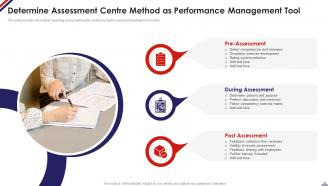
Slide 32: This slide shows Determine Assessment Centre Method as Performance Management Tool.
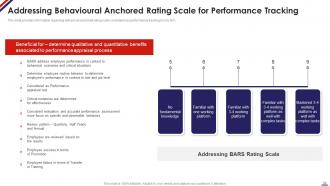
Slide 33: This slide presents Addressing Behavioural Anchored Rating Scale for Performance Tracking.
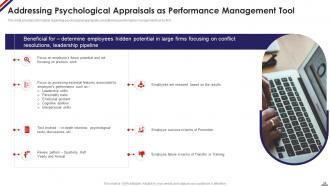
Slide 34: This slide displays Addressing Psychological Appraisals as Performance Management Tool.
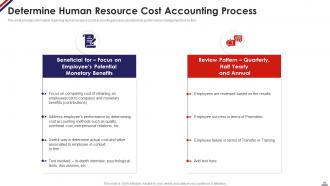
Slide 35: This slide represents Determine Human Resource Cost Accounting Process.
Slide 36: This slide showcases title for topics that are to be covered next in the template.
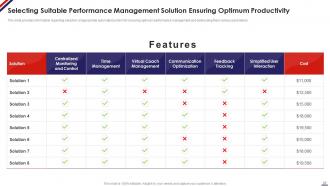
Slide 37: This slide shows Selecting Suitable Performance Management Solution Ensuring Optimum Productivity.
Slide 38: This slide presents title for topics that are to be covered next in the template.
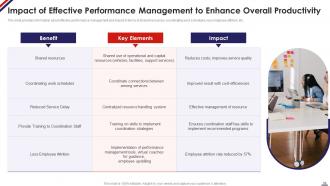
Slide 39: This slide displays Impact of Effective Performance Management to Enhance Overall Productivity.
Slide 40: This slide represents title for topics that are to be covered next in the template.
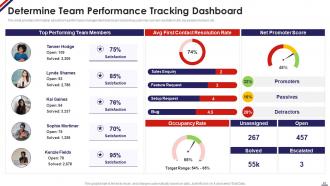
Slide 41: This slide showcases Determine Team Performance Tracking Dashboard.
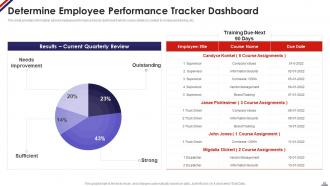
Slide 42: This slide shows Determine Employee Performance Tracker Dashboard.
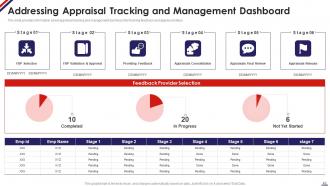
Slide 43: This slide presents Addressing Appraisal Tracking and Management Dashboard.
Slide 44: This slide displays Icons for Managing Staff Productivity.
Slide 45: This slide is titled as Additional Slides for moving forward.
Slide 46: This slide provides 30 60 90 Days Plan with text boxes.
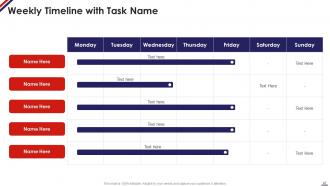
Slide 47: This slide showcases Weekly Timeline with Task Name.
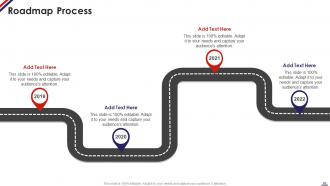
Slide 48: This slide presents Roadmap with additional textboxes.
Slide 49: This is About Us slide to show company specifications etc.
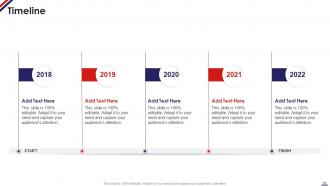
Slide 50: This is a Timeline slide. Show data related to time intervals here.
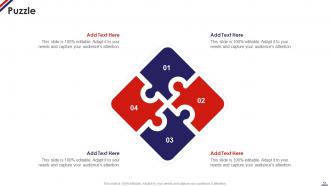
Slide 51: This slide contains Puzzle with related icons and text.
Slide 52: This is an Idea Generation slide to state a new idea or highlight information, specifications etc.
Slide 53: This slide depicts Venn diagram with text boxes.
Slide 54: This is a Comparison slide to state comparison between commodities, entities etc.
Slide 55: This is Our Goal slide. State your firm's goals here.
Slide 56: This is a Thank You slide with address, contact numbers and email address.
Managing Staff Productivity Powerpoint Presentation Slides with all 61 slides:
Use our Managing Staff Productivity Powerpoint Presentation Slides to effectively help you save your valuable time. They are readymade to fit into any presentation structure.







FAQs for Managing Staff Productivity
Focus on output per hour and quality scores first - those are your bread and butter. Goal completion rates matter too, obviously. If your team touches sales at all, revenue per employee is critical. Don't sleep on engagement scores though, because miserable employees tank productivity even when metrics look decent initially. Project completion times and customer satisfaction help round things out. Honestly, pick maybe 4 metrics max that actually connect to what your business cares about. Way better than drowning in data you'll never use.
Honestly, most people I know get way more done working from home - no random interruptions or that soul-crushing commute. The tricky part is keeping everyone engaged since you lose all those random coffee machine chats. I've found you really have to be deliberate about staying connected, like scheduling regular check-ins that aren't just about work stuff. Some folks absolutely love the freedom while others get super lonely. Check in with your team one-on-one pretty often to see how they're actually doing, not just if they're hitting deadlines.
Honestly, recognition is huge - like actually telling people they did good work, not just assuming they know. Get them involved in decisions too, especially stuff that affects their day-to-day. Flexible schedules help when you can swing it. Oh and please skip the pizza parties lol, a real "thanks" beats that every time. Make sure they have what they need to do their job well. Nothing's worse than being set up to fail from the start. Clear expectations matter too. Maybe just pick one thing to start with? I'd probably go with better recognition in meetings.
Honestly, good communication tools are a game-changer for productivity. You eliminate so much confusion when everyone's on the same page about priorities. Slack works great for quick updates, project management apps help track tasks, and video calls are perfect for those complicated discussions that would take forever over text. Information actually flows instead of getting stuck somewhere. Email chains are the worst - nobody reads those anyway! Your team won't duplicate work as much, plus decisions happen faster when people can easily find the info they need. I'd start by looking at your current setup and figuring out where things break down most.
Dude, culture basically makes or breaks productivity. Trust me on this one. I've watched amazing processes get completely torpedoed by toxic workplaces - it's wild how fast that happens. But when people actually feel safe to speak up and mess up? That's when the magic happens. Teams collaborate without all the weird politics, they'll take risks, and honestly they just give a damn about their work. The tricky part is walking the walk though. You can plaster "work-life balance" on every wall you want, but if you're still texting people at 11pm, nobody's buying it.
Look, time management really is everything when it comes to getting stuff done at work. Your best people know how to prioritize and set deadlines that actually make sense - meanwhile everyone else is drowning in email hell. It's wild how much better work gets when people aren't constantly stressed about being behind. Help your team figure out when they're most focused during the day, then guard that time like it's sacred. No random meetings allowed during peak hours! That frantic feeling kills productivity faster than anything else.
Look at your data first - timelines, completion rates, where stuff gets stuck. But honestly? The real problems usually aren't in spreadsheets. It's more like unclear expectations, waiting forever for approvals, or some process everyone absolutely hates but won't admit it. I'd just ask your team straight up what's blocking them daily. You'll be surprised what you hear. Once you find the bottleneck, figure out if it's resources, skills, or broken processes. Start with whatever's easiest to fix - quick wins keep people motivated.
Okay so first thing - silence your phone or literally just shove it in a drawer somewhere. I swear by time-blocking where you carve out chunks for deep work and don't let anyone mess with them. Pomodoro technique is honestly amazing too (work 25 min, break 5 min). If your space is loud and distracting, grab some noise-canceling headphones or relocate somewhere quieter. The whole thing comes down to being deliberate about your setup and protecting your focus time. Oh and don't go crazy trying to implement everything - just pick one thing and test it out tomorrow.
Look, good training actually makes your team way more productive - they get faster, screw up less, and stop bugging you with constant questions. People also work harder when they feel like you're investing in them, which is honestly just common sense. The trick is don't just do random training for the sake of it. Figure out where your team is struggling most and hit those pain points first. I've seen companies waste so much money on generic stuff that doesn't match what people actually need day-to-day. Target the real workflow problems and you'll see results pretty quick.
Honestly, start with project management - Asana or Monday are solid picks. Zapier's amazing for connecting all your apps so they actually talk to each other. I know everyone says Slack but seriously, most teams are still drowning in email chains which is just painful to watch. Get some time tracking going with Toggl, and decent cloud storage so people stop hunting for files. Here's the thing though - don't go crazy with tools. Pick maybe 3-4 max and actually train people on them properly. Find one workflow that's driving everyone nuts right now and fix that first.
Honestly, your team needs to know what winning looks like or they'll just spin their wheels. Without clear goals, even smart people waste tons of time on stuff that doesn't matter - kinda like driving without GPS. When you spell out exactly what you want and when, people can actually prioritize instead of playing that annoying guessing game where they think they're killing it but you're not happy with the work. I'd literally write down 2-3 specific things you want each person to hit this quarter. Make them measurable too. Then just... tell them?
Dude, seriously get your workspace sorted out. I thought ergonomics was total BS until my neck started killing me daily. Your monitor needs to be at eye level - that alone is huge. Get a decent chair that actually supports your back too. When everything's positioned right, you're not constantly fidgeting or dealing with those annoying aches that wreck your focus. I can actually work past 3pm now without feeling like garbage. Oh and don't cheap out on your keyboard/mouse setup either. Start with monitor height and chair - you'll notice the difference pretty quick.
Honestly, feedback is a game-changer for keeping people motivated. Your team stops playing that annoying guessing game when they know exactly where they stand. Plus it shows you actually give a damn about their development, not just hitting numbers. Don't wait for those yearly reviews though - that's useless. Quick stuff works better. Like telling someone "that presentation format yesterday was spot-on" can literally make their week. I try to give each person something every week, even if it's tiny. Makes a huge difference in how they perform.
Dude, burnout is a productivity killer. Your team starts making more mistakes, calling in sick constantly, and good people just bounce. When everyone's fried, nobody can think straight or come up with decent ideas. Watch for red flags early - like when Sarah suddenly can't meet deadlines she used to crush. Prevention is way easier than fixing it later. Actually manage workloads instead of just piling stuff on. Make people take real breaks (seriously, eating sad desk salads doesn't count). Build an environment where someone can say "I'm drowning" without getting side-eye. Just start by asking how stressed everyone actually feels right now.
Dude, work-life balance isn't just some HR buzzword - it actually matters for getting stuff done. At my old job we had everyone pulling 60+ hour weeks and honestly? People just started phoning it in after a while. You get short bursts of productivity but then creativity dies and mistakes pile up. Plus turnover gets expensive real fast. What worked for us was cutting the after-hours Slack messages and actually making people take their PTO. I had to start doing it first though - your team watches everything you do. Set those boundaries yourself and they'll follow.
-
I am glad to have come across Slideteam. I was searching for some unique presentations and templates for my business. There are a lot of alternatives available here.
-
A big thanks to SlideTeam! An incredible and diverse library of templates helped me with my business project presentation.